> ## Documentation Index
> Fetch the complete documentation index at: https://solana.com/llms.txt
> Use this file to discover all available pages before exploring further.

> ## Agent Instructions
> This page is part of the Solana developer documentation at https://solana.com/developers/docs. Append `.md` to any docs URL, or send `Accept: text/markdown`, to get the page as Markdown.
> Index of all pages: https://solana.com/llms.txt. Per-section indexes such as https://solana.com/developers/docs/payments/llms.txt are smaller; prefer them when working on one task.
> Coding agents: install the official Solana skill for current APIs and conventions with `npx skills add https://github.com/solana-foundation/solana-dev-skill` (also served at https://solana.com/SKILL.md).
> Code in the cookbook and task pages comes from tested example files. Prefer it over writing API calls from memory.

# Pay-per-call & agents

> Charge per request with x402 or MPP, settled on Solana, and let AI agents pay for APIs and tools on their own.

Pay-per-call lets a client pay for one HTTP request at a time. The server
answers an unpaid request with `402 Payment Required` and a price. The client
signs a stablecoin payment, retries the request with it, and gets the data.
There is no signup, API key, or invoice, so the same flow works for people's
apps and for AI agents that pay for a data query, model inference, or tool call
without first creating a billing account.

Each payment is a Solana
<span className="sol-chip" data-concept="transaction"><Tooltip headline="Transactions" tip="A transaction is a signed request to change the shared ledger. It either fully happens or doesn't happen at all, and once confirmed anyone can look it up." cta="Learn more" href="/developers/docs/core/transactions">transaction</Tooltip><span className="nojs-only"> ([Transactions](/developers/docs/core/transactions): A transaction is a signed request to change the shared ledger. It either fully happens or doesn't happen at all, and once confirmed anyone can look it up.)</span>,</span> so the
cost to the payer is the amount plus a flat
<span className="sol-chip" data-concept="fees"><Tooltip headline="Fees" tip="Every transaction pays a small flat network fee, currently a fraction of a cent, whatever the amount. The transaction's fee payer pays, and that can be your app rather than your customer." cta="Learn more" href="/developers/docs/core/fees">network fee</Tooltip><span className="nojs-only"> ([Fees](/developers/docs/core/fees): Every transaction pays a small flat network fee, currently a fraction of a cent, whatever the amount. The transaction's fee payer pays, and that can be your app rather than your customer.)</span>,</span> whatever the
price of the request.

<div className="sol-pcard not-prose" data-path="paywall-api">
<div className="sol-pcard-main">
<p className="sol-pcard-k">Charge per API call · <span className="sol-nowrap">4 steps · \~30 min</span></p>
<p className="sol-pcard-title">[Paywall an endpoint](/developers/docs/payments/paywall-api)</p>
<p className="sol-pcard-desc">Price each request at a fraction of a cent. Clients, whether people's apps or AI agents, pay inline over HTTP, with no signup, API key, or invoice.</p>
<ol className="sol-pcard-steps"><li>[Call a paid API](/developers/docs/payments/paywall-api/try-it)</li><li>[Read the code](/developers/docs/payments/paywall-api/browser)</li><li>[Add it to your server](/developers/docs/payments/paywall-api/server)</li><li>[Go live](/developers/docs/payments/paywall-api/go-live)</li></ol>
</div>
<p className="sol-pcard-cta">[Start the tutorial →](/developers/docs/payments/paywall-api)</p>
</div>

## Protocols

Two protocols settle these payments on Solana. Both use the `402` status code,
with different headers and payment models.

<Columns cols={2}>
<Card title="How x402 works" icon="workflow" href="/developers/docs/payments/agentic-payments/x402">
Payment requirements, signatures, and settlement for a paid HTTP resource, with the x402 V2 SDK.
</Card>
<Card title="Machine payments (MPP)" icon="gauge" href="/developers/docs/payments/agentic-payments/mpp">
One-time charges and capped, metered payment sessions with HTTP authentication semantics.
</Card>
<Card title="Let an agent pay (x402)" icon="bot" href="/developers/docs/payments/pay-sh#let-an-agent-pay-x402">
Launch an agent with Pay and complete one x402 payment against a sandbox API, without moving real funds.
</Card>
<Card title="pay.sh" icon="terminal" href="/developers/docs/payments/pay-sh">
A command-line payment gateway for pay-per-use and subscription APIs.
</Card>
</Columns>

## The common payment flow

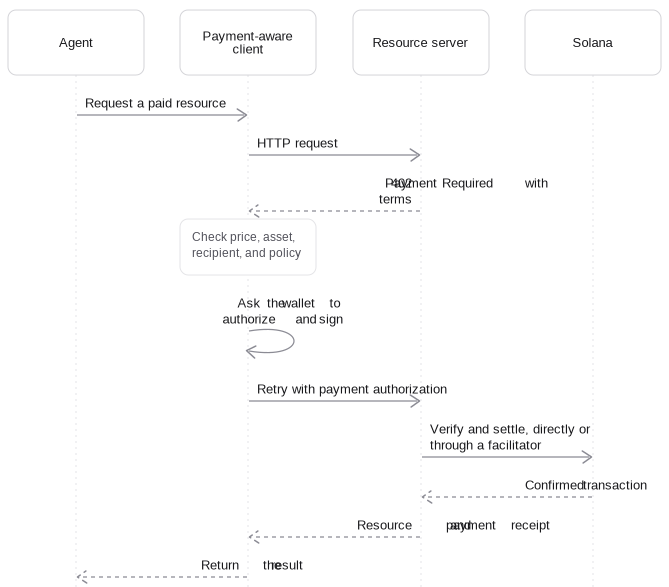
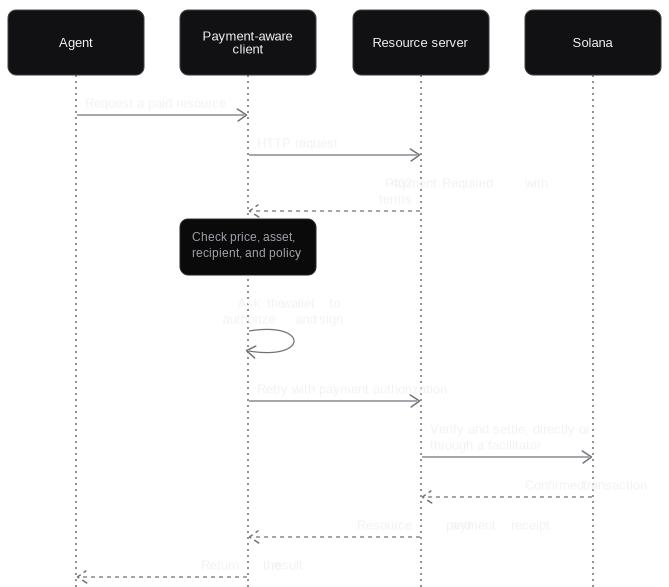
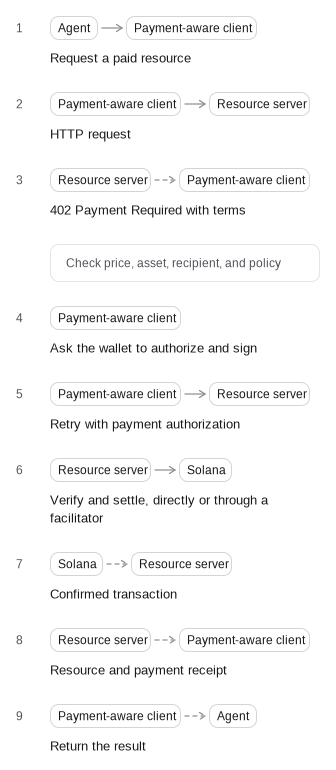
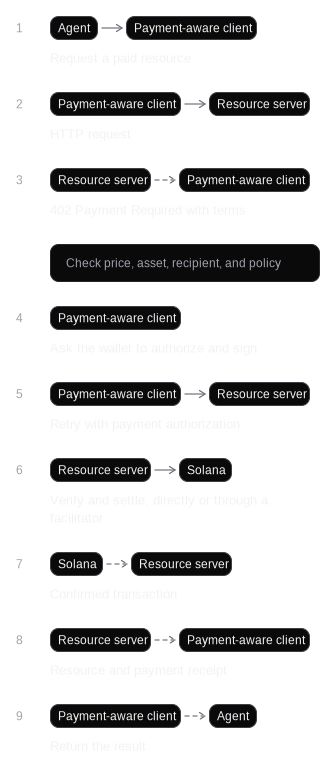
MPP and x402 use different headers and data models, but their basic HTTP flow is
similar:

```mermaid
sequenceDiagram
    participant Agent
    participant Payer as Payment-aware client
    participant API as Resource server
    participant Solana
    Agent->>Payer: Request a paid resource
    Payer->>API: HTTP request
    API-->>Payer: 402 Payment Required with terms
    Note over Payer: Check price, asset, recipient, and policy
    Payer->>Payer: Ask the wallet to authorize and sign
    Payer->>API: Retry with payment authorization
    API->>Solana: Verify and settle, directly or through a facilitator
    Solana-->>API: Confirmed transaction
    API-->>Payer: Resource and payment receipt
    Payer-->>Agent: Return the result
```

<div className="sol-mermaid" data-fallback="mermaid" data-mermaid="c3fe3fd1c991">
  <img className="block dark:hidden" src="/docs-assets/assets/docs/mermaid/c3fe3fd1c991-light.svg" alt="Agentic HTTP Payment Flow" />

  <img className="hidden dark:block" src="/docs-assets/assets/docs/mermaid/c3fe3fd1c991.svg" alt="Agentic HTTP Payment Flow" />

  <img className="block dark:hidden" src="/docs-assets/assets/docs/mermaid/c3fe3fd1c991-sm-light.svg" alt="Agentic HTTP Payment Flow" />

  <img className="hidden dark:block" src="/docs-assets/assets/docs/mermaid/c3fe3fd1c991-sm.svg" alt="Agentic HTTP Payment Flow" />
</div>

<p className="sol-caption">Agentic HTTP Payment Flow</p>

## MPP and x402

Both protocols can settle stablecoin payments on Solana. Choose based on the
payment model and interoperability your service needs, not only the shared `402`
status code.

|                         | MPP                                                               | x402                                                                     |
| ----------------------- | ----------------------------------------------------------------- | ------------------------------------------------------------------------ |
| Challenge               | `WWW-Authenticate: Payment`                                       | `PAYMENT-REQUIRED`                                                       |
| Client authorization    | `Authorization: Payment`                                          | `PAYMENT-SIGNATURE`                                                      |
| Receipt                 | `Payment-Receipt`                                                 | `PAYMENT-RESPONSE`                                                       |
| Solana payment models   | One-time `charge` and capped, metered `session` intents           | Schemes such as `exact` and `upto`; support varies by network and client |
| Settlement architecture | Server validation, or an optional relay or gateway                | Resource server with local verification or a facilitator                 |
| Good starting point     | APIs that need HTTP authentication semantics or repeated metering | Pay-per-request resources and existing x402 clients                      |

MPP is the **Machine Payments Protocol**. Do not confuse it with the **Model
Context Protocol (MCP)**. MCP exposes tools and resources to agents; MPP or x402
can require payment when an agent invokes one of those tools.

<Info>
  A service may advertise more than one protocol. The client selects a payment
  option it supports, then uses the matching challenge, authorization, and
  receipt headers for the entire exchange.
</Info>

## Run it in production

<Columns cols={2}>
<Card title="x402 facilitator" icon="server" href="/developers/docs/tools/x402-facilitator" arrow>
Choose, integrate, or operate a service that verifies and settles x402 payments for your API.
</Card>
<Card title="x402 with Kora" icon="fuel" href="/developers/docs/tools/kora/guides/x402" arrow>
Use Kora as the policy-enforced signer and fee payer behind an x402 facilitator.
</Card>
<Card title="Production readiness" icon="shield-check" href="/developers/docs/tools/production-readiness" arrow>
RPC infrastructure, confirmation, monitoring, and key management before you launch.
</Card>
</Columns>

## Watch

<Columns cols={2}>
<Card title="Agent payments" icon="play" href="/developers/docs/video-guides/agent-payments" arrow>
A 4-part video series: monetize an API with HTTP 402, and let AI agents pay for APIs on Solana.
</Card>
<Card title="Pay.sh course" icon="play" href="/developers/docs/video-guides/pay-sh-video-tutorials" arrow>
A 12-part video series, from installing the CLI to publishing a paid API gateway.
</Card>
</Columns>
