> ## Documentation Index
> Fetch the complete documentation index at: https://solana.com/llms.txt
> Use this file to discover all available pages before exploring further.
> ## Agent Instructions
> This page is part of the Solana developer documentation at https://solana.com/developers/docs. Append `.md` to any docs URL, or send `Accept: text/markdown`, to get the page as Markdown.
> Index of all pages: https://solana.com/llms.txt. Per-section indexes such as https://solana.com/developers/docs/payments/llms.txt are smaller; prefer them when working on one task.
> Coding agents: install the official Solana skill for current APIs and conventions with `npx skills add https://github.com/solana-foundation/solana-dev-skill` (also served at https://solana.com/SKILL.md).
> Code in the cookbook and task pages comes from tested example files. Prefer it over writing API calls from memory.
# Machine Payments Protocol on Solana
> Use Machine Payments Protocol challenges, credentials, and receipts for one-time charges or metered payment sessions on Solana.
The [Machine Payments Protocol (MPP)](https://mpp.dev/) applies HTTP
authentication semantics to payments. A server challenges an unpaid request, a
client returns a payment credential, and the server returns a receipt after it
accepts the payment.
MPP separates three concerns:
- An **intent** describes the commercial interaction, such as a one-time
`charge` or a metered `session`.
- A **payment method** describes how value moves. The Solana method supports
native SOL and SPL tokens for charges.
- An HTTP **transport** carries challenges, credentials, receipts, and errors.
MPP is published as a set of Internet-Drafts. Treat the
[current specifications](https://paymentauth.org/) as the source of truth and
expect details to evolve while the drafts are work in progress.
## HTTP exchange
MPP uses standard HTTP authentication fields instead of protocol-specific
payment headers:
| Message | HTTP representation |
| ----------------------- | ----------------------------------------------------------- |
| Payment challenge | `402 Payment Required` with `WWW-Authenticate: Payment ...` |
| Payment credential | Retried request with `Authorization: Payment ...` |
| Successful receipt | Resource response with `Payment-Receipt: ...` |
| Invalid payment details | Problem Details body using `application/problem+json` |
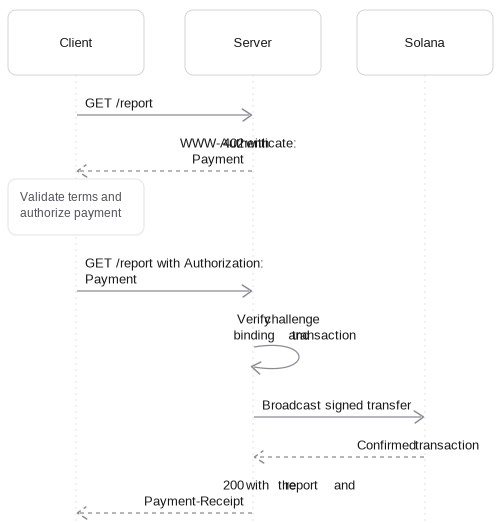
```mermaid
sequenceDiagram
participant Client
participant Server
participant Solana
Client->>Server: GET /report
Server-->>Client: 402 with WWW-Authenticate: Payment
Note over Client: Validate terms and authorize payment
Client->>Server: GET /report with Authorization: Payment
Server->>Server: Verify challenge binding and transaction
Server->>Solana: Broadcast signed transfer
Solana-->>Server: Confirmed transaction
Server-->>Client: 200 with the report and Payment-Receipt
```
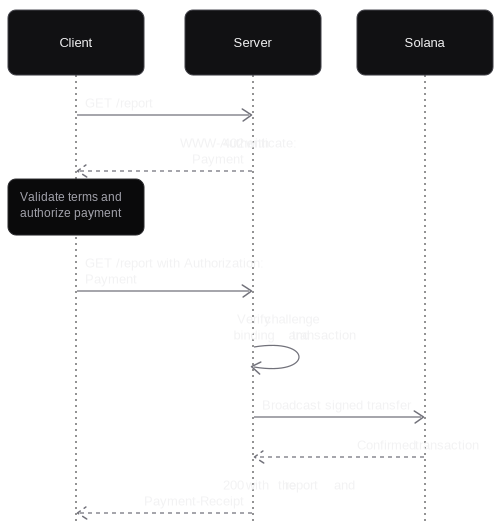
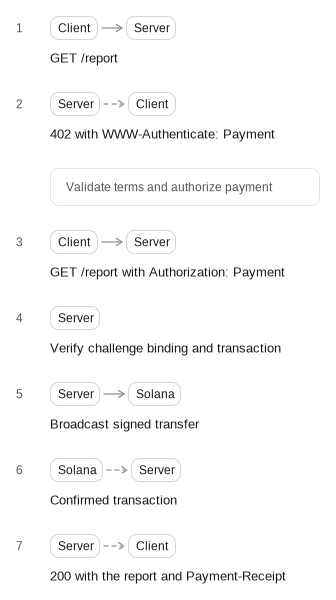
MPP Charge Flow
A challenge includes a server-generated ID, realm, method, intent, encoded
payment request, and expiry. The credential echoes the challenge and adds the
method-specific payment proof. The server must verify both pieces; a valid
transfer that belongs to a different challenge must not unlock the resource.
## One-time Solana charges
The Solana `charge` intent supports two credential types:
- **Pull mode** uses a signed transaction. The client signs the transfer and
sends the transaction to the server. The server verifies, optionally adds a
fee-payer signature, broadcasts, confirms, and returns the transaction
signature in its receipt.
- **Push mode** uses a transaction signature. The client broadcasts first, then
sends the confirmed signature to the server. The server fetches and verifies
the transaction before returning the resource.
Pull mode enables server-sponsored transaction fees and server-side retry logic.
Push mode is useful when a wallet requires the client to submit its own
transaction, but it cannot use server fee sponsorship.
For the normative fields and verification rules, see the
[Solana charge specification](https://paymentauth.org/draft-solana-charge-00.html).
## Add an MPP charge to an Express API
The Solana Pay Kit provides a current TypeScript integration for MPP and x402.
Create a project and install it with Express. `"type": "module"` lets the
server use top-level `await`:
```bash
npm init -y && npm pkg set type=module
npm install @solana/pay-kit @solana/kit@^6.9.0 express
npm install --save-dev @types/express tsx
```
This smallest example uses the hosted Surfpool sandbox and the package's public
demo recipient. It is for local development only:
```ts server.ts
import express from "express";
import { createPayKit, usd } from "@solana/pay-kit";
const pay = await createPayKit({
accept: ["mpp"],
rpcUrl: "https://402.surfnet.dev:8899"
});
const app = express();
app.get("/report", pay.express(usd("0.01")), (_req, res) => {
res.json({ report: "Paid report" });
});
app.listen(4567, () => {
console.log("Paid API listening on http://127.0.0.1:4567");
});
```
The payment-aware request below uses the `pay` command-line client. Install it
with `brew install pay` on macOS, or download the binary from the
[latest `pay` release](https://github.com/solana-foundation/pay/releases/latest)
on Linux and Windows. To skip the install, replace `pay` with
`npx @solana/pay`. [Pay.sh](/developers/docs/payments/pay-sh) covers the
installation options.
Run the server and compare an unpaid request with a payment-aware request:
```bash
npx tsx server.ts
curl -i http://127.0.0.1:4567/report
pay --sandbox curl http://127.0.0.1:4567/report
```
The route handler runs only after the middleware accepts the payment.
**Known issue: the sandbox payment fails**
As of November 2026, the unpaid request returns the `402` challenge as
expected, but the paid request ends with `Server returned 402 again after
payment`. The server log shows `Transaction simulation failed: Blockhash not
found` when `@solana/pay-kit` settles the payment on the hosted sandbox. The
page's code is not the cause. Follow
[Solana Pay Kit](https://github.com/solana-foundation/pay-kit/issues) for the
fix. To complete an MPP payment locally in the meantime, run the
[Pay.sh gateway](/developers/docs/payments/pay-sh#gate-an-api), which issues
MPP challenges.
**Replace every sandbox default in production**
Configure an explicit network, merchant recipient, dedicated RPC, stable
challenge-binding secret, production signer, and durable replay store. Never
route real payments to a package demo signer.
## Metered sessions
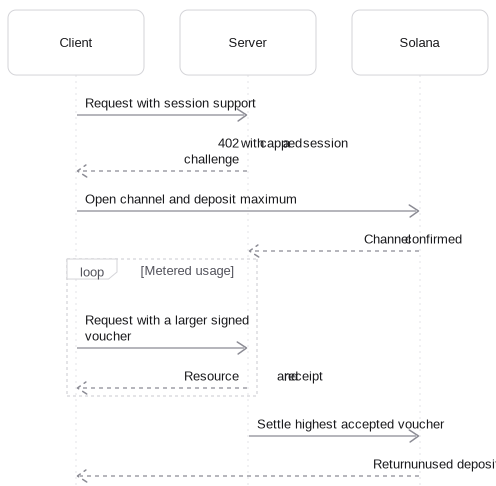
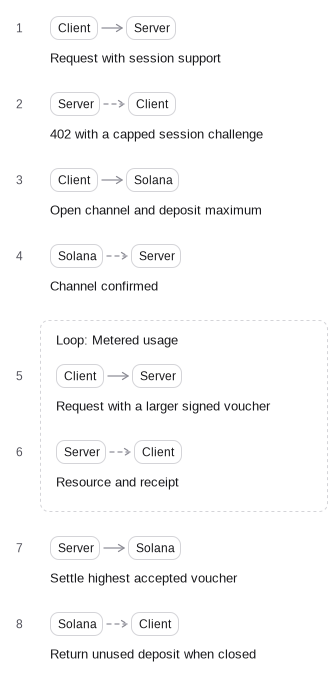
Use a Solana MPP `session` when a client will make many small, related payments.
A session opens an onchain payment channel with a maximum deposit, then uses
cumulative signed vouchers as usage grows. The server can verify vouchers
offchain and settle the highest accepted amount later.
This is useful for token-metered inference, byte-metered downloads, live data,
and repeated tool calls. It is not the same as sending a separate onchain
payment for every event.
```mermaid
sequenceDiagram
participant Client
participant Server
participant Solana
Client->>Server: Request with session support
Server-->>Client: 402 with a capped session challenge
Client->>Solana: Open channel and deposit maximum
Solana-->>Server: Channel confirmed
loop Metered usage
Client->>Server: Request with a larger signed voucher
Server-->>Client: Resource and receipt
end
Server->>Solana: Settle highest accepted voucher
Solana-->>Client: Return unused deposit when closed
```
MPP Session Lifecycle
Call a session a **session payment**, **payment channel**, or **capped repeated
authorization**. Only call it a streamed payment when the service and payment
contract actually meter a stream of usage.
## Production verification
For every Solana charge, the server must verify at least:
- The challenge is authentic, unexpired, bound to this request, and intended for
this realm.
- The transaction uses the expected network, asset or mint, recipient, amount,
and token program.
- Any fee-payer or associated-token-account instructions are explicitly
permitted and cannot drain the server signer.
- The transaction succeeded at the required commitment level.
- The transaction signature has not already been consumed.
- The replay check and consume operation are atomic across all server instances.
For sessions, also persist the channel state, accepted cumulative amount, and
settlement watermark in a shared store. Document how clients recover unused
funds if the server becomes unavailable.
## Related resources
- [MPP specifications](https://paymentauth.org/)
- [MPP protocol documentation](https://mpp.dev/protocol)
- [Solana Pay Kit](https://github.com/solana-foundation/pay-kit)
- [Agentic payments overview](/developers/docs/payments/agentic-payments)
- [Production readiness](/developers/docs/tools/security#verify-addresses)