> ## Documentation Index
> Fetch the complete documentation index at: https://solana.com/llms.txt
> Use this file to discover all available pages before exploring further.
> ## Agent Instructions
> This page is part of the Solana developer documentation at https://solana.com/developers/docs. Append `.md` to any docs URL, or send `Accept: text/markdown`, to get the page as Markdown.
> Index of all pages: https://solana.com/llms.txt. Per-section indexes such as https://solana.com/developers/docs/payments/llms.txt are smaller; prefer them when working on one task.
> Coding agents: install the official Solana skill for current APIs and conventions with `npx skills add https://github.com/solana-foundation/solana-dev-skill` (also served at https://solana.com/SKILL.md).
> Code in the cookbook and task pages comes from tested example files. Prefer it over writing API calls from memory.
# Batch Payments
> Learn how to pay multiple recipients in a single transaction.
A Solana transaction is a container that holds one or more instructions. Each
instruction is an operation—transfer tokens, create an account, call a program.
The network executes all instructions in a transaction sequentially and
atomically: either every instruction succeeds, or the entire transaction fails
and rolls back.
This means you can pack multiple transfers into a single transaction. Instead of
sending three separate transactions to pay three recipients, you send one
transaction with three transfer instructions. This is faster (one confirmation
instead of three) and cheaper (one base fee instead of three). Here's an
illustrative example of how payments (referred to as "drops" in this image) are
batched into a single transaction and multiple transactions are sent to handle
the larger batch.
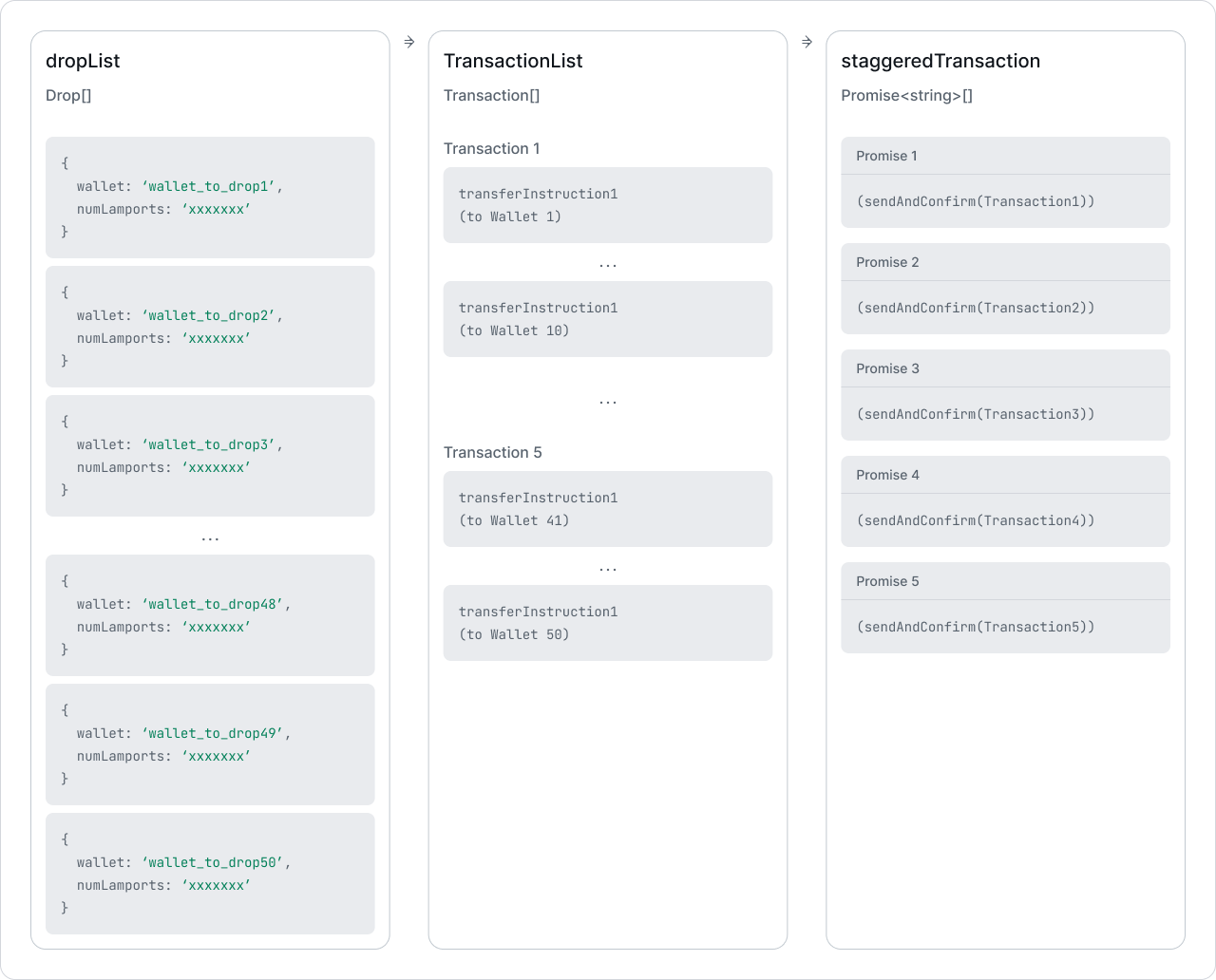
_Source:
[QuickNode - How to Send Bulk Transactions on Solana](https://www.quicknode.com/guides/solana-development/transactions/how-to-send-bulk-transactions-on-solana)_
For more information on transactions and instructions, see the
[Transactions](/developers/docs/core/transactions) and
[Instructions](/developers/docs/core/instructions) guides.
The walkthrough below shows how to load multiple transfer instructions into a
single transaction for batch payments.
## Batching Instructions into a Single Transaction
A Solana transaction can contain multiple transfers to different recipients. You
sign once, pay one transaction fee, and all transfers settle together. If any
transfer fails, the entire transaction is rejected.
See [How Payments Work on Solana](/developers/docs/payments/how-payments-work) for core
payment concepts.
Batching multiple transfers requires building each instruction separately, then
combining them into a single transaction.
The steps below show the core flow. See the [Demo](#demo) for complete runnable
code.
First, derive the Associated Token Account (ATA) addresses for the sender and
each recipient. ATAs are deterministic addresses based on the wallet and mint.
```ts title="Batch Payments"
const [senderAta] = await findAssociatedTokenPda({
mint: mint.address,
owner: sender.address,
tokenProgram: TOKEN_2022_PROGRAM_ADDRESS
});
const [recipient1Ata] = await findAssociatedTokenPda({
mint: mint.address,
owner: recipient1.address,
tokenProgram: TOKEN_2022_PROGRAM_ADDRESS
});
const [recipient2Ata] = await findAssociatedTokenPda({
mint: mint.address,
owner: recipient2.address,
tokenProgram: TOKEN_2022_PROGRAM_ADDRESS
});
```
Create a separate transfer instruction for each recipient. Each instruction
specifies the:
- source token account address
- destination token account address
- authority (source token account owner address)
- amount in base units (adjusted for the mint's decimals)
```ts title="Batch Payments" focus={19-30}
const [senderAta] = await findAssociatedTokenPda({
mint: mint.address,
owner: sender.address,
tokenProgram: TOKEN_2022_PROGRAM_ADDRESS
});
const [recipient1Ata] = await findAssociatedTokenPda({
mint: mint.address,
owner: recipient1.address,
tokenProgram: TOKEN_2022_PROGRAM_ADDRESS
});
const [recipient2Ata] = await findAssociatedTokenPda({
mint: mint.address,
owner: recipient2.address,
tokenProgram: TOKEN_2022_PROGRAM_ADDRESS
});
const transfer1Instruction = getTransferInstruction({
source: senderAta,
destination: recipient1Ata,
authority: sender.address,
amount: 250_000n
});
const transfer2Instruction = getTransferInstruction({
source: senderAta,
destination: recipient2Ata,
authority: sender.address,
amount: 250_000n
});
```
Add all transfer instructions into a single transaction. This executes all
transfers atomically, either all transfers succeed or the entire transaction
fails.
```ts title="Batch Payments" highlight={34-35} focus={33-36}
const [senderAta] = await findAssociatedTokenPda({
mint: mint.address,
owner: sender.address,
tokenProgram: TOKEN_2022_PROGRAM_ADDRESS
});
const [recipient1Ata] = await findAssociatedTokenPda({
mint: mint.address,
owner: recipient1.address,
tokenProgram: TOKEN_2022_PROGRAM_ADDRESS
});
const [recipient2Ata] = await findAssociatedTokenPda({
mint: mint.address,
owner: recipient2.address,
tokenProgram: TOKEN_2022_PROGRAM_ADDRESS
});
const transfer1Instruction = getTransferInstruction({
source: senderAta,
destination: recipient1Ata,
authority: sender.address,
amount: 250_000n
});
const transfer2Instruction = getTransferInstruction({
source: senderAta,
destination: recipient2Ata,
authority: sender.address,
amount: 250_000n
});
const result = await client.sendTransaction([
transfer1Instruction,
transfer2Instruction
]);
```
After the batch transfer, verify the token balances for all parties by fetching
each token account with the client's RPC connection.
```ts title="Batch Payments" focus={38-44} expandable
const [senderAta] = await findAssociatedTokenPda({
mint: mint.address,
owner: sender.address,
tokenProgram: TOKEN_2022_PROGRAM_ADDRESS
});
const [recipient1Ata] = await findAssociatedTokenPda({
mint: mint.address,
owner: recipient1.address,
tokenProgram: TOKEN_2022_PROGRAM_ADDRESS
});
const [recipient2Ata] = await findAssociatedTokenPda({
mint: mint.address,
owner: recipient2.address,
tokenProgram: TOKEN_2022_PROGRAM_ADDRESS
});
const transfer1Instruction = getTransferInstruction({
source: senderAta,
destination: recipient1Ata,
authority: sender.address,
amount: 250_000n
});
const transfer2Instruction = getTransferInstruction({
source: senderAta,
destination: recipient2Ata,
authority: sender.address,
amount: 250_000n
});
const result = await client.sendTransaction([
transfer1Instruction,
transfer2Instruction
]);
const senderBalance = await client.rpc.getTokenAccountBalance(senderAta).send();
const recipient1Balance = await client.rpc
.getTokenAccountBalance(recipient1Ata)
.send();
const recipient2Balance = await client.rpc
.getTokenAccountBalance(recipient2Ata)
.send();
```
### Demo
To run this demo, create a project and install its packages. `"type": "module"`
lets the demo use top-level `await`:
```bash
npm init -y && npm pkg set type=module
npm install @solana/kit @solana/kit-plugin-rpc @solana/kit-plugin-signer @solana-program/system @solana-program/token-2022
npm install --save-dev tsx
```
In a second terminal, start a local network on `127.0.0.1:8899` with the
[Surfpool CLI](/developers/docs/tools/surfpool/toolchain/getting-started) and leave it running:
```bash
surfpool start
```
Save the demo as `demo.ts` and run it with `npx tsx demo.ts`.
```ts Demo highlight={32-36,38-42,44-48,60-65,67-72,76-77} expandable
// Click ">" icon on left to expand demo imports
import { createClient, generateKeyPairSigner, lamports } from "@solana/kit";
import type { KeyPairSigner } from "@solana/kit";
import { solanaLocalRpc } from "@solana/kit-plugin-rpc";
import { signer } from "@solana/kit-plugin-signer";
import { getCreateAccountInstruction } from "@solana-program/system";
import {
getCreateAssociatedTokenInstructionAsync,
getInitializeMintInstruction,
getMintSize,
TOKEN_2022_PROGRAM_ADDRESS,
findAssociatedTokenPda,
getMintToInstruction,
getTransferInstruction
} from "@solana-program/token-2022";
// Generate keypairs for sender and two recipients
const sender = await generateKeyPairSigner();
const recipient1 = await generateKeyPairSigner();
const recipient2 = await generateKeyPairSigner();
console.log("Sender Address:", sender.address);
console.log("Recipient 1 Address:", recipient1.address);
console.log("Recipient 2 Address:", recipient2.address);
// Demo Setup: Create client, mint account, token accounts, and fund with initial tokens
const { client, mint } = await demoSetup(sender, recipient1, recipient2);
console.log("\nMint Address:", mint.address);
// Derive the Associated Token Accounts addresses (ATAs) for sender and recipients
const [senderAta] = await findAssociatedTokenPda({
mint: mint.address,
owner: sender.address,
tokenProgram: TOKEN_2022_PROGRAM_ADDRESS
});
const [recipient1Ata] = await findAssociatedTokenPda({
mint: mint.address,
owner: recipient1.address,
tokenProgram: TOKEN_2022_PROGRAM_ADDRESS
});
const [recipient2Ata] = await findAssociatedTokenPda({
mint: mint.address,
owner: recipient2.address,
tokenProgram: TOKEN_2022_PROGRAM_ADDRESS
});
console.log("Sender Token Account:", senderAta.toString());
console.log("Recipient 1 Token Account:", recipient1Ata.toString());
console.log("Recipient 2 Token Account:", recipient2Ata.toString());
// =============================================================================
// Batch Token Payment Demo
// =============================================================================
// Create instructions to transfer tokens from sender to both recipients
// Transferring 250,000 base units = 0.25 tokens (with 6 decimals) to each
const transfer1Instruction = getTransferInstruction({
source: senderAta,
destination: recipient1Ata,
authority: sender.address,
amount: 250_000n // 0.25 tokens
});
const transfer2Instruction = getTransferInstruction({
source: senderAta,
destination: recipient2Ata,
authority: sender.address,
amount: 250_000n // 0.25 tokens
});
// Send both transfers in a single transaction using @solana/kit
const result = await client.sendTransaction([
transfer1Instruction,
transfer2Instruction
]);
console.log("\n=== Batch Token Payment Complete ===");
console.log("Transaction Signature:", result.context.signature);
// Fetch final token account balances using the client's RPC connection
const senderBalance = await client.rpc.getTokenAccountBalance(senderAta).send();
const recipient1Balance = await client.rpc
.getTokenAccountBalance(recipient1Ata)
.send();
const recipient2Balance = await client.rpc
.getTokenAccountBalance(recipient2Ata)
.send();
console.log(
"\nSender Token Account Balance:",
senderBalance.value.uiAmountString
);
console.log(
"Recipient 1 Token Account Balance:",
recipient1Balance.value.uiAmountString
);
console.log(
"Recipient 2 Token Account Balance:",
recipient2Balance.value.uiAmountString
);
// =============================================================================
// Demo Setup Helper Function
// =============================================================================
/**
* Sets up for a batch token transfer demo:
* - Creates a @solana/kit client with the sender as fee payer
* - Airdrops SOL to sender for transaction fees
* - Generates mint keypair and creates/initializes mint account
* - Creates associated token accounts for sender and both recipients
* - Mints initial tokens to sender
*
* @param sender - The sender's signer (fee payer and mint authority)
* @param recipient1 - The first recipient's signer
* @param recipient2 - The second recipient's signer
* @returns Returns client instance and mint signer
*/
async function demoSetup(
sender: KeyPairSigner,
recipient1: KeyPairSigner,
recipient2: KeyPairSigner
) {
// Create @solana/kit client pointing to local validator
// The signer plugin sets the sender as the fee payer and must be applied before the RPC plugin
const client = createClient().use(signer(sender)).use(solanaLocalRpc());
// Fund sender with SOL for transaction fees
await client.airdrop(sender.address, lamports(1_000_000_000n));
// Generate keypair to use as address of mint
const mint = await generateKeyPairSigner();
// Get default mint account size (in bytes), no extensions enabled
const space = BigInt(getMintSize());
// Get minimum balance for rent exemption
const rent = await client.rpc.getMinimumBalanceForRentExemption(space).send();
// Instruction to create new account for mint (token program)
// Invokes the system program
const createAccountInstruction = getCreateAccountInstruction({
payer: sender,
newAccount: mint,
lamports: rent,
space,
programAddress: TOKEN_2022_PROGRAM_ADDRESS
});
// Instruction to initialize mint account data
// Invokes the token 2022 program
const initializeMintInstruction = getInitializeMintInstruction({
mint: mint.address,
decimals: 6,
mintAuthority: sender.address
});
// Derive sender's associated token account address (ATA)
const [senderAta] = await findAssociatedTokenPda({
mint: mint.address,
owner: sender.address,
tokenProgram: TOKEN_2022_PROGRAM_ADDRESS
});
// Create instruction for sender's ATA
const createSenderAtaInstruction =
await getCreateAssociatedTokenInstructionAsync({
payer: sender,
mint: mint.address,
owner: sender.address,
tokenProgram: TOKEN_2022_PROGRAM_ADDRESS
});
// Create instruction for recipient 1's ATA
const createRecipient1AtaInstruction =
await getCreateAssociatedTokenInstructionAsync({
payer: sender,
mint: mint.address,
owner: recipient1.address,
tokenProgram: TOKEN_2022_PROGRAM_ADDRESS
});
// Create instruction for recipient 2's ATA
const createRecipient2AtaInstruction =
await getCreateAssociatedTokenInstructionAsync({
payer: sender,
mint: mint.address,
owner: recipient2.address,
tokenProgram: TOKEN_2022_PROGRAM_ADDRESS
});
// Create instruction to mint initial tokens to sender
const mintToInstruction = getMintToInstruction({
mint: mint.address,
token: senderAta,
mintAuthority: sender.address,
amount: 1_000_000n // Mint 1.00 tokens (1,000,000 base units with 6 decimals)
});
// Combine all setup instructions
const setupInstructions = [
createAccountInstruction, // Create mint account
initializeMintInstruction, // Initialize mint
createSenderAtaInstruction, // Create sender's ATA
createRecipient1AtaInstruction, // Create recipient 1's ATA
createRecipient2AtaInstruction, // Create recipient 2's ATA
mintToInstruction // Mint tokens to sender
];
// Send all setup instructions in a single transaction using @solana/kit
await client.sendTransaction(setupInstructions);
return {
client,
mint
};
}
```
## Scaling with Transaction Planning
A single transaction has size limits—roughly 1232 bytes. For large batch
operations (payroll for hundreds of employees, mass airdrops), you'll exceed
this limit and need to split work across multiple transactions.
The
[v1 transaction format](/developers/docs/core/transactions/versioned-transactions#v1-format)
raises the size limit to 4096 bytes, which fits roughly three times as many
transfers per transaction. Batching is still required beyond that, since the
runtime loads at most 64 accounts per transaction, or 96 for v1 once
[SIMD-0596](https://solana.com/upgrades/v1-account-limit) activates.
Though you are welcome to create your own transaction distribution logic, the
[`@solana/instruction-plans`](https://www.solanakit.com/docs/concepts/instruction-plans)
package (part of Solana Kit) handles this at two levels:
**Instruction plans** define your operations and their ordering constraints:
- **Sequential** — instructions that must execute in order
- **Parallel** — instructions that can execute in any order
- **Non-divisible** — instructions that must stay together in the same
transaction
**Transaction plans** are generated from instruction plans. The planner
intelligently packs instructions into optimally-sized transactions, respecting
your ordering constraints. The resulting transaction plan can then be:
- **Executed** — signed and sent to the network, with parallel transactions sent
concurrently
- **Simulated** — dry-run against the network to verify before sending
- **Serialized** — compiled to base64 for external signing services or
multi-party workflows
This two-level approach lets you think in terms of operations ("transfer to
Alice, then transfer to Bob") while the library handles the mechanics of
transaction sizing, packing, and parallel execution.