> ## Documentation Index
> Fetch the complete documentation index at: https://solana.com/llms.txt
> Use this file to discover all available pages before exploring further.
> ## Agent Instructions
> This page is part of the Solana developer documentation at https://solana.com/developers/docs. Append `.md` to any docs URL, or send `Accept: text/markdown`, to get the page as Markdown.
> Index of all pages: https://solana.com/llms.txt. Per-section indexes such as https://solana.com/developers/docs/payments/llms.txt are smaller; prefer them when working on one task.
> Coding agents: install the official Solana skill for current APIs and conventions with `npx skills add https://github.com/solana-foundation/solana-dev-skill` (also served at https://solana.com/SKILL.md).
> Code in the cookbook and task pages comes from tested example files. Prefer it over writing API calls from memory.
# x402 Integration with Kora
> Use Kora as the policy-enforced Solana signer and fee payer behind an x402 V2 facilitator.
Kora can provide the Solana signing, transaction-policy, and fee-sponsorship
layer behind an [x402 V2 facilitator](/developers/docs/tools/x402-facilitator). The
facilitator implements the x402 HTTP API; Kora validates, signs, and sends the
payment transactions it accepts.
This guide starts the reference Kora facilitator on Solana Devnet. It is a
development environment for testing the integration, not a production
deployment.
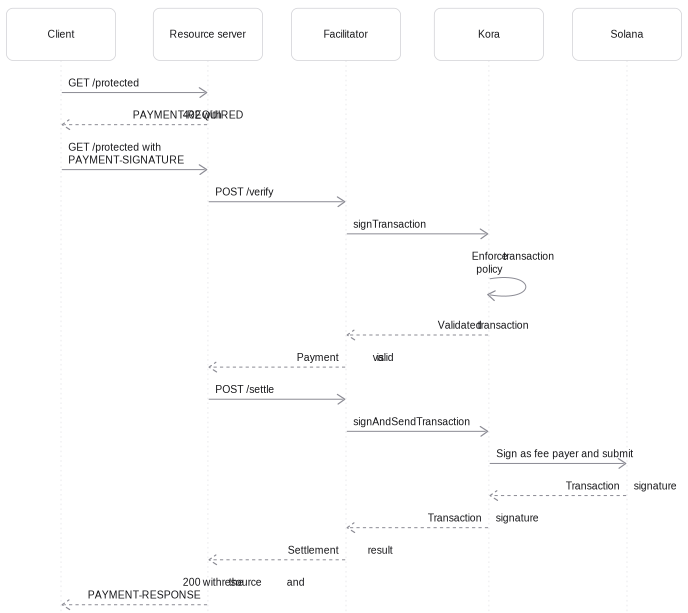
## Architecture
```mermaid
sequenceDiagram
participant Client
participant API as Resource server
participant Facilitator
participant Kora
participant Solana
Client->>API: GET /protected
API-->>Client: 402 with PAYMENT-REQUIRED
Client->>API: GET /protected with PAYMENT-SIGNATURE
API->>Facilitator: POST /verify
Facilitator->>Kora: signTransaction
Kora->>Kora: Enforce transaction policy
Kora-->>Facilitator: Validated transaction
Facilitator-->>API: Payment is valid
API->>Facilitator: POST /settle
Facilitator->>Kora: signAndSendTransaction
Kora->>Solana: Sign as fee payer and submit
Solana-->>Kora: Transaction signature
Kora-->>Facilitator: Transaction signature
Facilitator-->>API: Settlement result
API-->>Client: 200 with the resource and PAYMENT-RESPONSE
```
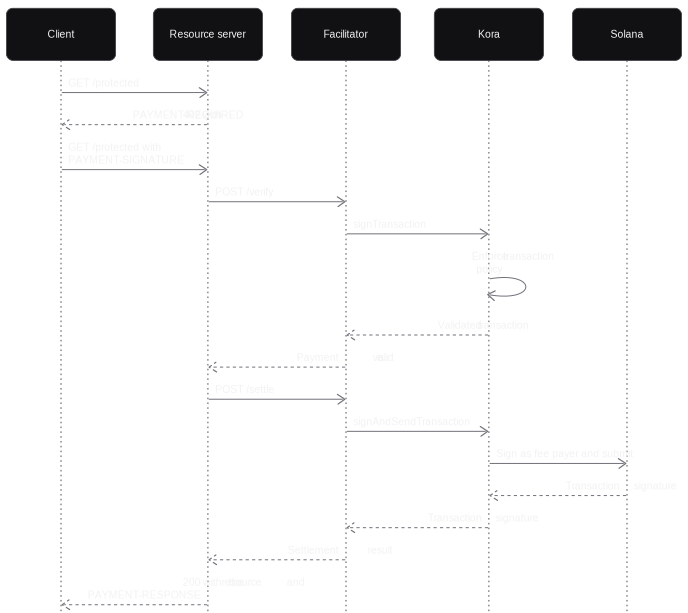
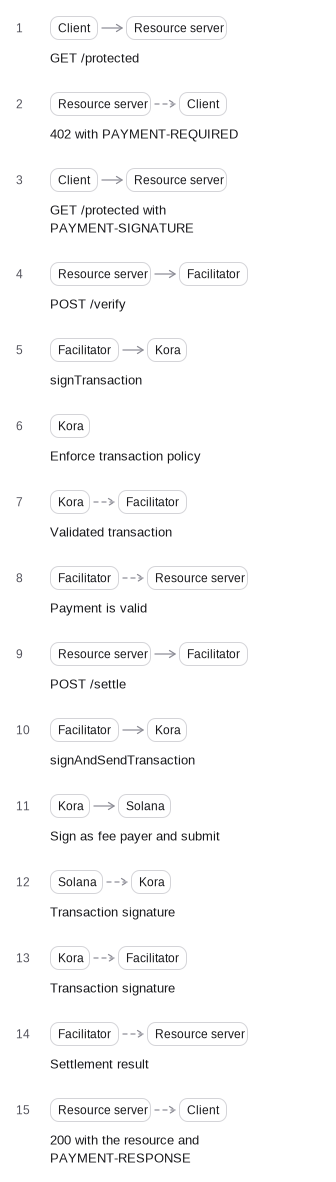
x402 with Kora
The four application roles remain separate:
- The **client** selects a payment requirement and signs the payment
authorization.
- The **resource server** prices a route and fulfills it only after successful
verification and settlement.
- The **facilitator** exposes x402's `/supported`, `/verify`, and `/settle`
endpoints.
- **Kora** signs only transactions allowed by its policy and can sponsor their
Solana network fees.
Kora does not replace the x402 protocol. It is the signing and policy boundary
used by this facilitator implementation.
## Start the reference facilitator
You need Git, Node.js with pnpm (the demo's scripts call pnpm), and the `kora` CLI
([installation](/developers/docs/tools/kora/getting-started/installation)). Clone the
latest stable Kora release and enter the x402 demo:
```bash
git clone --branch v2.0.5 --depth 1 https://github.com/solana-foundation/kora.git
cd kora/examples/x402/demo
cp .env.example .env
pnpm run install:all
pnpm run setup
```
`pnpm run setup` generates a Kora signer keypair (`KORA_SIGNER_ADDRESS` and
`KORA_SIGNER_PRIVATE_KEY`) and a payer keypair (`PAYER_ADDRESS` and
`PAYER_PRIVATE_KEY`) and appends them to `.env`. The demo's `kora/signers.toml`
reads the signer secret from `KORA_PRIVATE_KEY`, so add that variable to `.env`
with the same value as `KORA_SIGNER_PRIVATE_KEY`:
```bash
KORA_PRIVATE_KEY=
```
Fund the Kora signer address with Devnet SOL from the
[Solana Faucet](https://faucet.solana.com) so it can sponsor transaction fees.
**Use a disposable Devnet signer**
The demo loads the Kora signer from an environment variable. Do not put a
production signing key in this demo or commit the `.env` file.
Start Kora and the facilitator in separate terminals:
```bash
# Terminal 1: Kora on port 8080, using Devnet RPC
pnpm run start:kora
# Terminal 2: the x402 facilitator on port 3000
pnpm run start:facilitator
```
> **Note:** The x402 demo has no `docker-compose.yml` at `v2.0.5`. The
> one-command `docker compose up --build` flow exists only on `main` and the
> `v2.2.0-beta.8` pre-release tag.
When both servers are running, inspect the facilitator's advertised capabilities from another terminal:
```bash
curl http://127.0.0.1:3000/supported
```
The response should advertise x402 version `2`, the `exact` scheme, and the
Devnet CAIP-2 network identifier:
```json
{
"kinds": [
{
"x402Version": 2,
"scheme": "exact",
"network": "solana:EtWTRABZaYq6iMfeYKouRu166VU2xqa1",
"extra": {
"feePayer": ""
}
}
]
}
```
Kora listens on port `8080` and the facilitator on port `3000`, on all network
interfaces; the commands on this page reach them at `127.0.0.1`. The Kora
signer pays fees with real Devnet SOL, so firewall both ports from other
machines while the demo runs. Stop each process with `Ctrl+C`.
## Connect a resource server
Configure the x402 resource server to use the local facilitator and the Kora
signer's public address as its recipient:
```bash
FACILITATOR_URL=http://127.0.0.1:3000
SOLANA_PAY_TO=
```
Then follow [x402 on Solana](/developers/docs/payments/agentic-payments/x402) to add x402
V2 middleware to an Express route. An unpaid request receives
`PAYMENT-REQUIRED`, the retry carries `PAYMENT-SIGNATURE`, and a successful
response carries `PAYMENT-RESPONSE`.
Do not copy examples that use `X-PAYMENT`, `X-PAYMENT-RESPONSE`, or the
`solana-devnet` network name. Those fields belong to x402 V1.
The Kora repository also includes a protected API and payment-aware client in
the same `examples/x402/demo` directory. Use those applications when you need to
exercise the complete local flow.
## Configure the Kora policy
The reference `kora/kora.toml` is intentionally narrow. Its validation policy
controls:
- which Solana programs the signer permits;
- which SPL token mints can be used;
- the maximum sponsored lamports and signature count;
- which fee-payer operations are forbidden; and
- which Token-2022 extensions are rejected.
> **Warning:** At `v2.0.5`, the demo's `kora/kora.toml` lists the blocked
> Token-2022 extensions under `[validation.token2022]`. Kora 2.0.5 only reads
> `[validation.token_2022]` and silently ignores the other name, so the demo
> blocks no extensions. Rename the section to `[validation.token_2022]` before
> you rely on it, and check `validation_config.token_2022` in the `getConfig`
> response. See
> [Token-2022 Extension Blocking](/developers/docs/tools/kora/operators/configuration#token-2022-extension-blocking).
The demo enables only the Kora RPC methods its facilitator needs:
`signTransaction`, `signAndSendTransaction`, `getBlockhash`, `getPayerSigner`,
and `getConfig`.
Treat the policy as the security boundary for the fee-payer key. For a
production service:
1. Allowlist only the programs, token mints, and transaction forms your x402
scheme produces.
2. Deny transfers, authority changes, account closure, and other instructions
that can move value from the Kora signer.
3. Set transaction and usage limits that bound the loss from a compromised
facilitator credential.
4. Use a managed signer backend instead of an environment-held private key.
## Secure the facilitator-to-Kora connection
The demo enables Kora API-key authentication. The facilitator sends the value of
`KORA_API_KEY`, which must match `[kora.auth].api_key` in `kora.toml`.
For production, also:
- keep Kora on a private network and terminate TLS at a trusted boundary;
- store API credentials in a secret manager and rotate them;
- consider Kora's HMAC request authentication for tamper and replay protection;
- separate fee-payer and payment-recipient keys when your accounting model
requires it; and
- alert on policy rejections, settlement failures, fee consumption, and signer
balance.
## Harden payment settlement
Kora validates the Solana transaction, but the facilitator and resource server
still own x402 protocol correctness. Before serving a resource, enforce:
- the selected x402 version, scheme, network, asset, amount, and recipient;
- the authorization lifetime and exact Solana instruction layout;
- atomic replay protection and idempotent settlement;
- confirmation at the commitment level required by the product; and
- a durable mapping between the purchase, settlement result, and fulfillment.
Do not return paid content merely because Kora accepted a transaction for
signing. Fulfill only after the facilitator returns a successful settlement
result.
## Related resources
- [Kora repository and x402 demo](https://github.com/solana-foundation/kora/tree/main/examples/x402/demo)
- [Kora operator configuration](/developers/docs/tools/kora/operators/configuration)
- [Kora signer backends](/developers/docs/tools/kora/operators/signers)
- [Kora security audits](/developers/docs/tools/kora/security-audits)
- [x402 V2 specification](https://github.com/x402-foundation/x402/blob/main/specs/x402-specification-v2.md)
- [Agentic payments overview](/developers/docs/payments/agentic-payments)