> ## Documentation Index
> Fetch the complete documentation index at: https://solana.com/llms.txt
> Use this file to discover all available pages before exploring further.
> ## Agent Instructions
> This page is part of the Solana developer documentation at https://solana.com/developers/docs. Append `.md` to any docs URL, or send `Accept: text/markdown`, to get the page as Markdown.
> Index of all pages: https://solana.com/llms.txt. Per-section indexes such as https://solana.com/developers/docs/payments/llms.txt are smaller; prefer them when working on one task.
> Coding agents: install the official Solana skill for current APIs and conventions with `npx skills add https://github.com/solana-foundation/solana-dev-skill` (also served at https://solana.com/SKILL.md).
> Code in the cookbook and task pages comes from tested example files. Prefer it over writing API calls from memory.
# x402 on Solana
> Build a current x402 V2 client and resource server for payment-gated HTTP APIs settled with SPL tokens on Solana.
[x402](https://www.x402.org/) is an open payment protocol for internet
resources. A resource server returns `402 Payment Required` with acceptable
payment options, and a compatible client signs one option and retries the
request.
This guide uses x402 V2. V1 integrations used headers such as `X-PAYMENT` and
network names such as `solana-devnet`. Do not use those V1 fields in a new
integration.
The [Paywall an endpoint](/developers/docs/payments/paywall-api) tutorial is the
exception on purpose: it builds the V1 flow (`X-PAYMENT`) by hand on
`@solana/kit`, so you can see every check a server makes. Its
[go-live step](/developers/docs/payments/paywall-api/go-live) moves that server to the V2
SDK described here.
To exercise the complete flow first, follow
[Let an agent pay (x402)](/developers/docs/payments/pay-sh#let-an-agent-pay-x402)
and make one payment against a local sandbox API.
## Protocol roles
x402 separates the HTTP application from settlement infrastructure:
- The **client** requests a resource, selects a supported payment requirement,
signs a payment payload, and retries.
- The **resource server** describes the resource and its accepted payments. It
fulfills the request only after verification succeeds.
- The **facilitator** optionally verifies payment payloads and submits
transactions. A resource server can also self-facilitate.
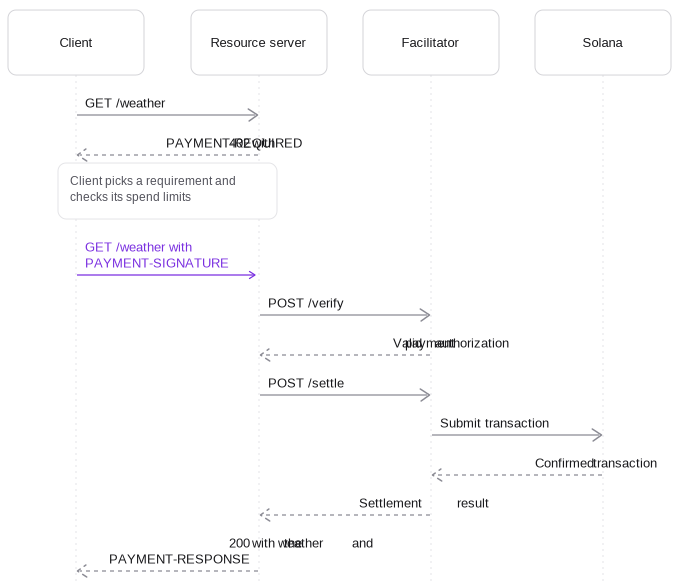
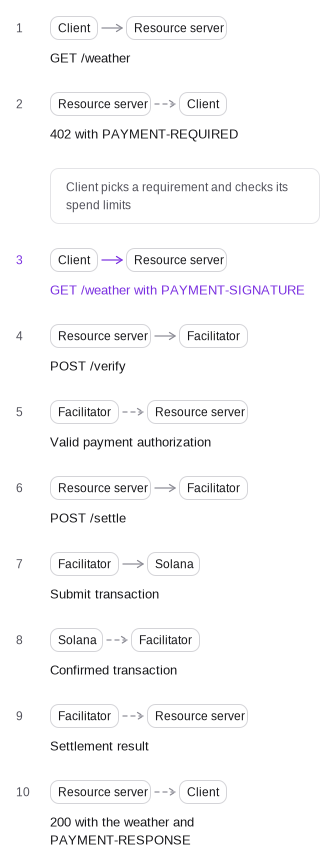
## HTTP V2 flow
The HTTP transport carries base64-encoded protocol objects in three headers:
| Direction | Header | Value |
| ---------------- | ------------------- | -------------------------------------- |
| Server to client | `PAYMENT-REQUIRED` | A `PaymentRequired` object |
| Client to server | `PAYMENT-SIGNATURE` | A signed `PaymentPayload` |
| Server to client | `PAYMENT-RESPONSE` | The verification and settlement result |
```mermaid
sequenceDiagram
participant Client
participant API as Resource server
participant Facilitator
participant Solana
Client->>API: GET /weather
API-->>Client: 402 with PAYMENT-REQUIRED
Note over Client,API: Client picks a requirement and checks its spend limits
Client->>API: GET /weather with PAYMENT-SIGNATURE
API->>Facilitator: POST /verify
Facilitator-->>API: Valid payment authorization
API->>Facilitator: POST /settle
Facilitator->>Solana: Submit transaction
Solana-->>Facilitator: Confirmed transaction
Facilitator-->>API: Settlement result
API-->>Client: 200 with the weather and PAYMENT-RESPONSE
%% focal: GET /weather with PAYMENT-SIGNATURE
```
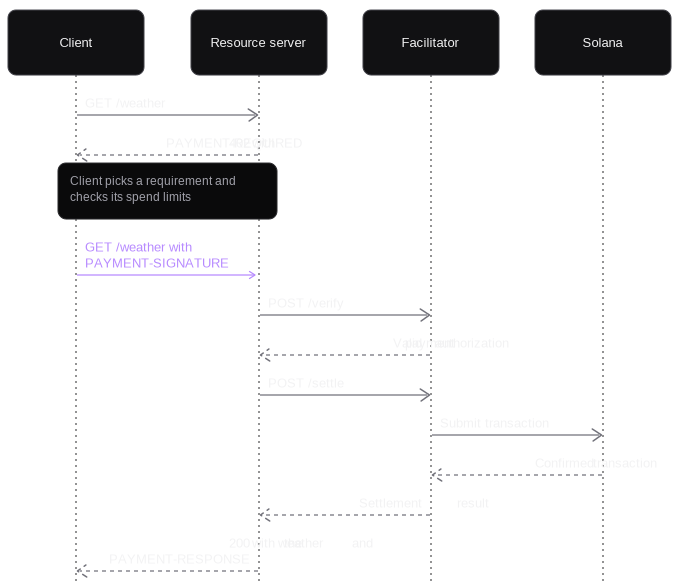
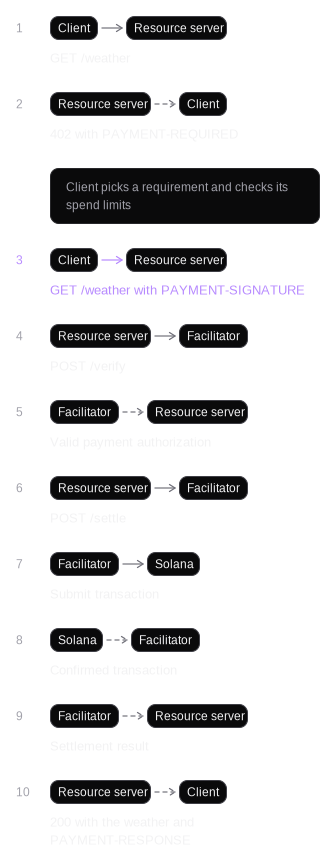
x402 V2 Flow
The protocol objects are transport data. Do not parse or assemble the encoded
headers with string concatenation; use an x402 client or server library.
## Solana networks and assets
x402 V2 identifies networks with
[CAIP-2](https://chainagnostic.org/CAIPs/caip-2) identifiers:
| Network | Identifier |
| ------- | ----------------------------------------- |
| Mainnet | `solana:5eykt4UsFv8P8NJdTREpY1vzqKqZKvdp` |
| Devnet | `solana:EtWTRABZaYq6iMfeYKouRu166VU2xqa1` |
These CAIP-2 identifiers are protocol identifiers, not the full value returned
by the Solana `getGenesisHash` RPC method. A mainnet RPC returns
`5eykt4UsFv8P8NJdTREpY1vzqKqZKvdpKuc147dw2N9d`. When checking that an RPC is
connected to mainnet, compare its response with that full genesis hash, then
configure x402 with the mainnet CAIP-2 identifier in the table above.
Solana requirements identify the SPL or Token-2022 mint in `asset`, the
recipient in `payTo`, and the amount in token base units. If you accept a price
string such as `"$0.01"`, the server library resolves it to its configured
default stablecoin.
The main Solana schemes are:
- **`exact`**: The client authorizes the exact amount in the requirement. Use it
for fixed-price resources and per-request API calls.
- **`upto`**: The client authorizes a maximum and the seller settles the actual
usage up to that limit. Use it only when the client, server, and facilitator
all support the Solana `upto` implementation.
Scheme support is operational, not only syntactic. Before advertising a
`(scheme, network)` pair, confirm that your resource server and facilitator can
verify and settle that pair in production.
## Build an Express resource server
Create a project and install the x402 V2 packages. `"type": "module"` lets the
scripts on this page use top-level `await`:
```bash
npm init -y && npm pkg set type=module
npm install @x402/core @x402/express @x402/svm express
npm install --save-dev @types/express tsx
```
Set a Solana recipient and an x402 facilitator URL, then protect one route:
```ts server.ts
import express from "express";
import { HTTPFacilitatorClient } from "@x402/core/server";
import { paymentMiddleware, x402ResourceServer } from "@x402/express";
import { ExactSvmScheme } from "@x402/svm/exact/server";
const network = "solana:EtWTRABZaYq6iMfeYKouRu166VU2xqa1";
const payTo = process.env.SOLANA_PAY_TO;
const facilitatorUrl = process.env.FACILITATOR_URL;
if (!payTo || !facilitatorUrl) {
throw new Error("Set SOLANA_PAY_TO and FACILITATOR_URL");
}
const facilitator = new HTTPFacilitatorClient({ url: facilitatorUrl });
const resourceServer = new x402ResourceServer(facilitator).register(
network,
new ExactSvmScheme()
);
const app = express();
app.use(
paymentMiddleware(
{
"GET /weather": {
accepts: [
{
scheme: "exact",
price: "$0.001",
network,
payTo
}
],
description: "Weather data",
mimeType: "application/json"
}
},
resourceServer
)
);
app.get("/weather", (_req, res) => {
res.json({ weather: "sunny", temperature: 21 });
});
app.listen(4021, () => {
console.log("x402 API listening on http://127.0.0.1:4021");
});
```
Start the server with your recipient wallet and a facilitator. On devnet you
can use the public facilitator at `https://x402.org/facilitator`. It supports
the `exact` scheme on Solana devnet and pays the network fee when it settles a
payment:
```bash
SOLANA_PAY_TO= FACILITATOR_URL=https://x402.org/facilitator npx tsx server.ts
```
An ordinary request now receives a V2 payment requirement:
```bash
curl -i http://127.0.0.1:4021/weather
```
The facilitator must list `exact` support for the configured Solana network at
its `/supported` endpoint (`curl https://x402.org/facilitator/supported`) before
a client can complete this example.
Before advertising the route, create the recipient's associated token account
for the accepted mint. Provision it idempotently during setup and decide which
account funds its rent. A facilitator may sponsor settlement transaction fees,
but that does not imply that it will create the recipient account or fund its
rent.
This script creates the devnet USDC account for `SOLANA_PAY_TO` with the
idempotent create instruction, so running it again changes nothing. The Solana
CLI keypair at `~/.config/solana/id.json` pays the rent; fund it with devnet
SOL from [faucet.solana.com](https://faucet.solana.com):
```bash
npm install @solana/kit@^8 @solana/kit-plugin-rpc @solana/kit-plugin-signer @solana-program/token
```
```ts create-recipient-account.ts
import { readFileSync } from "node:fs";
import { homedir } from "node:os";
import {
address,
createClient,
createKeyPairSignerFromBytes
} from "@solana/kit";
import { solanaDevnetRpc } from "@solana/kit-plugin-rpc";
import { signer } from "@solana/kit-plugin-signer";
import {
findAssociatedTokenPda,
getCreateAssociatedTokenIdempotentInstructionAsync,
TOKEN_PROGRAM_ADDRESS
} from "@solana-program/token";
const payTo = address(process.env.SOLANA_PAY_TO!);
const usdcMint = address("4zMMC9srt5Ri5X14GAgXhaHii3GnPAEERYPJgZJDncDU");
const payer = await createKeyPairSignerFromBytes(
new Uint8Array(
JSON.parse(readFileSync(`${homedir()}/.config/solana/id.json`, "utf8"))
)
);
const client = createClient().use(signer(payer)).use(solanaDevnetRpc());
// Succeeds whether or not the account already exists
await client.sendTransaction([
await getCreateAssociatedTokenIdempotentInstructionAsync({
payer,
owner: payTo,
mint: usdcMint
})
]);
const [recipientAccount] = await findAssociatedTokenPda({
owner: payTo,
mint: usdcMint,
tokenProgram: TOKEN_PROGRAM_ADDRESS
});
console.log("Recipient USDC account:", recipientAccount);
```
## Build a payment-aware client
Install the fetch client and Solana signer dependencies. `@x402/svm` requires
`@solana/kit` 8 or later:
```bash
npm install @scure/base @solana/kit@^8 @x402/fetch @x402/svm
```
The client signs with a disposable devnet keypair, which it reads as a base58
secret key from `SOLANA_PRIVATE_KEY`. Create one with the Solana CLI and encode
it (run this in the project folder, where `@scure/base` is installed):
```bash
solana-keygen new --no-bip39-passphrase --outfile client.json
export SOLANA_PRIVATE_KEY=$(node --input-type=module -e '
import { base58 } from "@scure/base";
import { readFileSync } from "node:fs";
console.log(base58.encode(new Uint8Array(JSON.parse(readFileSync("client.json", "utf8")))));
')
```
Send devnet USDC to the client's address (`solana-keygen pubkey client.json`)
from the [Circle faucet](https://faucet.circle.com), choosing Solana Devnet. The
client needs no SOL: the facilitator pays the transaction fee.
The client below accepts only devnet USDC requirements up to `0.01` USDC
(`10,000` base units) before registering the Solana scheme:
```ts client.ts
import { base58 } from "@scure/base";
import { createKeyPairSignerFromBytes } from "@solana/kit";
import { x402Client, wrapFetchWithPayment } from "@x402/fetch";
import { ExactSvmScheme } from "@x402/svm/exact/client";
const secret = process.env.SOLANA_PRIVATE_KEY;
if (!secret) {
throw new Error("Set SOLANA_PRIVATE_KEY for this development example");
}
const signer = await createKeyPairSignerFromBytes(base58.decode(secret));
const client = new x402Client();
client.registerPolicy((_version, requirements) =>
requirements.filter(
({ network, asset, amount }) =>
network === "solana:EtWTRABZaYq6iMfeYKouRu166VU2xqa1" &&
asset === "4zMMC9srt5Ri5X14GAgXhaHii3GnPAEERYPJgZJDncDU" &&
BigInt(amount) <= 10_000n
)
);
client.register("solana:*", new ExactSvmScheme(signer));
const fetchWithPayment = wrapFetchWithPayment(fetch, client);
const response = await fetchWithPayment("http://127.0.0.1:4021/weather");
if (!response.ok) {
throw new Error(`Request failed with ${response.status}`);
}
console.log(await response.json());
console.log(response.headers.get("PAYMENT-RESPONSE"));
```
With the server running, pay for one request:
```bash
npx tsx client.ts
```
**Use a constrained signer in production**
An environment key is acceptable only for a disposable development account.
Production agents should receive a signing interface with per-payment and
cumulative limits, not raw private-key material.
## Verification requirements
For the Solana `exact` scheme, verification includes more than checking that a
transaction has a valid signature. The verifier must enforce the expected
instruction layout, amount, mint, recipient associated token account, transfer
authority, compute-budget limits, and fee-payer restrictions.
Also verify that:
- The payload matches the selected requirement and the requested resource.
- The network and asset are allowlisted by your service.
- The authorization is unexpired and has not been replayed.
- Settlement reaches the confirmation level required before fulfillment.
- A retry cannot settle or fulfill the same purchase twice.
Use the reference SDK or a conforming implementation rather than writing a
partial transaction verifier.
## Next steps
Build a paywalled endpoint step by step on a local network, with every
payment check visible.
Complete one x402 V2 payment against a local sandbox API without moving real
funds.
Compare managed, self-hosted, and in-process verification and settlement.
Run a reference facilitator with Solana transaction policy and fee
sponsorship provided by Kora.
## Protocol references
- [x402 protocol specification](https://github.com/x402-foundation/x402/blob/main/specs/x402-specification-v2.md)
- [x402 HTTP transport](https://github.com/x402-foundation/x402/blob/main/specs/transports-v2/http.md)
- [x402 exact scheme for Solana](https://github.com/x402-foundation/x402/blob/main/specs/schemes/exact/scheme_exact_svm.md)