> ## Documentation Index
> Fetch the complete documentation index at: https://solana.com/llms.txt
> Use this file to discover all available pages before exploring further.
> ## Agent Instructions
> This page is part of the Solana developer documentation at https://solana.com/developers/docs. Append `.md` to any docs URL, or send `Accept: text/markdown`, to get the page as Markdown.
> Index of all pages: https://solana.com/llms.txt. Per-section indexes such as https://solana.com/developers/docs/payments/llms.txt are smaller; prefer them when working on one task.
> Coding agents: install the official Solana skill for current APIs and conventions with `npx skills add https://github.com/solana-foundation/solana-dev-skill` (also served at https://solana.com/SKILL.md).
> Code in the cookbook and task pages comes from tested example files. Prefer it over writing API calls from memory.
# Deferred Execution
> Sign transactions now, execute later—enabling approval workflows, treasury operations, and secure signing
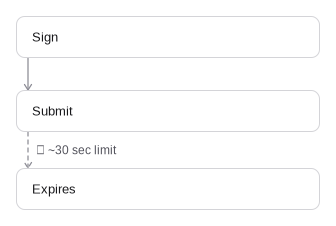
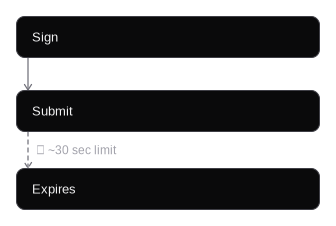
Every Solana transaction includes a recent blockhash—a reference to a recent
network state that proves the transaction was created "now." The network rejects
any transaction with a blockhash older than 150 blocks (about 30 seconds at 200ms slots),
preventing replay attacks and stale submissions. This works perfectly for
real-time payments. But it breaks workflows that need a gap between signing and
submission, such as:
| Scenario | Why Standard Transactions Fail |
| -------------------------- | ------------------------------------------------------------------------- |
| **Treasury operations** | CFO in Tokyo signs, Controller in NYC approves—30 seconds isn't enough |
| **Compliance workflows** | Transactions need legal/compliance review before execution |
| **Cold storage signing** | Air-gapped machines require manual transfer of signed transactions |
| **Batch preparation** | Prepare payroll or disbursements during business hours, execute overnight |
| **Multi-sig coordination** | Multiple approvers across time zones |
| **Scheduled payments** | Schedule payments to be executed at a future date |
In traditional finance, a signed check doesn't expire in 30 seconds. Certain
onchain operations shouldn't either. **Durable nonces** solve this by
replacing the recent blockhash with a stored, persistent value that only
advances when you use it—giving you transactions that stay valid until you're
ready to submit.
## How It Works
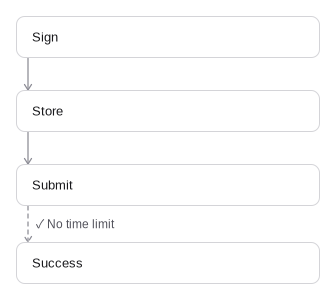
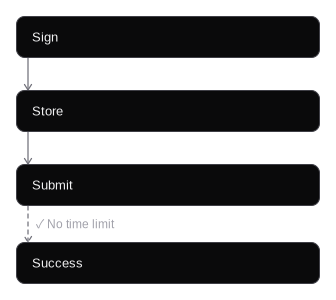
Instead of a recent blockhash (valid ~150 blocks), you use a **nonce account**,
a special account that stores a _unique_ value which can be used in place of a
blockhash. Each transaction using this nonce must "advance" it as the first
instruction. Each nonce value can only be used for one transaction.
```mermaid
flowchart LR
D1[Sign] --> D2[Store] --> D3[Submit]
D3 -. "✓ No time limit" .-> D4[Success]
```
Durable Nonce
```mermaid
flowchart LR
S1[Sign] --> S2[Submit]
S2 -. "⏱️ ~30 sec limit" .-> S3[Expires]
```
Standard Blockhash
The nonce account costs about 0.001 SOL for rent exemption (1,056,640
lamports for its 80 bytes at the rate mainnet and devnet use as of November
2026; local validators can charge more). One nonce account = one pending
transaction at a time. For parallel workflows, create multiple nonce
accounts.
### Create a Nonce Account
Creating a nonce account requires two instructions in a single transaction:
1. **Create the account** using `getCreateAccountInstruction` from the System
Program
2. **Initialize it as a nonce** using `getInitializeNonceAccountInstruction`
Generate a new keypair to use as the nonce account address and calculate the
required space and rent.
```ts title="Create Nonce Account"
const nonceKeypair = await generateKeyPairSigner();
const nonceSpace = BigInt(getNonceSize());
const nonceRent = await rpc
.getMinimumBalanceForRentExemption(nonceSpace)
.send();
```
Create the account owned by the System Program with enough lamports for rent
exemption.
```ts title="Create Nonce Account" focus={7-13}
const nonceKeypair = await generateKeyPairSigner();
const nonceSpace = BigInt(getNonceSize());
const nonceRent = await rpc
.getMinimumBalanceForRentExemption(nonceSpace)
.send();
const createNonceAccountIx = getCreateAccountInstruction({
payer: sender,
newAccount: nonceKeypair,
lamports: nonceRent,
space: nonceSpace,
programAddress: SYSTEM_PROGRAM_ADDRESS
});
```
Initialize the account as a nonce account, setting the authority that can
advance it.
```ts title="Create Nonce Account" focus={15-18}
const nonceKeypair = await generateKeyPairSigner();
const nonceSpace = BigInt(getNonceSize());
const nonceRent = await rpc
.getMinimumBalanceForRentExemption(nonceSpace)
.send();
const createNonceAccountIx = getCreateAccountInstruction({
payer: sender,
newAccount: nonceKeypair,
lamports: nonceRent,
space: nonceSpace,
programAddress: SYSTEM_PROGRAM_ADDRESS
});
const initNonceIx = getInitializeNonceAccountInstruction({
nonceAccount: nonceKeypair.address,
nonceAuthority: sender.address
});
```
Build a transaction with both instructions.
```ts title="Create Nonce Account" focus={20-26}
const nonceKeypair = await generateKeyPairSigner();
const nonceSpace = BigInt(getNonceSize());
const nonceRent = await rpc
.getMinimumBalanceForRentExemption(nonceSpace)
.send();
const createNonceAccountIx = getCreateAccountInstruction({
payer: sender,
newAccount: nonceKeypair,
lamports: nonceRent,
space: nonceSpace,
programAddress: SYSTEM_PROGRAM_ADDRESS
});
const initNonceIx = getInitializeNonceAccountInstruction({
nonceAccount: nonceKeypair.address,
nonceAuthority: sender.address
});
const { value: blockhash } = await rpc.getLatestBlockhash().send();
const createNonceTx = pipe(
createTransactionMessage({ version: 0 }),
(tx) => setTransactionMessageFeePayerSigner(sender, tx),
(tx) => setTransactionMessageLifetimeUsingBlockhash(blockhash, tx),
(tx) =>
appendTransactionMessageInstructions(
[createNonceAccountIx, initNonceIx],
tx
)
);
```
Sign and send the transaction to create and initialize the nonce account.
```ts title="Create Nonce Account" focus={32-37}
const nonceKeypair = await generateKeyPairSigner();
const nonceSpace = BigInt(getNonceSize());
const nonceRent = await rpc
.getMinimumBalanceForRentExemption(nonceSpace)
.send();
const createNonceAccountIx = getCreateAccountInstruction({
payer: sender,
newAccount: nonceKeypair,
lamports: nonceRent,
space: nonceSpace,
programAddress: SYSTEM_PROGRAM_ADDRESS
});
const initNonceIx = getInitializeNonceAccountInstruction({
nonceAccount: nonceKeypair.address,
nonceAuthority: sender.address
});
const { value: blockhash } = await rpc.getLatestBlockhash().send();
const createNonceTx = pipe(
createTransactionMessage({ version: 0 }),
(tx) => setTransactionMessageFeePayerSigner(sender, tx),
(tx) => setTransactionMessageLifetimeUsingBlockhash(blockhash, tx),
(tx) =>
appendTransactionMessageInstructions(
[createNonceAccountIx, initNonceIx],
tx
)
);
const signedCreateNonceTx =
await signTransactionMessageWithSigners(createNonceTx);
await sendAndConfirmTransactionFactory({ rpc, rpcSubscriptions })(
signedCreateNonceTx,
{ commitment: "confirmed" }
);
```
### Build a Deferred Transaction
Instead of a recent blockhash, use the nonce account's `blockhash` as the
transaction's lifetime.
Fetch the data from the nonce account. Use the `blockhash` from the nonce
account as the transaction's lifetime.
```sh title="Example Nonce Account Data" highlight={5}
{
version: 1,
state: 1,
authority: 'HgjaL8artMtmntaQDVM2UBk3gppsYYERS4PkUhiaLZD1',
blockhash: '5U7seXqfgZx1uh5DFhdH1vyBhr7XGRrKxBAnJJTbbUa',
lamportsPerSignature: 5000n
}
```
```ts title="Build Deferred Transaction" focus={1}
const { data: nonceData } = await fetchNonce(rpc, nonceKeypair.address);
```
Create the instruction for your payment. This example shows a token transfer.
```ts title="Build Deferred Transaction" focus={3-8}
const { data: nonceData } = await fetchNonce(rpc, nonceKeypair.address);
const transferInstruction = getTransferInstruction({
source: senderAta,
destination: recipientAta,
authority: sender.address,
amount: 250_000n
});
```
Use `setTransactionMessageLifetimeUsingDurableNonce` which sets the nonce as the
blockhash and automatically prepends the advance nonce instruction.
```ts title="Build Deferred Transaction" highlight={14-21} focus={10-23}
const { data: nonceData } = await fetchNonce(rpc, nonceKeypair.address);
const transferInstruction = getTransferInstruction({
source: senderAta,
destination: recipientAta,
authority: sender.address,
amount: 250_000n
});
const transactionMessage = pipe(
createTransactionMessage({ version: 0 }),
(tx) => setTransactionMessageFeePayerSigner(sender, tx),
(tx) =>
setTransactionMessageLifetimeUsingDurableNonce(
{
nonce: nonceData.blockhash as Nonce,
nonceAccountAddress: nonceKeypair.address,
nonceAuthorityAddress: nonceData.authority
},
tx
),
(tx) => appendTransactionMessageInstructions([transferInstruction], tx)
);
```
Sign the transaction. It now uses the durable nonce instead of a standard
blockhash.
```ts title="Build Deferred Transaction" focus={25-26}
const { data: nonceData } = await fetchNonce(rpc, nonceKeypair.address);
const transferInstruction = getTransferInstruction({
source: senderAta,
destination: recipientAta,
authority: sender.address,
amount: 250_000n
});
const transactionMessage = pipe(
createTransactionMessage({ version: 0 }),
(tx) => setTransactionMessageFeePayerSigner(sender, tx),
(tx) =>
setTransactionMessageLifetimeUsingDurableNonce(
{
nonce: nonceData.blockhash as Nonce,
nonceAccountAddress: nonceKeypair.address,
nonceAuthorityAddress: nonceData.authority
},
tx
),
(tx) => appendTransactionMessageInstructions([transferInstruction], tx)
);
const signedTransaction =
await signTransactionMessageWithSigners(transactionMessage);
```
### Store or Send Transaction
After signing, encode the transaction for storage. When ready, send it to the
network.
Encode the signed transaction to base64. Store this value in your database.
```ts title="Store and Execute" focus={4-5}
const signedTransaction =
await signTransactionMessageWithSigners(transactionMessage);
const base64EncodedTransaction =
getBase64EncodedWireTransaction(signedTransaction);
// Store base64EncodedTransaction in your database
```
Send the signed transaction when ready. The transaction remains valid until the
nonce is advanced.
```ts title="Store and Execute" focus={8-10}
const signedTransaction =
await signTransactionMessageWithSigners(transactionMessage);
const base64EncodedTransaction =
getBase64EncodedWireTransaction(signedTransaction);
// When ready to execute (could be days later):
await rpc
.sendTransaction(base64EncodedTransaction, { encoding: "base64" })
.send();
```
### Demo
To run this demo, create a project and install its packages. `"type": "module"`
lets the demo use top-level `await`:
```bash
npm init -y && npm pkg set type=module
npm install @solana/kit @solana-program/system @solana-program/token-2022
npm install --save-dev tsx
```
In a second terminal, start a local network on `127.0.0.1:8899` with the
[Surfpool CLI](/developers/docs/tools/surfpool/toolchain/getting-started) and leave it running:
```bash
surfpool start
```
Save the demo as `demo.ts` and run it with `npx tsx demo.ts`.
```ts Demo highlight={54,57-60,63-69,72-75,106,139-146,156-157,161-166} expandable
// Click ">" icon on left to expand demo imports
import {
airdropFactory,
appendTransactionMessageInstructions,
assertIsTransactionWithBlockhashLifetime,
assertIsTransactionWithDurableNonceLifetime,
createSolanaRpc,
createSolanaRpcSubscriptions,
createTransactionMessage,
generateKeyPairSigner,
getSignatureFromTransaction,
lamports,
type Nonce,
pipe,
sendAndConfirmTransactionFactory,
setTransactionMessageFeePayerSigner,
setTransactionMessageLifetimeUsingBlockhash,
setTransactionMessageLifetimeUsingDurableNonce,
signTransactionMessageWithSigners,
type KeyPairSigner,
getBase64EncodedWireTransaction
} from "@solana/kit";
import {
fetchNonce,
getCreateAccountInstruction,
getInitializeNonceAccountInstruction,
getNonceSize,
SYSTEM_PROGRAM_ADDRESS
} from "@solana-program/system";
import {
getCreateAssociatedTokenInstructionAsync,
getInitializeMintInstruction,
getMintSize,
TOKEN_2022_PROGRAM_ADDRESS,
findAssociatedTokenPda,
getMintToInstruction,
getTransferInstruction
} from "@solana-program/token-2022";
// Generate keypairs for sender and recipient
const sender = await generateKeyPairSigner();
const recipient = await generateKeyPairSigner();
console.log("Sender Address:", sender.address);
console.log("Recipient Address:", recipient.address);
// Demo Setup: Create RPC connection, mint, and token accounts
const { rpc, rpcSubscriptions, mint } = await demoSetup(sender, recipient);
// =============================================================================
// Step 1: Create a Nonce Account
// =============================================================================
const nonceKeypair = await generateKeyPairSigner();
console.log("\nNonce Account Address:", nonceKeypair.address);
const nonceSpace = BigInt(getNonceSize());
const nonceRent = await rpc
.getMinimumBalanceForRentExemption(nonceSpace)
.send();
// Instruction to create new account for the nonce
const createNonceAccountIx = getCreateAccountInstruction({
payer: sender,
newAccount: nonceKeypair,
lamports: nonceRent,
space: nonceSpace,
programAddress: SYSTEM_PROGRAM_ADDRESS
});
// Instruction to initialize the nonce account
const initNonceIx = getInitializeNonceAccountInstruction({
nonceAccount: nonceKeypair.address,
nonceAuthority: sender.address
});
// Build and send nonce account creation transaction
const { value: blockhash } = await rpc.getLatestBlockhash().send();
const createNonceTx = pipe(
createTransactionMessage({ version: 0 }),
(tx) => setTransactionMessageFeePayerSigner(sender, tx),
(tx) => setTransactionMessageLifetimeUsingBlockhash(blockhash, tx),
(tx) =>
appendTransactionMessageInstructions(
[createNonceAccountIx, initNonceIx],
tx
)
);
const signedCreateNonceTx =
await signTransactionMessageWithSigners(createNonceTx);
assertIsTransactionWithBlockhashLifetime(signedCreateNonceTx);
await sendAndConfirmTransactionFactory({ rpc, rpcSubscriptions })(
signedCreateNonceTx,
{ commitment: "confirmed" }
);
console.log("Nonce Account created.");
// =============================================================================
// Step 2: Token Payment with Durable Nonce
// =============================================================================
// Fetch current nonce value from the nonce account
const { data: nonceData } = await fetchNonce(rpc, nonceKeypair.address);
console.log("Nonce Account data:", nonceData);
const [senderAta] = await findAssociatedTokenPda({
mint: mint.address,
owner: sender.address,
tokenProgram: TOKEN_2022_PROGRAM_ADDRESS
});
const [recipientAta] = await findAssociatedTokenPda({
mint: mint.address,
owner: recipient.address,
tokenProgram: TOKEN_2022_PROGRAM_ADDRESS
});
console.log("\nMint Address:", mint.address);
console.log("Sender Token Account:", senderAta);
console.log("Recipient Token Account:", recipientAta);
const transferInstruction = getTransferInstruction({
source: senderAta,
destination: recipientAta,
authority: sender.address,
amount: 250_000n // 0.25 tokens
});
// Create transaction message using durable nonce lifetime
// setTransactionMessageLifetimeUsingDurableNonce automatically prepends
// the AdvanceNonceAccount instruction
const transactionMessage = pipe(
createTransactionMessage({ version: 0 }),
(tx) => setTransactionMessageFeePayerSigner(sender, tx),
(tx) =>
setTransactionMessageLifetimeUsingDurableNonce(
{
nonce: nonceData.blockhash as string as Nonce,
nonceAccountAddress: nonceKeypair.address,
nonceAuthorityAddress: nonceData.authority
},
tx
),
(tx) => appendTransactionMessageInstructions([transferInstruction], tx)
);
const signedTransaction =
await signTransactionMessageWithSigners(transactionMessage);
assertIsTransactionWithDurableNonceLifetime(signedTransaction);
const transactionSignature = getSignatureFromTransaction(signedTransaction);
// Encode the transaction to base64, optionally save and send at a later time
const base64EncodedTransaction =
getBase64EncodedWireTransaction(signedTransaction);
console.log("\nBase64 Encoded Transaction:", base64EncodedTransaction);
// Send the encoded transaction, blockhash does not expire
await rpc
.sendTransaction(base64EncodedTransaction, {
encoding: "base64",
skipPreflight: true
})
.send();
console.log("\n=== Token Payment with Durable Nonce Complete ===");
console.log("Transaction Signature:", transactionSignature);
// =============================================================================
// Demo Setup Helper Function
// =============================================================================
/**
* Sets up for a token transfer demo:
* - Creates RPC connection
* - Airdrops SOL to sender for transaction fees
* - Generates mint keypair and creates/initializes mint account
* - Creates associated token accounts for sender and recipient
* - Mints initial tokens to sender
*
* @param sender - The sender's keypair (will be funded and used as mint authority)
* @param recipient - The recipient's keypair
* @returns RPC connection and mint address
*/
async function demoSetup(sender: KeyPairSigner, recipient: KeyPairSigner) {
const rpc = createSolanaRpc("http://localhost:8899");
const rpcSubscriptions = createSolanaRpcSubscriptions("ws://localhost:8900");
// Fund sender with SOL for transaction fees
await airdropFactory({ rpc, rpcSubscriptions })({
recipientAddress: sender.address,
lamports: lamports(1_000_000_000n),
commitment: "confirmed"
});
// Create Mint and Token Accounts
const mint = await generateKeyPairSigner();
const mintSpace = BigInt(getMintSize());
const mintRent = await rpc
.getMinimumBalanceForRentExemption(mintSpace)
.send();
const createMintAccountIx = getCreateAccountInstruction({
payer: sender,
newAccount: mint,
lamports: mintRent,
space: mintSpace,
programAddress: TOKEN_2022_PROGRAM_ADDRESS
});
const initializeMintIx = getInitializeMintInstruction({
mint: mint.address,
decimals: 6,
mintAuthority: sender.address
});
const [senderAta] = await findAssociatedTokenPda({
mint: mint.address,
owner: sender.address,
tokenProgram: TOKEN_2022_PROGRAM_ADDRESS
});
const createSenderAtaIx = await getCreateAssociatedTokenInstructionAsync({
payer: sender,
mint: mint.address,
owner: sender.address
});
const createRecipientAtaIx = await getCreateAssociatedTokenInstructionAsync({
payer: sender,
mint: mint.address,
owner: recipient.address
});
const mintToIx = getMintToInstruction({
mint: mint.address,
token: senderAta,
mintAuthority: sender.address,
amount: 1_000_000n // Mint 1.00 tokens (1,000,000 base units with 6 decimals)
});
const { value: latestBlockhash } = await rpc.getLatestBlockhash().send();
const instructions = [
createMintAccountIx,
initializeMintIx,
createSenderAtaIx,
createRecipientAtaIx,
mintToIx
];
const transactionMessage = pipe(
createTransactionMessage({ version: 0 }),
(tx) => setTransactionMessageFeePayerSigner(sender, tx),
(tx) => setTransactionMessageLifetimeUsingBlockhash(latestBlockhash, tx),
(tx) => appendTransactionMessageInstructions(instructions, tx)
);
const signedTransaction =
await signTransactionMessageWithSigners(transactionMessage);
assertIsTransactionWithBlockhashLifetime(signedTransaction);
await sendAndConfirmTransactionFactory({ rpc, rpcSubscriptions })(
signedTransaction,
{ commitment: "confirmed" }
);
return { rpc, rpcSubscriptions, mint };
}
```
## Invalidate a Pending Transaction
Each nonce account `blockhash` can only be used once. To invalidate a pending
transaction or prepare the nonce account for reuse, advance it manually:
```ts
import { getAdvanceNonceAccountInstruction } from "@solana-program/system";
// Submit this instruction (with a regular blockhash) to invalidate any pending transaction
getAdvanceNonceAccountInstruction({
nonceAccount: nonceAddress,
nonceAuthority
});
```
This generates a new nonce value, making any transaction signed with the old
value permanently invalid.
## Multi-Party Approval Workflow
When a transaction needs signatures from several people, the first approver
can't use `signTransactionMessageWithSigners`: it throws while any required
signature is missing. In the message, stand in for each approver who signs
later with `createNoopSigner(address)`, which marks the account as a required
signer without signing. For example, in the transfer instruction above, set
`authority: createNoopSigner(approverAddress)` when a second approver owns the
source token account. Then sign what you can with
`partiallySignTransactionMessageWithSigners` and serialize the result for
storage:
```ts
import {
getBase64EncodedWireTransaction,
partiallySignTransactionMessageWithSigners
} from "@solana/kit";
// Signs with the signers you hold (here the fee payer); no-op signers leave
// their approvers' signatures empty
const firstSignedTx =
await partiallySignTransactionMessageWithSigners(transactionMessage);
// Store this string until the next approver signs
const serializedString = getBase64EncodedWireTransaction(firstSignedTx);
```
Each later approver deserializes the stored transaction, adds a signature, and
serializes it again for storage or submission:
```ts
import {
getBase64Encoder,
getTransactionDecoder,
getBase64EncodedWireTransaction,
partiallySignTransaction
} from "@solana/kit";
// Deserialize the stored transaction
const txBytes = getBase64Encoder().encode(serializedString);
const partiallySignedTx = getTransactionDecoder().decode(txBytes);
// Each approver adds their signature. partiallySignTransaction takes
// CryptoKeyPairs, so pass the KeyPairSigner's `keyPair`
const fullySignedTx = await partiallySignTransaction(
[newKeyPairSigner.keyPair],
partiallySignedTx
);
// Serialize again for storage or submission
const serialized = getBase64EncodedWireTransaction(fullySignedTx);
```
The transaction can be serialized, stored, and passed between approvers. Once
all required signatures are collected, submit to the network.
## Production Considerations
**Nonce account management:**
- Create a pool of nonce accounts for parallel transaction preparation
- Track which nonces are "in use" (have pending signed transactions)
- Implement nonce recycling after transactions are submitted or abandoned
**Security:**
- The nonce authority controls whether transactions can be invalidated. Consider
separating nonce authority from transaction signers for additional control and
separation of duties
- _Anyone_ with the serialized transaction bytes can submit it to the network
## Related Resources
- [Introduction to Durable Nonces](/developers/cookbook/transactions/durable-nonces)