> ## Documentation Index
> Fetch the complete documentation index at: https://solana.com/llms.txt
> Use this file to discover all available pages before exploring further.
> ## Agent Instructions
> This page is part of the Solana developer documentation at https://solana.com/developers/docs. Append `.md` to any docs URL, or send `Accept: text/markdown`, to get the page as Markdown.
> Index of all pages: https://solana.com/llms.txt. Per-section indexes such as https://solana.com/developers/docs/payments/llms.txt are smaller; prefer them when working on one task.
> Coding agents: install the official Solana skill for current APIs and conventions with `npx skills add https://github.com/solana-foundation/solana-dev-skill` (also served at https://solana.com/SKILL.md).
> Code in the cookbook and task pages comes from tested example files. Prefer it over writing API calls from memory.
# How Payments Work on Solana
> Core concepts for sending and receiving payments on Solana
Payments on Solana rest on five concepts: wallets, stablecoins, token accounts,
fees, and transactions. They map onto a multi-currency payment system:
| Traditional Payment Model | Solana | Description |
| ---------------------------- | ----------------------- | ------------------------------------------- |
| Customer ID / Account number | Wallet address | Unique identifier for an account holder |
| Currency (USD, EUR) | Token Mint (USDG, USDC) | The asset type being transferred |
| Balance by currency | Token Account (ATA) | Holds a balance of a specific currency/mint |
As a bank customer has one identity and a balance per currency, a Solana wallet
has one address and a token account per asset.
## Wallets: Senders and Receivers
Every payment involves two parties, each identified by a **wallet address**—a
unique 32-byte public key (e.g., `7EcDhS...`).
- **Sender**: The wallet initiating the payment. Must hold sufficient stablecoin
account balance and sign the transaction.
- **Receiver**: The destination wallet. Does not need to sign or hold an
existing balance.
- **Fee Payer**: Optional. Pays the network fee, so users can transact holding
only stablecoins.
Wallet addresses work like bank account numbers: they are public, safe to
share, and needed to send or receive funds.
## Stablecoins
On Solana, stablecoins are tokens, and each token is identified by its **mint
address**. Common stablecoin mints on mainnet:
| Token | Issuer | Mint Address |
| ----- | ------ | ---------------------------------------------- |
| USDC | Circle | `EPjFWdd5AufqSSqeM2qN1xzybapC8G4wEGGkZwyTDt1v` |
| USDT | Tether | `Es9vMFrzaCERmJfrF4H2FYD4KCoNkY11McCe8BenwNYB` |
| PYUSD | PayPal | `2b1kV6DkPAnxd5ixfnxCpjxmKwqjjaYmCZfHsFu24GXo` |
| USDG | Paxos | `2u1tszSeqZ3qBWF3uNGPFc8TzMk2tdiwknnRMWGWjGWH` |
For more on stablecoins on Solana, see the
[Stablecoins](https://solana.com/solutions/stablecoins) solution page.
When accepting payments, always validate the mint address and token program.
Tokens can share names but have different issuers and underlying assets.
## Token Accounts
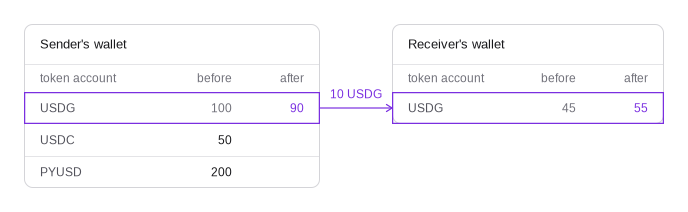
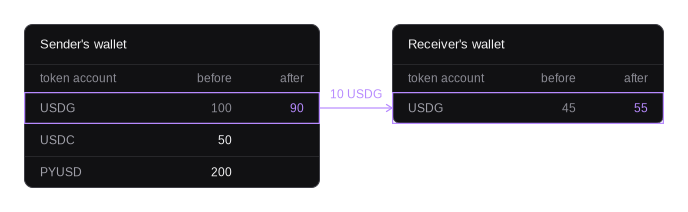
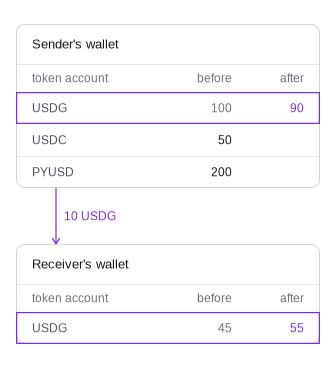
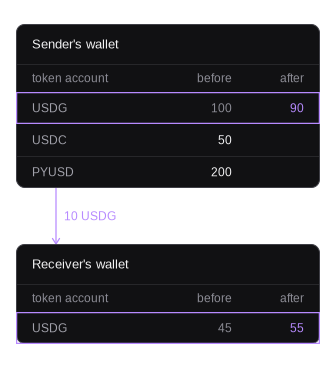
Wallets don't hold tokens directly. Each wallet controls a **token account** for
each token it holds, and a payment moves tokens from the sender's token account
to the receiver's token account for the same mint:
 An **Associated Token Account** is a deterministic token account tied to a
specific wallet and mint. Given a wallet address and mint, the ATA address is
always the same.
1. **One ATA per mint**. A wallet has exactly one ATA for USDC, one for USDT,
etc.
2. **Must exist before receiving**. You cannot send tokens to an ATA that
doesn't exist.
3. **Sender typically creates**. If the receiver's ATA doesn't exist, the sender
can create it as part of the payment transaction.
```typescript
import { findAssociatedTokenPda } from "@solana-program/token";
import { TOKEN_2022_PROGRAM_ADDRESS } from "@solana-program/token-2022";
// USDG is a Token-2022 mint, so its ATA is derived with the Token-2022 program
const [receiverATA] = await findAssociatedTokenPda({
mint: USDG_MINT_ADDRESS,
owner: receiverWallet.address,
tokenProgram: TOKEN_2022_PROGRAM_ADDRESS
});
```
## Token Programs
Token accounts are managed by a **token program**, the onchain code that verifies
transfers and updates balances. Solana has two:
| Program | Address | Example Tokens that
use this program |
| ----------------- | --------------------------------------------- | ------------------------------------------ |
| **Token Program** | `TokenkegQfeZyiNwAJbNbGKPFXCWuBvf9Ss623VQ5DA` | USDC, USDT |
| **Token-2022** | `TokenzQdBNbLqP5VEhdkAS6EPFLC1PHnBqCXEpPxuEb` | PYUSD, USDG |
Token-2022 adds optional [extensions](/developers/docs/tokens/extensions) such as
transfer hooks, transfer fees, and Confidential Balances. Both programs work
the same for basic transfers, but you must use the token's own program.
### Why this matters
ATAs are derived from three inputs: `wallet + mint + token_program`. Using the
wrong program produces an **entirely different address**:
```typescript
import {
findAssociatedTokenPda,
TOKEN_PROGRAM_ADDRESS
} from "@solana-program/token";
import { TOKEN_2022_PROGRAM_ADDRESS } from "@solana-program/token-2022";
// USDC uses Token Program
const [usdcAta] = await findAssociatedTokenPda({
mint: USDC_MINT,
owner: walletAddress,
tokenProgram: TOKEN_PROGRAM_ADDRESS // ✓ Correct
});
// ❌ This will produce a different address because it uses the wrong program
const [wrongUsdcAta] = await findAssociatedTokenPda({
mint: USDC_MINT,
owner: walletAddress,
tokenProgram: TOKEN_2022_PROGRAM_ADDRESS // ❌ Wrong program
});
// PYUSD uses Token-2022
const [pyusdAta] = await findAssociatedTokenPda({
mint: PYUSD_MINT,
owner: walletAddress,
tokenProgram: TOKEN_2022_PROGRAM_ADDRESS // ✓ Correct
});
```
Each token program also has its own transfer instruction. Use the checked
variant, `transferChecked`: it names the mint and its decimals, so the program
rejects a transfer that uses the wrong token or the wrong number of decimal
places. Token-2022 mints with the transfer fee extension, such as PYUSD, accept
only `transferChecked`; the plain `transfer` instruction fails with "Mint
required for this account to transfer tokens, use transfer_checked".
```typescript
import {
getTransferCheckedInstruction,
TOKEN_PROGRAM_ADDRESS
} from "@solana-program/token";
import { getTransferCheckedInstruction as getTransferCheckedInstruction22 } from "@solana-program/token-2022";
// For USDC (Token Program)
const usdcTransferIx = getTransferCheckedInstruction({
source: senderUsdcAta,
mint: USDC_MINT,
destination: receiverUsdcAta,
authority: senderWallet,
amount: 1_000_000n, // 1 USDC (6 decimals)
decimals: 6
});
// For PYUSD (Token-2022)
const pyusdTransferIx = getTransferCheckedInstruction22({
source: senderPyusdAta,
mint: PYUSD_MINT,
destination: receiverPyusdAta,
authority: senderWallet,
amount: 1_000_000n, // 1 PYUSD (6 decimals)
decimals: 6
});
// *Note*: Most token program JS Client functions include the ability
// to specify the token program address. Generally, defining it is a
// good practice to ensure you are fully aware of the program you are using
const usdcTransferIx2 = getTransferCheckedInstruction(
{
source: senderUsdcAta,
mint: USDC_MINT,
destination: receiverUsdcAta,
authority: senderWallet,
amount: 1_000_000n, // 1 USDC (6 decimals)
decimals: 6
},
{ programAddress: TOKEN_PROGRAM_ADDRESS }
);
```
A transfer sent to the wrong program fails, because each program only moves
token accounts it owns. To check which program a token uses, fetch the mint or
token account and read its `owner` field:
```typescript
import { createSolanaRpc, address } from "@solana/kit";
const rpc = createSolanaRpc("https://api.mainnet.solana.com");
const accountInfo = await rpc.getAccountInfo(address(mintAddress)).send();
// The owner field tells you which program manages this token
const tokenProgram = accountInfo.value?.owner;
// Returns: TokenkegQfeZyiNwAJbNbGKPFXCWuBvf9Ss623VQ5DA (Token Program)
// or: TokenzQdBNbLqP5VEhdkAS6EPFLC1PHnBqCXEpPxuEb (Token-2022)
```
Store the program address alongside each token you support:
```typescript
const SUPPORTED_TOKENS = {
USDC: {
mint: "EPjFWdd5AufqSSqeM2qN1xzybapC8G4wEGGkZwyTDt1v",
program: TOKEN_PROGRAM_ADDRESS,
decimals: 6
},
PYUSD: {
mint: "2b1kV6DkPAnxd5ixfnxCpjxmKwqjjaYmCZfHsFu24GXo",
program: TOKEN_2022_PROGRAM_ADDRESS,
decimals: 6
}
};
```
## Fees
Solana payments involve up to three cost components:
| Fee Type | SOL | USD (est.) | When |
| --------------------------- | --------------------------- | ---------- | -------------------------------------------------------- |
| **Base transaction fee** | 5,000 lamports\* | ~$0.0005 | Every transaction (bundle multiple payments to amortize) |
| **Priority fee** | Variable | Variable | Optional; faster inclusion during congestion |
| **Account creation (rent)** | ~0.0015 SOL† | ~$0.15 | Only when creating a new token account |
USD estimates assume \$100/SOL. †The rent deposit for a 165-byte
token account at the rate mainnet uses as of October 2026; it is refundable when
the account is closed. See [rent](/developers/docs/core/rent).
**Total cost per payment**: about \$0.0005 for most transfers. If creating a new
token account, expect ~\$0.15 total.
Solana has local fee markets: transactions compete only with others that write
the same state, so payment fees stay low when the network is busy elsewhere.
You can also pay fees for your users so they never touch SOL; see
[Fee abstraction](/developers/docs/payments/send-payments/payment-processing/fee-abstraction).
## Transactions and Instructions
A transaction holds one or more instructions, such as "create token account"
and "transfer 10 USDC", and either all of them succeed or none do. A typical
payment has two: create the receiver's token account if needed, then transfer.
You can also [bundle several payments](/developers/docs/payments/send-payments/payment-processing)
into one transaction to cut costs.
## Putting It Together
A typical payment flow:
1. **Gather input**. Get sender and receiver wallet addresses and the mint
address of the token being transferred.
2. **Derive ATAs**. Determine the token accounts for both parties.
3. **Build and sign**. Construct the transaction with necessary transfer
instructions, sign with the sender's key.
4. **Send & Confirm**. Transaction settles in under a second.
## Next Steps
Connect to the network and explore Solana payment data.
Build and send a stablecoin transfer.
Use Pay to make one wallet-approved x402 V2 request to a local API.
\* a lamport is the smallest unit of SOL and is equal to
0.000000001 SOL