> ## Documentation Index
> Fetch the complete documentation index at: https://solana.com/llms.txt
> Use this file to discover all available pages before exploring further.
> ## Agent Instructions
> This page is part of the Solana developer documentation at https://solana.com/developers/docs. Append `.md` to any docs URL, or send `Accept: text/markdown`, to get the page as Markdown.
> Index of all pages: https://solana.com/llms.txt. Per-section indexes such as https://solana.com/developers/docs/payments/llms.txt are smaller; prefer them when working on one task.
> Coding agents: install the official Solana skill for current APIs and conventions with `npx skills add https://github.com/solana-foundation/solana-dev-skill` (also served at https://solana.com/SKILL.md).
> Code in the cookbook and task pages comes from tested example files. Prefer it over writing API calls from memory.
# Become an x402 Facilitator
> Choose, integrate, and operate an x402 facilitator for Solana payment verification and settlement.
An x402 facilitator performs payment verification and settlement for one or more
resource servers. It lets an API accept onchain payments without putting RPC,
transaction-submission, and fee-payer logic in every application process.
A facilitator is an architectural role, not a required third party. You can use
a managed service, operate a separate facilitator, or self-facilitate inside
your resource server.
## Facilitator interface
x402 V2 defines three HTTP operations:
| Endpoint | Purpose |
| ------------ | ----------------------------------------------------------------------------- |
| `/supported` | Lists supported protocol versions, schemes, networks, extensions, and signers |
| `/verify` | Checks a payment payload against its requirements without settling it |
| `/settle` | Submits or completes the payment and returns its settlement result |
Your resource server should check `/supported` during startup or deployment. Do
not advertise a payment option until the selected facilitator confirms support
for that exact x402 version, scheme, and Solana network.
```bash
curl https://facilitator.example/supported
```
To test on devnet, you can use the public facilitator at
`https://x402.org/facilitator`. Its `/supported` response lists the `exact`
scheme on Solana devnet (`solana:EtWTRABZaYq6iMfeYKouRu166VU2xqa1`) with the fee
payer it signs with:
```bash
curl https://x402.org/facilitator/supported
```
## Verification before fulfillment
The safe request order is:
1. Parse the `PAYMENT-SIGNATURE` payload with a protocol library.
2. Match it to the exact `PaymentRequirements` originally offered.
3. Verify the payload locally or through `/verify`.
4. Perform the resource operation only if the chosen payment flow permits
post-fulfillment settlement.
5. Call `/settle` and return `PAYMENT-RESPONSE` with the result.
Different schemes can define different fulfillment ordering. For example, an
authorization flow may verify before the resource operation and settle after it,
while another scheme may require settlement before fulfillment. Follow the flow
declared by the selected scheme rather than assuming one order for every
payment.
**Treat facilitator responses as payment decisions**
Authenticate facilitator traffic, validate every response, use strict
timeouts, and fail closed. A network error or malformed response is not proof
of payment.
## Choose a deployment model
| Model | Use when | Main responsibility |
| ----------------------- | --------------------------------------------------------------- | ---------------------------------------------------------------------- |
| Managed facilitator | You want the smallest operational surface | Review supported networks, trust model, availability, and data policy |
| Dedicated self-hosted | Several APIs share signing and settlement infrastructure | Secure keys, RPCs, storage, scaling, and upgrades |
| In-process facilitation | One service needs full control and can operate chain components | Keep payment code isolated and prevent request load from exhausting it |
### In-process facilitation with Pay
[Pay.sh](/developers/docs/payments/pay-sh) runs in-process facilitation with
one command. Its gateway returns the `402` challenge, verifies and settles the
payment itself, and then serves or proxies the request to your API, so you don't
run a separate facilitator. These steps need `pay` 0.29.0 or later. To try the
flow locally first, run `pay --sandbox gate demo`.
1. Generate a paywall file:
```shell
pay gate scaffold paywall.yml
```
2. Replace the `forward_url:` line in `paywall.yml` with a `routing` block that
points at your API. In `pay` 0.29.0 the scaffold still writes `forward_url`,
and `pay gate api` rejects the file with `` missing field `routing` ``:
```yaml paywall.yml
routing:
type: proxy
url: https://api.example.com
```
3. Add the x402 scheme to each metered endpoint. Without `schemes`, the gateway
only offers an MPP charge (`mpp/charge`), not x402. With `x402-exact`, the
`402` response also carries an x402 V2 `PAYMENT-REQUIRED` header for the
`exact` scheme:
```yaml paywall.yml
endpoints:
- method: POST
path: "v1/generate"
description: "Generate content"
metering:
schemes: [mpp-charge, x402-exact]
dimensions:
- direction: usage
unit: requests
scale: 1
tiers:
- price_usd: 0.001
```
Use `schemes: [x402-exact]` to offer x402 only.
4. Start the gateway with the wallet that receives payments:
```shell
pay gate api paywall.yml --recipient --bind 127.0.0.1:1402
```
Do not select a facilitator only because its URL responds to `/supported`.
Review how it protects fee-payer keys, prevents replay, confirms transactions,
handles partial failures, and reports incidents.
## Kora as Solana signing infrastructure
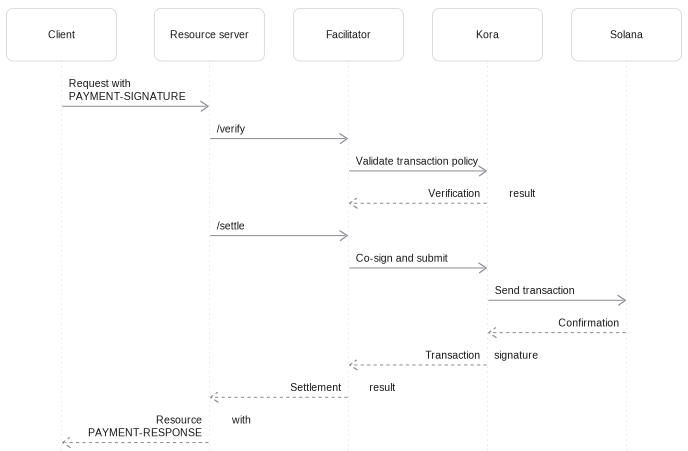
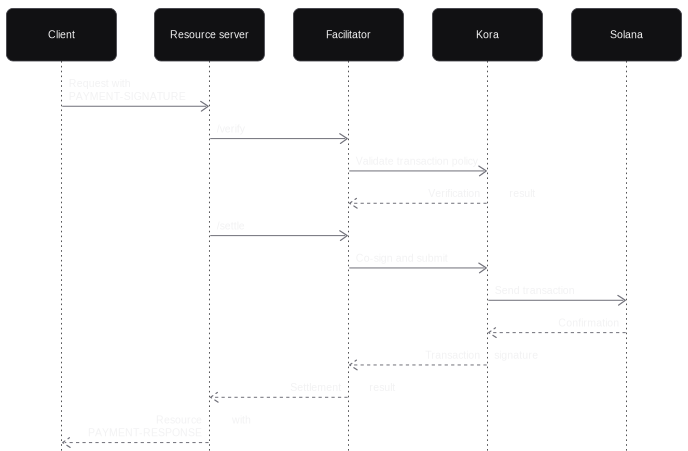
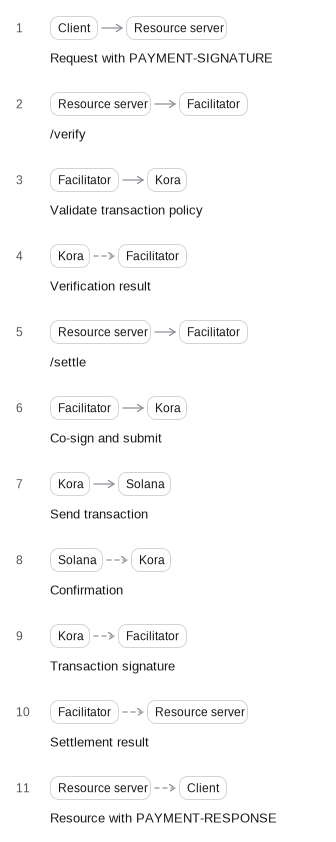
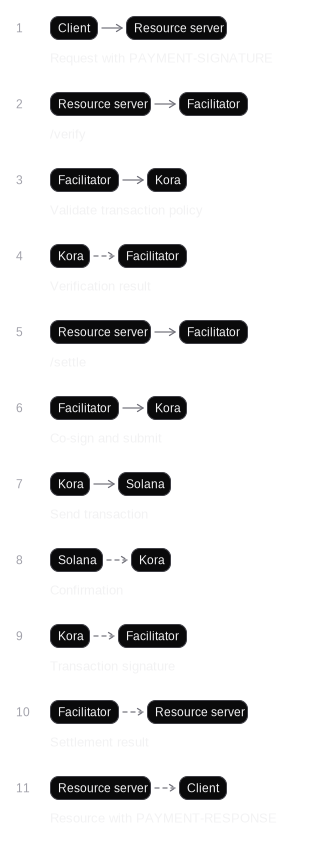
[Kora](/developers/docs/tools/kora) is a Solana signer node with transaction validation and
fee-sponsorship policies. An x402 facilitator can use Kora as its signing and
submission backend:
```mermaid
sequenceDiagram
participant Client
participant API as Resource server
participant Facilitator
participant Kora
participant Solana
Client->>API: Request with PAYMENT-SIGNATURE
API->>Facilitator: /verify
Facilitator->>Kora: Validate transaction policy
Kora-->>Facilitator: Verification result
API->>Facilitator: /settle
Facilitator->>Kora: Co-sign and submit
Kora->>Solana: Send transaction
Solana-->>Kora: Confirmation
Kora-->>Facilitator: Transaction signature
Facilitator-->>API: Settlement result
API-->>Client: Resource with PAYMENT-RESPONSE
```
x402 with Kora
Kora does not replace x402. The resource server and facilitator still implement
the x402 V2 objects and endpoints; Kora enforces Solana transaction policy and
protects the fee-payer signer behind its RPC interface.
Follow the [Kora x402 guide](/developers/docs/tools/kora/guides/x402) for the maintained
demo and configuration.
## Production checklist
### Keys and transaction policy
- Store facilitator and fee-payer keys in a hardware-backed or remote signing
backend.
- Allowlist the System, Compute Budget, Token, Token-2022, and Associated Token
programs only as required by the supported scheme.
- Reject unexpected writable accounts, transfer authorities, recipients, mints,
instructions, and compute prices before signing.
- Keep payment-receiving accounts separate from operational fee-payer accounts.
### Replay and idempotency
- Persist consumed payment identifiers and transaction signatures in a shared,
durable store.
- Make verification and consume atomic so two server instances cannot accept the
same authorization concurrently.
- Require an idempotency key for resource operations with side effects.
- Return the original result for a legitimate retry instead of charging again.
### Availability and failure handling
- Set bounded timeouts for `/verify`, `/settle`, RPC submission, and
confirmation.
- Distinguish rejected, expired, pending, confirmed, and failed settlements.
- Do not rebuild or resign a transaction after blockhash expiry without asking
the payer to authorize the new transaction.
- Use more than one RPC endpoint and monitor blockhash freshness, confirmation
latency, and fee-payer balance.
### Observability
Record the resource, challenge ID, selected scheme and network, amount, asset,
recipient, payer address, transaction signature, confirmation level, latency,
and final status. Never log encoded payment credentials, bearer tokens, private
keys, or raw signer responses.
Alert on settlement failures, replay attempts, policy rejections, unexpected
assets or recipients, fee-payer depletion, and differences between verified
payments and fulfilled resources.
## Related resources
- [x402 facilitator specification](https://github.com/x402-foundation/x402/blob/main/specs/x402-specification-v2.md#7-facilitator-interface)
- [x402 on Solana](/developers/docs/payments/agentic-payments/x402)
- [Pay.sh](/developers/docs/payments/pay-sh)
- [Kora operators guide](/developers/docs/tools/kora/operators)
- [Production readiness](/developers/docs/tools/transaction-landing#rpc-infrastructure)