Solana instruction structure — program_id, accounts, and data fields, AccountMeta flags is_signer and is_writable, compiled instructions, and SOL transfer examples in TypeScript and Rust.
SummaryAn instruction has 3 fields: program_id (which program to invoke),
accounts (AccountMeta list with is_signer/is_writable flags), and data
(byte array of data that the program interprets).
data: A byte array with additional data
to be used by the instruction.
Instruction struct
pub struct Instruction { /// Pubkey of the program that executes this instruction. pub program_id: Pubkey, /// Metadata describing accounts that should be passed to the program. pub accounts: Vec<AccountMeta>, /// Opaque data passed to the program for its own interpretation. pub data: Vec<u8>,}
The instruction’s program_id is the
public key address of the program that contains the instruction’s execution
logic. The runtime uses this field to route the instruction to the correct
program for processing.
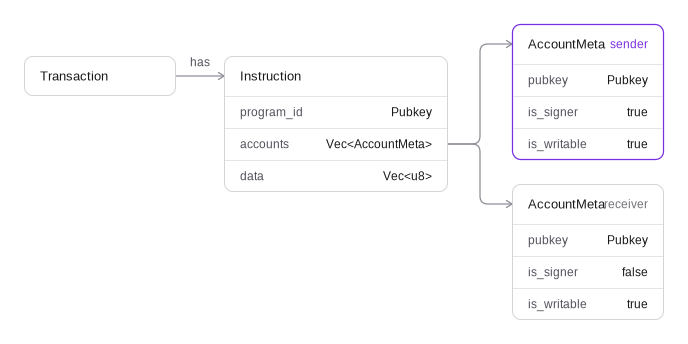
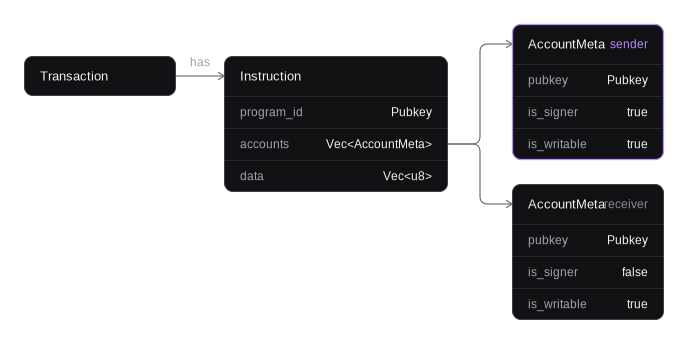
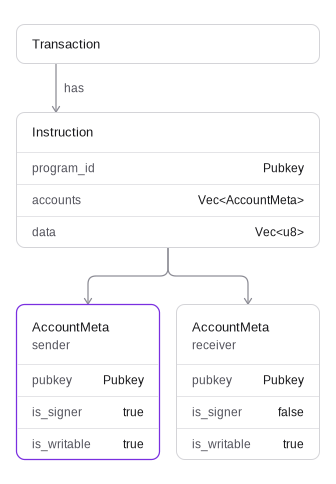
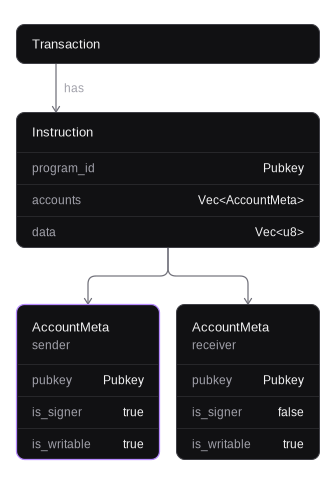
The instruction’s accounts array is an ordered list of
AccountMeta
structs. Metadata must be provided for each account the instruction interacts
with. The validator uses this metadata to determine which transactions can run
in parallel. Transactions that write to different accounts can execute in
parallel.The diagram below depicts a transaction that contains a single instruction. The
instruction’s accounts array contains metadata for two accounts.
Each entry in an instruction's accounts list is an AccountMeta: an address plus signer and writable flags.Each AccountMeta has three fields:
pubkey: The account’s public key address
is_signer: Set to true if the account must sign the
transaction
is_writable: Set to true if the instruction modifies
the account’s data
To know which accounts an instruction requires, including which must be
writable, read-only, or sign the transaction, you must refer to the
implementation of the instruction, as defined by the program.
AccountMeta
pub struct AccountMeta { /// An account's public key. pub pubkey: Pubkey, /// True if an `Instruction` requires a `Transaction` signature matching `pubkey`. pub is_signer: bool, /// True if the account data or metadata may be mutated during program execution. pub is_writable: bool,}
The instruction’s data field is a byte array that tells the program which
function to invoke and supplies the arguments for that function. The data
typically begins with a discriminator or index byte(s) that identifies the
target function, followed by the serialized arguments. The encoding format is
defined by each program (for example, Borsh serialization or a custom layout).Common encoding conventions:
Core programs (System, Stake, Vote): Use a Bincode-serialized enum variant
index followed by serialized arguments.
Anchor programs: Use an 8-byte discriminator (the first 8 bytes of the
SHA-256 hash of "global:<function_name>") followed by Borsh-serialized
arguments.
The runtime does not interpret the data field. It is passed as-is to the
program’s process_instruction entrypoint.
When instructions are serialized into a transaction message, they become
CompiledInstruction
structs that replace all public keys with compact integer indices into the
message’s account_keys array.
The example below shows the structure of a SOL transfer instruction.
The Rust tabs on this page use the 2.x Solana crates. Install the
dependencies with (tested with Rust 1.89 and 1.98):
cargo add anyhow solana-sdk@2 solana-system-interface@1cargo add tokio --features full
import { createClient, generateKeyPairSigner, lamports } from "@solana/kit";import { solanaRpc, rpcAirdrop } from "@solana/kit-plugin-rpc";import { generatedPayer, airdropPayer } from "@solana/kit-plugin-signer";import { systemProgram } from "@solana-program/system";const client = await createClient() .use(generatedPayer()) .use( solanaRpc({ rpcUrl: "http://localhost:8899", rpcSubscriptionsUrl: "ws://localhost:8900" }) ) .use(rpcAirdrop()) .use(airdropPayer(lamports(1_000_000_000n))) .use(systemProgram());// Generate sender and recipient keypairsconst sender = client.payer;const recipient = await generateKeyPairSigner();// Define the amount to transferconst LAMPORTS_PER_SOL = 1_000_000_000n;const transferAmount = lamports(LAMPORTS_PER_SOL / 100n); // 0.01 SOL// Create a transfer instruction for transferring SOL from sender to recipientconst transferInstruction = client.system.instructions.transferSol({ source: sender, destination: recipient.address, amount: transferAmount});console.log(JSON.stringify(transferInstruction, null, 2));
import { LAMPORTS_PER_SOL, SystemProgram, Transaction, Keypair} from "@solana/web3.js";// Generate sender and recipient keypairsconst sender = await Keypair.generate();const recipient = await Keypair.generate();// Define the amount to transferconst transferAmount = 0.01; // 0.01 SOL// Create a transfer instruction for transferring SOL from sender to recipientconst transferInstruction = SystemProgram.transfer({ fromPubkey: sender.publicKey, toPubkey: recipient.publicKey, lamports: transferAmount * LAMPORTS_PER_SOL // Convert transferAmount to lamports});console.log(JSON.stringify(transferInstruction, null, 2));
use anyhow::Result;use solana_sdk::{native_token::LAMPORTS_PER_SOL, signature::Signer, signer::keypair::Keypair};use solana_system_interface::instruction::transfer;#[tokio::main]async fn main() -> Result<()> { // Generate sender and recipient keypairs let sender = Keypair::new(); let recipient = Keypair::new(); // Define the amount to transfer let transfer_amount = LAMPORTS_PER_SOL / 100; // 0.01 SOL // Create a transfer instruction for transferring SOL from sender to recipient let transfer_instruction = transfer(&sender.pubkey(), &recipient.pubkey(), transfer_amount); println!("{:#?}", transfer_instruction); Ok(())}
@solana/web3.js 1.x is no longer actively maintainedIt receives critical fixes only. Use Kit for new code. To migrate existing code, follow the Kit upgrade guide, or the web3.js v3 migration guide to keep the class-based API.To run this code, install 1.x with npm install @solana/web3.js@1. A plain npm install @solana/web3.js installs v3, which this code doesn’t run on.
import { LAMPORTS_PER_SOL, SystemProgram, Transaction, Keypair} from "@solana/web3.js";// Generate sender and recipient keypairsconst sender = Keypair.generate();const recipient = new Keypair();// Define the amount to transferconst transferAmount = 0.01; // 0.01 SOL// Create a transfer instruction for transferring SOL from sender to recipientconst transferInstruction = SystemProgram.transfer({ fromPubkey: sender.publicKey, toPubkey: recipient.publicKey, lamports: transferAmount * LAMPORTS_PER_SOL // Convert transferAmount to lamports});console.log(JSON.stringify(transferInstruction, null, 2));
The code below shows the output from the previous code snippets. The format will
differ between SDKs, but notice that each instruction contains the same three
pieces of required information: program_id,
accounts, data.
The examples below show how to manually build the transfer instruction. (The
Expanded Instruction tab is functionally equivalent to the Instruction tab.)
In practice, you usually don’t have to construct an Instruction
manually. Most programs provide client libraries with helper functions that
create the instructions for you. If a library isn’t available, you can
manually build the instruction.
const transferAmount = LAMPORTS_PER_SOL / 100n; // 0.01 SOL// Instruction index for the System Program's transfer instructionconst TRANSFER_INSTRUCTION_INDEX = 2;// Create a buffer for the data to include in the instructionconst instructionData = Buffer.alloc(4 + 8); // uint32 + uint64instructionData.writeUInt32LE(TRANSFER_INSTRUCTION_INDEX, 0);instructionData.writeBigUInt64LE(transferAmount, 4);const SYSTEM_PROGRAM_ADDRESS = "11111111111111111111111111111111" as Address;// Manually create the transfer instructionconst transferInstruction: Instruction = { programAddress: SYSTEM_PROGRAM_ADDRESS, accounts: [ { address: sender.address, role: AccountRole.WRITABLE_SIGNER }, { address: recipient.address, role: AccountRole.WRITABLE } ], data: new Uint8Array(instructionData)};
const transferAmount = 0.01; // 0.01 SOL// Instruction index for the System Program's transfer instructionconst transferInstructionIndex = 2;// Create a buffer for the data to include in the instructionconst instructionData = Buffer.alloc(4 + 8); // uint32 + uint64instructionData.writeUInt32LE(transferInstructionIndex, 0);instructionData.writeBigUInt64LE(BigInt(transferAmount * LAMPORTS_PER_SOL), 4);// Manually create a transfer instructionconst transferInstruction = new TransactionInstruction({ keys: [ { pubkey: sender.publicKey, isSigner: true, isWritable: true }, // from account, is signer and is writable { pubkey: recipient.publicKey, isSigner: false, isWritable: true } // to account, is not signer but is writable ], programId: SystemProgram.programId, data: instructionData});
// Instruction index for the System Program's transfer instructionlet transfer_instruction_index: u32 = 2;// Define the amount to transferlet transfer_amount = LAMPORTS_PER_SOL / 100; // 0.01 SOL// Create instruction data manually (12 bytes: 4 for u32 index + 8 for u64 lamports)let mut instruction_data = Vec::with_capacity(12);instruction_data.extend_from_slice(&transfer_instruction_index.to_le_bytes());instruction_data.extend_from_slice(&transfer_amount.to_le_bytes());// Manually create the transfer instructionlet transfer_instruction = Instruction { program_id: solana_system_interface::program::ID, accounts: vec![ AccountMeta::new(sender.pubkey(), true), // from account, is signer and is writable AccountMeta::new(recipient.pubkey(), false), // to account, is not signer but is writable ], data: instruction_data,};
@solana/web3.js 1.x is no longer actively maintainedIt receives critical fixes only. Use Kit for new code. To migrate existing code, follow the Kit upgrade guide, or the web3.js v3 migration guide to keep the class-based API.To run this code, install 1.x with npm install @solana/web3.js@1. A plain npm install @solana/web3.js installs v3, which this code doesn’t run on.
const transferAmount = 0.01; // 0.01 SOL// Instruction index for the System Program's transfer instructionconst transferInstructionIndex = 2;// Create a buffer for the data to include in the instructionconst instructionData = Buffer.alloc(4 + 8); // uint32 + uint64instructionData.writeUInt32LE(transferInstructionIndex, 0);instructionData.writeBigUInt64LE(BigInt(transferAmount * LAMPORTS_PER_SOL), 4);// Manually create a transfer instructionconst transferInstruction = new TransactionInstruction({ keys: [ { pubkey: sender.publicKey, isSigner: true, isWritable: true }, // from account, is signer and is writable { pubkey: recipient.publicKey, isSigner: false, isWritable: true } // to account, is not signer but is writable ], programId: SystemProgram.programId, data: instructionData});