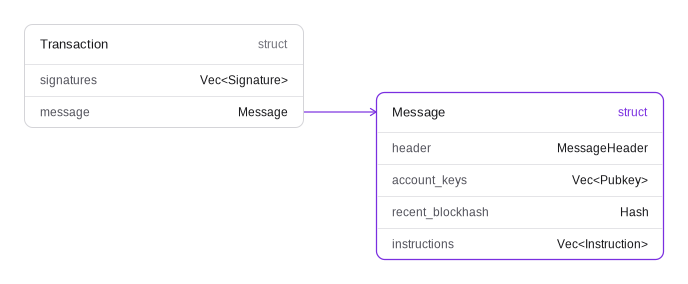
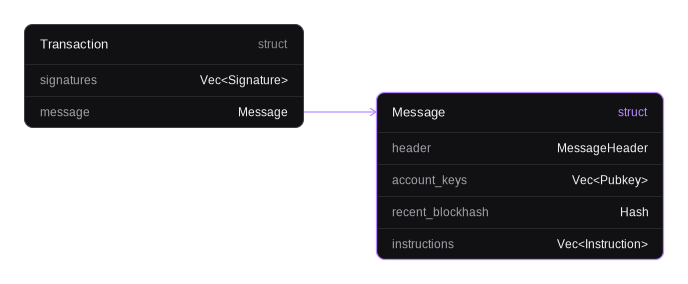
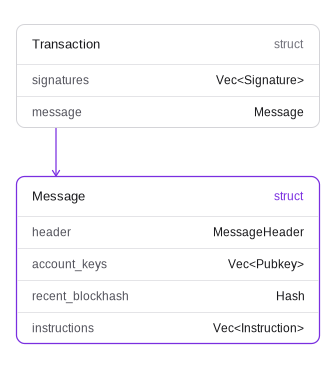
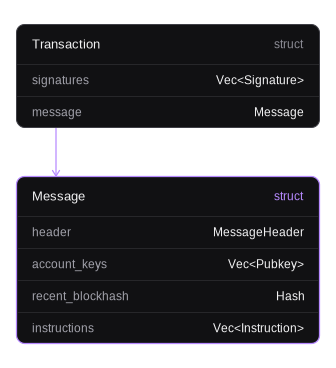
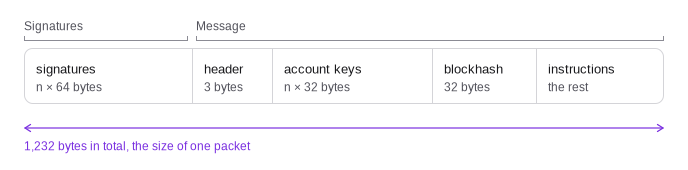
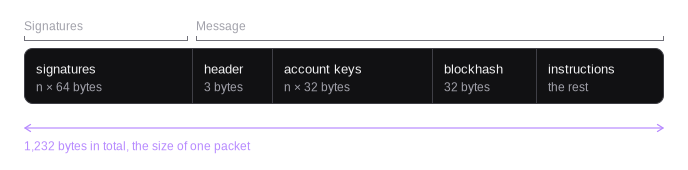
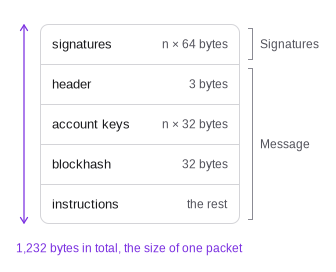
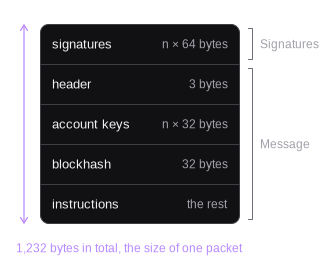
Anatomy of a Solana transaction including signatures, message format, header, account addresses, blockhash, compiled instructions, binary encoding, and size budget.
SummaryA transaction has signatures + a message. The message contains a header,
account addresses, recent blockhash, and compiled instructions. Max serialized
size: 1,232 bytes (4,096 bytes for the v1 format).
A transaction is its signatures plus the message they sign.The total serialized size of a transaction must not exceed
PACKET_DATA_SIZE
(1,232 bytes). This limit equals 1,280 bytes (the IPv6 minimum MTU) minus 48
bytes for network headers (40 bytes IPv6 + 8 bytes fragment header). The 1,232
bytes include both the signatures array and the
message struct.
v1 transactions raise the limit to 4,096 bytesThis page describes the legacy transaction format, which the v0 format also
follows apart from its version prefix and address lookup tables. The v1
format raises the
size limit to 4,096 bytes and uses a different wire layout.
Signatures and message together must fit in one 1,232-byte packet.
The signatures field is a compact-encoded array of
Signature
values. Each Signature is a 64-byte Ed25519 signature of the serialized
Message, signed with the signer account’s private key. One signature is
required for every signer account referenced by the
transaction’s instructions.Each signature is produced by a private key. Where that key lives — a local
keypair, a cloud HSM or KMS, or a managed wallet service — is a production
design decision. See
Signing in Production.The first signature in the array belongs to the fee payer, the account that
pays the transaction
base fee and prioritization fee. This
first signature also serves as the transaction ID, used to look up the
transaction on the network. The transaction ID is commonly referred to as the
transaction signature.Fee payer requirements:
Must be the first account in the message (index 0) and a signer.
Must be a System Program-owned account or a nonce account (validated by
validate_fee_payer).
Must hold at least the total fee (for a nonce account, the fee plus the
account’s rent-exempt minimum); otherwise the transaction fails with
InsufficientFundsForFee.
Must not drop from rent-exempt to rent-paying when the fee is deducted: a
rent-exempt fee payer must stay at or above its rent-exempt minimum, or be
drained to exactly 0 lamports. Otherwise the transaction fails with
InsufficientFundsForRent.
pub struct Message { /// The message header, identifying signed and read-only `account_keys`. pub header: MessageHeader, /// All the account keys used by this transaction. #[serde(with = "short_vec")] pub account_keys: Vec<Pubkey>, /// The id of a recent ledger entry. pub recent_blockhash: Hash, /// Programs that will be executed in sequence and committed in /// one atomic transaction if all succeed. #[serde(with = "short_vec")] pub instructions: Vec<CompiledInstruction>,}
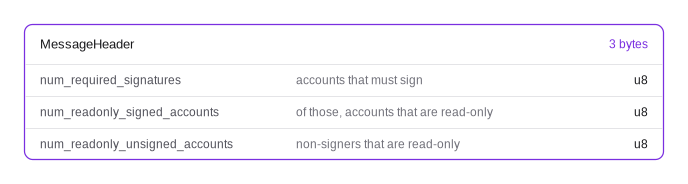
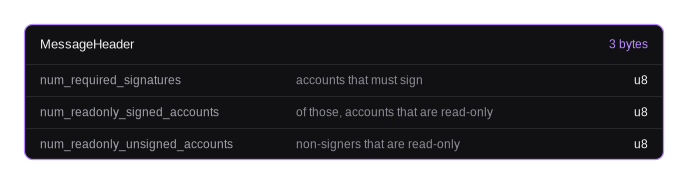
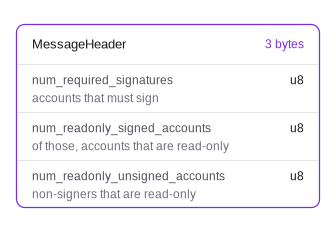
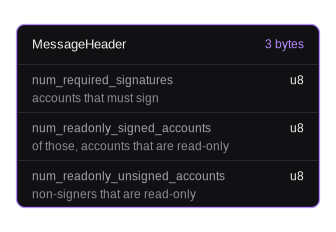
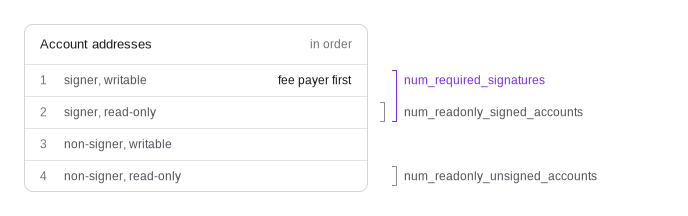
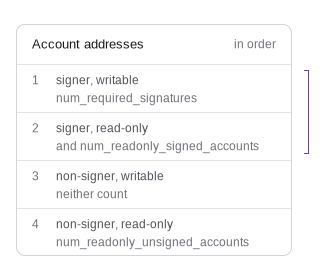
The header field is a
MessageHeader
struct with three u8 fields that partition the account_keys array into
permission groups:
num_required_signatures: Total number of
signatures required by the transaction.
num_readonly_signed_accounts: Number
of signed accounts that are read-only.
num_readonly_unsigned_accounts:
Number of unsigned accounts that are read-only.
MessageHeader
pub struct MessageHeader { /// The number of signatures required for this message to be considered /// valid. The signers of those signatures must match the first /// `num_required_signatures` of [`Message::account_keys`]. pub num_required_signatures: u8, /// The last `num_readonly_signed_accounts` of the signed keys are read-only /// accounts. pub num_readonly_signed_accounts: u8, /// The last `num_readonly_unsigned_accounts` of the unsigned keys are /// read-only accounts. pub num_readonly_unsigned_accounts: u8,}
Legacy and versioned message prefixesIn a legacy transaction message, the first message byte is
num_required_signatures, followed by the other two MessageHeader bytes. In
a versioned transaction message, the first byte is a version prefix instead;
the three-byte MessageHeader starts immediately after that prefix. See
versioned transactions for
the full v0 and v1 message layouts.
The header's three counts give every account in account_keys its permissions.
The
account_keys
field is a compact-encoded array of public keys. Each entry identifies an
account used by at least one of the transaction’s instructions. The array must
include every account and must follow this strict ordering:
Signer + Writable
Signer + Read-only
Non-signer + Writable
Non-signer + Read-only
This strict ordering allows the account_keys array to be combined with the
three counts in the message’s header to determine the permissions
for each account without storing per-account metadata flags. The header counts
partition the array into the four permission groups listed above.
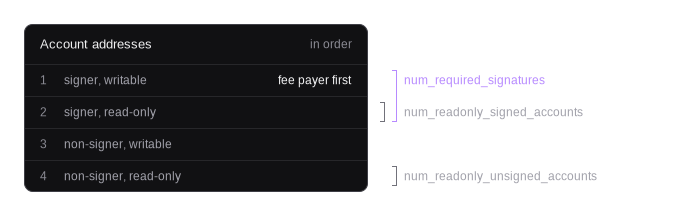
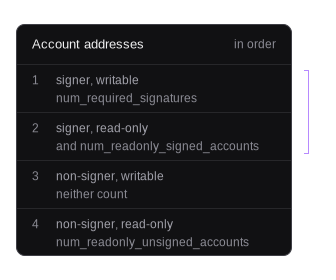
Account addresses are ordered by permission; the header counts mark the boundaries.
The recent_blockhash field is a 32-byte hash that serves two purposes:
Timestamp: proves the transaction was created recently.
Deduplication: prevents the same transaction from being processed twice.
A blockhash expires after 150 blocks, about 30 seconds at 200ms slots. If the blockhash is no longer valid when
the transaction arrives, it is rejected with BlockhashNotFound, unless it
is a valid durable nonce transaction.
The getLatestBlockhash RPC method
allows you to get the current blockhash and last block height at which the
blockhash will be valid.
The
instructions
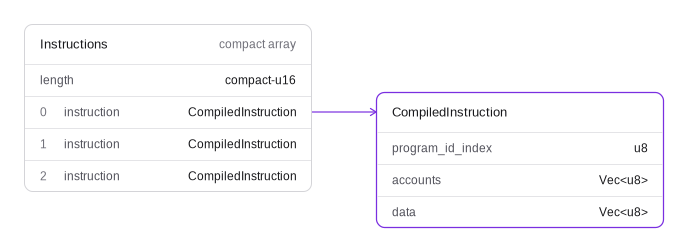
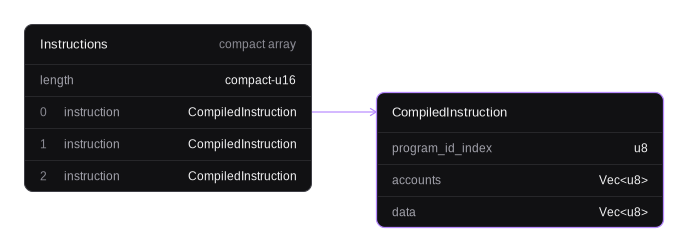
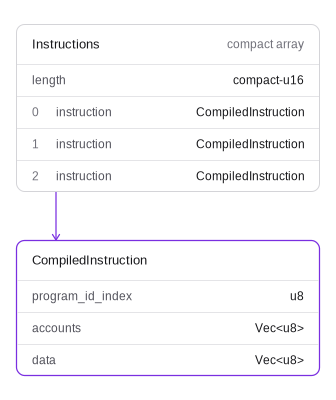
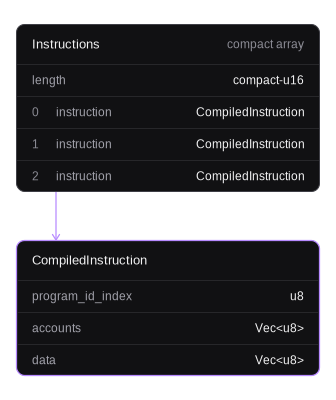
field is a compact-encoded array of
CompiledInstruction
structs. Each CompiledInstruction references accounts by index into the
account_keys array rather than by full public key. It contains:
program_id_index: Index into account_keys
identifying the program to invoke.
accounts: Array of indices into account_keys
specifying the accounts to pass to the program.
data: Byte array containing the instruction
discriminator and serialized arguments.
CompiledInstruction
pub struct CompiledInstruction { /// Index into the transaction keys array indicating the program account that executes this instruction. pub program_id_index: u8, /// Ordered indices into the transaction keys array indicating which accounts to pass to the program. #[serde(with = "short_vec")] pub accounts: Vec<u8>, /// The program input data. #[serde(with = "short_vec")] pub data: Vec<u8>,}
Each compiled instruction names its program and accounts by index into account_keys.
Transactions are serialized using a compact encoding scheme. All variable-length
arrays (signatures, account keys, instructions) are prefixed with a compact-u16
length encoding. This format uses 1 byte for values 0-127 and 2-3 bytes for
larger values.Legacy transaction layout (on the wire):
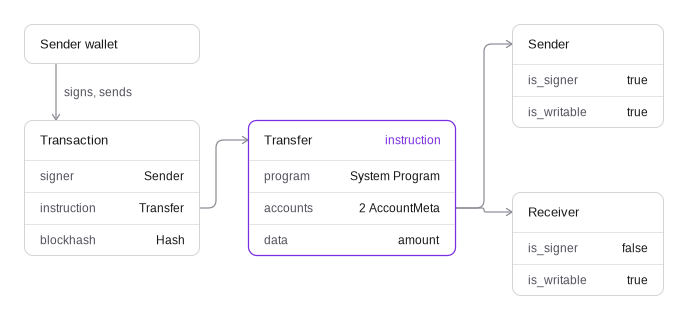
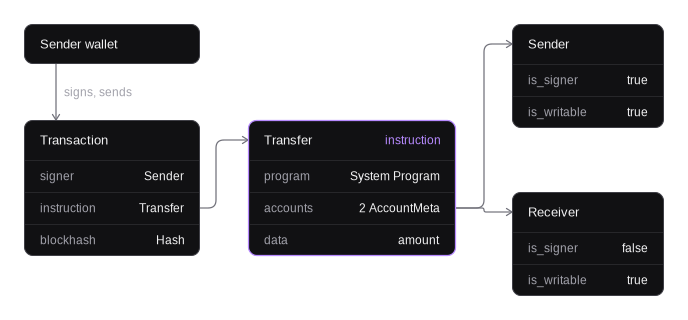
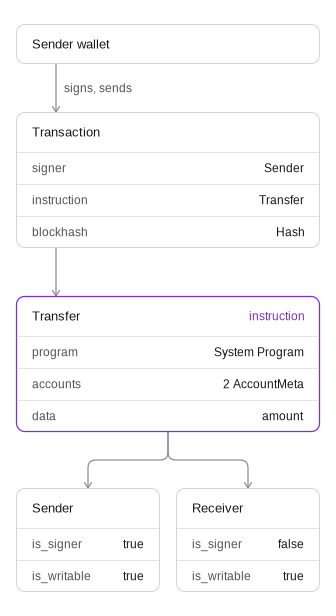
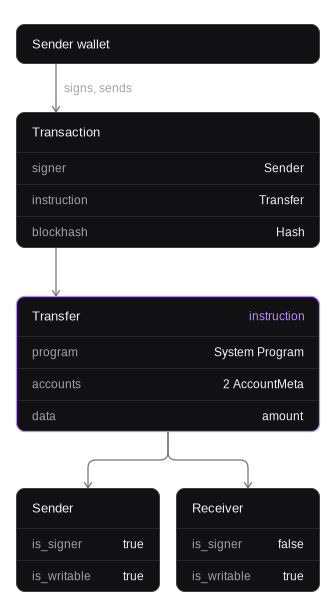
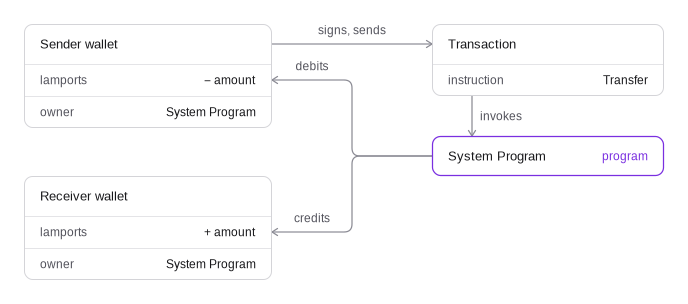
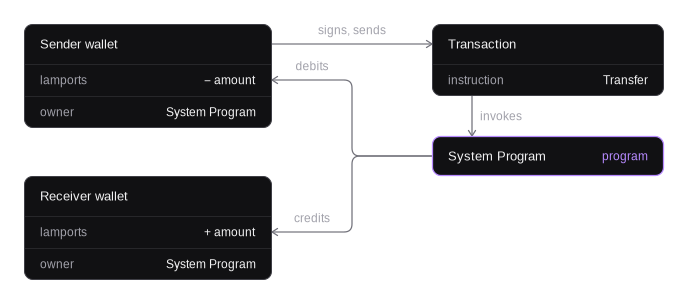
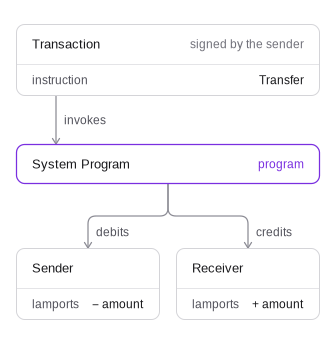
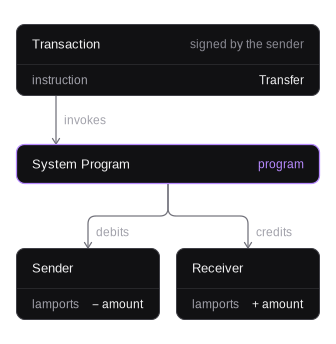
The diagram below shows how transactions and instructions work together to allow
users to interact with the network. In this example, SOL is transferred from one
account to another.The sender account’s
metadata
indicates that it must sign for the transaction. This allows the System Program
to deduct lamports. Both the sender and recipient accounts must be writable, in
order for their lamport balance to change. To execute this instruction, the
sender’s wallet sends the transaction containing its signature and the message
containing the SOL transfer instruction.
The sender signs; the instruction lists the sender as a writable signer and the receiver as writable.After the transaction is sent, the System Program processes the transfer
instruction and updates the lamport balance of both accounts.
The System Program debits the sender and credits the receiver.
Verify the recipient before sending SOLA System Program transfer adds lamports to any account. There is no
protocol-level check that the recipient can move the SOL back out. Lamports can
only be moved out by the account’s owning program, so sending SOL to a
token mint, a program, or a
PDA you don’t control risks permanent loss of funds — only
an authority specified by the owning program can return them. SOL sent to a
token account is recoverable only by
that account’s owner, never by the sender.SPL token transfers are partly self-protecting: the Token Program rejects a
transfer whose accounts don’t match the expected mint. Native SOL transfers
have no such guard, so the sender must verify the recipient before signing. See
Verify Address for the full
classification logic.
The example below shows the code relevant to the above diagrams. See the System
Program’s
transfer function.
The Rust tab needs solana-sdk 4.x, which matches the current
solana-client. With the latest solana-sdk (5.x), the transaction type no
longer matches the one solana-client expects. Install the dependencies
with:
import { LAMPORTS_PER_SOL, SystemProgram, Transaction, sendAndConfirmTransaction, Keypair, Connection} from "@solana/web3.js";// Create a connection to clusterconst connection = new Connection("http://localhost:8899", "confirmed");// Generate sender and recipient keypairsconst sender = await Keypair.generate();const recipient = await Keypair.generate();// Fund sender with airdropconst airdropSignature = await connection.requestAirdrop( sender.publicKey, LAMPORTS_PER_SOL);await connection.confirmTransaction(airdropSignature, "confirmed");// Check balance before transferconst preBalance1 = await connection.getBalance(sender.publicKey);const preBalance2 = await connection.getBalance(recipient.publicKey);// Define the amount to transferconst transferAmount = 0.01; // 0.01 SOL// Create a transfer instruction for transferring SOL from sender to recipientconst transferInstruction = SystemProgram.transfer({ fromPubkey: sender.publicKey, toPubkey: recipient.publicKey, lamports: transferAmount * LAMPORTS_PER_SOL // Convert transferAmount to lamports});// Add the transfer instruction to a new transactionconst transaction = new Transaction().add(transferInstruction);// Send the transaction to the networkconst transactionSignature = await sendAndConfirmTransaction( connection, transaction, [sender] // signer);// Check balance after transferconst postBalance1 = await connection.getBalance(sender.publicKey);const postBalance2 = await connection.getBalance(recipient.publicKey);console.log("Sender prebalance:", Number(preBalance1) / LAMPORTS_PER_SOL);console.log("Recipient prebalance:", Number(preBalance2) / LAMPORTS_PER_SOL);console.log("Sender postbalance:", Number(postBalance1) / LAMPORTS_PER_SOL);console.log("Recipient postbalance:", Number(postBalance2) / LAMPORTS_PER_SOL);console.log("Transaction Signature:", transactionSignature);
use anyhow::Result;use solana_client::nonblocking::rpc_client::RpcClient;use solana_commitment_config::CommitmentConfig;use solana_sdk::{ native_token::LAMPORTS_PER_SOL, signature::Signer, signer::keypair::Keypair, transaction::Transaction,};use solana_system_interface::instruction::transfer;#[tokio::main]async fn main() -> Result<()> { // Create a connection to cluster let connection = RpcClient::new_with_commitment( "http://localhost:8899".to_string(), CommitmentConfig::confirmed(), ); // Generate sender and recipient keypairs let sender = Keypair::new(); let recipient = Keypair::new(); // Fund sender with airdrop let airdrop_signature = connection .request_airdrop(&sender.pubkey(), LAMPORTS_PER_SOL) .await?; loop { let confirmed = connection.confirm_transaction(&airdrop_signature).await?; if confirmed { break; } } // Check balance before transfer let pre_balance1 = connection.get_balance(&sender.pubkey()).await?; let pre_balance2 = connection.get_balance(&recipient.pubkey()).await?; // Define the amount to transfer let transfer_amount = LAMPORTS_PER_SOL / 100; // 0.01 SOL // Create a transfer instruction for transferring SOL from sender to recipient let transfer_instruction = transfer(&sender.pubkey(), &recipient.pubkey(), transfer_amount); // Add the transfer instruction to a new transaction let mut transaction = Transaction::new_with_payer(&[transfer_instruction], Some(&sender.pubkey())); let blockhash = connection.get_latest_blockhash().await?; transaction.sign(&[&sender], blockhash); // Send the transaction to the network let transaction_signature = connection .send_and_confirm_transaction(&transaction) .await?; // Check balance after transfer let post_balance1 = connection.get_balance(&sender.pubkey()).await?; let post_balance2 = connection.get_balance(&recipient.pubkey()).await?; println!( "Sender prebalance: {}", pre_balance1 as f64 / LAMPORTS_PER_SOL as f64 ); println!( "Recipient prebalance: {}", pre_balance2 as f64 / LAMPORTS_PER_SOL as f64 ); println!( "Sender postbalance: {}", post_balance1 as f64 / LAMPORTS_PER_SOL as f64 ); println!( "Recipient postbalance: {}", post_balance2 as f64 / LAMPORTS_PER_SOL as f64 ); println!("Transaction Signature: {}", transaction_signature); Ok(())}
@solana/web3.js 1.x is no longer actively maintainedIt receives critical fixes only. Use Kit for new code. To migrate existing code, follow the Kit upgrade guide, or the web3.js v3 migration guide to keep the class-based API.To run this code, install 1.x with npm install @solana/web3.js@1. A plain npm install @solana/web3.js installs v3, which this code doesn’t run on.
import { LAMPORTS_PER_SOL, SystemProgram, Transaction, sendAndConfirmTransaction, Keypair, Connection} from "@solana/web3.js";// Create a connection to clusterconst connection = new Connection("http://localhost:8899", "confirmed");// Generate sender and recipient keypairsconst sender = Keypair.generate();const recipient = new Keypair();// Fund sender with airdropconst airdropSignature = await connection.requestAirdrop( sender.publicKey, LAMPORTS_PER_SOL);await connection.confirmTransaction(airdropSignature, "confirmed");// Check balance before transferconst preBalance1 = await connection.getBalance(sender.publicKey);const preBalance2 = await connection.getBalance(recipient.publicKey);// Define the amount to transferconst transferAmount = 0.01; // 0.01 SOL// Create a transfer instruction for transferring SOL from sender to recipientconst transferInstruction = SystemProgram.transfer({ fromPubkey: sender.publicKey, toPubkey: recipient.publicKey, lamports: transferAmount * LAMPORTS_PER_SOL // Convert transferAmount to lamports});// Add the transfer instruction to a new transactionconst transaction = new Transaction().add(transferInstruction);// Send the transaction to the networkconst transactionSignature = await sendAndConfirmTransaction( connection, transaction, [sender] // signer);// Check balance after transferconst postBalance1 = await connection.getBalance(sender.publicKey);const postBalance2 = await connection.getBalance(recipient.publicKey);console.log("Sender prebalance:", preBalance1 / LAMPORTS_PER_SOL);console.log("Recipient prebalance:", preBalance2 / LAMPORTS_PER_SOL);console.log("Sender postbalance:", postBalance1 / LAMPORTS_PER_SOL);console.log("Recipient postbalance:", postBalance2 / LAMPORTS_PER_SOL);console.log("Transaction Signature:", transactionSignature);
The following example shows the structure of a transaction that contains a
single SOL transfer instruction.
import { LAMPORTS_PER_SOL, SystemProgram, Transaction, Keypair, Connection} from "@solana/web3.js";const connection = new Connection("http://localhost:8899", "confirmed");const { blockhash, lastValidBlockHeight } = await connection.getLatestBlockhash();// Generate sender and recipient keypairsconst sender = await Keypair.generate();const recipient = await Keypair.generate();// Define the amount to transferconst transferAmount = 0.01; // 0.01 SOL// Create a transfer instruction for transferring SOL from sender to recipientconst transferInstruction = SystemProgram.transfer({ fromPubkey: sender.publicKey, toPubkey: recipient.publicKey, lamports: transferAmount * LAMPORTS_PER_SOL // Convert transferAmount to lamports});const transaction = new Transaction({ blockhash, lastValidBlockHeight, feePayer: sender.publicKey}).add(transferInstruction);await transaction.sign(sender);const compiledMessage = transaction.compileMessage();console.log(JSON.stringify(compiledMessage, null, 2));
use anyhow::Result;use solana_client::nonblocking::rpc_client::RpcClient;use solana_commitment_config::CommitmentConfig;use solana_sdk::{ native_token::LAMPORTS_PER_SOL, signature::Signer, signer::keypair::Keypair, transaction::Transaction,};use solana_system_interface::instruction::transfer;#[tokio::main]async fn main() -> Result<()> { let connection = RpcClient::new_with_commitment( "http://localhost:8899".to_string(), CommitmentConfig::confirmed(), ); // Fetch the latest blockhash and last valid block height let blockhash = connection.get_latest_blockhash().await?; // Generate sender and recipient keypairs let sender = Keypair::new(); let recipient = Keypair::new(); // Create a transfer instruction for transferring SOL from sender to recipient let transfer_instruction = transfer( &sender.pubkey(), &recipient.pubkey(), LAMPORTS_PER_SOL / 100, // 0.01 SOL ); let mut transaction = Transaction::new_with_payer(&[transfer_instruction], Some(&sender.pubkey())); transaction.sign(&[&sender], blockhash); println!("{:#?}", transaction); Ok(())}
@solana/web3.js 1.x is no longer actively maintainedIt receives critical fixes only. Use Kit for new code. To migrate existing code, follow the Kit upgrade guide, or the web3.js v3 migration guide to keep the class-based API.To run this code, install 1.x with npm install @solana/web3.js@1. A plain npm install @solana/web3.js installs v3, which this code doesn’t run on.
import { LAMPORTS_PER_SOL, SystemProgram, Transaction, Keypair, Connection} from "@solana/web3.js";const connection = new Connection("http://localhost:8899", "confirmed");const { blockhash, lastValidBlockHeight } = await connection.getLatestBlockhash();// Generate sender and recipient keypairsconst sender = Keypair.generate();const recipient = new Keypair();// Define the amount to transferconst transferAmount = 0.01; // 0.01 SOL// Create a transfer instruction for transferring SOL from sender to recipientconst transferInstruction = SystemProgram.transfer({ fromPubkey: sender.publicKey, toPubkey: recipient.publicKey, lamports: transferAmount * LAMPORTS_PER_SOL // Convert transferAmount to lamports});const transaction = new Transaction({ blockhash, lastValidBlockHeight, feePayer: sender.publicKey}).add(transferInstruction);transaction.sign(sender);const compiledMessage = transaction.compileMessage();console.log(JSON.stringify(compiledMessage, null, 2));
The code below shows the output from the previous code snippets.
The format differs between SDKs,
but notice that each instruction contains the same required information.
Because a SOL transfer succeeds into any account, check the recipient before
signing. Fetch the account and only send to a System Program wallet (or an
unfunded
on-curve
address); reject mints, token accounts, programs, and PDAs you don’t control.
Kit
import { type Address, createSolanaRpc, fetchJsonParsedAccount, isOffCurveAddress} from "@solana/kit";const rpc = createSolanaRpc("https://api.mainnet.solana.com");const SYSTEM_PROGRAM = "11111111111111111111111111111111" as Address;/** * Throws if `recipient` cannot safely receive native SOL. * * Only System Program wallets (or unfunded on-curve addresses) are safe. Any * other account locks the lamports because no authority can debit them. */async function assertSafeSolRecipient(recipient: Address): Promise<void> { const account = await fetchJsonParsedAccount(rpc, recipient); if (!account.exists) { // Off-curve = a PDA with no account; reject conservatively. if (isOffCurveAddress(recipient)) { throw new Error( "Recipient is a PDA with no account; SOL would be locked" ); } // On-curve = an unfunded wallet, safe to fund. return; } if (account.programAddress !== SYSTEM_PROGRAM) { throw new Error( `Recipient is owned by ${account.programAddress}, not a wallet; SOL would be locked` ); }}// A wallet: safe.await assertSafeSolRecipient( "H8sMJSCQxfKiFTCfDR3DUMLPwcRbM61LGFJ8N4dK3WjS" as Address);// The USDC mint: rejected before any SOL leaves the sender.await assertSafeSolRecipient( "EPjFWdd5AufqSSqeM2qN1xzybapC8G4wEGGkZwyTDt1v" as Address);
This snippet checks native SOL recipients. For the full classification that
also handles SPL token sends (token accounts, ATAs, Token-2022), see Verify
Address.
The raw response identifies accounts by index and stores inner (CPI)
instructions as encoded blobs. To resolve these into addresses and walk the full
instruction tree, see
Transaction Introspection.