| Scenario | Why Standard Transactions Fail |
|---|---|
| Treasury operations | CFO in Tokyo signs, Controller in NYC approves—30 seconds isn’t enough |
| Compliance workflows | Transactions need legal/compliance review before execution |
| Cold storage signing | Air-gapped machines require manual transfer of signed transactions |
| Batch preparation | Prepare payroll or disbursements during business hours, execute overnight |
| Multi-sig coordination | Multiple approvers across time zones |
| Scheduled payments | Schedule payments to be executed at a future date |
How It Works
Instead of a recent blockhash (valid ~150 blocks), you use a nonce account, a special account that stores a unique value which can be used in place of a blockhash. Each transaction using this nonce must “advance” it as the first instruction. Each nonce value can only be used for one transaction.

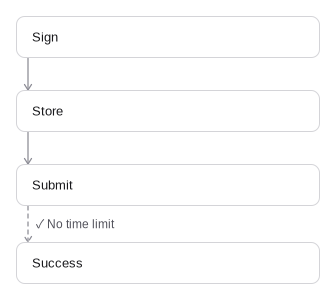
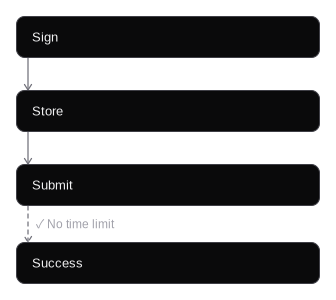
Durable Nonce


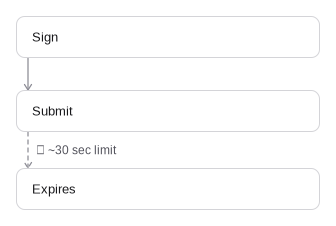
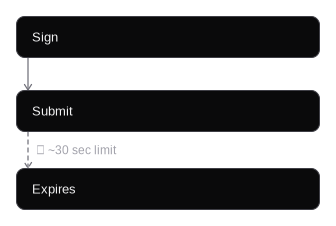
Standard Blockhash
The nonce account costs about 0.001 SOL for rent exemption (1,056,640
lamports for its 80 bytes at the rate mainnet and devnet use as of November
2026; local validators can charge more). One nonce account = one pending
transaction at a time. For parallel workflows, create multiple nonce
accounts.
Create a Nonce Account
Creating a nonce account requires two instructions in a single transaction:- Create the account using
getCreateAccountInstructionfrom the System Program - Initialize it as a nonce using
getInitializeNonceAccountInstruction
1
Generate Keypair
Generate a new keypair to use as the nonce account address and calculate the
required space and rent.
2
Create Account Instruction
Create the account owned by the System Program with enough lamports for rent
exemption.
3
Initialize Nonce Instruction
Initialize the account as a nonce account, setting the authority that can
advance it.
4
Build Transaction
Build a transaction with both instructions.
5
Sign and Send
Sign and send the transaction to create and initialize the nonce account.
Build a Deferred Transaction
Instead of a recent blockhash, use the nonce account’sblockhash as the
transaction’s lifetime.
1
Fetch the Nonce
Fetch the data from the nonce account. Use the
blockhash from the nonce
account as the transaction’s lifetime.Example Nonce Account Data
2
Create Transfer Instruction
Create the instruction for your payment. This example shows a token transfer.
3
Build Transaction with Durable Nonce
Use
setTransactionMessageLifetimeUsingDurableNonce which sets the nonce as the
blockhash and automatically prepends the advance nonce instruction.4
Sign Transaction
Sign the transaction. It now uses the durable nonce instead of a standard
blockhash.
Store or Send Transaction
After signing, encode the transaction for storage. When ready, send it to the network.1
Encode for Storage
Encode the signed transaction to base64. Store this value in your database.
2
Send Transaction
Send the signed transaction when ready. The transaction remains valid until the
nonce is advanced.
Demo
To run this demo, create a project and install its packages."type": "module"
lets the demo use top-level await:
127.0.0.1:8899 with the
Surfpool CLI and leave it running:
demo.ts and run it with npx tsx demo.ts.
Demo
Invalidate a Pending Transaction
Each nonce accountblockhash can only be used once. To invalidate a pending
transaction or prepare the nonce account for reuse, advance it manually:
Multi-Party Approval Workflow
When a transaction needs signatures from several people, the first approver can’t usesignTransactionMessageWithSigners: it throws while any required
signature is missing. In the message, stand in for each approver who signs
later with createNoopSigner(address), which marks the account as a required
signer without signing. For example, in the transfer instruction above, set
authority: createNoopSigner(approverAddress) when a second approver owns the
source token account. Then sign what you can with
partiallySignTransactionMessageWithSigners and serialize the result for
storage:
Production Considerations
Nonce account management:- Create a pool of nonce accounts for parallel transaction preparation
- Track which nonces are “in use” (have pending signed transactions)
- Implement nonce recycling after transactions are submitted or abandoned
- The nonce authority controls whether transactions can be invalidated. Consider separating nonce authority from transaction signers for additional control and separation of duties
- Anyone with the serialized transaction bytes can submit it to the network