What is a Signer?
A signer is the cryptographic keypair that your Kora node uses to sign Solana transactions as the fee payer. When users send transactions to your Kora node, it validates them and co-signs them with your signer’s private key to cover the SOL transaction fees. Note: By default, token payment fees are sent to the signer’s address. However, you can configure a separatepayment_address in your kora.toml to
receive payments at a different address while keeping your signer separate. See
Configuration Guide for details.
Your signer keypair has direct access to your SOL funds used for paying
transaction fees. If compromised, an attacker could:
- Drain your SOL balance
- Sign unauthorized transactions
- Disrupt your paymaster service
Signer Configuration
The Kora RPC CLI requires asigners.toml to be specified via the
--signers-config flag. The signers.toml file allows you to configure the
signer(s) and signer configuration for your node. signers.toml has two
sections:
[signer_pool]- Configuration for the signer pool[[signers]]- Configuration for each signer (at least one signer is required unless using--no-load-signerflag which has limited functionality)
[signer_pool]
The signer pool configuration specifies attributes specific to the signer pool
as a whole:
strategy- The selection strategy for choosing signers. Available strategies are:round_robin(default)- Cycle through signers in order.random- Select signers randomly.weighted- Select signers based on weight.
[[signers]]
Each signer is configured with:
- a
name: a human-readable identifier for the signer and must be unique within the signer pool - an optional
weight: a number that specifies the weight of the signer ifstrategyisweighted - a
typeand type-specific configuration (see Signer Types)
--no-load-signer flag which has
limited functionality. For production deployments, it is recommended to
configure multiple signers for improved reliability and performance.
Example
Here’s an examplesigners.toml file to defines a round-robin signer pool with
three signers (note: we’ll cover the different signer types/configurations in
the next section):
Environment Variables
Set environment variables for all configured signers:Start Kora with Signers Configuration
Signer Types
Kora supports four main signer types, each with different security and operational characteristics (and a no-signer option for limited testing):- Private Key - simple, self-managed
- Turnkey - key management service
- Privy - key management service
- Vault - HashiCorp Vault integration
- No Signer - no signer (for limited testing)
Private Key Signer
The simplest approach - store your private key directly in environment variables or pass via CLI flags. Kora accepts private keys in three formats:1. Base58 Format (Default)
Standard Solana base58 encoded private key:2. U8Array Format
Array of 64 bytes in JSON format:3. JSON File Path
Path to a JSON file containing the keypair:keypair.json contains:
Generate New Keypair
You can create a new keypair for your Kora node using the Solana CLI:solana transfer needs
--allow-unfunded-recipient to send it SOL.
Signer.toml Configuration
Required variables:name- The name of the signertype- The type of signer (must bememory)private_key_env- The environment variable containing the private key
Turnkey Signer
Turnkey provides enterprise-grade key management with hardware security modules (HSMs) and policy controls.Prerequisites
You will need a Turnkey Account to use the Turnkey signer. Sign up at turnkey.comSetup
You will need five keys to use the Turnkey signer:- Turnkey organization ID
- Turnkey API public key
- Turnkey API private key
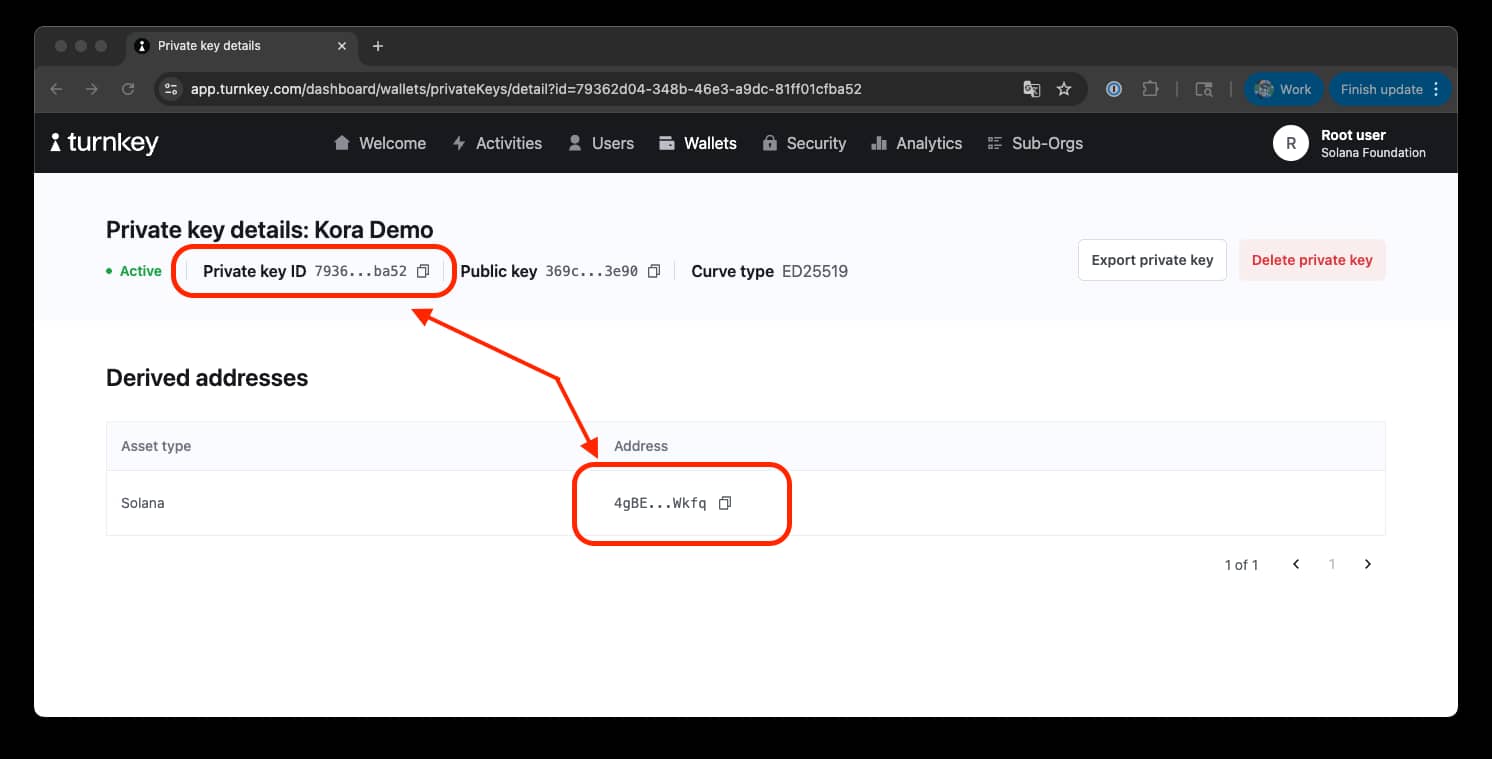
- Turnkey private key ID
- Turnkey public key
1. Turnkey Organization
Click the user menu in the top right corner of the Turnkey dashboard and copy the organization ID: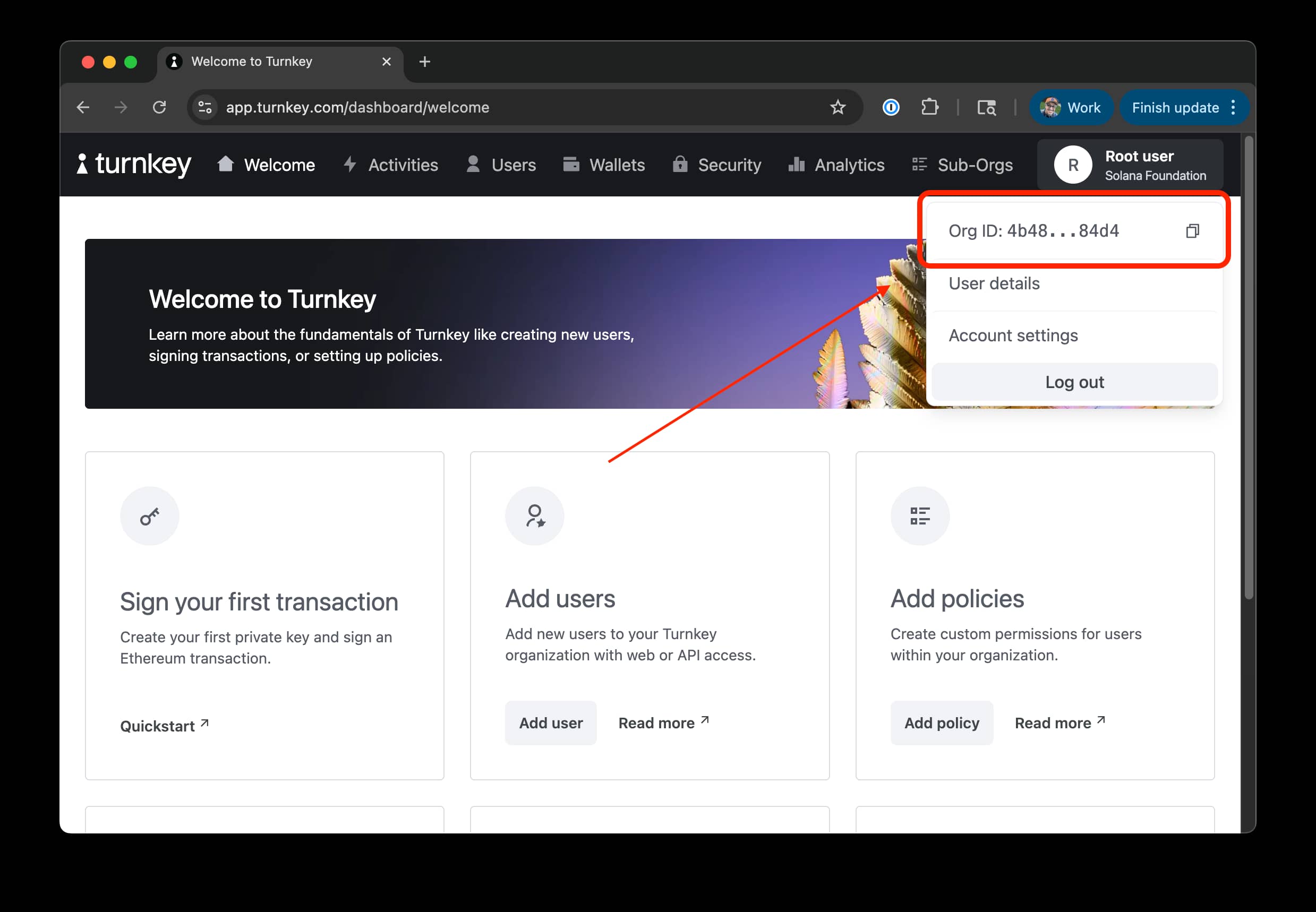
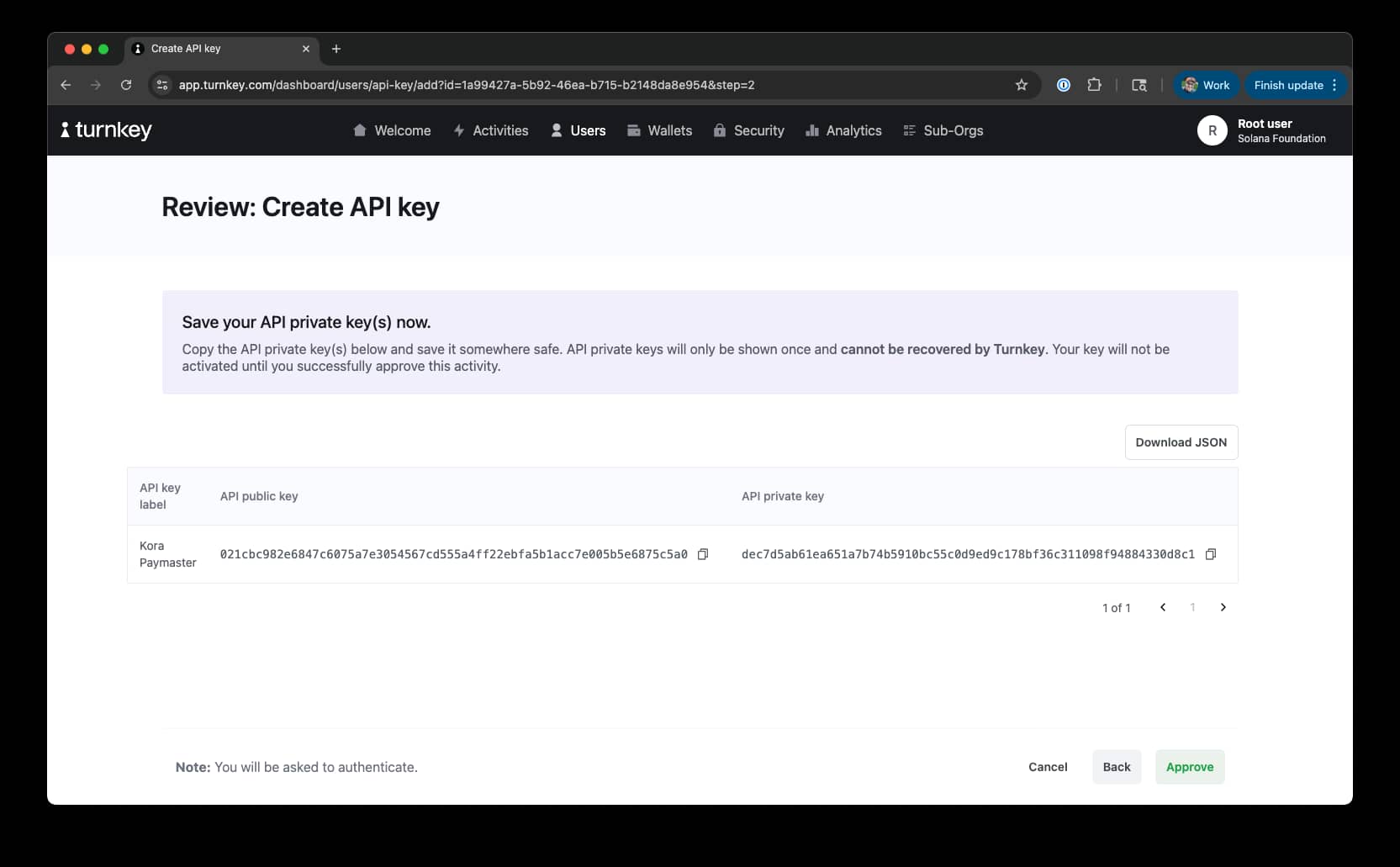
2. Turnkey API Keys
- Click the user menu in the top right corner of the Turnkey dashboard and click “Account Settings”.
- Under “API Keys”, click “+ Create API Key”.
- Select “Generate API keys in-browser”
- Enter a name for the API key and click “Continue”
- Save the public and private keys and click “Approve”
3. Turnkey Wallet Keys
From the main menu, navigate to “Wallets” and click “Create Private Key”. We are going to create a new ED25519 private key with “Solana” asset address type: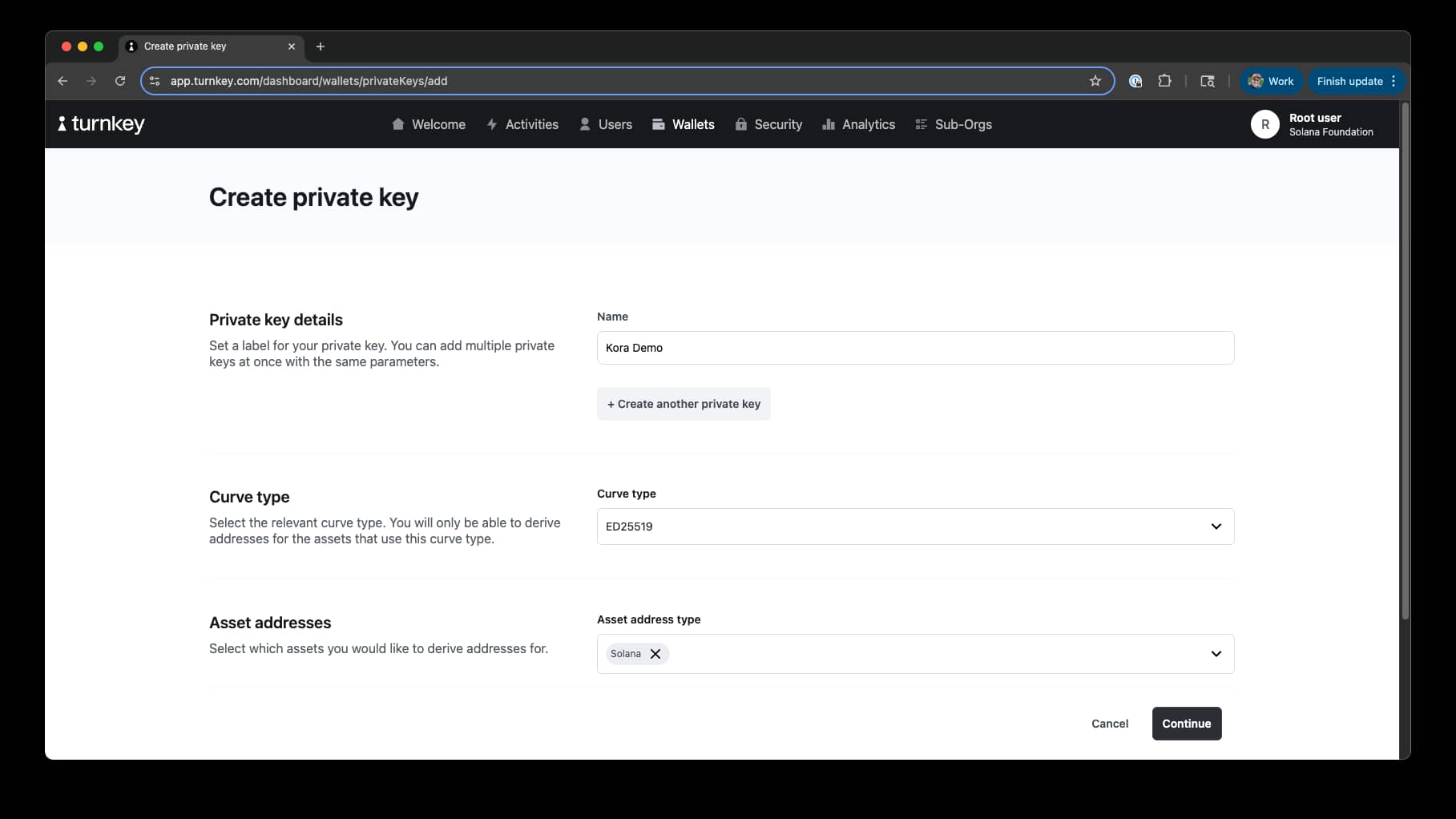
Configure Environment Variables
You should now have the following environment variables:.env.example file.
For support with Turnkey, see the
Turnkey documentation.
Signer.toml Configuration
Required variables:name- The name of the signertype- The type of signer (must beturnkey)api_public_key_env- The environment variable containing the Turnkey API public keyapi_private_key_env- The environment variable containing the Turnkey API private keyorganization_id_env- The environment variable containing the Turnkey organization IDprivate_key_id_env- The environment variable containing the Turnkey private key IDpublic_key_env- The environment variable containing the Turnkey public key
Privy Signer
Privy offers embedded wallet infrastructure with secure key management for Web3 applications.Prerequisites
You will need a Privy Account to use the Privy signer. Sign up at privy.ioSetup
You will need three keys to use the Privy signer:- Privy App ID
- Privy App Secret
- Privy Wallet ID
1. Privy App ID
From your dashboard, select the application you want to use for Kora (or click “+ New app” if you don’t have one). Select “Retrieve API Keys” anc click “+ New Secret”: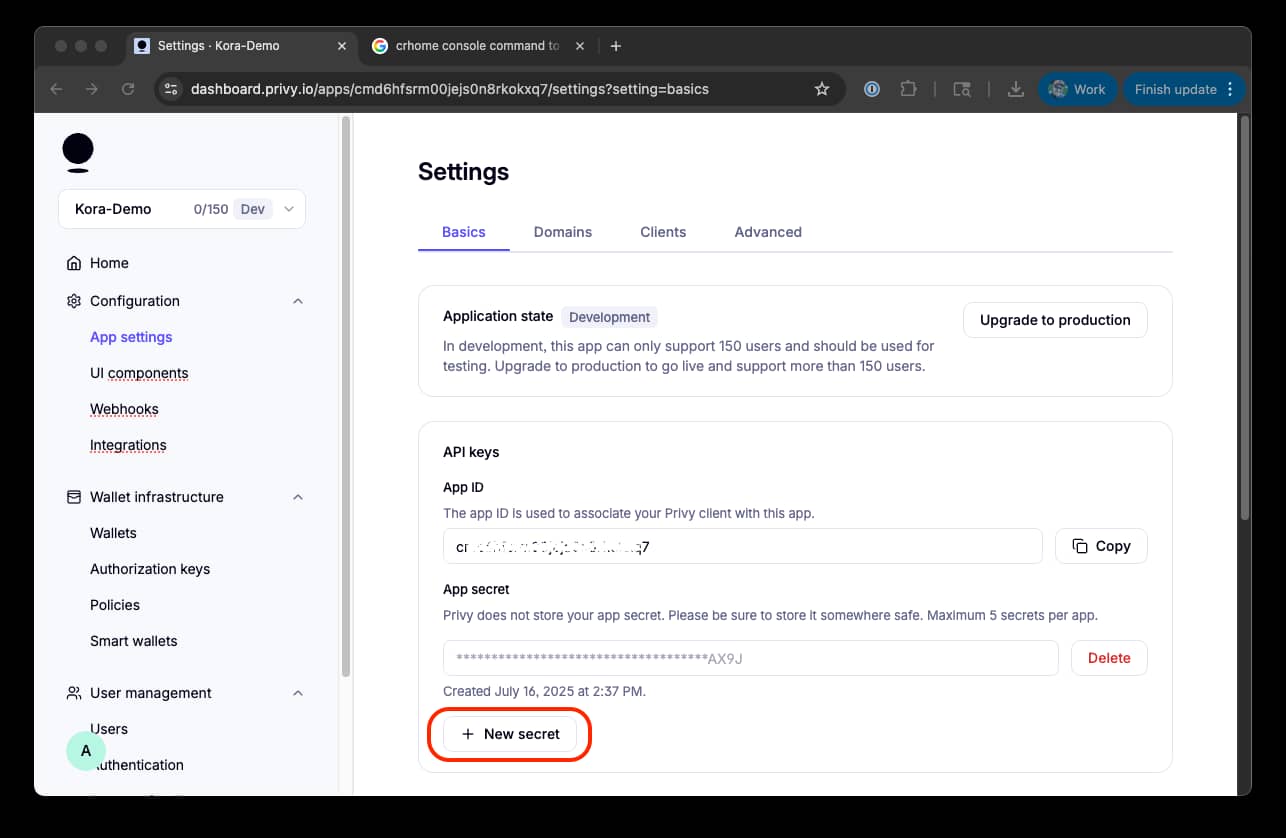
2. Privy Wallet
Next, we’ll need to create a new wallet for Kora. From your dashboard’s sidebar click “Wallets” under “Wallet Infrastructure”, and select “New Wallet”. Select “Solana” as the blockchain and click “Save”. Click on the wallet to view the details: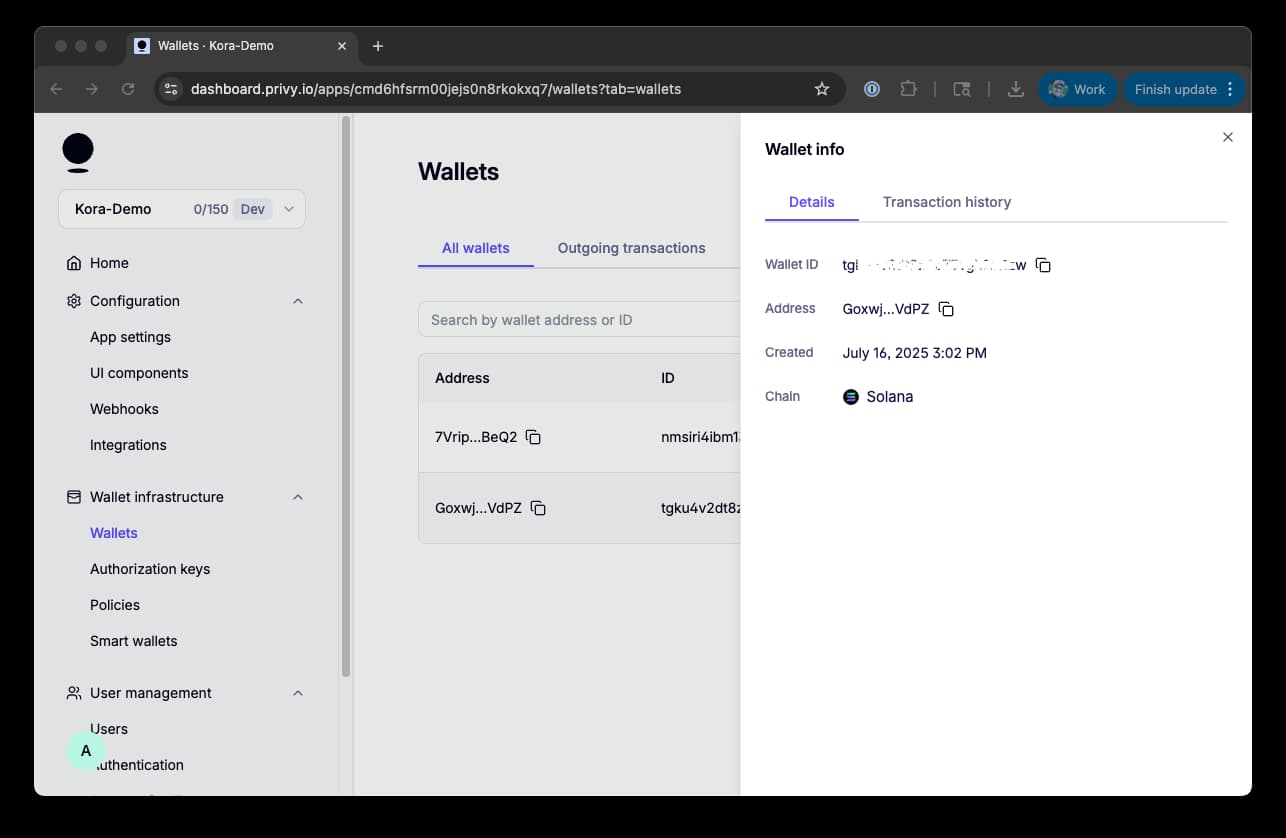
Configure Environment Variables
You should now have the following environment variables:.env.example file.
For support with Privy, see the
Privy documentation.
Signer.toml Configuration
Required variables:name- The name of the signertype- The type of signer (must beprivy)app_id_env- The environment variable containing the Privy app IDapp_secret_env- The environment variable containing the Privy app secretwallet_id_env- The environment variable containing the Privy wallet ID
Vault Signer
HashiCorp Vault can hold the signing key in its Transit secrets engine. Kora sends each transaction to Vault’stransit/sign/<key name> endpoint and
never sees the private key.
Prerequisites
- A Vault server with the Transit secrets engine enabled at
transit/ - A Vault token that can sign with Transit keys
Setup
Create aned25519 Transit key for Kora and read its public key:
@solana/kit installed:
Configure Environment Variables
Signer.toml Configuration
Required variables:name- The name of the signertype- The type of signer (must bevault)vault_addr_env- The environment variable containing the Vault addressvault_token_env- The environment variable containing the Vault tokenkey_name_env- The environment variable containing the Transit key namepubkey_env- The environment variable containing the signer’s base58 public key
signers.example.toml at v2.0.5 uses addr_env and
token_env for Vault; Kora 2.0.5 rejects those names. Use vault_addr_env and
vault_token_env as shown above.
No Signer
If no signer is configured, Kora will throw an error. If you want to run Kora without a signer, you run it with the--no-load-signer flag:
getConfig) return
Signer pool not initialized.
Troubleshooting
Quick Reference
| Error Message | Signer Type | Quick Fix |
|---|---|---|
| “At least one signer must be configured” | Any | The signers file has signers = []; add at least one signer |
| “Failed to read config file” | Any | Check file path and contents |
| “Failed to parse signers config TOML” | Any | Check file format and signer contents |
| “Duplicate signer name” | Any | Ensure each signer is uniquely named in the configuration |
| “Invalid base58 string” | Private Key | Check key format, no extra spaces |
| “Invalid private key length” | Private Key | Use complete 64-byte Solana key |
| “Environment variable ‘KORA_PRIVATE_KEY’ required for signer ‘main’ is not set” (names vary) | Private Key, Turnkey, Privy, Vault | Set the environment variable named in the signer’s *_env field |
| “Failed to create Vault client” | Vault | Verify Vault credentials |
| “Failed to sign with [service]” | Any | Check service status & credentials & rate limits |
| “Signer pool not initialized” | Multi-Signer | Check signers.toml path and format |
| “Cannot create empty signer pool” | Multi-Signer | Add at least one signer to config |
| “Signer with pubkey … not found” | Multi-Signer | Check signer hint matches configured signers |
| “Signers configuration is required unless using --no-load-signer” | Any | Add a signers configuration file |
General Debugging Tips
Enable Verbose Logging
Add detailed logging to diagnose issues:Security & Best Practices
General Security
- Use dedicated keypairs for Kora (don’t reuse personal wallets)
- Only fund with SOL you’re willing to spend on fees
- Maintain minimal operational balance with automated monitoring and top-offs
- Implement monitoring and alerting for unusual activity
- All private keys and API keys should be stored in environment variables or secrets management systems (Railway secrets, AWS Secrets Manager, etc.)