Overview
Private Channels includes an optional Auth Service that gates gateway access
with JWT authentication and role-based access control (RBAC). When
authentication is disabled, the gateway accepts all connections. When enabled,
clients must present a valid JWT in every request.
This page covers both audiences:
- Developers - registration, login, wallet verification, and making
authenticated requests
- Operators - enabling the auth service, configuring
JWT_SECRET, and
provisioning the operator role
Enabling Auth
Authentication is enabled by setting JWT_SECRET (non-empty) on both the
gateway and the Auth Service. The Auth Service also requires
AUTH_DATABASE_URL.
When JWT_SECRET is not set, the gateway operates in open mode; no token is
required.
Docker Compose: The auth service is a Docker Compose profile and is not
started by default. To include it, pass --profile auth to your
docker compose command, including --env-file .env so secrets like
JWT_SECRET and POSTGRES_PASSWORD actually resolve (Compose disables its
automatic .env auto-load once any --env-file flag is passed):
docker compose -f docker-compose.devnet.yml --env-file versions.env --env-file .env.devnet --env-file .env --profile auth up -d
Auth Service API
All endpoints are under /auth. The auth service listens on AUTH_PORT
(default 8903).
POST /auth/register
Create a new account. All users are registered with the user role.
{ "username": "alice", "password": "hunter2" }
- Username: 5-32 characters, alphanumeric plus
_ and -
- Password: 6-128 characters
- Returns the created user; password is never returned
POST /auth/login
Authenticate and receive a signed JWT valid for 24 hours.
{ "username": "alice", "password": "hunter2" }
{ "token": "<jwt>" }. Both wrong username and wrong password return
401 to prevent username enumeration.
POST /auth/challenge-wallet
Request a signing challenge to prove ownership of a Solana wallet. Requires a
valid JWT; the request has no body.
Returns a message, nonce, and expiry. The challenge expires in 10 minutes. Sign
the message exactly as returned; it names the user id and the nonce:
{
  "message": "PrivateChannel wallet verification\nuser: <uuid>\nnonce: <uuid>\nexpires: <unix>",
  "nonce": "<uuid>",
  "expires_at": "<iso8601>"
}
POST /auth/verify-wallet
Submit the signed challenge to register a wallet as verified. Requires a valid
JWT.
{
  "pubkey": "<base58 pubkey>",
  "nonce": "<uuid from challenge>",
  "signature": "<base58 Ed25519 signature>"
}
400 invalid or expired challenge.
Returns { "pubkey": "<base58>", "created_at": "<iso8601>" }.
GET /auth/wallets
List all verified wallets for the authenticated user. Requires a valid JWT.
DELETE /auth/wallets/{pubkey}
Remove a verified wallet from the authenticated user’s account. Requires a valid
JWT. Returns 204 on success, or 400 wallet not associated with this user if
the wallet is not attached to the user.
GET /health
Liveness check. Returns 200 with an empty body. No authentication required.
JWT Structure
Tokens use the HS256 algorithm and expire 24 hours after issue.
iss and aud are present in the JWT payload but are validated by the
gateway’s JWT configuration, not deserialized into the application claims
struct. Application-layer code has access to sub, role, and exp only.
Pass the token in the Authorization header:
Authorization: Bearer <JWT_TOKEN>
Roles
user
Default role on registration.
- Access is gated to the user’s own verified wallets
- Blocked from:
getBlock, getTransaction, simulateTransaction
- Can: call
Deposit on the Escrow Program, initiate withdrawals via
WithdrawFunds
operator
Elevated role. Must be provisioned directly; there is no self-service path to
escalate from user to operator.
Grant the role with the Admin CLI (auth-admin, installed in the services’
Docker image). It reads the auth database URL from AUTH_DATABASE_URL and
identifies users by username:
export AUTH_DATABASE_URL=postgres://<user>:<password>@<host>/<db>

auth-admin set-role --username alice --role operator
This is a privileged database operation. Restrict access to the Auth Service
database accordingly and audit any role changes.
UPDATE private_channel_auth.users SET role = 'operator' WHERE username = 'alice';
auth-admin,
same environment variables as above):
auth-admin attach-wallet --username alice --pubkey <base58-pubkey>
verified_wallets table,
bypassing the challenge/verify flow. Enforces a unique constraint on
(user_id, pubkey). It does not grant the operator role by itself; use
set-role or the SQL update above for that. This command is for attaching a
wallet to an account (for example, a service account) without requiring the
interactive challenge/verify flow.
Capabilities:
- Bypasses all wallet ownership checks
- Full access to all gateway RPC methods, including
getBlock,
getTransaction, simulateTransaction
- Required for:
ReleaseFunds, ResetSmtRoot (RotateBitmap on upstream main)
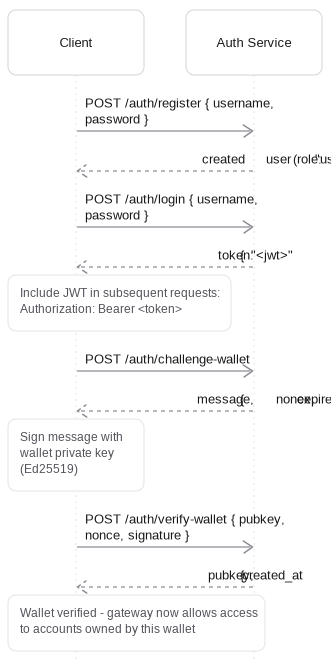
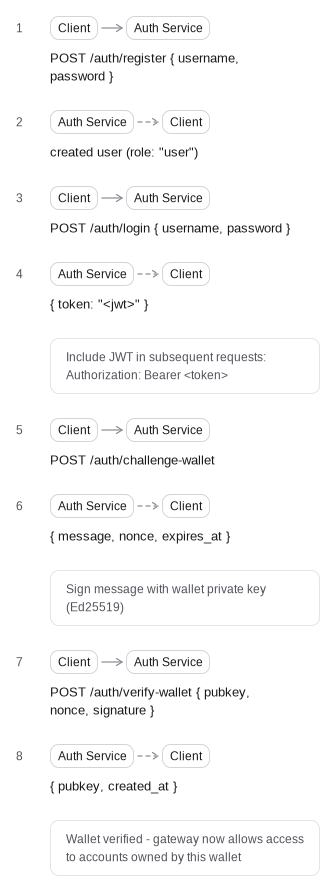
Full Authentication Flow
Making Authenticated Requests
Send the token with every gateway request. This example reads the balance of
the user’s channel token account, which the user role may query because the
account’s owner is one of the user’s verified wallets:
import { address } from "@solana/kit";
import {
  findAssociatedTokenPda,
  TOKEN_PROGRAM_ADDRESS
} from "@solana-program/token";

const [channelAta] = await findAssociatedTokenPda({
  mint: address(mintAddress),
  owner: address(walletAddress),
  tokenProgram: TOKEN_PROGRAM_ADDRESS
});

const response = await fetch("http://localhost:8899/", {
  method: "POST",
  headers: {
    "Content-Type": "application/json",
    Authorization: `Bearer ${jwtToken}`
  },
  body: JSON.stringify({
    jsonrpc: "2.0",
    id: 1,
    method: "getTokenAccountBalance",
    params: [channelAta]
  })
});
const data = await response.json();
getBalance, so
read token balances with getTokenAccountBalance.
Gateway Endpoints
These endpoints do not require authentication:
For the JWT_SECRET and gateway environment variable reference, see the
Configuration reference.
RPC Method Access Matrix
The following methods are recognized by the gateway. When JWT_SECRET is set,
access depends on JWT role:
¹ Ownership-gated: for an SPL Token account (owner field is TokenkegQ...
or TokenzQ..., data of at least 165 bytes), the gateway checks that the
owner or delegate field matches one of the authenticated user’s verified
wallets. For any other account type (a System Program wallet, or an unknown
PDA), it instead checks whether the queried pubkey itself is one of the user’s
verified wallets, since such accounts have no owner/delegate field to inspect.
Either check failing returns 403.
² Not served at commit c9e2240, the version these docs target; upstream
main adds it.