1
Map the authorities
Each operational power has its own key, from the four you generated in the
setup. If one key held every power, one compromise would expose all of them.
In production each can sit in its own custody arrangement: an
incident-response key for pause, a legal and compliance quorum for the
permanent delegate, a redemption-operations key for permissioned burn, and a
low-privilege operations key for metadata.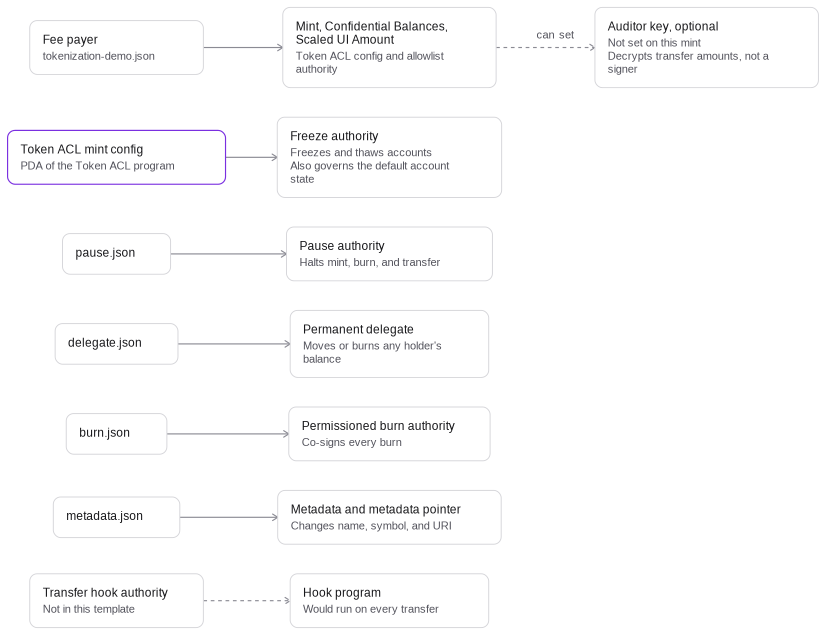
The mint authority is the exception. The freeze authority starts on the mint
authority, and Token ACL’s create config instruction needs that key to sign
before it takes the freeze authority over. The same key then becomes the
authority of the Token ACL config and of the allowlist. This tutorial keeps it
on the fee payer, in all four implementations, so one key signs. A supervised
issuance would hold the mint authority on a treasury quorum, which then signs
the creation and every change to the list; see
program and authority design.
2
Create the mint
Save this as Two settings make the mint usable as a gated token:
create-the-mint.ts (in Rust, src/bin/create-the-mint.rs) and
run it. One transaction creates the mint with its extensions, creates the Token
ACL config for the mint, points it at the gate program, turns on
permissionless thaw, and creates the allowlist.Mosaic SDK
Output
- The freeze authority moves to Token ACL. In the Mosaic SDK this is
enableSrfc37: true; the Kit, Web3.js v3, and Rust scripts send Token ACL’s create config instruction, signed by the current freeze authority. It hands the freeze authority to the Token ACL mint config for this mint, a program-derived address, which is then the only party that can thaw a frozen account. Without it, the mint creates frozen accounts but nothing can thaw them through a gate. - The gate is an allowlist.
aclMode: "allowlist"(modeAllowin the other scripts) fails closed: nobody holds the token until they are added. A blocklist fails open.
Terminal
3
Review the extensions
The mint carries the extension set of Mosaic’s
Permissioned burn makes redemption a two-party operation: a holder cannot
extinguish their own balance without the burn authority signing alongside
them. It suits a redemption process with an offchain settlement leg. It can
only be added at creation. Clearing its authority later lets holders burn
alone, and the authority cannot be set again. If holders must be able to burn
on their own from the start, leave it out.Scaled UI Amount lets an accrual or a corporate action change every
holder’s displayed balance without a transfer. It can only be enabled when the
mint is created. Carrying it unused does not change any balance, but it does
appear on the mint, so include it in the extension-by-extension support check
described in
custody integration.
The template always adds it, with the multiplier authority on the mint
authority. To create a mint without it, remove it from the Kit, Web3.js v3, or
Rust script.Confidential Balances is configured but not active for any holder until
that holder configures their account and the Confidential Balances authority
approves it. Using it requires zero-knowledge proofs on every confidential
operation, and it changes what the permanent delegate can reach;
privacy and transfer controls
covers both.Authorities are assigned when the mint is created. Decide your authority
layout before you run the script: rotating an authority afterwards is a
separate
tokenized-security template:| Extension | Effect | Reference |
|---|---|---|
| Default Account State | Every new token account is created frozen | Default state |
| Metadata | Name, symbol, and URI stored onchain | Metadata |
| Pausable | One action halts mint, burn, and transfer | Pausable |
| Permanent Delegate | Forced transfer and forced burn from any account | Permanent delegate |
| Permissioned Burn | A holder’s burn needs the burn authority’s co-signature | Permissioned burn |
| Scaled UI Amount | A multiplier applied to displayed balances; the DvP program does not accept mints with it | Scaled UI Amount |
| Confidential Balances | Balances and amounts can be hidden from the public ledger | Confidential Balances |
SetAuthority transaction for each one.4
Confirm what you built
Read the mint back and check the extensions and authorities against what you
intended. Save this as Check three things:
inspect-mint.ts (in Rust, src/bin/inspect-mint.rs)
and run it.Mosaic SDK
Output
- The freeze authority is
$MINT_CONFIG, the Token ACL mint config for this mint, and not your own key or none.tokenAclistrue. If it is anything else, Token ACL did not take the freeze authority; see confirm the gate is in place for when that can be fixed. - The gate is the gate program with permissionless thaw on. The Kit,
Web3.js v3, and Rust scripts print
gatingProgram(GATEzzqxhJnsWF6vHRsgtixxSB8PaQdcqGEVTEHWiULz) andpermissionlessThaw: true; the Mosaic SDK printsaclMode: 'allowlist'. - Each authority is the key you passed. The Mosaic SDK lists them under
authorities(pausableAuthority,permanentDelegate,permissionedBurnAuthority, andupdateAuthorityfor metadata). The mint authority is your fee payer, as noted above.
patterns field lists tokenized-security, and also stablecoin:
in Mosaic SDK 0.2.0, inspectToken reports stablecoin for any mint with
metadata, a permanent delegate, a default account state, and Confidential
Balances, and this mint has all four.If an operational authority came back as your fee payer rather than the key
you passed, create a new mint rather than correcting it; on devnet or a local
network the cost is negligible.Next steps
- Gate the holders: decide who is allowed to hold the token