How the pieces fit
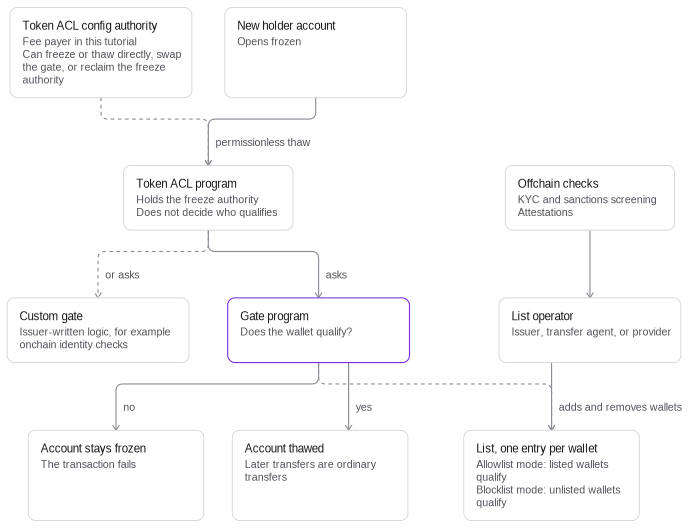
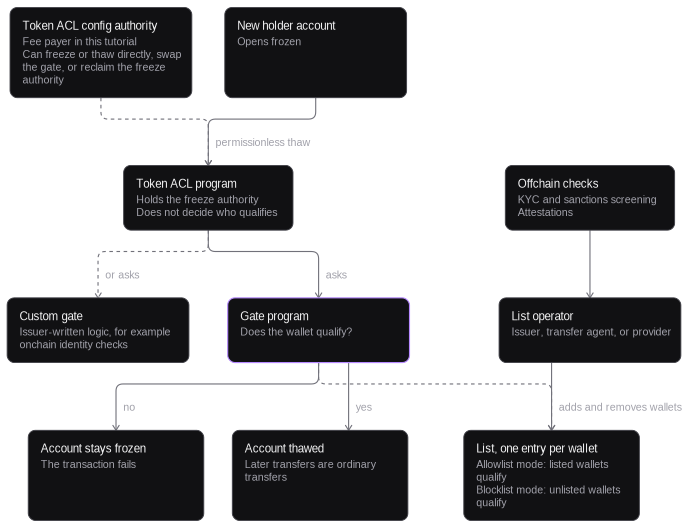
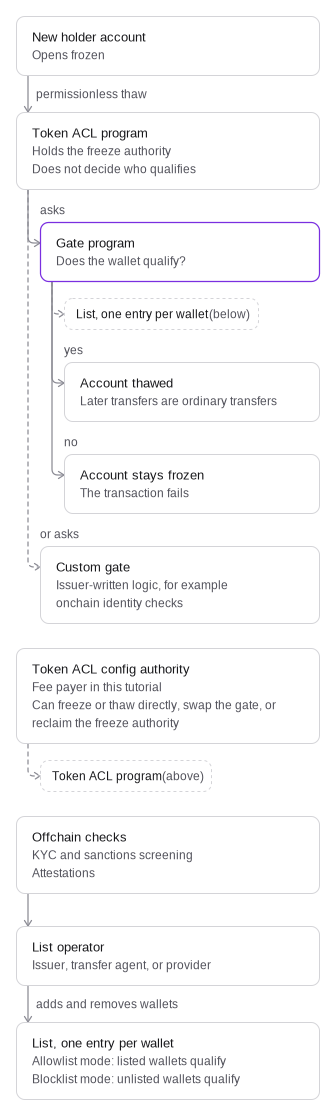
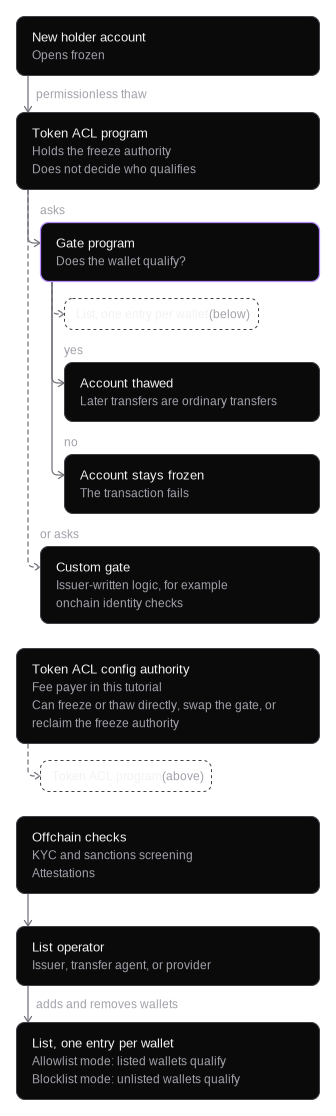
Three programs cooperate:- Token-2022 holds the mint and creates every new account frozen.
- The Token ACL program holds the delegated freeze authority, through a config account for each mint, and exposes a permissionless thaw. It does not decide who qualifies.
- A gate program makes that decision. With an address-based list as the gate, qualifying means being on the list.
1
Confirm the gate is in place
The create transaction in the previous step already handed the freeze
authority to the Token ACL mint config, created the allowlist, pointed the gate
at it, and turned on permissionless thaw. The
inspect-mint output
confirms it: the freeze authority is
$MINT_CONFIG, a program-derived address
of the Token ACL program (TACLkU6CiCdkQN2MjoyDkVg2yAH9zkxiHDsiztQ52TP), not
the program ID itself.If the freeze authority is anything else, the mint was created without Token
ACL, and nothing can thaw an account through the gate. Whether that can be
fixed depends on what the freeze authority is.Wiring the gate on a mint created without it
Wiring the gate on a mint created without it
Start from the freeze authority in the Export the two addresses it prints, then run
inspect-mint output:- Your own key: recoverable. Token ACL’s create config instruction, signed by that key, takes the freeze authority over. Run the script below.
- None: a freeze authority cannot be restored once it is unset. Nothing can thaw an account, so the mint cannot be gated. Create a new one.
- Any other address: whoever holds that key has to sign the create config instruction. If nobody can sign for it, create a new mint.
enableSrfc37: true does at creation, in one transaction
signed by the fee payer as the current freeze authority. It is written for the
Mosaic SDK project from
before you start.
Save it as wire-gate.ts and run it with $MINT exported:Mosaic SDK
Output
inspect-mint again to confirm
the freeze authority is now the Token ACL mint config:Terminal
Do not move the freeze authority by hand first, for example with
spl-token authorize $MINT freeze <address>. Token ACL’s create config
instruction must be signed by the current freeze authority, and it moves the
authority itself. A freeze authority set by hand to the Token ACL program or to
the mint config address cannot sign: create config then fails with custom
program error 0x0 (InvalidAuthority), nothing can move the freeze authority
again, and the mint cannot be gated.2
Create a holder to approve
Generate a key for an onboarded client, and fund it from the fee payer so it
can pay its own transaction fees.
${RPC_URL:-devnet} points the Solana CLI at
the same network as the scripts.Terminal
3
Add the holder to the allowlist
This records the onboarding decision. Save this as Read the list back to confirm. The script takes the list from
allowlist-add.ts (in
Rust, src/bin/allowlist-add.rs) and run it with $HOLDER.Mosaic SDK
Output
$LIST, the
allowlist address create-the-mint printed.Mosaic SDK
Output
4
Mint to the holder
Minting creates the holder’s token account and thaws it in the same
transaction: the script inserts Token ACL’s permissionless thaw between the
account creation and the mint, and the gate program approves it because the
holder is on the list. If the holder is not on the list, the whole transaction
fails, so there is no partly minted state. Save this as The fee payer signs, because it holds the mint authority on this mint. Where
the mint authority sits on its own key, this is the script that uses it, and no
other key can create supply.The Mosaic SDK output starts with a decoded Token ACL mint config and an
address.
mint.ts (in Rust,
src/bin/mint.rs) and run it with $HOLDER 1000.Mosaic SDK
Output
@solana/token-acl-sdk 0.4.0 prints them while it builds the
permissionless thaw; they are not part of the transaction.5
Show that the gate rejects a non-holder
Generate a third key, leave it off the list, and have the holder send tokens to
it. Save this as It fails. The transfer creates the outsider’s token account and inserts a
permissionless thaw for it; Token ACL hands the decision to the gate program,
and the gate rejects a wallet that is not on the list with custom program error
In Rust, run
transfer.ts (in Rust, src/bin/transfer.rs) and run it with
$OUTSIDER 1.Terminal
Mosaic SDK
Output
0x1002 (4098). The transfer instruction never runs, and because the RPC node
rejects the transaction in simulation, it never lands and no fee is charged.Now add the outsider to the list with allowlist-add and run the same transfer
again:Terminal
cargo run --release --bin allowlist-add -- $OUTSIDER and then
cargo run --release --bin transfer -- $OUTSIDER 1. The transfer succeeds and
prints its signature. The only change was the onboarding decision recorded on
the list.Leave the outsider on the list. Removing a wallet is the
offboarding step
at the end of the next page, and it does more than reverse the add: it also
freezes the wallet’s existing token account.Blocklists
The same gate program supports a blocklist instead of an allowlist, where every address qualifies except the ones you name. An allowlist fails closed: an address holds the token only after it has been added. A blocklist fails open: an address holds the token unless it has been named. A blocklist suits cases where open holding is the intended design and the list acts as a sanctions overlay. Token ACL shows how to create one.Next steps
- Operate the token: freeze, pause, force a transfer, burn, and offboard a holder