nextjs-anchor
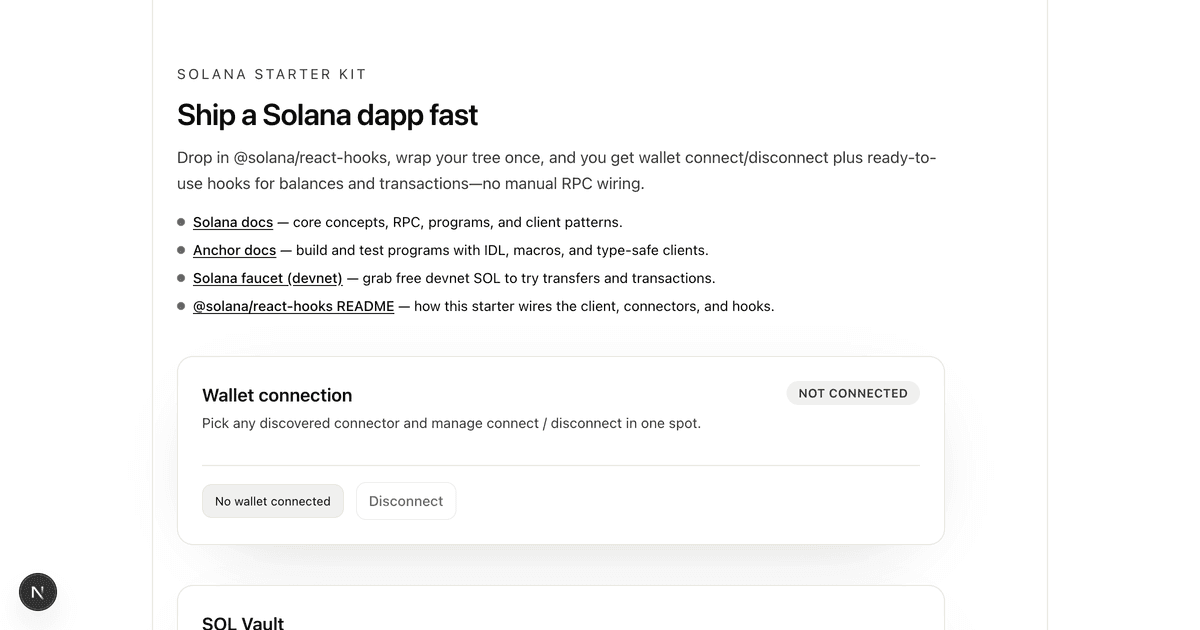
Next.js starter with Tailwind CSS, @solana/kit, and an Anchor vault program example.
Getting Started
npx -y create-solana-dapp@latest -t solana-foundation/templates/kit/nextjs-anchornpm install
npm run setup # Builds the Anchor program and generates the TypeScript client
npm run devOpen http://localhost:3000, connect your wallet, and interact with the vault.
What's Included
- Wallet connection via wallet-standard with auto-discovery and dropdown UI
- Cluster switching — devnet, testnet, mainnet, and localnet from the header
- Wallet balance display with airdrop button (devnet/testnet/localnet)
- SOL Vault program — deposit and withdraw SOL from a personal PDA vault
- Toast notifications with explorer links for every transaction
- Error handling — human-readable messages for common Solana and program errors
- Codama-generated client — type-safe program interactions using
@solana/kit - Tailwind CSS v4 with light/dark mode toggle
Stack
| Layer | Technology |
|---|---|
| Frontend | Next.js 16, React 19, TypeScript |
| Styling | Tailwind CSS v4 |
| Solana Client | @solana/kit, wallet-standard |
| Program Client | Codama-generated, @solana/kit |
| Program | Anchor (Rust) |
Project Structure
├── app/
│   ├── components/
│   │   ├── cluster-context.tsx  # Cluster state (React context + localStorage)
│   │   ├── cluster-select.tsx   # Cluster switcher dropdown
│   │   ├── grid-background.tsx  # Solana-branded decorative grid
│   │   ├── providers.tsx        # Wallet + theme providers
│   │   ├── theme-toggle.tsx     # Light/dark mode toggle
│   │   ├── vault-card.tsx       # Vault deposit/withdraw UI
│   │   └── wallet-button.tsx    # Wallet connect/disconnect dropdown
│   ├── generated/vault/        # Codama-generated program client
│   ├── lib/
│   │   ├── wallet/             # Wallet-standard connection layer
│   │   │   ├── types.ts        # Wallet types
│   │   │   ├── standard.ts     # Wallet discovery + session creation
│   │   │   ├── signer.ts       # WalletSession → TransactionSigner
│   │   │   └── context.tsx     # WalletProvider + useWallet() hook
│   │   ├── hooks/
│   │   │   ├── use-balance.ts  # SWR-based balance fetching
│   │   │   └── use-send-transaction.ts  # Transaction send with loading state
│   │   ├── cluster.ts          # Cluster endpoints + RPC factory
│   │   ├── lamports.ts         # SOL/lamports conversion
│   │   ├── send-transaction.ts # Transaction build + sign + send pipeline
│   │   ├── errors.ts           # Transaction error parsing
│   │   └── explorer.ts         # Explorer URL builder + address helpers
│   └── page.tsx                # Main page
├── anchor/                     # Anchor workspace
│   └── programs/vault/         # Vault program (Rust)
└── codama.json                 # Codama client generation config
Local Development
To test against a local validator instead of devnet:
Start a local validator
solana-test-validatorDeploy the program locally
solana config set --url localhost
cd anchor
anchor build
anchor deploy
cd ..
npm run codama:js   # Regenerate client with local program ID
Switch to localnet in the app using the cluster selector in the header.
Deploy Your Own Vault
The included vault program is already deployed to devnet. To deploy your own:
Note:
npm run setupandnpm run anchor-buildpass--ignore-keystoanchor buildso the program keeps the devnet program ID shipped with this template (F4jZpgbtTb6RWNWq6v35fUeiAsRJMrDczVPv9U23yXjB). Anchor 1.x otherwise generates a fresh program keypair on build and rewritesdeclare_id!. The steps below build without that flag on purpose, so Anchor syncs your own program ID before deploying.
Prerequisites
Steps
Configure Solana CLI for devnet
solana config set --url devnetCreate a wallet (if needed) and fund it
solana-keygen new
solana airdrop 2
Build and deploy the program
cd anchor
anchor build
anchor keys sync    # Updates program ID in source
anchor build        # Rebuild with new ID
anchor deploy
cd ..
Regenerate the client and restart
npm run setup   # Rebuilds program and regenerates client
npm run dev
Testing
Tests use LiteSVM, a fast lightweight Solana VM for testing.
npm run anchor-build   # Build the program first
npm run anchor-test    # Run tests
The tests are in anchor/programs/vault/src/tests.rs and automatically use the program ID from declare_id!.
Regenerating the Client
If you modify the program, regenerate the TypeScript client:
npm run setup # Or: npm run anchor-build && npm run codama:jsThis uses Codama to generate a type-safe client from the Anchor IDL.
Learn More
- Solana Docs — core concepts and guides
- Anchor Docs — program development framework
- Deploying Programs — deployment guide
- @solana/kit — Solana JavaScript SDK
- Codama — client generation from IDL