What is a Kora Node Operator?
As a Kora node operator, you run a paymaster service that sponsors Solana transaction fees for your users. Your node accepts SPL token payments and uses your SOL to pay actual network fees, enabling gasless transactions for your application.Why Run a Kora Node?
- Better UX: Your users transact without needing SOL (streamlined onboarding, better retention, etc.)
- Revenue Stream: Collect fees in tokens your business prefers (USDC, BONK, etc.)
Contents
Quick Start
Want to try locally first? Spin up a local Kora node in a few minutes: → Local Quick Start GuideCore Concepts
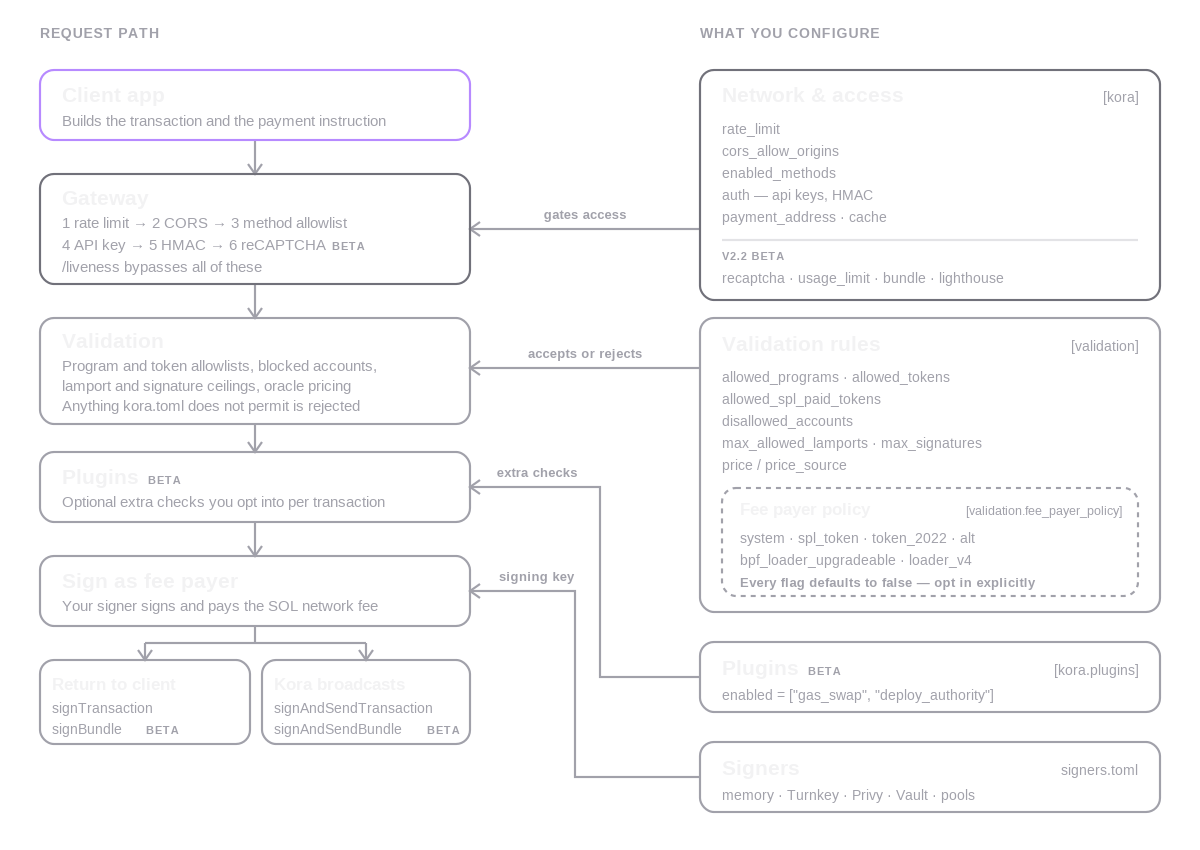
As a Kora node operator, you’re responsible for running a secure paymaster service that enables gasless transactions for your users. Every request follows the same path. The left column is what happens to a transaction. The right column is the part of your configuration that decides the outcome at each stage.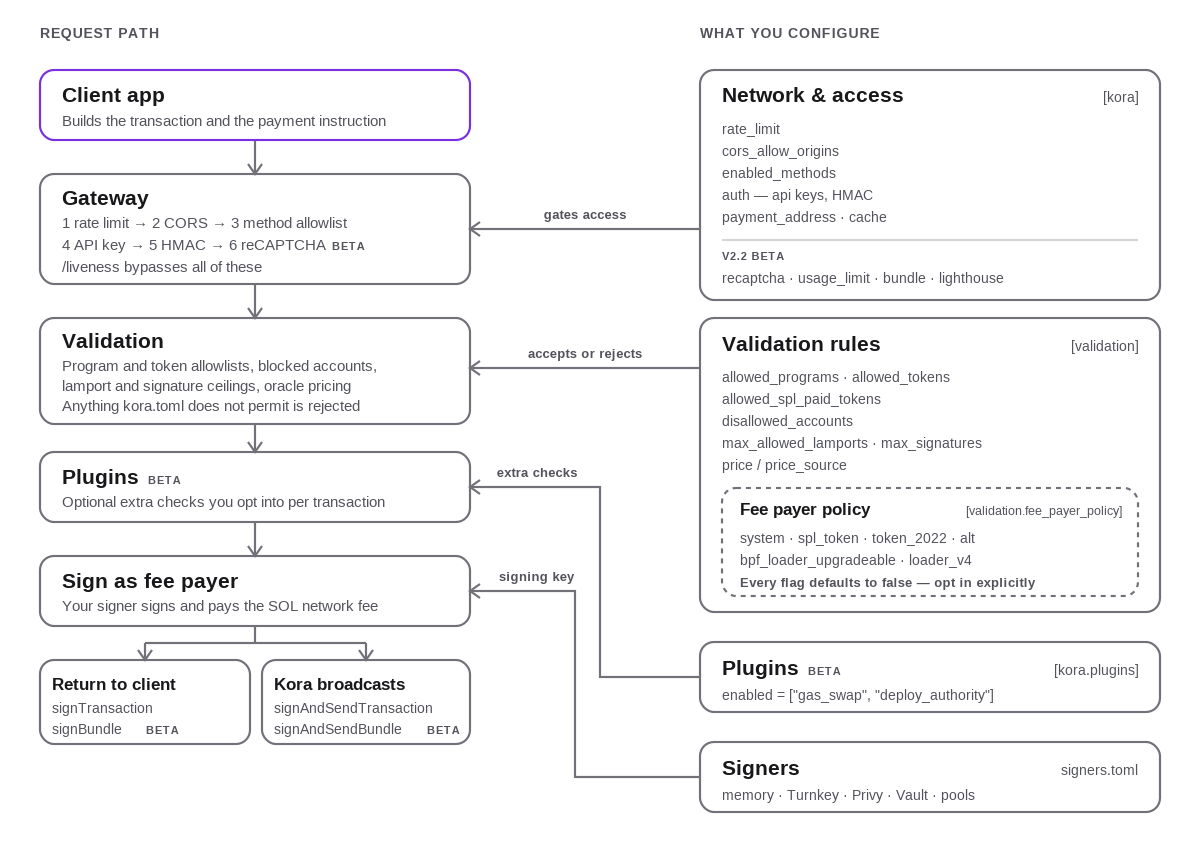


1. Validate Transactions
Configure your node to accept only transactions that meet your business requirements viakora.toml:
- Token allowlists: Define which SPL tokens you accept as payment (supports both SPL and Token-2022)
- Program allowlists: Whitelist which Solana programs users can interact with
- Transaction limits: Set maximum fees you’re willing to pay and signature limits
- Account blocklists: Prevent interactions with problematic addresses
- Pricing oracles: Configure Jupiter or mock pricing for fee calculations
- Payment tokens: Specify which type of tokens you will accept as payment
- Feepayer policies: Control what operations your feepayer can perform (transfers, burns, approvals, etc.)
- Token-2022 extensions: Block specific Token-2022 extensions for enhanced security
- Caching: Enable Redis caching to improve performance by reducing RPC calls
- Usage limits: Set per-wallet transaction limits to prevent abuse, ensure fair usage, or reward users with subsidized transactions up to a certain limit
2. Sign Transactions
Your node needs Solana keypair(s) to sign transactions as the fee payer. For production deployments, Kora supports multi-signer configurations for improved reliability and account-lock distribution. Consider implementing key rotation, access controls, backups, and other strategies for signer security. Signing options available:- Local Private Key: Store private key directly in server environment (as base58, .json file, or u8 array)
- Turnkey: Private key management made simple. Create wallets, sign transactions, and automate onchain actions.
- Privy: Easy crypto infrastructure. Securely spin up whitelabel wallets and sign transactions.
- HashiCorp Vault: Manage Secrets & Protect Sensitive Data
3. Pay Transaction Fees
Maintain sufficient SOL to cover network fees for your expected transaction volume:- Balance monitoring: Track SOL balance and set up low-balance alerts (Kora provides built-in Prometheus metrics - see Monitoring)
- Automation: Implement automatic SOL top-up procedures for production environments
- Capacity planning: Plan for expected use case, user volume, etc.
4. Monitor Operations
Continuously track your node’s security, performance, and business metrics:- Security monitoring: Unusual patterns, failed validations, and rate limit breaches
- Operational alerts: System health, balance warnings, and security events
- Financial tracking: SOL costs vs. token revenue, profitability analysis
- Signer balance monitoring: Track signer balance and set up low-balance alerts
/metrics endpoint that provides real-time
performance data in Prometheus format.
→ Kora Monitoring Reference Guide
5. Optimize Performance (Optional)
For high-traffic deployments, enable Redis caching to reduce RPC calls and improve response times:- Account caching: Cache Solana account data with configurable time to live (TTL)
- Startup check and fallback: Redis must be reachable when Kora starts
(otherwise
kora rpc startexits); after startup, a failed cache read falls back to a direct RPC call - Cache management: Automatic expiration and force-refresh capabilities for critical operations
Kora CLI
The kora-cli crate is a production-ready Rust binary that provides everything you need to run a Kora paymaster node. It’s distributed as a standalone executable that you can install globally or deploy in containers.Installation Options
Global Installation (recommended for development)--locked builds with the dependency versions Kora was released with. Without
it, Cargo resolves the newest compatible dependencies, which need Rust 1.89 or
later.
Or build from source (recommended for contributing)
Basic Usage
The Kora RPC server exposes a JSON-RPC endpoint (default: http://localhost:8080). Launch it with thekora rpc command:
Configuration
Every Kora RPC node must be configured with at least:- a Solana RPC endpoint (specified via the
--rpc-urlflag orRPC_URLenvironment variable) [default: http://127.0.0.1:8899] - Solana signer(s) configuration (specified via the
--signers-config signers.tomlflag) - a config file,
kora.toml(specified via the--config path/to/kora.tomlflag)
kora.toml to specify:
- Rate limiting and authentication
- Payment destination address
- RPC method availability
- Transaction validation rules
- Security policies (whitelist or blacklist of SPL tokens, programs, accounts, token extensions, etc.)
- Fee pricing models
- Enhanced fee payer policies (protect against unwanted signer behavior)
- Metrics collection
- Redis caching configuration (optional)
signers.toml file to specify:
- Signer(s) for your node
- Signer selection strategy
- Each signer’s configuration and applicable keys
Deployment
Local Deployment
Start up and test a local Kora Server in minutes: Quick Start GuideDocker
Build on the official image,ghcr.io/solana-foundation/kora:v2.0.5, to deploy
on any container platform. The
Railway guide
has a Dockerfile that copies in kora.toml and signers.toml. The
repository’s v2.0.5 sample Dockerfile installs Kora with cargo install on
rust:1.88 and no longer builds; if you compile Kora in your image, use
rust:1.89 or later with cargo install kora-cli@2.0.5 --locked.
The docker-compose.yml file includes Redis for caching support:
→ Docker Compose with Redis
Platform-Specific Guides
Need Help?
- Solana Stack Exchange - Ask
questions/share learnings (make sure to use the
koratag) - GitHub Issues - Report bugs or get help
- Run
kora rpc --helpto see all available flags and configuration options