
BP26 · Hardware walkthrough
An ESP32-C5 badge running Solana OS.
A conference badge that is really a dev board: a 320×240 color screen, a D-pad, eight RGB LEDs, a microSD slot, a 1000 mAh LiPo and three radios on one RISC-V chip. Flash it over USB-C, open it up, write apps for it.
Specifications
- 01MCU
- ESP32-C5 · RISC-V · 240 MHz
- 02Board
- 117 × 78 mm
- 03Flash
- 16 MB
- 04Display
- 320×240 ILI9341 TFT
- 05Wi-Fi
- Wi-Fi 6 · 2.4 + 5 GHz
- 06Bluetooth
- BLE 5
- 07Low-power radio
- IEEE 802.15.4
- 08Input
- D-pad · SELECT · CANCEL · BOOT
- 09Light
- 8× WS2812B RGB
- 10Storage
- microSD
- 11Battery
- 3.7 V 1000 mAh LiPo · ADC gauge
- 12USB
- USB-C · CH340C serial
Fig. 01 · Board view
Explore the hardware
Hover or focus a component to highlight it, click to jump to its module. Flip the board to see the module, battery and connectors on the back.
01 Module
Compute
A single RISC-V core with two radios bolted on.
The brain is an Espressif ESP32-C5-WROOM module, the shielded can on the back of the board. Inside is an ESP32-C5 (silicon rev 1.2): a single-core 32-bit RISC-V CPU at 240 MHz, a 48 MHz crystal and 16 MB of flash.
There is no PSRAM enabled, so Wi-Fi and the LVGL graphics stack share internal SRAM. Solana OS is built around that budget: one app runs at a time and every app frees its memory when you leave it.
- Module
- ESP32-C5-WROOM
- SoC
- ESP32-C5 rev 1.2
- CPU
- RISC-V, single core, 240 MHz
- Crystal
- 48 MHz
- Flash
- 16 MB
- PSRAM
- Not enabled
- SDK
- ESP-IDF v5.5 · FreeRTOS (unicore)
| Signal | Pin | Note |
|---|---|---|
| Flash (reserved) | 16–22 | 15 is PSRAM CS1 |
| USB (reserved) | 13 / 14 | — |
| Unused, floating | 2 / 5 / 26 | free for hacks |
02 Module
Display
320×240 pixels of color TFT over SPI.
An ILI9341 TFT sits in a bracket on the front, driven in landscape at 320×240 over the SPI2 bus. Its flex cable passes through a slot to an FPC connector on the back. The panel is BGR and color-inverted, and the driver rotates it into place.
The UI is rendered with LVGL 9 through esp_lvgl_port. The backlight has its own GPIO, active high, with an external pull-down so it stays dark until firmware turns it on.
Boot splash · color check
Red, green, blue from left to right means the BGR order, inversion and rotation are all right.
- Controller
- ILI9341
- Resolution
- 320×240, landscape
- Bus
- SPI2 (shared with microSD)
- Color
- BGR, inverted
- Connector
- FPC, on the back
- Graphics
- LVGL 9
| Signal | Pin | Note |
|---|---|---|
| SPI2 SCK | GPIO 9 | shared with SD |
| SPI2 MOSI | GPIO 10 | shared with SD |
| SPI2 MISO | GPIO 8 | shared with SD |
| LCD CS | GPIO 6 | — |
| LCD DC | GPIO 7 | — |
| LCD RST | GPIO 0 | not independently verified |
| Backlight | GPIO 3 | active high, ext. pull-down |
03 Module
Input
A D-pad, SELECT and CANCEL on the front, BOOT and RST on the back.
The front has a four-way D-pad (UP, DOWN, LEFT, RIGHT) and two action buttons, SELECT and CANCEL. All six sit on a TCA9534 I2C GPIO expander at address 0x20, which pulls an interrupt line low when any of them changes, so the firmware does not have to poll the bus.
On the back, BOOT is wired straight to GPIO 28 with an external pull-up and works as Home in Solana OS. RST resets the chip. All buttons are active low, and Solana OS maps them to logical keys in one place, so apps never read raw button bits.
Signal path
- 6 front buttons P0–P5 TCA9534
- TCA9534 I2C 0x20 · SCL 23 / SDA 24 ESP32-C5
- INT active low GPIO 25
- BOOT ext. pull-up GPIO 28
- Front
- UP · DOWN · LEFT · RIGHT · SELECT · CANCEL
- Back
- BOOT (Home) · RST
- Expander
- TCA9534 @ I2C 0x20
- Logic
- Active low
- Expander P6/P7
- Not connected
| Signal | Pin | Note |
|---|---|---|
| I2C SCL | GPIO 23 | — |
| I2C SDA | GPIO 24 | — |
| TCA9534 INT | GPIO 25 | active low |
| UP · LEFT · RIGHT · DOWN | TCA9534 P0–P3 | active low |
| SELECT · CANCEL | TCA9534 P4–P5 | active low |
| BOOT | GPIO 28 | ext. pull-up |
04 Module
Light
Eight addressable RGB LEDs on a single data pin.
Eight WS2812B addressable LEDs are chained on one GPIO: six across the top edge (silkscreen D3–D8) and two beside the screen on the right edge (D9, D10). They are driven with Espressif's led_strip component.
Full power is blinding and pulls too much current, so the firmware caps brightness at about 24/255. In the reference firmware each held button lights its own LED.
Data chain · GPIO 27
- LEDs
- 8× WS2812B
- Layout
- 6 top (D3–D8) · 2 right (D9, D10)
- Data
- Single wire, chained
- Brightness cap
- ≈ 24 / 255
| Signal | Pin | Note |
|---|---|---|
| WS2812B DIN | GPIO 27 | — |
05 Module
Storage
A microSD slot that shares a bus with the screen.
The microSD slot is on the back, on the same SPI2 bus as the display, with its own chip-select on GPIO 4. There is no card-detect pin.
Sharing a bus with a display is harder than it sounds. A freshly powered card starts in SD-native mode and reads MOSI as its command line, whatever the chip-select level. The stock firmware ran about 4 s of LCD tests first, so pixel data reached the card as SD commands. The fix: mount the card before the display starts.
- Slot
- microSD, SPI mode
- Bus
- SPI2 (shared with LCD)
- Card detect
- None
- Filesystem
- FAT via FatFs
| Signal | Pin | Note |
|---|---|---|
| SD CS | GPIO 4 | ext. pull-up, reaches DAT3 |
| SCK / MOSI / MISO | GPIO 9 / 10 / 8 | shared with LCD |
Boot order
- bsp_spi_bus_init()bring up SPI2
- bsp_sd_mount()card first, while the bus is quiet
- …buttons, LEDs, battery, radios
- bsp_display_start()LCD traffic starts last
Four things that broke the SD card
- 01
Bus ordering
A fresh card listens to MOSI regardless of CS. Solana OS mounts the SD card before it starts the display.
- 02
Lagging error flags
Some cards report errors on the next command. The driver answers the SDIO probes (CMD52, CMD5) itself instead of sending them.
- 03
Invalid FAT32
FAT32 volumes with fewer than 65,525 clusters are rejected by FatFs. The firmware detects this and offers an on-device format behind a confirmation.
- 04
Cards that ignore CS
Some no-name cards keep executing bus traffic while deselected. The firmware detects them and refuses to use them rather than risk random reads or erases.
Takeaway: use a name-brand microSD card. The first three are fixed in firmware; the fourth is the card.
06 Module
Connectivity
Dual-band Wi-Fi 6, BLE 5 and 802.15.4 on one chip, plus USB-C.
The ESP32-C5 has dual-band Wi-Fi 6 (2.4 and 5 GHz), Bluetooth LE 5 and an IEEE 802.15.4 radio. Solana OS uses Wi-Fi and ESP-NOW and leaves Bluetooth out of the firmware to save RAM.
For wired access there is a USB-C port on the back. UART0 goes through a CH340C USB-serial bridge, which carries flashing and a serial console at 115200 baud with commands like help, info, sd, ls, cat and rgb.
- Wi-Fi
- Wi-Fi 6, 2.4 + 5 GHz
- Bluetooth
- BLE 5 (not used by Solana OS)
- Low-power radio
- IEEE 802.15.4
- USB
- USB-C
- USB-serial
- CH340C
- Console
- 115200 baud
| Signal | Pin | Note |
|---|---|---|
| UART0 TX | GPIO 11 | to CH340C |
| UART0 RX | GPIO 12 | from CH340C |
07 Module
Power
A 1000 mAh LiPo, an OFF/ON switch and an ADC fuel gauge.
A 3.7 V 1000 mAh LiPo pouch (523450) covers the lower half of the back and plugs into a JST connector. An OFF/ON slide switch on the left edge cuts power.
There is no dedicated fuel-gauge chip. The battery voltage goes through a 1:1 resistor divider into ADC1 on GPIO 1, and firmware doubles the reading. Solana OS shows the result as a percentage in the status bar, and the Hardware Debug app shows millivolts too.
Battery sense
Vbat = 2 × VADC1 · GPIO 1
- Battery
- 3.7 V 1000 mAh LiPo
- Cell
- 523450 pouch
- Connector
- JST
- Switch
- OFF / ON slide
- Fuel gauge
- ADC, no gauge IC
- Divider
- 1:1 (reading ×2)
| Signal | Pin | Note |
|---|---|---|
| Battery sense | GPIO 1 | ADC1, 1:1 divider |
Firmware · ESP-IDF v5.5 · LVGL 9
Solana OS
The badge firmware. It builds and runs today: a launcher, a status bar, one input layer and a growing set of apps, set in ABC Diatype on the device. It runs one app at a time and hands it the screen.
Try it in the emulator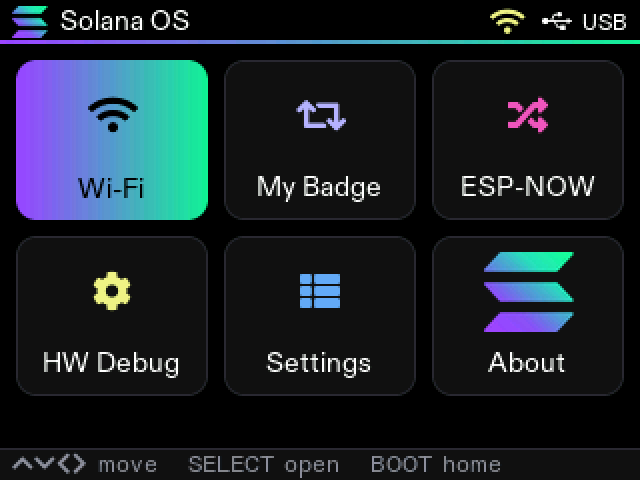
Screenshot from a real badge · 320×240
Launcher
The home screen is an app browser: a grid of every registered app that pages as the catalog grows. The focused tile lights up in the Solana gradient.
- Status bar: Solana logomark, app title, Wi-Fi, battery %
- Move with the D-pad, open with SELECT
- BOOT always brings you back here
- One app runs at a time and frees its memory on exit
Controls
The default mapping. Apps read logical keys, so the mapping lives in one header and can change without touching apps.
| Button | Does | Where |
|---|---|---|
| UP | Move up | Front · D-pad |
| DOWN | Move down | Front · D-pad |
| LEFT | Move left | Front · D-pad |
| RIGHT | Move right | Front · D-pad |
| SELECT | Open / confirm | Front |
| CANCEL | Cancel / go back | Front |
| BOOT | Home | Back |
More apps coming
Wi-Fi, My Badge, ESP-NOW, HW Debug, Settings and About are the first six. Adding an app is
a new directory under apps/, one entry in sources.cmake and one line
in the registry; the badge and the emulator both pick it up. The descriptor below
is the real one from the firmware.
// firmware/main/core/os.h - one descriptor per app,// listed in firmware/main/apps/registry.ctypedef struct { const char *id; // console: "open wifi" const char *name; // launcher + status bar title const char *symbol; // LV_SYMBOL_* icon, or NULL... const lv_image_dsc_t *icon; // ...to use an image uint32_t accent; void (*on_enter)(lv_obj_t *root); // build UI in the OS-owned root void (*on_exit)(void); // stop tasks/radios/timers, free memory bool (*on_key)(os_key_t key, bool repeat); // false = not handled void (*on_tick)(void); // every 100 ms, LVGL locked} os_app_t;The game on your badge
The Hitchhiker’s Guide to Solana
Your badge is your ticket into a game that runs across the whole conference. Collect the pages of the Guide, earn !LAMPs, swap cards with the people you meet and follow the characters around the venue.
- Guide Collect the pages of the Guide from packs: eight categories, four rarities. Duplicates count up.
- !LAMPs The game’s currency. Earn it from bounties and quests, spend it on packs and apps.
- X Dex Swap cards with nearby badges. With X linked on both sides, every new person raises your Level and pays a bounty.
- Quests Characters wait at beacons around the venue. Talk to them on your badge.
- App Store Lua apps for the badge, made by attendees. Install them to the microSD card.
Web Serial · USB-C
Flash your badge
Put Solana OS 0.4.4 on your badge straight from this page: plug it in over USB-C, pick its port, flash. Nothing to install. Developers can build it from source instead.
Erase options, release and re-link, and an offline download for esptool are on the Stock firmware page.
Loading the flasher…