Was ist x402?
Das x402-Protokoll ist ein offenes Protokoll für internetbasierte Zahlungen. Der 402-Fehlercode steht für „Payment Required“ (Zahlung erforderlich) und existierte bereits seit Langem in den HTTP-Spezifikationen, war jedoch erst durch den Aufstieg der Blockchain-Netzwerke praktisch nutzbar. Das 402-Protokoll beschreibt nun die Implementierung des HTTP-402-Payment-Required-Musters: Der Server verlangt eine Zahlung, bevor er eine geschützte Antwort zurückgibt. Auf Solana wird dies üblicherweise umgesetzt, indem der Client aufgefordert wird, eine kleine Überweisung durchzuführen, woraufhin der Server diese On-Chain verifiziert und den Inhalt bereitstellt.
Derzeit ist noch nicht klar, welches der 402-SDKs am weitesten verbreitet sein wird. In dieser Anleitung zeigen wir daher, wie x402 mit einem minimalen Server und Client implementiert werden kann, und listen alle verfügbaren 402-SDKs mit dem jeweils beschriebenen aktuellen Solana-Support auf.
Wie funktioniert es?
Es gibt verschiedene Möglichkeiten, x402 zu implementieren – von sehr schlank bis vollständig verwaltet.
Protokoll-Idee: Einfaches HTTP verwenden. Ein Client ruft deine URL auf → du antwortest mit 402 Payment Required und einem JSON-Payment-Requirements-Objekt → der Client zahlt und wiederholt die Anfrage mit einem X-PAYMENT-Header → du verifizierst/verrechnest → Antwort 200 OK. Keine Konten, kein OAuth.
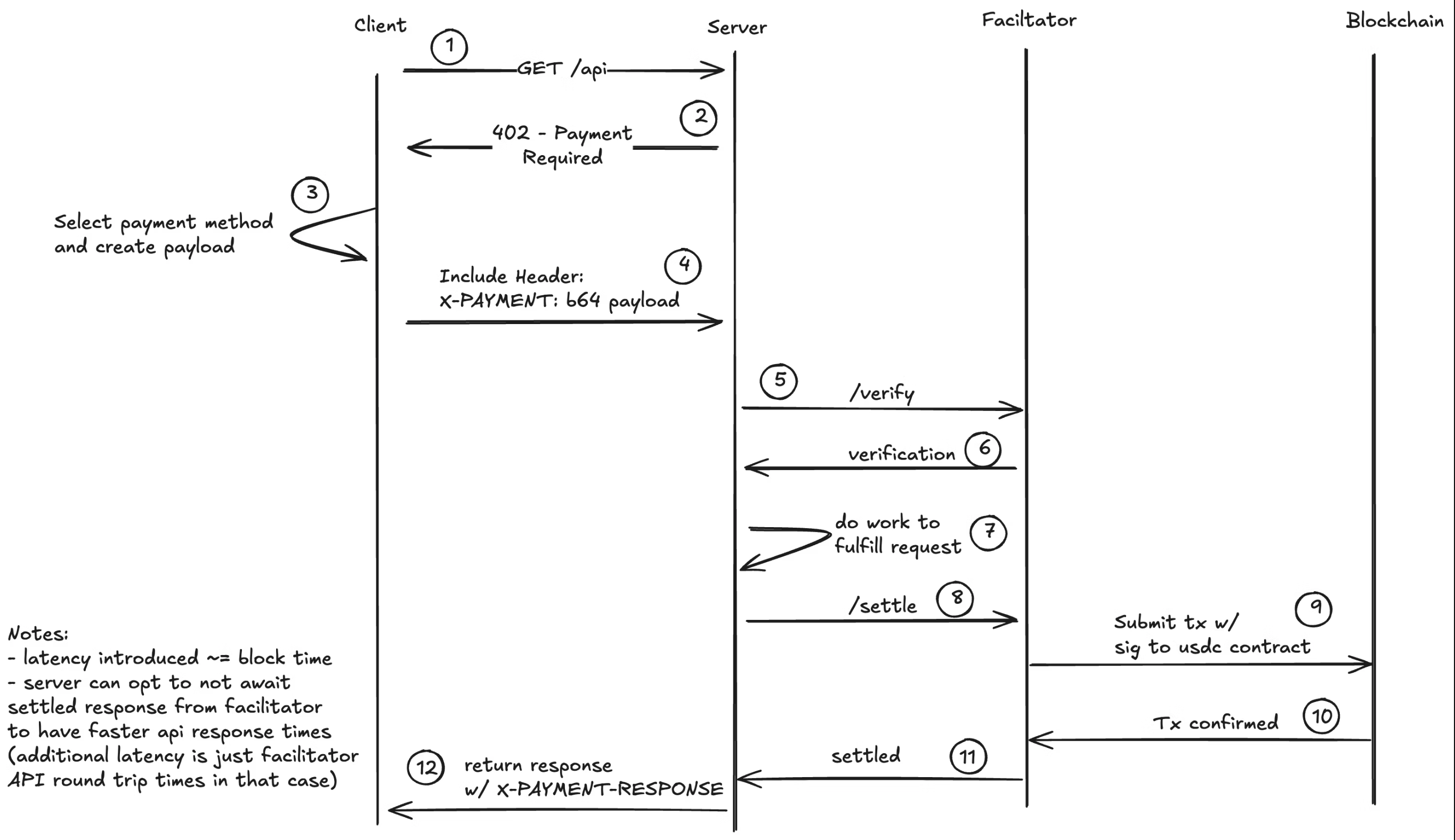 x402 Ablaufdiagramm
Hinweis: Der Facilitator ist vollständig optional – du kannst auch deine eigene Validierungslogik mit wenigen Codezeilen implementieren. Der Facilitator abstrahiert die Blockchain-Integrationsdetails von Server und Client, was die Implementierung erleichtert.
Wichtige Spezifikationsdetails: Die PaymentRequirements-Struktur, base64-kodierter X-PAYMENT-Header, optionaler X-PAYMENT-RESPONSE bei Erfolg sowie die (optionale) Facilitator-API für /verify, /settle, /supported. Das aktuelle konkrete Schema ist „exact“ (einen bestimmten Betrag zahlen). Andere Schemata wie upto sind vorgeschlagen.
Solana-Unterstützung: Das Protokoll selbst ist chain-agnostisch; auf Solana werden alle SPL-Token unterstützt. Solana-Unterstützung ist für die meisten 402-SDKs verfügbar oder in Entwicklung.
Weiter unten findest du eine Liste der verfügbaren 402-SDKs mit ihrem aktuellen Solana-Support.
Anwendungsfälle
x402 ermöglicht eine Vielzahl von Mikrozahlungs- und Pay-per-Use-Szenarien, die vor der Blockchain wirtschaftlich nicht realisierbar waren. Stell dir vor, Netflix zahlt für jeden einzelnen Abruf oder Spotify für jeden einzelnen Song, anstatt Abonnements zu verkaufen. Hier sind einige mögliche Ideen – doch das gesamte Spektrum der Möglichkeiten ist der Vorstellungskraft überlassen:
KI & Agent Commerce:
- KI-Agent-API-Zugang: Zahlung pro LLM-Inferenz, Bildgenerierung oder KI-Modell-API-Aufruf (Siehe ACK-Beispiel)
- MCP-Server-Monetarisierung: Gebühren für Model Context Protocol-Tools, Datenquellen und spezialisierte Agent-Funktionen (Siehe MCPay.tech)
- Agent-zu-Agent-Zahlungen: Autonome Agenten können untereinander für Dienste und Daten transagieren (Siehe a2a-x402-Beispiel)
- Premium-KI-Trainingsdaten: Zugang zu kuratierten Datensätzen auf Anfragebasis verkaufen
Inhalte & Medien:
- Kostenpflichtige Artikel: Mikrobeträge pro Artikel statt vollständiger Abonnements berechnen
- Video-/Audio-Streaming: Zahlung pro Abruf oder pro Inhaltsminute
- Hochauflösende Bilder: Vollauflösende Downloads nach Zahlung freischalten (siehe ACK-Beispiel) oder x402 Coinbase-Beispiel
- Premium-Newsletter-Zugang: Einzelne Newsletter-Ausgaben monetarisieren
Entwicklerdienste:
- API-Messung: Zahlung pro RPC-Aufruf, Datenbankabfrage oder Compute Unit (Siehe Corbits-Beispiel)
- Serverlose Funktionen: Gebühren für einzelne Funktionsausführungen
Daten & Analysen:
- Echtzeit-Marktdaten: Preisfeeds pro Kurs oder pro Tick
- Analyse-Dashboards: Bestimmte Berichte oder Datenexporte freischalten
- IoT-Sensordaten: Mikrozahlungen für Sensorwerte aus DePIN-Netzwerken
Gaming & virtuelle Güter:
- Game-Server-Zugang: Zahlung pro Sitzung oder pro Stunde
- Mod-/Asset-Downloads: Nutzergenerierten Content monetarisieren
- Turnier-Teilnahmegebühren: Automatisierte Preispool-Verteilung
Sonstiges:
- E-Mail-/DM-Filterung: Zahlung verlangen, um deinen Posteingang zu erreichen (Spam-Prävention)
- Rechenressourcen: Zahlung pro CPU-Stunde, GPU-Minute oder Speicher-GB
- VPN-/Proxy-Zugang: Bandbreitenpreise pro GB
- Einmalige Datei-Downloads: Digitale Dateien ohne Abonnement-Overhead verkaufen (Siehe ACK-Beispiel)
Der entscheidende Vorteil von x402 auf Solana sind niedrige Transaktionskosten (Bruchteile eines Cents), die echte Mikrozahlungen ermöglichen, sowie sofortige Abwicklung für Echtzeit-Zugangskontrollen.
SDKs und ihr Solana-Support
Dies ist eine sich weiterentwickelnde Liste, die aktualisiert wird, sobald weitere SDKs veröffentlicht oder Solana-Unterstützung hinzugefügt wird.
| SDK / Projekt | Solana-Unterstützung | Hinweise | Docs / URL |
|---|---|---|---|
| Corbits | Ja | Praktisches SDK für 402 auf Solana | Docs |
| MCPay.tech | Ja | Zahlung für MCP-Server in Mikrozahlungen | Website |
| PayAI Facilitator | Ja | x402-Facilitator mit Solana-Unterstützung | payai.network |
| Coinbase | Ja / Python in Arbeit | Die Coinbase-Referenzimplementierung des x402-Protokolls | GitHub |
| ACK | Im PR | Ein Agent-Zahlungsprotokoll mit x402-Unterstützung | GitHub |
| Crossmint | In Entwicklung | Zahlungen, Wallets, agentisches Finance; nicht x402-spezifisch | crossmint.com |
| A2A x402 (Google) | In Entwicklung | Agent-zu-Agent-Zahlungen mit Google AI | GitHub |
| Nexus (Thirdweb) | In Entwicklung | x402-Wrapper um API-Schlüssel | Nexus |
| x402scan | K. A. (Explorer) | x402-Ökosystem-Explorer (kein SDK) | x402scan.com |
| Natives Beispiel | Ja | Minimales Beispiel ohne Abhängigkeiten | Beispiele |
Corbits
Solana-first SDK zur schnellen Implementierung von x402-Flows auf Solana. Siehe die Docs: https://corbits.dev/
Beispiel, mit dem du für Solana-RPC-Anfragen bezahlen kannst.
npm install @faremeter/payment-solana @faremeter/fetch @faremeter/info@solana/web3.js
Erstelle eine payer-wallet.json und lade sie mit etwas USDC und etwas Mainnet-SOL auf.
import {Keypair,PublicKey,VersionedTransaction,Connection} from "@solana/web3.js";import { createPaymentHandler } from "@faremeter/payment-solana/exact";import { wrap } from "@faremeter/fetch";import { lookupKnownSPLToken } from "@faremeter/info/solana";import * as fs from "fs";// Load keypair from fileconst keypairData = JSON.parse(fs.readFileSync("./payer-wallet.json", "utf-8"));const keypair = Keypair.fromSecretKey(Uint8Array.from(keypairData));const network = "mainnet-beta";const connection = new Connection("https://api.mainnet.solana.com");const usdcInfo = lookupKnownSPLToken(network, "USDC");const usdcMint = new PublicKey(usdcInfo.address);// Create wallet interfaceconst wallet = {network,publicKey: keypair.publicKey,updateTransaction: async (tx: VersionedTransaction) => {tx.sign([keypair]);return tx;}};// Setup payment handlerconst handler = createPaymentHandler(wallet, usdcMint, connection);const fetchWithPayer = wrap(fetch, { handlers: [handler] });// Call the API - payment happens automaticallyconst response = await fetchWithPayer("https://helius.api.corbits.dev", {method: "POST",headers: { "Content-Type": "application/json" },body: JSON.stringify({jsonrpc: "2.0",id: 1,method: "getBlockHeight"})});const data = await response.json();console.log(data);
npx tsx e2e.ts
Damit wird für die RPC-Anfrage bezahlt und die Blockhöhe mithilfe des corbits-402-Protokolls zurückgegeben.
Coinbase
Coinbases Referenzimplementierung des x402-Protokolls bietet TypeScript-Bibliotheken und Beispiele für Client- und Server-Flows. Das Repository enthält End-to-End-Tests für 6 verschiedene SVM-Szenarien (Solana Virtual Machine). Die Implementierung umfasst Zahlungsverifizierung, Beleggenerierung und Fehlerbehandlung.
Wichtige Funktionen:
- TypeScript-Client- und Server-Implementierungen
- Hilfsprogramme zur Zahlungsverifizierung
- Unterstützung mehrerer Zahlungsschemata (exakter Betrag, Höchstbetrag)
- Testsuite mit Solana-Transaktionsbeispielen
- Trennung zwischen Protokolllogik und Geschäftslogik
Ein einfach nutzbares Beispiel mit einem minimalen Server und Client findest du hier.
const app = express();const PORT = 3000;// Apply x402 payment middleware// This automatically handles:// - 402 responses with payment requirements// - Payment verification (pre-flight checks)// - Transaction submission via facilitator// - Settlement confirmationapp.use(paymentMiddleware(RECIPIENT, {// Protected endpoint: requires $0.001 USDC payment"GET /premium": {price: "$0.0001", // Price in USD (converted to USDC)network: "solana-devnet" // Solana devnet},// Another endpoint with different price"GET /expensive": {price: "$0.001",network: "solana-devnet"}}));// Protected endpoints - only accessible after paymentapp.get("/premium", (req, res) => {res.json({message: "🎉 Premium content accessed!",data: {secret: "This is premium content",timestamp: new Date().toISOString()}});});
Die Python-Unterstützung befindet sich in Entwicklung; ein funktionierendes End-to-End-Beispiel ist hier verfügbar.
ACK
Das Agent Commerce Kit (ACK) unterstützt das x402-Protokoll und ergänzt es um kritische Schichten für die Agent-Wirtschaft: verifizierbare Agent-Identität (ACK-ID) mittels W3C-DIDs/VCs sowie kryptografisch gesicherte Belege (ACK-Pay) als Verifiable Credentials. Dies ermöglicht es Agenten, Eigentümerschaft nachzuweisen, sich autonom zu authentifizieren und compliance-fähige Zahlungsnachweise zu generieren – und adressiert damit die Identitätskrise und Transaktionsbarrieren, die KI-Agenten an der Teilnahme am Handel hindern.
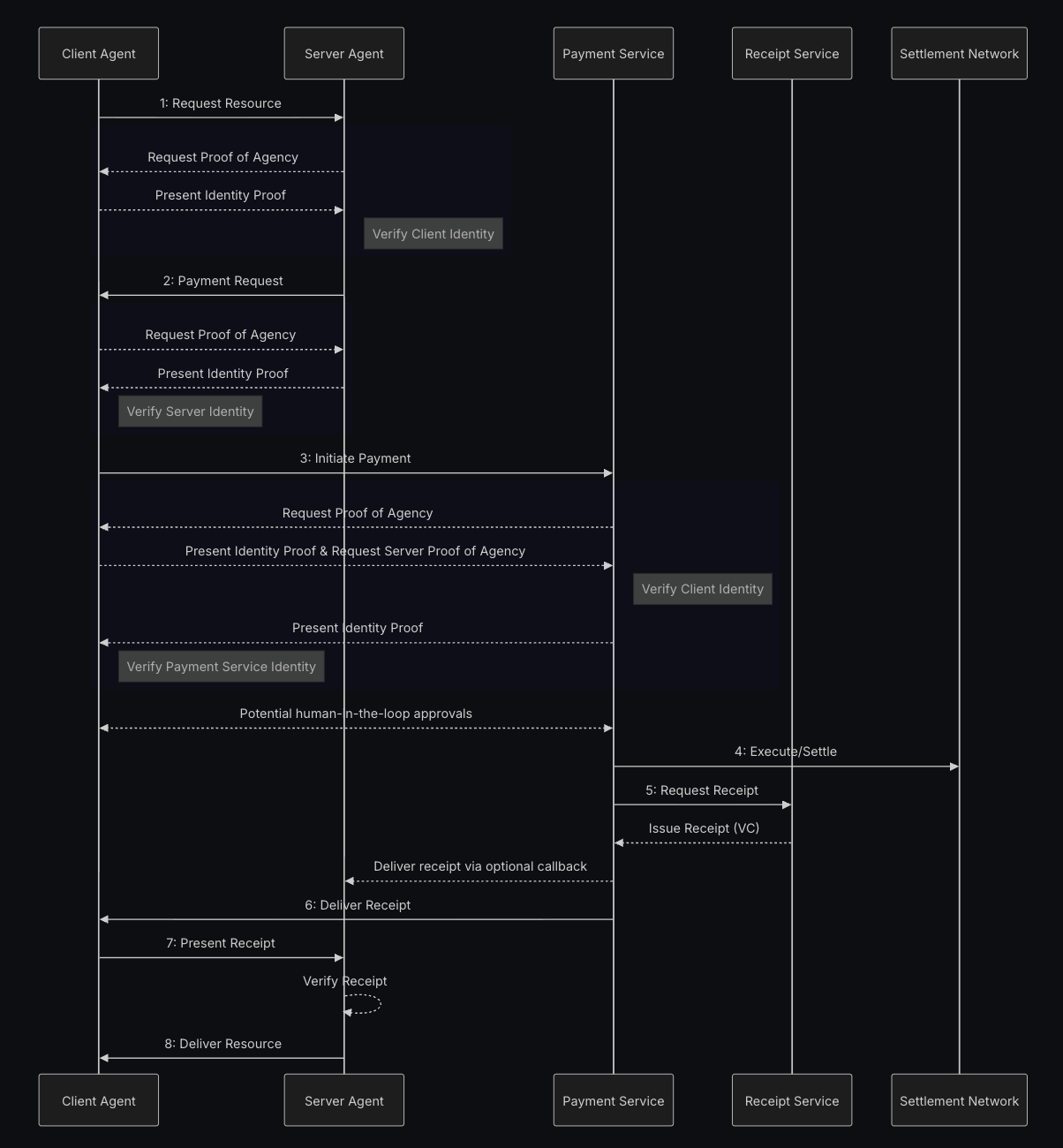 ACK Ablaufdiagramm
Es gibt einen PR mit einem E2E-Beispiel, der noch nicht gemergt wurde, aber funktioniert. Außerdem gibt es ein Live-Beispiel, das zeigt, wie man Bilder, eine Jukebox und eine API zum Animieren von Bildern kostenpflichtig macht. Den Quellcode der Beispiele sowie einen Twitter-Bot, der die API nutzt, um Bilder im Zeitstrahl zu animieren, findest du hier.
MCPay.tech
Pay-per-Request-Mikrozahlungen für MCP-Server (Model Context Protocol) mit x402-ähnlichen Flows. Ermöglicht Entwicklern die Monetarisierung von MCP-Tools und -Ressourcen durch kleine Zahlungen pro API-Aufruf oder Tool-Aufruf – so lässt sich der KI-Agent-Zugang zu Premium-Datenquellen, spezialisierten Tools oder Rechenressourcen einfach in Rechnung stellen. Website: https://mcpay.tech/
PayAI Facilitator
Solana-first-x402-Facilitator mit einem Live-Echo-Merchant zum Testen und Rückerstatten von Zahlungen. PayAI übernimmt derzeit alle Transaktions-Fee. Website: https://payai.network/
A2A x402 (Google)
Agent-zu-Agent-402-Initiative zur Erforschung standardisierter Payment-Required-Flows. Die Solana-Unterstützung befindet sich derzeit in Entwicklung; ein funktionierendes Chat-Beispiel findest du hier
Crossmint
Crossmint ist eine All-in-One-Plattform für Unternehmen und Agenten zur Integration von Krypto-Infrastruktur – einschließlich Wallets, Onramps, Stablecoin-Orchestrierung und mehr. Die Solana-x402-Unterstützung befindet sich derzeit in Entwicklung und soll bis zum 30.10.2025 abgeschlossen sein. Website: https://www.crossmint.com/
x402scan
Explorer für das x402-Ökosystem mit umfassenden Statistiken, Projektlisten und Analysen zu x402-Implementierungen. Verfolge Transaktionsvolumen, entdecke aktive Händler und beobachte das Wachstum von Payment-Required-Endpunkten in verschiedenen Netzwerken. Website: https://x402scan.com/
Nexus (Thirdweb)
Thirdweb Nexus entwickelt einen x402-Wrapper um API-Schlüssel (derzeit in Entwicklung). Website: https://nexus.thirdweb.com/
Natives Beispiel
Ein natives Beispiel ohne Abhängigkeiten und mit einem minimalen Server und Client.
Du kannst das Repository klonen und das Beispiel ausführen:
git clone https://github.com/Woody4618/x402-solana-examplesnpm install# Terminal 1: Start servernpm run usdc:server# Terminal 2: Run client (requires devnet USDC)npm run usdc:client
Flow-Übersicht
- Client ruft
/premiumauf. - Server antwortet mit 402 und den Zahlungsbedingungen: Empfänger, Betrag.
- Client erstellt eine Transaktion mit einer Überweisungsanweisung an den Empfänger.
- Client wiederholt die Anfrage an
/premiummit dem Transaktions-Payload. - Server verifiziert die Transaktion und sendet sie an das Netzwerk.
- Sobald sie bestätigt ist, antwortet der Server mit 200.
Solana-spezifische Alternative: Auf Solana könnte man eine Variante implementieren, bei der der Client die Transaktion direkt mit einer Memo-Anweisung an das Netzwerk übermittelt (anstatt sie an den Server zu senden) und anschließend nur die Transaktionssignatur zur Verifizierung an den Server schickt. Dies löst das Problem bei Verbindungsabbrüchen – wenn der Client nach der Zahlung, aber vor dem Empfang des Inhalts die Verbindung verliert, kann er es mit derselben Signatur erneut versuchen, da die Zahlung bereits onchain bestätigt ist. Dieser Ansatz weicht jedoch vom x402.org-Standardablauf ab (der erwartet, dass der Server die Transaktion überträgt), weshalb wir in diesem Beispiel den Standardansatz verwenden.
Hinweis: Der Code dieses Beispiels wurde nicht geprüft, ist nicht produktionsreif und dient ausschließlich zu Demonstrationszwecken. Er zeigt, dass x402 ohne Abhängigkeiten und ohne den Einsatz eines Facilitators implementiert werden kann. Die Nutzung eines Facilitators ist praktisch, da er Komplexität verbirgt und Transaktionsgebühren übernehmen kann – er kann jedoch auch ein Single Point of Failure sein, etwa wenn das Facilitator-Wallet keine ausreichenden Mittel mehr hat. Der Beispiel-Server übermittelt vom Client signierte Transaktionen. Diese müssen möglicherweise validiert werden.
Minimaler Server (Express)
// x402-compliant server with USDC (SPL Token) paymentsimport express from "express";import { Connection, PublicKey, Transaction } from "@solana/web3.js";import { TOKEN_PROGRAM_ID, getAssociatedTokenAddress } from "@solana/spl-token";const connection = new Connection("https://api.devnet.solana.com", "confirmed");// Devnet USDC mint addressconst USDC_MINT = new PublicKey("4zMMC9srt5Ri5X14GAgXhaHii3GnPAEERYPJgZJDncDU");// Your recipient wallet address (same as SOL example)const RECIPIENT_WALLET = new PublicKey("seFkxFkXEY9JGEpCyPfCWTuPZG9WK6ucf95zvKCfsRX");// Derive the recipient's USDC token account (Associated Token Account)const RECIPIENT_TOKEN_ACCOUNT = await getAssociatedTokenAddress(USDC_MINT,RECIPIENT_WALLET);// Picking a small USDC priceconst PRICE_USDC = 100; // 0.0001 USDCconst app = express();app.use(express.json());// x402 endpoint - Quote or verify paymentapp.get("/premium", async (req, res) => {const xPaymentHeader = req.header("X-Payment");// If client provided X-Payment header, verify and submit transactionif (xPaymentHeader) {try {// Decode base64 and parse JSON (x402 standard)const paymentData = JSON.parse(Buffer.from(xPaymentHeader, "base64").toString("utf-8")) as {x402Version: number;scheme: string;network: string;payload: {serializedTransaction: string;};};console.log("Received USDC payment proof from client");console.log(` Network: ${paymentData.network}`);// Deserialize the transactionconst txBuffer = Buffer.from(paymentData.payload.serializedTransaction,"base64");const tx = Transaction.from(txBuffer);console.log("Verifying SPL Token transfer instructions...");// Step 1: Introspect and decode SPL Token transfer instructionconst instructions = tx.instructions;let validTransfer = false;let transferAmount = 0;for (const ix of instructions) {// Check if this is a Token Program instructionif (ix.programId.equals(TOKEN_PROGRAM_ID)) {// SPL Token Transfer instruction layout:// [0] = instruction type (3 for Transfer)// [1-8] = amount (u64, little-endian)if (ix.data.length >= 9 && ix.data[0] === 3) {// Read the amount (u64 in little-endian, starts at byte 1)transferAmount = Number(ix.data.readBigUInt64LE(1));// Verify accounts: [source, destination, owner]if (ix.keys.length >= 2) {const destAccount = ix.keys[1].pubkey;if (destAccount.equals(RECIPIENT_TOKEN_ACCOUNT) &&transferAmount >= PRICE_USDC) {validTransfer = true;console.log(` ✓ Valid USDC transfer: ${transferAmount / 1000000} USDC`);console.log(` To: ${RECIPIENT_TOKEN_ACCOUNT.toBase58()}`);break;}}}}}if (!validTransfer) {return res.status(402).json({error:"Transaction does not contain valid USDC transfer to recipient with correct amount",details:transferAmount > 0? `Found transfer of ${transferAmount}, expected ${PRICE_USDC}`: "No valid token transfer instruction found"});}// Step 2: Simulate the transaction BEFORE submittingconsole.log("Simulating transaction...");try {const simulation = await connection.simulateTransaction(tx);if (simulation.value.err) {console.error("Simulation failed:", simulation.value.err);return res.status(402).json({error: "Transaction simulation failed",details: simulation.value.err,logs: simulation.value.logs});}console.log(" ✓ Simulation successful");} catch (simError) {console.error("Simulation error:", simError);return res.status(402).json({error: "Failed to simulate transaction",details:simError instanceof Error ? simError.message : "Unknown error"});}// Step 3: Submit the transaction (only if verified and simulated successfully)// Note: Solana blockchain automatically rejects duplicate transaction signaturesconsole.log("Submitting transaction to network...");const signature = await connection.sendRawTransaction(txBuffer, {skipPreflight: false,preflightCommitment: "confirmed"});console.log(`Transaction submitted: ${signature}`);// Wait for confirmationconst confirmation = await connection.confirmTransaction(signature,"confirmed");if (confirmation.value.err) {return res.status(402).json({error: "Transaction failed onchain",details: confirmation.value.err});}// Fetch the transaction to verify payment details.// web3.js v1 cannot deserialize v1 transactions, so the max version is// capped at 0 here. A facilitator that must settle v1 payments needs// @solana/kit or web3.js v3 and a max version of 1.const confirmedTx = await connection.getTransaction(signature, {commitment: "confirmed",maxSupportedTransactionVersion: 0});if (!confirmedTx) {return res.status(402).json({error: "Could not fetch confirmed transaction"});}// Verify token balance changes from transaction metadataconst postTokenBalances = confirmedTx.meta?.postTokenBalances ?? [];const preTokenBalances = confirmedTx.meta?.preTokenBalances ?? [];// Find the recipient's token account in the balance changeslet amountReceived = 0;for (let i = 0; i < postTokenBalances.length; i++) {const postBal = postTokenBalances[i];const preBal = preTokenBalances.find((pre) => pre.accountIndex === postBal.accountIndex);// Check if this is the recipient's accountconst accountKey =confirmedTx.transaction.message.staticAccountKeys[postBal.accountIndex];if (accountKey && accountKey.equals(RECIPIENT_TOKEN_ACCOUNT)) {const postAmount = postBal.uiTokenAmount.amount;const preAmount = preBal?.uiTokenAmount.amount ?? "0";amountReceived = Number(postAmount) - Number(preAmount);break;}}if (amountReceived < PRICE_USDC) {return res.status(402).json({error: `Insufficient payment: received ${amountReceived}, expected ${PRICE_USDC}`});}console.log(`Payment verified: ${amountReceived / 1000000} USDC received`);console.log(`View transaction: https://explorer.solana.com/tx/${signature}?cluster=devnet`);// Payment verified! Return premium contentreturn res.json({data: "Premium content - USDC payment verified!",paymentDetails: {signature,amount: amountReceived,amountUSDC: amountReceived / 1000000,recipient: RECIPIENT_TOKEN_ACCOUNT.toBase58(),explorerUrl: `https://explorer.solana.com/tx/${signature}?cluster=devnet`}});} catch (e) {console.error("Payment verification error:", e);return res.status(402).json({error: "Payment verification failed",details: e instanceof Error ? e.message : "Unknown error"});}}// No payment provided - return 402 with payment detailsconsole.log("New USDC payment quote requested");return res.status(402).json({payment: {recipientWallet: RECIPIENT_WALLET.toBase58(),tokenAccount: RECIPIENT_TOKEN_ACCOUNT.toBase58(),mint: USDC_MINT.toBase58(),amount: PRICE_USDC,amountUSDC: PRICE_USDC / 1000000,cluster: "devnet",message: "Send USDC to the token account"}});});app.listen(3001, () => console.log("x402 USDC server listening on :3001"));
Minimaler Client (Node)
import { Connection, Keypair, PublicKey, Transaction } from "@solana/web3.js";import {createTransferInstruction,getOrCreateAssociatedTokenAccount,createAssociatedTokenAccountInstruction,getAccount} from "@solana/spl-token";import fetch from "node-fetch";import { readFileSync } from "fs";const connection = new Connection("https://api.devnet.solana.com", "confirmed");const keypairData = JSON.parse(readFileSync("./pay-in-usdc/client.json", "utf-8"));const payer = Keypair.fromSecretKey(Uint8Array.from(keypairData));async function run() {// 1) Request payment quote from serverconst quote = await fetch("http://localhost:3001/premium");const q = (await quote.json()) as {payment: {tokenAccount: string;mint: string;amount: number;amountUSDC: number;cluster: string;};};if (quote.status !== 402) throw new Error("Expected 402 quote");const recipientTokenAccount = new PublicKey(q.payment.tokenAccount);const mint = new PublicKey(q.payment.mint);const amount = q.payment.amount;console.log("USDC Payment required:");console.log(` Recipient Token Account: ${q.payment.tokenAccount}`);console.log(` Mint (USDC): ${q.payment.mint}`);console.log(` Amount: ${q.payment.amountUSDC} USDC (${amount} smallest units)`);// 2) Get or create the payer's associated token accountconsole.log("\nChecking/creating associated token account...");const payerTokenAccount = await getOrCreateAssociatedTokenAccount(connection,payer,mint,payer.publicKey);console.log(` Payer Token Account: ${payerTokenAccount.address.toBase58()}`);// Check if payer has enough USDCconst balance = await connection.getTokenAccountBalance(payerTokenAccount.address);console.log(` Current Balance: ${balance.value.uiAmountString} USDC`);if (Number(balance.value.amount) < amount) {throw new Error(`Insufficient USDC balance. Have: ${balance.value.uiAmountString}, Need: ${q.payment.amountUSDC}`);}// 3) Check if recipient token account exists, create if notconsole.log("\nChecking recipient token account...");let recipientAccountExists = false;try {await getAccount(connection, recipientTokenAccount);recipientAccountExists = true;console.log(" ✓ Recipient token account exists");} catch (error) {console.log(" ⚠ Recipient token account doesn't exist, will create it");}// 4) Create USDC transfer transaction (but DON'T submit it)const { blockhash } = await connection.getLatestBlockhash();const tx = new Transaction({feePayer: payer.publicKey,blockhash,lastValidBlockHeight: (await connection.getLatestBlockhash()).lastValidBlockHeight});// Add create account instruction if neededif (!recipientAccountExists) {// We need to know the recipient wallet address to create the ATA// The server should provide this, so let's get it from the wallet address// Usually the server will already have the token account, but to be sure for the examples// lets create one.const recipientWallet = new PublicKey("seFkxFkXEY9JGEpCyPfCWTuPZG9WK6ucf95zvKCfsRX");const createAccountIx = createAssociatedTokenAccountInstruction(payer.publicKey, // payerrecipientTokenAccount, // associated token account addressrecipientWallet, // ownermint // mint);tx.add(createAccountIx);console.log(" + Added create token account instruction");}// Add transfer instructionconst transferIx = createTransferInstruction(payerTokenAccount.address, // sourcerecipientTokenAccount, // destinationpayer.publicKey, // owneramount // amount in smallest units);tx.add(transferIx);// Sign the transaction (but don't send it, the server will do that)tx.sign(payer);// Serialize the signed transactionconst serializedTx = tx.serialize().toString("base64");console.log("\nTransaction created and signed (not submitted yet)");console.log(` Instructions: ${tx.instructions.length}`);// 4) Send X-Payment header with serialized transaction (x402 standard)const paymentProof = {x402Version: 1,scheme: "exact",network:q.payment.cluster === "devnet" ? "solana-devnet" : "solana-mainnet",payload: {serializedTransaction: serializedTx}};// Base64 encode the payment proofconst xPaymentHeader = Buffer.from(JSON.stringify(paymentProof)).toString("base64");console.log("\nSending payment proof to server (server will submit transaction)...");const paid = await fetch("http://localhost:3001/premium", {headers: {"X-Payment": xPaymentHeader}});const result = (await paid.json()) as {data?: string;error?: string;paymentDetails?: {signature: string;amount: number;amountUSDC: number;recipient: string;explorerUrl: string;};};console.log("\nServer response:");console.log(result);// Display explorer link if payment was successfulif (result.paymentDetails?.explorerUrl) {console.log("\n🔗 View transaction on Solana Explorer:");console.log(result.paymentDetails.explorerUrl);}}run().catch(console.error);
Verbesserungen
- Erwägen Sie, nach der Zahlung ein JWT zurückzugeben, damit Clients den Zugang kurzzeitig wiederverwenden können. ACK macht das sehr einfach.
- Stellen Sie sicher, dass Ihre Schlüssel nicht nach außen gelangen, und speichern Sie sie in Umgebungsvariablen.
Is this page helpful?