Monetize Inference with Pay.sh
Open models let you run inference on compute you own. Pay.sh lets you charge for it without signing up for a billing platform or forcing users through accounts, API keys, and subscriptions. This template connects the two: define input and output token rates in rates.yml, let users pay for consumption with stablecoins, and test the full flow safely in a sandbox.
This is a public sandbox reference implementation, not an audited production deployment. Treat the Pay gateway as an internet-facing attack surface, review SECURITY.md, and complete your own security, legal, and compliance review before handling real traffic or funds.
How it works
plain curl ─────POST────▶ Pay.sh gateway ──402──▶ blocked before inference
pay curl ──────POST────▶ Pay.sh gateway ───────▶ local model
x402-upto local inference engine- Pay.sh discovers your local engine and exposes its OpenAI-compatible API through a payment gateway.
- An unsigned inference request receives
HTTP 402 Payment Requiredbefore the model runs. Health and model-listing endpoints remain free. pay --sandbox curlaccepts the payment terms with disposable sandbox stablecoins and retries the same request.- After inference, Pay.sh settles the actual input and output token cost using the rates in rates.yml.
The local quickstart binds the gateway and inference engine to loopback. No JavaScript dependencies or API keys are required.
Start locally with Ollama
Download and install Ollama, then install Pay.sh 0.26 or newer:
brew install pay
# or
npm install -g @solana/pay
Create the project. Ollama is the default engine:
pnpm create solana-dapp@latest my-inference-app \
  --template pay-gate-inference \
  --ollama
cd my-inference-app
Start Ollama, list any installed models, and pull the small 523 MB model used by request.json:
ollama serve
ollama list
ollama pull qwen3:0.6b
If the Ollama desktop app is already running, only the pull command is needed.
Start the Pay.sh gateway in terminal one:
pay gate inference \
  rates.yml \
  --providers ollama \
  --sandbox
This asks Pay.sh to discover Ollama and apply the token rates in rates.yml.
In terminal two, make the request with ordinary curl:
curl --include \
  http://ollama.localhost:1402/v1/chat/completions \
  --json @request.json
The response must be HTTP/1.1 402 Payment Required. The model does not run and no payment is signed.
Now make the identical request through Pay.sh:
pay --sandbox curl \
  http://ollama.localhost:1402/v1/chat/completions \
  --json @request.json
Review the sandbox terms shown by Pay.sh before authorizing. The final JSON response comes from your local model.
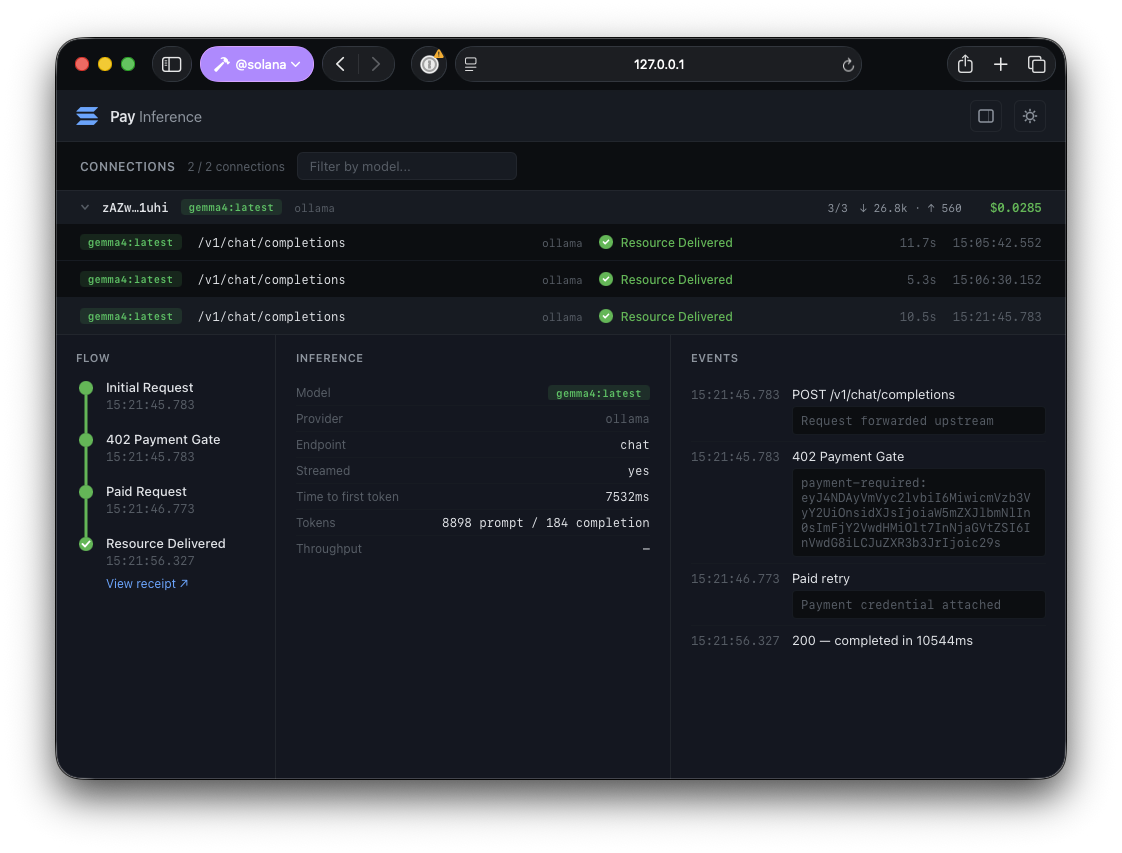
The local gateway also exposes a web UI at http://127.0.0.1:1402/. Open it to watch requests and payments arrive in real time, from the initial 402 challenge through the paid retry and delivered response.
Use llama.cpp instead
Generate the llama.cpp variant:
pnpm create solana-dapp@latest my-llamacpp-app \
  --template pay-gate-inference \
  --llamacpp
cd my-llamacpp-app
Install a pre-built llama.cpp release, then download a GGUF model.
Start an OpenAI-compatible server on loopback port 8080. The --alias value becomes the model ID:
llama-server \
  -m /path/to/model.gguf \
  --host 127.0.0.1 \
  --port 8080 \
  --alias local-model
The --llamacpp generator option sets the model in request.json to local-model. If you use another --alias, update that model value. Then select Pay's built-in llama.cpp provider:
pay gate inference \
  rates.yml \
  --providers llama-cpp \
  --sandbox
Use the provider-specific gateway hostname for both test requests:
# Must return HTTP 402
curl --include \
  http://llama-cpp.localhost:1402/v1/chat/completions \
  --json @request.json

# Handles the sandbox payment and retries
pay --sandbox curl \
  http://llama-cpp.localhost:1402/v1/chat/completions \
  --json @request.json
Deploy llama.cpp to an Ubuntu CPU server
The generated project includes an Ansible deployment under deploy/llamacpp. It builds a pinned llama.cpp release with native CPU optimizations, verifies the model checksum, keeps inference on loopback, and exposes the sandbox Pay gateway from a dedicated non-login service account.
Install Ansible and just on your development machine, then create your local inventory:
brew install ansible just
just setup
Edit deploy/llamacpp/ansible/inventory.yml with your Ubuntu host and SSH user. The file is ignored by Git. Inspect the server before choosing model and runtime settings:
just specs ubuntu@<host>The defaults in deploy/llamacpp/ansible/group_vars/all.yml run the same local-model used by request.json. Replace the pinned model URL and checksum together when changing models, then tune the llama.cpp release, thread count, context, parallel slots, gateway URL, and token prices for your hardware.
Review and apply the playbook:
just check
just deploy
The playbook installs and starts two systemd services:
llama-serverlistens only on127.0.0.1:8081.pay-gatewaylistens publicly on port8080. Its diagnostic web UI is disabled.
Run the unpaid test from your development machine:
just gate-test <host>It must return HTTP 402 without running inference. Run the paid test on the server so the payer and gateway share the sandbox account:
just paid-test ubuntu@<host>To make the gateway private instead, set pay_gateway_expose_publicly: false, set pay_public_url to its loopback URL, redeploy, and forward the API over SSH:
just tunnel ubuntu@<host>The public deployment does not add TLS, authentication beyond the payment challenge, rate limits, request-size limits, or DDoS protection. Keep it sandbox-only. Put a hardened HTTPS edge with abuse controls in front of the gateway and complete a threat review before handling real users or funds. Use just logs <host> and just gateway-logs <host> to follow either service.
Set token prices
The default rates in rates.yml are:
- $0.10 per 1 million input tokens
- $0.30 per 1 million output tokens
Edit that file to set model-specific rates:
default:
  in: 0.10
  out: 0.30
models:
  'qwen3:0.6b':
    in: 0.05
    out: 0.15
The paywall activates charging. Without the positional paywall or inline --price, pay gate inference is an uncharged observability proxy.
Connect a coding harness
The pay command can wrap coding harnesses such as Goose, Claude Code, and Codex. This example uses Goose; follow the Goose installation instructions before continuing:
pay goose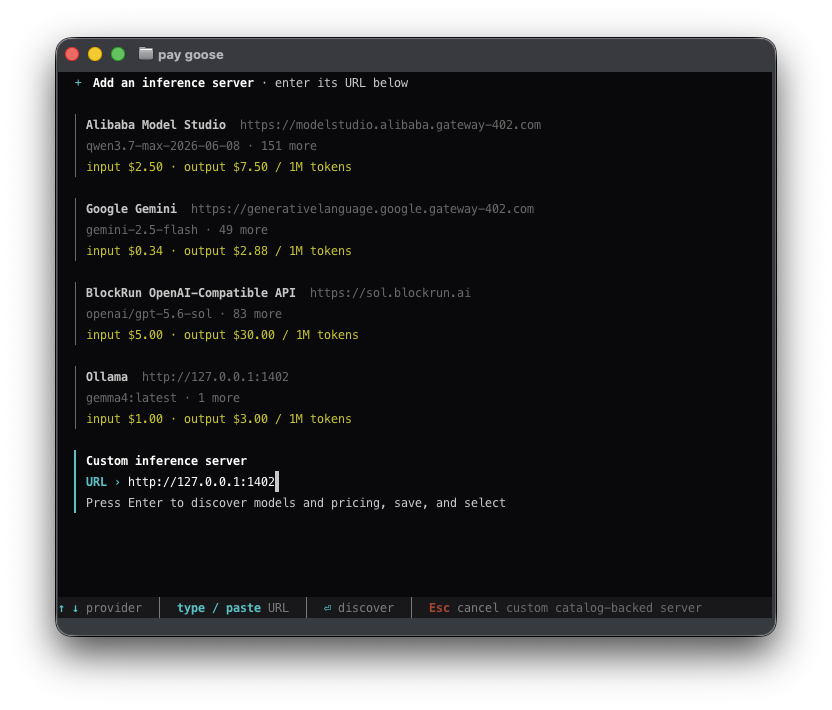
Add your inference server as a provider. Pay then routes Goose's inference traffic to your endpoint.
Security notice and operator responsibility
- All examples use
--sandbox; the gateway refuses non-localnet payment configuration. - Local quickstarts bind both services to loopback. The Ubuntu playbook keeps llama.cpp on loopback but intentionally exposes the Pay sandbox gateway on port
8080; UFW opens SSH and that port. - The playbook pins the llama.cpp release commit, verifies the default GGUF SHA-256, verifies the Pay.sh release checksum, uses non-login service accounts, and applies systemd sandboxing. These controls reduce risk; they do not prove the deployment is secure.
- The inference engine has no application authentication and remains private. The public gateway is still vulnerable to scanning, denial of service, dependency flaws, and sandbox-funded compute abuse.
- The gateway root publishes provider availability, model names, and configured prices. Its diagnostic UI is disabled on the public deployment.
- Plain
curlmakes an unsigned request only. It never invokes Pay.sh or a signer. pay --sandbox curlhandles payment authorization and retry. Review the displayed recipient, maximum amount, asset, and network before approving.- Model prompts and responses are forwarded to the selected local engine. Sandbox settlement may use Pay's configured localnet RPC infrastructure.
- No private key, seed phrase, API token, or wallet file belongs in this project.
- You are responsible for host patching, SSH access, network policy, TLS, abuse controls, backups, monitoring, model licensing, privacy, sanctions, tax, and other legal or regulatory obligations.
- Stop the gateway to remove access. Use
pay account --helpas thepay-gatewayservice user to inspect or remove its sandbox account state.
This template and its Ubuntu provisioning are provided as-is under the MIT License, without warranties or guarantees. They have not received a formal security audit or certification. You assume the risk of deploying or modifying them. Nothing here is legal, security, tax, or compliance advice. Read the full security policy and deployment checklist.
Pay resources
- Pay.sh — Browse pay-per-use APIs and see how Pay.sh works.
- Getting started — Gate a local API with Pay.sh and test its first paid request.
- Deployment overview — Compare Vercel and Cloud Run deployment paths for a hosted Pay.sh gateway.
- Video walkthrough — Watch an end-to-end introduction to Pay.sh.