Summary
An instruction has 3 fields: program_id (which program to invoke),
accounts (AccountMeta list with is_signer/is_writable flags), and data
(byte array of data that the program interprets).
Instruction structure
An
Instruction
consists of three fields:
program_id: The ID of the program being invoked.accounts: An array of account metadatadata: A byte array with additional data to be used by the instruction.
pub struct Instruction {/// Pubkey of the program that executes this instruction.pub program_id: Pubkey,/// Metadata describing accounts that should be passed to the program.pub accounts: Vec<AccountMeta>,/// Opaque data passed to the program for its own interpretation.pub data: Vec<u8>,}
Program ID
The instruction's program_id is the
public key address of the program that contains the instruction's execution
logic. The runtime uses this field to route the instruction to the correct
program for processing.
Account metadata
The instruction's accounts array is an ordered list of
AccountMeta
structs. Metadata must be provided for each account the instruction interacts
with. The validator uses this metadata to determine which transactions can run
in parallel. Transactions that write to different accounts can execute in
parallel.
The diagram below depicts a transaction that contains a single instruction. The
instruction's accounts array contains metadata for two accounts.
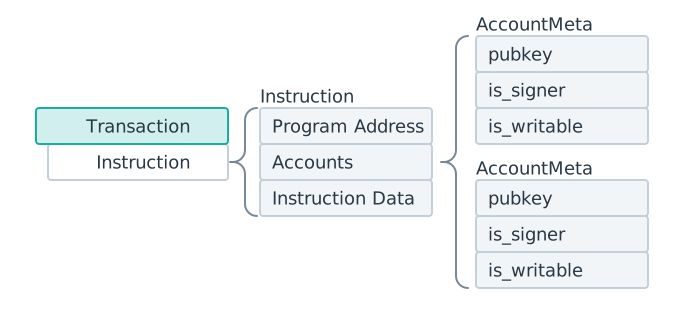 A transaction with one instruction. The instruction contains two AccountMeta structs in its accounts array.
Each AccountMeta has three fields:
- pubkey: The account's public key address
- is_signer: Set to
trueif the account must sign the transaction - is_writable: Set to
trueif the instruction modifies the account's data
To know which accounts an instruction requires, including which must be writable, read-only, or sign the transaction, you must refer to the implementation of the instruction, as defined by the program.
pub struct AccountMeta {/// An account's public key.pub pubkey: Pubkey,/// True if an `Instruction` requires a `Transaction` signature matching `pubkey`.pub is_signer: bool,/// True if the account data or metadata may be mutated during program execution.pub is_writable: bool,}
Data
The instruction's data field is a byte array that tells the program which
function to invoke and supplies the arguments for that function. The data
typically begins with a discriminator or index byte(s) that identifies the
target function, followed by the serialized arguments. The encoding format is
defined by each program (for example, Borsh serialization or a custom layout).
Common encoding conventions:
- Core programs (System, Stake, Vote): Use a Bincode-serialized enum variant index followed by serialized arguments.
- Anchor programs: Use an 8-byte discriminator (the first 8 bytes of the
SHA-256 hash of
"global:<function_name>") followed by Borsh-serialized arguments.
The runtime does not interpret the data field. It is passed as-is to the
program's process_instruction entrypoint.
Compiled instruction
When instructions are serialized into a transaction message, they become
CompiledInstruction
structs that replace all public keys with compact integer indices into the
message's account_keys array.
Example: SOL transfer instruction
The example below shows the structure of a SOL transfer instruction.
import { generateKeyPairSigner, lamports } from "@solana/kit";import { getTransferSolInstruction } from "@solana-program/system";// Generate sender and recipient keypairsconst sender = await generateKeyPairSigner();const recipient = await generateKeyPairSigner();// Define the amount to transferconst LAMPORTS_PER_SOL = 1_000_000_000n;const transferAmount = lamports(LAMPORTS_PER_SOL / 100n); // 0.01 SOL// Create a transfer instruction for transferring SOL from sender to recipientconst transferInstruction = getTransferSolInstruction({source: sender,destination: recipient.address,amount: transferAmount});console.log(JSON.stringify(transferInstruction, null, 2));
The code below shows the output from the previous code snippets. The format will
differ between SDKs, but notice that each instruction contains the same three
pieces of required information: program_id,
accounts, data.
{"accounts": [{"address": "Hu28vRMGWpQXN56eaE7jRiDDRRz3vCXEs7EKHRfL6bC","role": 3,"signer": {"address": "Hu28vRMGWpQXN56eaE7jRiDDRRz3vCXEs7EKHRfL6bC","keyPair": {"privateKey": {},"publicKey": {}}}},{"address": "2mBY6CTgeyJNJDzo6d2Umipw2aGUquUA7hLdFttNEj7p","role": 1}],"programAddress": "11111111111111111111111111111111","data": {"0": 2,"1": 0,"2": 0,"3": 0,"4": 128,"5": 150,"6": 152,"7": 0,"8": 0,"9": 0,"10": 0,"11": 0}}
The examples below show how to manually build the transfer instruction. (The
Expanded Instruction tab is functionally equivalent to the Instruction tab.)
In practice, you usually don’t have to construct an Instruction manually.
Most programs provide client libraries with helper functions that create the
instructions for you. If a library isn't available, you can manually build the
instruction.
const transferAmount = 0.01; // 0.01 SOLconst transferInstruction = getTransferSolInstruction({source: sender,destination: recipient.address,amount: transferAmount * LAMPORTS_PER_SOL});
Is this page helpful?