Summary
A transaction has signatures + a message. The message contains a header, account addresses, recent blockhash, and compiled instructions. Max serialized size: 1,232 bytes.
A
Transaction
has two top-level fields:
signatures: An array of signaturesmessage: Transaction information, including the list of instructions to be processed
pub struct Transaction {pub signatures: Vec<Signature>,pub message: Message,}
 Diagram showing the two parts of a transaction
The total serialized size of a transaction must not exceed
PACKET_DATA_SIZE
(1,232 bytes). This limit equals 1,280 bytes (the IPv6 minimum MTU) minus 48
bytes for network headers (40 bytes IPv6 + 8 bytes fragment header). The 1,232
bytes include both the signatures array and the
message struct.
 Diagram showing the transaction format and size limits
Signatures
The signatures field is a compact-encoded array of
Signature
values. Each Signature is a 64-byte Ed25519 signature of the serialized
Message, signed with the signer account's private key. One signature is
required for every signer account referenced by the
transaction's instructions.
The first signature in the array belongs to the fee payer, the account that pays the transaction base fee and prioritization fee. This first signature also serves as the transaction ID, used to look up the transaction on the network. The transaction ID is commonly referred to as the transaction signature.
Fee payer requirements:
- Must be the first account in the message (index 0) and a signer.
- Must be a System Program-owned account or a nonce account (validated by
validate_fee_payer). - Must hold enough lamports to cover
rent_exempt_minimum + total_fee; otherwise the transaction fails withInsufficientFundsForFee.
Message
The message field is a
Message
struct containing the transaction's payload:
header: The message headeraccount_keys: An array of account addresses required by the transaction's instructionsrecent_blockhash: A blockhash that acts as a timestamp for the transactioninstructions: An array of instructions
pub struct Message {/// The message header, identifying signed and read-only `account_keys`.pub header: MessageHeader,/// All the account keys used by this transaction.#[serde(with = "short_vec")]pub account_keys: Vec<Pubkey>,/// The id of a recent ledger entry.pub recent_blockhash: Hash,/// Programs that will be executed in sequence and committed in/// one atomic transaction if all succeed.#[serde(with = "short_vec")]pub instructions: Vec<CompiledInstruction>,}
Header
The header field is a
MessageHeader
struct with three u8 fields that partition the account_keys array into
permission groups:
num_required_signatures: Total number of signatures required by the transaction.num_readonly_signed_accounts: Number of signed accounts that are read-only.num_readonly_unsigned_accounts: Number of unsigned accounts that are read-only.
pub struct MessageHeader {/// The number of signatures required for this message to be considered/// valid. The signers of those signatures must match the first/// `num_required_signatures` of [`Message::account_keys`].pub num_required_signatures: u8,/// The last `num_readonly_signed_accounts` of the signed keys are read-only/// accounts.pub num_readonly_signed_accounts: u8,/// The last `num_readonly_unsigned_accounts` of the unsigned keys are/// read-only accounts.pub num_readonly_unsigned_accounts: u8,}
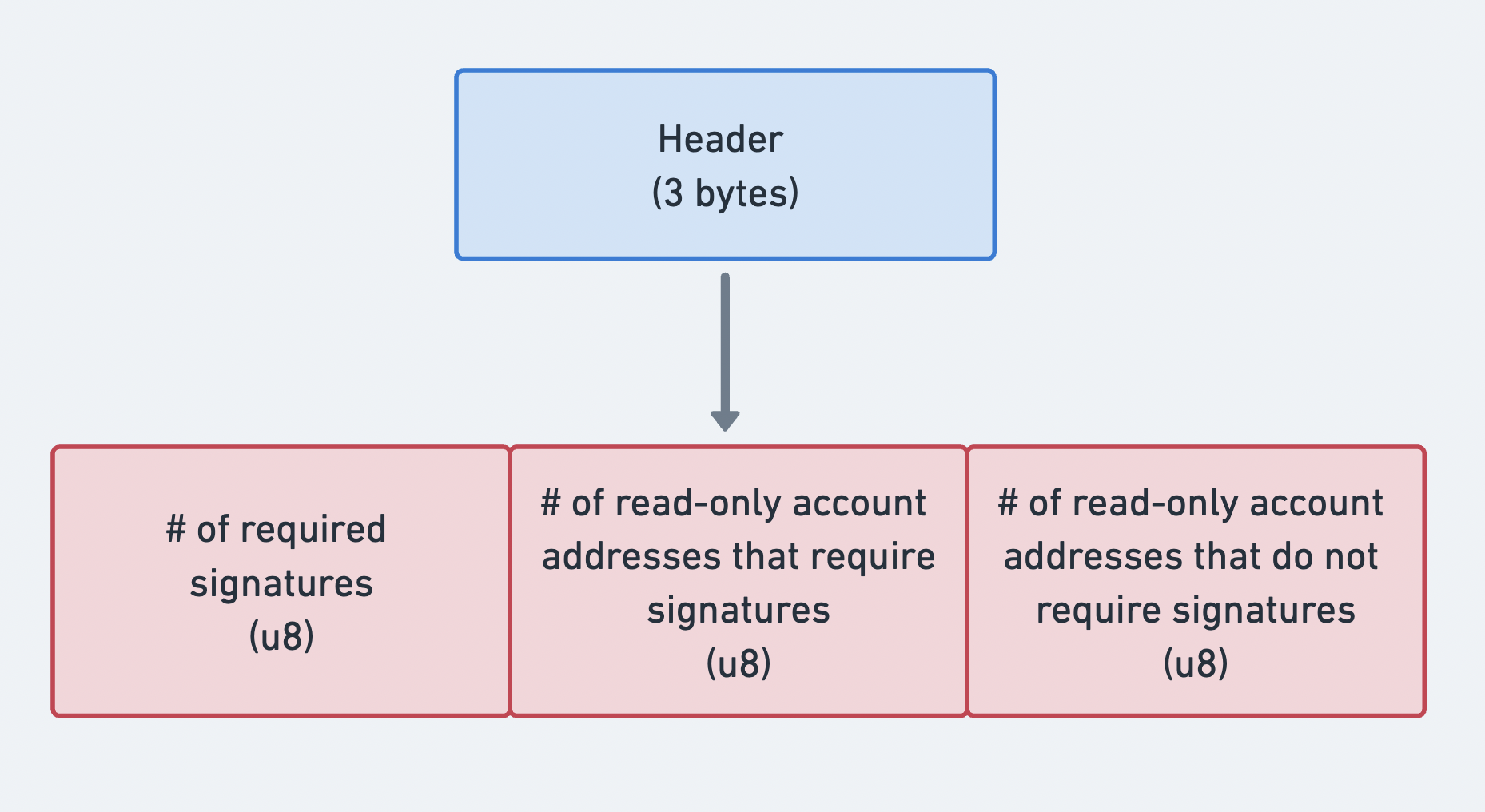 Diagram showing the three parts of the message header
Account addresses
The
account_keys
field is a compact-encoded array of public keys. Each entry identifies an
account used by at least one of the transaction's instructions. The array must
include every account and must follow this strict ordering:
- Signer + Writable
- Signer + Read-only
- Non-signer + Writable
- Non-signer + Read-only
This strict ordering allows the account_keys array to be combined with the
three counts in the message's header to determine the permissions
for each account without storing per-account metadata flags. The header counts
partition the array into the four permission groups listed above.
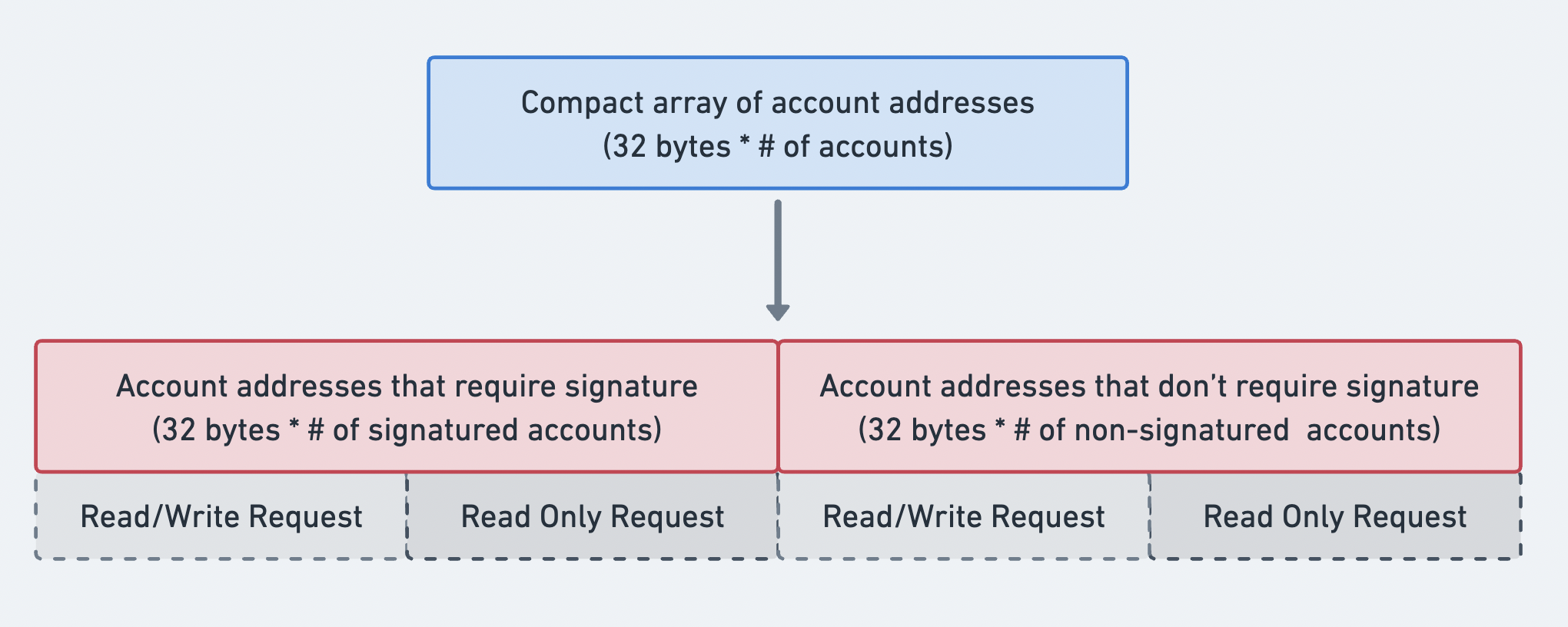 Diagram showing the order of the account addresses array
Recent blockhash
The recent_blockhash field is a 32-byte hash that serves two purposes:
- Timestamp: proves the transaction was created recently.
- Deduplication: prevents the same transaction from being processed twice.
A blockhash expires after 150 slots. If the blockhash is no longer valid when
the transaction arrives, it is rejected with BlockhashNotFound, unless it
is a valid durable nonce transaction.
The getLatestBlockhash RPC method
allows you to get the current blockhash and last block height at which the
blockhash will be valid.
Instructions
The
instructions
field is a compact-encoded array of
CompiledInstruction
structs. Each CompiledInstruction references accounts by index into the
account_keys array rather than by full public key. It contains:
program_id_index: Index intoaccount_keysidentifying the program to invoke.accounts: Array of indices intoaccount_keysspecifying the accounts to pass to the program.data: Byte array containing the instruction discriminator and serialized arguments.
pub struct CompiledInstruction {/// Index into the transaction keys array indicating the program account that executes this instruction.pub program_id_index: u8,/// Ordered indices into the transaction keys array indicating which accounts to pass to the program.#[serde(with = "short_vec")]pub accounts: Vec<u8>,/// The program input data.#[serde(with = "short_vec")]pub data: Vec<u8>,}
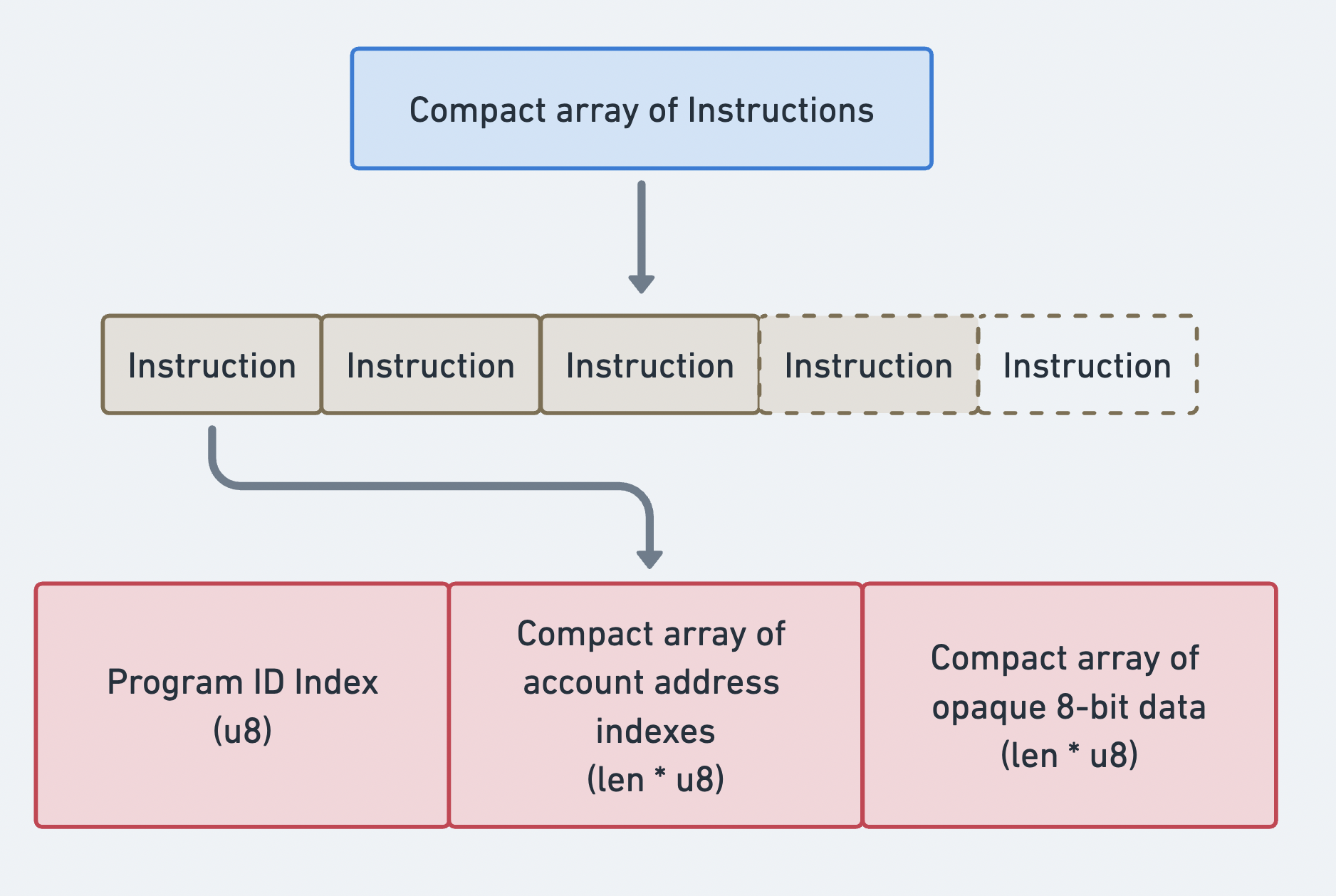 Compact array of Instructions
Transaction binary format
Transactions are serialized using a compact encoding scheme. All variable-length arrays (signatures, account keys, instructions) are prefixed with a compact-u16 length encoding. This format uses 1 byte for values 0-127 and 2-3 bytes for larger values.
Legacy transaction layout (on the wire):
| Field | Size | Description |
|---|---|---|
num_signatures | 1-3 bytes (compact-u16) | Number of signatures |
signatures | num_signatures x 64 bytes | Ed25519 signatures |
num_required_signatures | 1 byte | MessageHeader field 1 |
num_readonly_signed | 1 byte | MessageHeader field 2 |
num_readonly_unsigned | 1 byte | MessageHeader field 3 |
num_account_keys | 1-3 bytes (compact-u16) | Number of static account keys |
account_keys | num_account_keys x 32 bytes | Public keys |
recent_blockhash | 32 bytes | Blockhash |
num_instructions | 1-3 bytes (compact-u16) | Number of instructions |
instructions | variable | Array of compiled instructions |
Each compiled instruction is serialized as:
| Field | Size | Description |
|---|---|---|
program_id_index | 1 byte | Index into account keys |
num_accounts | 1-3 bytes (compact-u16) | Number of account indices |
account_indices | num_accounts x 1 byte | Account key indices |
data_len | 1-3 bytes (compact-u16) | Length of instruction data |
data | data_len bytes | Opaque instruction data |
Size calculation
Given PACKET_DATA_SIZE = 1,232 bytes, the available space can be
calculated:
Total = 1232 bytes- compact-u16(num_sigs) # 1 byte- num_sigs * 64 # signature bytes- 3 # message header- compact-u16(num_keys) # 1 byte- num_keys * 32 # account key bytes- 32 # recent blockhash- compact-u16(num_ixs) # 1 byte- sum(instruction_sizes) # per-instruction overhead + data
Example: SOL transfer transaction
The diagram below shows how transactions and instructions work together to allow users to interact with the network. In this example, SOL is transferred from one account to another.
The sender account's metadata indicates that it must sign for the transaction. This allows the System Program to deduct lamports. Both the sender and recipient accounts must be writable, in order for their lamport balance to change. To execute this instruction, the sender's wallet sends the transaction containing its signature and the message containing the SOL transfer instruction.
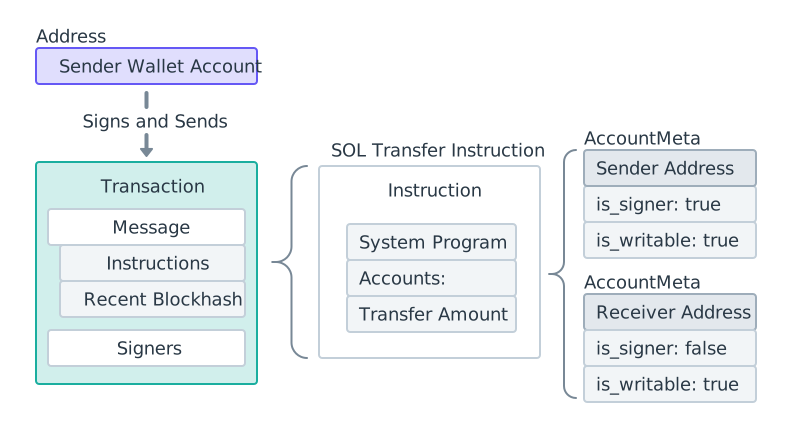 SOL transfer diagram
After the transaction is sent, the System Program processes the transfer instruction and updates the lamport balance of both accounts.
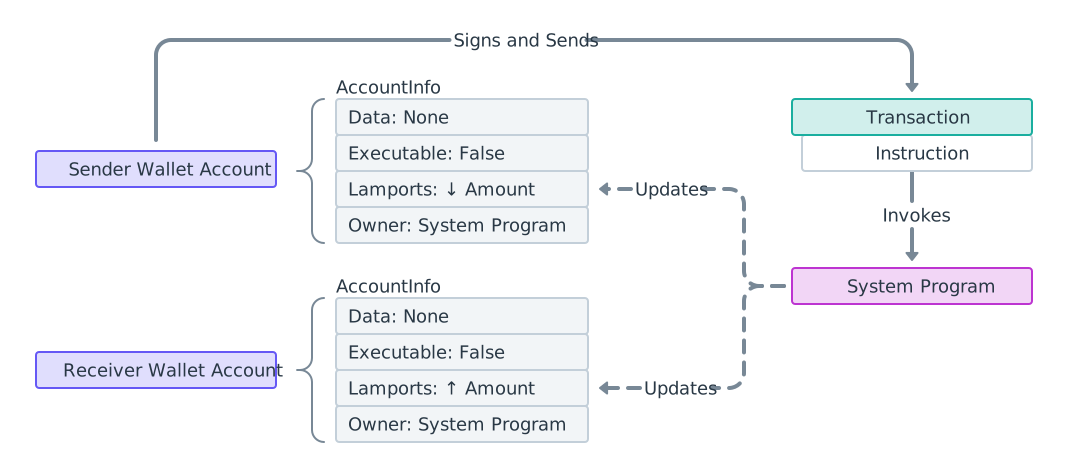 SOL transfer process diagram
The example below shows the code relevant to the above diagrams. See the System
Program's
transfer function.
import {airdropFactory,appendTransactionMessageInstructions,createSolanaRpc,createSolanaRpcSubscriptions,createTransactionMessage,generateKeyPairSigner,getSignatureFromTransaction,lamports,pipe,sendAndConfirmTransactionFactory,setTransactionMessageFeePayerSigner,setTransactionMessageLifetimeUsingBlockhash,signTransactionMessageWithSigners} from "@solana/kit";import { getTransferSolInstruction } from "@solana-program/system";// Create a connection to clusterconst rpc = createSolanaRpc("http://localhost:8899");const rpcSubscriptions = createSolanaRpcSubscriptions("ws://localhost:8900");// Generate sender and recipient keypairsconst sender = await generateKeyPairSigner();const recipient = await generateKeyPairSigner();const LAMPORTS_PER_SOL = 1_000_000_000n;const transferAmount = lamports(LAMPORTS_PER_SOL / 100n); // 0.01 SOL// Fund sender with airdropawait airdropFactory({ rpc, rpcSubscriptions })({recipientAddress: sender.address,lamports: lamports(LAMPORTS_PER_SOL), // 1 SOLcommitment: "confirmed"});// Check balance before transferconst { value: preBalance1 } = await rpc.getBalance(sender.address).send();const { value: preBalance2 } = await rpc.getBalance(recipient.address).send();// Create a transfer instruction for transferring SOL from sender to recipientconst transferInstruction = getTransferSolInstruction({source: sender,destination: recipient.address,amount: transferAmount // 0.01 SOL in lamports});// Add the transfer instruction to a new transactionconst { value: latestBlockhash } = await rpc.getLatestBlockhash().send();const transactionMessage = pipe(createTransactionMessage({ version: 0 }),(tx) => setTransactionMessageFeePayerSigner(sender, tx),(tx) => setTransactionMessageLifetimeUsingBlockhash(latestBlockhash, tx),(tx) => appendTransactionMessageInstructions([transferInstruction], tx));// Send the transaction to the networkconst signedTransaction =await signTransactionMessageWithSigners(transactionMessage);await sendAndConfirmTransactionFactory({ rpc, rpcSubscriptions })(signedTransaction,{ commitment: "confirmed" });const transactionSignature = getSignatureFromTransaction(signedTransaction);// Check balance after transferconst { value: postBalance1 } = await rpc.getBalance(sender.address).send();const { value: postBalance2 } = await rpc.getBalance(recipient.address).send();console.log("Sender prebalance:",Number(preBalance1) / Number(LAMPORTS_PER_SOL));console.log("Recipient prebalance:",Number(preBalance2) / Number(LAMPORTS_PER_SOL));console.log("Sender postbalance:",Number(postBalance1) / Number(LAMPORTS_PER_SOL));console.log("Recipient postbalance:",Number(postBalance2) / Number(LAMPORTS_PER_SOL));console.log("Transaction Signature:", transactionSignature);
The following example shows the structure of a transaction that contains a single SOL transfer instruction.
import {createSolanaRpc,generateKeyPairSigner,lamports,createTransactionMessage,setTransactionMessageFeePayerSigner,setTransactionMessageLifetimeUsingBlockhash,appendTransactionMessageInstructions,pipe,signTransactionMessageWithSigners,getCompiledTransactionMessageDecoder} from "@solana/kit";import { getTransferSolInstruction } from "@solana-program/system";const rpc = createSolanaRpc("http://localhost:8899");const { value: latestBlockhash } = await rpc.getLatestBlockhash().send();// Generate sender and recipient keypairsconst sender = await generateKeyPairSigner();const recipient = await generateKeyPairSigner();// Define the amount to transferconst LAMPORTS_PER_SOL = 1_000_000_000n;const transferAmount = lamports(LAMPORTS_PER_SOL / 100n); // 0.01 SOL// Create a transfer instruction for transferring SOL from sender to recipientconst transferInstruction = getTransferSolInstruction({source: sender,destination: recipient.address,amount: transferAmount});// Create transaction messageconst transactionMessage = pipe(createTransactionMessage({ version: 0 }),(tx) => setTransactionMessageFeePayerSigner(sender, tx),(tx) => setTransactionMessageLifetimeUsingBlockhash(latestBlockhash, tx),(tx) => appendTransactionMessageInstructions([transferInstruction], tx));const signedTransaction =await signTransactionMessageWithSigners(transactionMessage);// Decode the messageBytesconst compiledTransactionMessage =getCompiledTransactionMessageDecoder().decode(signedTransaction.messageBytes);console.log(JSON.stringify(compiledTransactionMessage, null, 2));
The code below shows the output from the previous code snippets. The format differs between SDKs, but notice that each instruction contains the same required information.
{"version": 0,"header": {"numSignerAccounts": 1,"numReadonlySignerAccounts": 0,"numReadonlyNonSignerAccounts": 1},"staticAccounts": ["HoCy8p5xxDDYTYWEbQZasEjVNM5rxvidx8AfyqA4ywBa","5T388jBjovy7d8mQ3emHxMDTbUF8b7nWvAnSiP3EAdFL","11111111111111111111111111111111"],"lifetimeToken": "EGCWPUEXhqHJWYBfDirq3mHZb4qDpATmYqBZMBy9TBC1","instructions": [{"programAddressIndex": 2,"accountIndices": [0, 1],"data": {"0": 2,"1": 0,"2": 0,"3": 0,"4": 128,"5": 150,"6": 152,"7": 0,"8": 0,"9": 0,"10": 0,"11": 0}}]}
Fetching transaction details
After submission, retrieve transaction details using the transaction signature and the getTransaction RPC method.
You can also find the transaction using Solana Explorer.
{"blockTime": 1745196488,"meta": {"computeUnitsConsumed": 150,"err": null,"fee": 5000,"innerInstructions": [],"loadedAddresses": {"readonly": [],"writable": []},"logMessages": ["Program 11111111111111111111111111111111 invoke [1]","Program 11111111111111111111111111111111 success"],"postBalances": [989995000, 10000000, 1],"postTokenBalances": [],"preBalances": [1000000000, 0, 1],"preTokenBalances": [],"rewards": [],"status": {"Ok": null}},"slot": 13049,"transaction": {"message": {"header": {"numReadonlySignedAccounts": 0,"numReadonlyUnsignedAccounts": 1,"numRequiredSignatures": 1},"accountKeys": ["8PLdpLxkuv9Nt8w3XcGXvNa663LXDjSrSNon4EK7QSjQ","7GLg7bqgLBv1HVWXKgWAm6YoPf1LoWnyWGABbgk487Ma","11111111111111111111111111111111"],"recentBlockhash": "7ZCxc2SDhzV2bYgEQqdxTpweYJkpwshVSDtXuY7uPtjf","instructions": [{"accounts": [0, 1],"data": "3Bxs4NN8M2Yn4TLb","programIdIndex": 2,"stackHeight": null}],"indexToProgramIds": {}},"signatures": ["3jUKrQp1UGq5ih6FTDUUt2kkqUfoG2o4kY5T1DoVHK2tXXDLdxJSXzuJGY4JPoRivgbi45U2bc7LZfMa6C4R3szX"]},"version": "legacy"}
Is this page helpful?