A Solana transaction is a container that holds one or more instructions. Each instruction is an operation—transfer tokens, create an account, call a program. The network executes all instructions in a transaction sequentially and atomically: either every instruction succeeds, or the entire transaction fails and rolls back.
This means you can pack multiple transfers into a single transaction. Instead of sending three separate transactions to pay three recipients, you send one transaction with three transfer instructions. This is faster (one confirmation instead of three) and cheaper (one base fee instead of three). Here's an illustrative example of how payments (referred to as "drops" in this image) are batched into a single transaction and multiple transactions are sent to handle the larger batch.
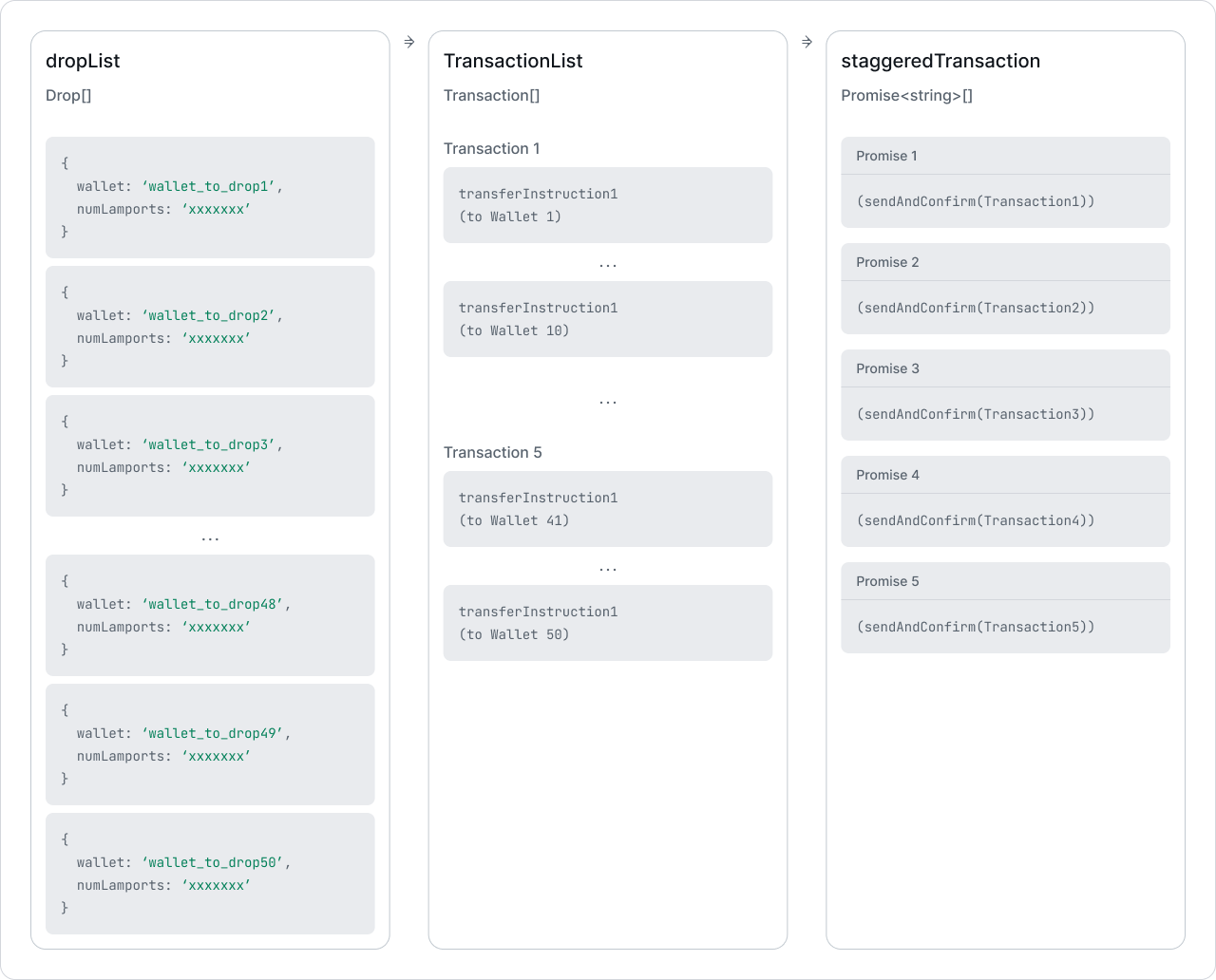 Batch payments diagram
Source: QuickNode - How to Send Bulk Transactions on Solana
For more information on transactions and instructions, see the Transactions and Instructions guides.
The walkthrough below shows how to load multiple transfer instructions into a single transaction for batch payments.
Batching Instructions into a Single Transaction
A Solana transaction can contain multiple transfers to different recipients. You sign once, pay one transaction fee, and all transfers settle together. If any transfer fails, the entire transaction is rejected.
See How Payments Work on Solana for core payment concepts.
Batching multiple transfers requires building each instruction separately, then combining them into a single transaction.
The steps below show the core flow. See the Demo for complete runnable code.
Derive Token Accounts
First, derive the Associated Token Account (ATA) addresses for the sender and each recipient. ATAs are deterministic addresses based on the wallet and mint.
const [senderAta] = await findAssociatedTokenPda({mint: mint.address,owner: sender.address,tokenProgram: TOKEN_2022_PROGRAM_ADDRESS});const [recipient1Ata] = await findAssociatedTokenPda({mint: mint.address,owner: recipient1.address,tokenProgram: TOKEN_2022_PROGRAM_ADDRESS});const [recipient2Ata] = await findAssociatedTokenPda({mint: mint.address,owner: recipient2.address,tokenProgram: TOKEN_2022_PROGRAM_ADDRESS});
Create Transfer Instructions
Create a separate transfer instruction for each recipient. Each instruction specifies the:
- source token account address
- destination token account address
- authority (source token account owner address)
- amount in base units (adjusted for the mint's decimals)
const [senderAta] = await findAssociatedTokenPda({mint: mint.address,owner: sender.address,tokenProgram: TOKEN_2022_PROGRAM_ADDRESS});const [recipient1Ata] = await findAssociatedTokenPda({mint: mint.address,owner: recipient1.address,tokenProgram: TOKEN_2022_PROGRAM_ADDRESS});const [recipient2Ata] = await findAssociatedTokenPda({mint: mint.address,owner: recipient2.address,tokenProgram: TOKEN_2022_PROGRAM_ADDRESS});const transfer1Instruction = getTransferInstruction({source: senderAta,destination: recipient1Ata,authority: sender.address,amount: 250_000n});const transfer2Instruction = getTransferInstruction({source: senderAta,destination: recipient2Ata,authority: sender.address,amount: 250_000n});
Send as Single Transaction
Add all transfer instructions into a single transaction. This executes all transfers atomically, either all transfers succeed or the entire transaction fails.
Verify Balances
After the batch transfer, verify the token balances for all parties using the
splToken helper.
const [senderAta] = await findAssociatedTokenPda({mint: mint.address,owner: sender.address,tokenProgram: TOKEN_2022_PROGRAM_ADDRESS});const [recipient1Ata] = await findAssociatedTokenPda({mint: mint.address,owner: recipient1.address,tokenProgram: TOKEN_2022_PROGRAM_ADDRESS});const [recipient2Ata] = await findAssociatedTokenPda({mint: mint.address,owner: recipient2.address,tokenProgram: TOKEN_2022_PROGRAM_ADDRESS});const transfer1Instruction = getTransferInstruction({source: senderAta,destination: recipient1Ata,authority: sender.address,amount: 250_000n});const transfer2Instruction = getTransferInstruction({source: senderAta,destination: recipient2Ata,authority: sender.address,amount: 250_000n});const signature = await client.transaction.prepareAndSend({authority: sender,instructions: [transfer1Instruction, transfer2Instruction],version: 0});const splToken = client.splToken({mint: mint.address,tokenProgram: "auto"});const senderBalance = await splToken.fetchBalance(sender.address);const recipient1Balance = await splToken.fetchBalance(recipient1.address);const recipient2Balance = await splToken.fetchBalance(recipient2.address);
Demo
// Generate keypairs for sender and two recipientsconst sender = (await generateKeypair()).signer;const recipient1 = (await generateKeypair()).signer;const recipient2 = (await generateKeypair()).signer;console.log("Sender Address:", sender.address);console.log("Recipient 1 Address:", recipient1.address);console.log("Recipient 2 Address:", recipient2.address);// Demo Setup: Create client, mint account, token accounts, and fund with initial tokensconst { client, mint } = await demoSetup(sender, recipient1, recipient2);console.log("\nMint Address:", mint.address);// Derive the Associated Token Accounts addresses (ATAs) for sender and recipientsconst [senderAta] = await findAssociatedTokenPda({mint: mint.address,owner: sender.address,tokenProgram: TOKEN_2022_PROGRAM_ADDRESS});const [recipient1Ata] = await findAssociatedTokenPda({mint: mint.address,owner: recipient1.address,tokenProgram: TOKEN_2022_PROGRAM_ADDRESS});const [recipient2Ata] = await findAssociatedTokenPda({mint: mint.address,owner: recipient2.address,tokenProgram: TOKEN_2022_PROGRAM_ADDRESS});console.log("Sender Token Account:", senderAta.toString());console.log("Recipient 1 Token Account:", recipient1Ata.toString());console.log("Recipient 2 Token Account:", recipient2Ata.toString());// =============================================================================// Batch Token Payment Demo// =============================================================================// Create instructions to transfer tokens from sender to both recipients// Transferring 250,000 base units = 0.25 tokens (with 6 decimals) to eachconst transfer1Instruction = getTransferInstruction({source: senderAta,destination: recipient1Ata,authority: sender.address,amount: 250_000n // 0.25 tokens});const transfer2Instruction = getTransferInstruction({source: senderAta,destination: recipient2Ata,authority: sender.address,amount: 250_000n // 0.25 tokens});// Prepare and send both transfers in a single transaction using @solana/clientconst signature = await client.transaction.prepareAndSend({authority: sender,instructions: [transfer1Instruction, transfer2Instruction],version: 0});console.log("\n=== Batch Token Payment Complete ===");console.log("Transaction Signature:", signature.toString());// Fetch final token account balances using @solana/client SPL token helperconst splToken = client.splToken({mint: mint.address,tokenProgram: "auto"});const senderBalance = await splToken.fetchBalance(sender.address);const recipient1Balance = await splToken.fetchBalance(recipient1.address);const recipient2Balance = await splToken.fetchBalance(recipient2.address);console.log("\nSender Token Account Balance:", senderBalance);console.log("Recipient 1 Token Account Balance:", recipient1Balance);console.log("Recipient 2 Token Account Balance:", recipient2Balance);// =============================================================================// Demo Setup Helper Function// =============================================================================
Scaling with Transaction Planning
A single transaction has size limits—roughly 1232 bytes. For large batch operations (payroll for hundreds of employees, mass airdrops), you'll exceed this limit and need to split work across multiple transactions.
Though you are welcome to create your own transaction distribution logic, the
@solana/instruction-plans
package (part of Solana Kit) handles this at two levels:
Instruction plans define your operations and their ordering constraints:
- Sequential — instructions that must execute in order
- Parallel — instructions that can execute in any order
- Non-divisible — instructions that must stay together in the same transaction
Transaction plans are generated from instruction plans. The planner intelligently packs instructions into optimally-sized transactions, respecting your ordering constraints. The resulting transaction plan can then be:
- Executed — signed and sent to the network, with parallel transactions sent concurrently
- Simulated — dry-run against the network to verify before sending
- Serialized — compiled to base64 for external signing services or multi-party workflows
This two-level approach lets you think in terms of operations ("transfer to Alice, then transfer to Bob") while the library handles the mechanics of transaction sizing, packing, and parallel execution.
Is this page helpful?