Ringkasan
Akun program menyimpan kode sBPF yang dapat dieksekusi. Akun data menyimpan state, yang dimiliki oleh program. Akun sistem dimiliki oleh System Program. Sysvars menyediakan state cluster-wide yang dapat diakses di alamat yang telah ditentukan.
Field executable menentukan kategori
akun:
- Akun program:
executable=true. Berisi kode yang dapat dieksekusi. - Akun data:
executable=false. Menyimpan state atau data pengguna.
Pemisahan kode dari state yang dapat diubah ini berarti program di-deploy sekali dan dapat mengelola sejumlah akun data.
Akun program
Akun program menyimpan kode yang dapat dieksekusi. Setiap akun program dimiliki oleh program loader. Ketika sebuah program di-deploy, runtime membuat akun program untuk menyimpan bytecode-nya.
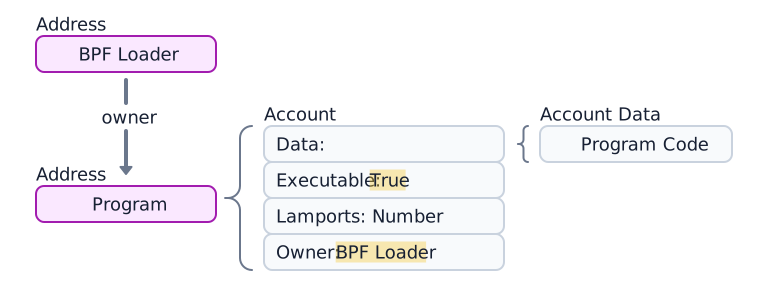
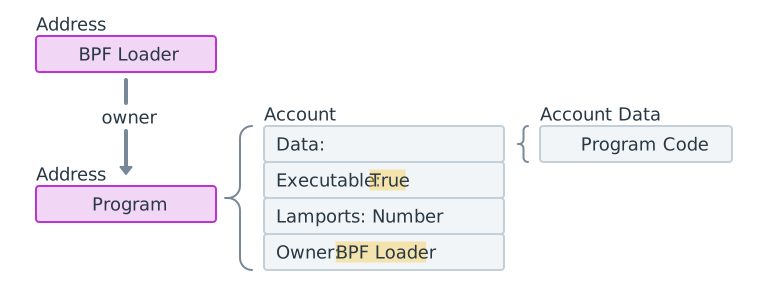 Diagram of a program account, its 4 components and its loader program.
Akun data program
Program yang di-deploy menggunakan loader-v3 (lihat
Program loader) tidak
menyimpan bytecode yang dapat dieksekusi di field data mereka sendiri.
Sebaliknya, data mereka menunjuk ke akun data program terpisah yang berisi
kode program. (Lihat diagram di bawah.)

 A program account with data. The data points to a separate program data account
Selama deployment atau upgrade program, akun buffer digunakan untuk sementara menyimpan upload.
Contoh berikut mengambil akun Token Program. Field executable adalah true,
mengonfirmasi bahwa ini adalah akun program.
import { Address, createClient } from "@solana/kit";import { solanaRpc } from "@solana/kit-plugin-rpc";import { generatedPayer } from "@solana/kit-plugin-signer";const client = await createClient().use(generatedPayer()).use(solanaRpc({rpcUrl: "https://api.mainnet.solana.com"}));const programId = "TokenkegQfeZyiNwAJbNbGKPFXCWuBvf9Ss623VQ5DA" as Address;const accountInfo = await client.rpc.getAccountInfo(programId, { encoding: "base64" }).send();console.log(accountInfo);
Akun data
Akun data tidak berisi kode yang dapat dieksekusi. Mereka menyimpan state yang didefinisikan oleh program.
Akun state program
Program menyimpan state mereka dalam akun data. Membuat akun state program melibatkan dua langkah:
- Panggil System Program untuk membuat akun. System Program mentransfer kepemilikan ke program yang ditentukan.
- Program pemilik menginisialisasi field
dataakun sesuai dengan instruksi nya.
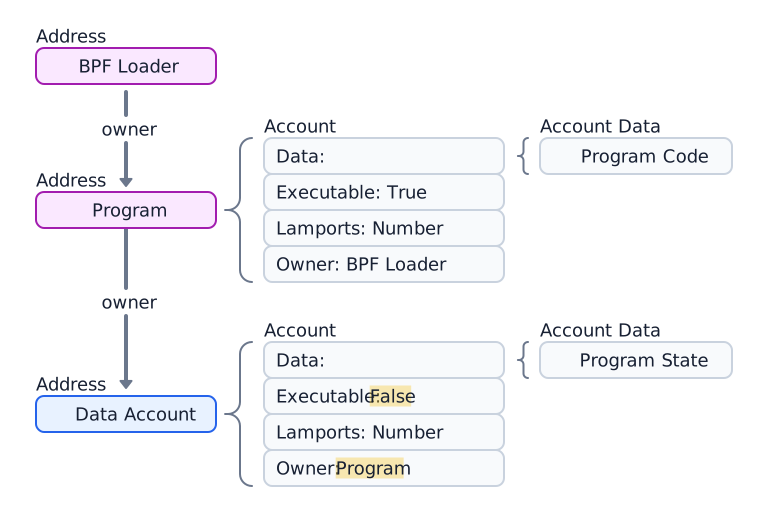
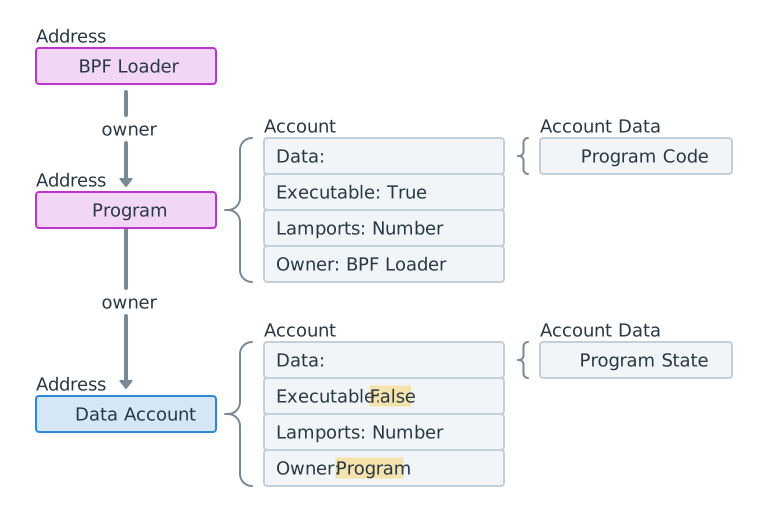 Diagram of a data account owned by a program account
Contoh berikut membuat dan mengambil akun Token Mint yang dimiliki oleh program Token 2022.
import { createClient, generateKeyPairSigner, lamports } from "@solana/kit";import { solanaRpc, rpcAirdrop } from "@solana/kit-plugin-rpc";import { generatedPayer, airdropPayer } from "@solana/kit-plugin-signer";import { systemProgram } from "@solana-program/system";import {getInitializeMintInstruction,getMintSize,TOKEN_2022_PROGRAM_ADDRESS,fetchMint} from "@solana-program/token-2022";const client = await createClient().use(generatedPayer()).use(solanaRpc({rpcUrl: "http://localhost:8899",rpcSubscriptionsUrl: "ws://localhost:8900"})).use(rpcAirdrop()).use(airdropPayer(lamports(1_000_000_000n))).use(systemProgram());// Generate keypair to use as address of mintconst mint = await generateKeyPairSigner();// Get default mint account size (in bytes), no extensions enabledconst space = BigInt(getMintSize());// Get minimum balance for rent exemptionconst rent = await client.rpc.getMinimumBalanceForRentExemption(space).send();const transactionSignature = await client.sendTransaction([client.system.instructions.createAccount({newAccount: mint,lamports: rent,space,programAddress: TOKEN_2022_PROGRAM_ADDRESS}),getInitializeMintInstruction({mint: mint.address,decimals: 9,mintAuthority: client.payer.address})]);console.log("Mint Address:", mint.address);console.log("Transaction Signature:", transactionSignature.context.signature);const accountInfo = await client.rpc.getAccountInfo(mint.address).send();console.log(accountInfo);const mintAccount = await fetchMint(client.rpc, mint.address);console.log(mintAccount);
Akun sistem
Akun yang tetap dimiliki oleh System Program setelah pembuatan disebut akun sistem. Mengirim SOL ke alamat baru untuk pertama kalinya membuat akun baru di alamat tersebut yang dimiliki oleh System Program.
Semua akun wallet adalah akun sistem. Pembayar biaya pada transaksi harus berupa akun sistem, karena hanya akun yang dimiliki System Program yang dapat membayar biaya transaksi.
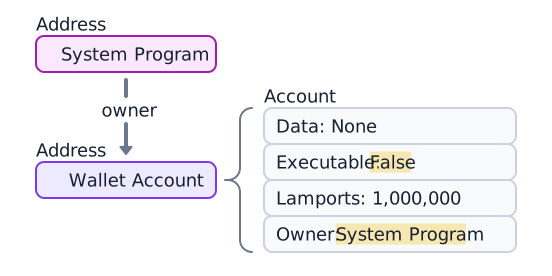
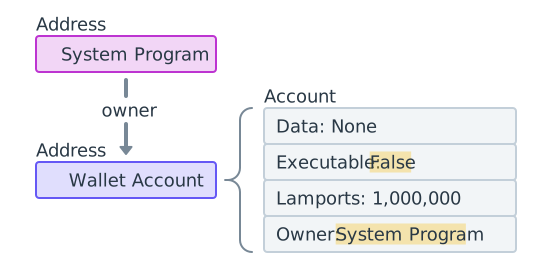 A wallet owned by the System Program containing 1,000,000 lamports
Contoh berikut menghasilkan keypair baru, mendanainya dengan SOL, dan mengambil
akun tersebut. Field owner adalah 11111111111111111111111111111111
(System Program).
import { createClient, generateKeyPairSigner, lamports } from "@solana/kit";import { solanaRpc, rpcAirdrop } from "@solana/kit-plugin-rpc";import { generatedPayer } from "@solana/kit-plugin-signer";const client = await createClient().use(generatedPayer()).use(solanaRpc({rpcUrl: "http://localhost:8899",rpcSubscriptionsUrl: "ws://localhost:8900"})).use(rpcAirdrop());// Generate a new keypairconst keypair = await generateKeyPairSigner();console.log(`Public Key: ${keypair.address}`);// Funding an address with SOL automatically creates an accountconst signature = await client.airdrop(keypair.address,lamports(1_000_000_000n));const accountInfo = await client.rpc.getAccountInfo(keypair.address).send();console.log(accountInfo);
Akun sysvar
Akun sysvar adalah akun khusus pada alamat yang telah ditentukan sebelumnya yang menyediakan akses read-only ke data state cluster. Akun ini diperbarui secara dinamis setiap slot.
| Sysvar | Alamat | Tujuan |
|---|---|---|
| Clock | SysvarC1ock11111111111111111111111111111111 | Slot, epoch, dan timestamp Unix saat ini |
| EpochSchedule | SysvarEpochSchedu1e111111111111111111111111 | Konstanta penjadwalan epoch yang ditetapkan di genesis |
| EpochRewards | SysvarEpochRewards1111111111111111111111111 | Status dan progres distribusi reward epoch |
| Rent | SysvarRent111111111111111111111111111111111 | Tarif rent dan ambang batas pembebasan |
| SlotHashes | SysvarS1otHashes111111111111111111111111111 | Hash terbaru dari bank parent slot |
| StakeHistory | SysvarStakeHistory1111111111111111111111111 | Aktivasi dan deaktivasi stake per epoch |
| LastRestartSlot | SysvarLastRestartS1ot1111111111111111111111 | Slot restart cluster terakhir |
| Instructions | Sysvar1nstructions1111111111111111111111111 | Instruksi terserialisasi dari transaksi saat ini |
| SlotHistory | SysvarS1otHistory11111111111111111111111111 | Catatan slot mana yang diproduksi selama epoch terakhir |
Contoh berikut mengambil dan mendeserialisasi akun Sysvar Clock.
import { createClient } from "@solana/kit";import { solanaRpc } from "@solana/kit-plugin-rpc";import { generatedPayer } from "@solana/kit-plugin-signer";import { fetchSysvarClock, SYSVAR_CLOCK_ADDRESS } from "@solana/sysvars";const client = await createClient().use(generatedPayer()).use(solanaRpc({rpcUrl: "https://api.mainnet.solana.com"}));const accountInfo = await client.rpc.getAccountInfo(SYSVAR_CLOCK_ADDRESS, { encoding: "base64" }).send();console.log(accountInfo);// Automatically fetch and deserialize the account dataconst clock = await fetchSysvarClock(client.rpc);console.log(clock);
Is this page helpful?