요약
명령어는 3개의 필드를 가집니다: program_id (호출할 프로그램), accounts
(is_signer/is_writable 플래그가 있는 AccountMeta 목록), 그리고 data
(프로그램이 해석하는 데이터의 바이트 배열).
명령어 구조
Instruction는
세 개의 필드로 구성됩니다:
pub struct Instruction {/// Pubkey of the program that executes this instruction.pub program_id: Pubkey,/// Metadata describing accounts that should be passed to the program.pub accounts: Vec<AccountMeta>,/// Opaque data passed to the program for its own interpretation.pub data: Vec<u8>,}
프로그램 ID
명령어의 program_id는 명령어의 실행
로직을 포함하는 프로그램의 공개 키 주소입니다. 런타임은 이 필드를 사용하여
명령어를 처리할 올바른 프로그램으로 라우팅합니다.
계정 메타데이터
명령어의 accounts 배열은
AccountMeta
구조체의 순서가 지정된 목록입니다. 명령어가 상호작용하는 각 계정에 대해
메타데이터를 제공해야 합니다. validator는 이 메타데이터를 사용하여 어떤
트랜잭션을 병렬로 실행할 수 있는지 결정합니다. 서로 다른 계정에 쓰는 트랜잭션은
병렬로 실행될 수 있습니다.
아래 다이어그램은 단일 명령어를 포함하는 트랜잭션을 나타냅니다. 명령어의
accounts 배열에는 두 개의 계정에 대한 메타데이터가 포함되어 있습니다.
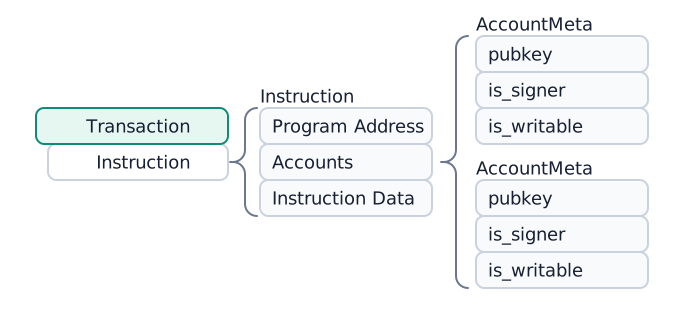
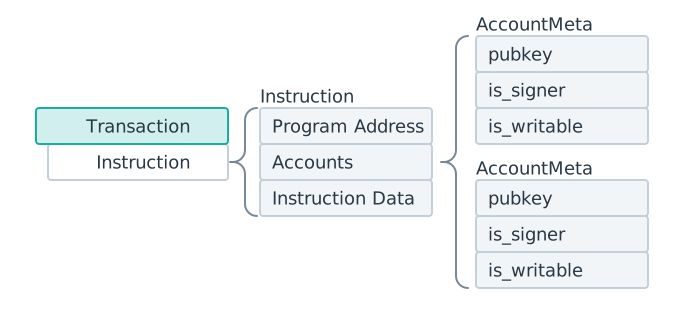 하나의 명령어가 있는 트랜잭션. 명령어의 accounts 배열에 두 개의 AccountMeta 구조체가 포함되어 있습니다.
각 AccountMeta 는 세 개의 필드를 가집니다:
- pubkey: 계정의 공개 키 주소
- is_signer: 계정이 트랜잭션에 서명해야 하는 경우
true로 설정 - is_writable: 명령어가 계정의 데이터를 수정하는 경우
true로 설정
명령어가 필요로 하는 계정, 쓰기 가능 여부, 읽기 전용 여부, 트랜잭션 서명 필요 여부를 알려면 프로그램에 정의된 명령어 구현을 참조해야 합니다.
pub struct AccountMeta {/// An account's public key.pub pubkey: Pubkey,/// True if an `Instruction` requires a `Transaction` signature matching `pubkey`.pub is_signer: bool,/// True if the account data or metadata may be mutated during program execution.pub is_writable: bool,}
데이터
명령어의 data 필드는 프로그램에 어떤 함수를 호출할지 알려주고 해당 함수의
인수를 제공하는 바이트 배열입니다. 데이터는 일반적으로 대상 함수를 식별하는
판별자 또는 인덱스 바이트로 시작하고, 그 뒤에 직렬화된 인수가 따라옵니다. 인코딩
형식은 각 프로그램에서 정의합니다(예: Borsh 직렬화 또는 사용자 정의 레이아웃).
일반적인 인코딩 규칙:
- 코어 프로그램(System, Stake, Vote): Bincode로 직렬화된 열거형 변형 인덱스와 직렬화된 인수를 사용합니다.
- Anchor 프로그램: 8바이트 판별자(
"global:<function_name>"의 SHA-256 해시의 처음 8바이트)와 Borsh로 직렬화된 인수를 사용합니다.
런타임은 data 필드를 해석하지 않습니다. 프로그램의 process_instruction
진입점에 그대로 전달됩니다.
컴파일된 명령어
명령어가 트랜잭션 메시지로 직렬화되면 모든 공개 키를 메시지의 account_keys
배열에 대한 압축 정수 인덱스로 대체하는
CompiledInstruction
구조체가 됩니다.
예시: SOL 전송 명령어
아래 예시는 SOL 전송 명령어의 구조를 보여줍니다.
import { createClient, generateKeyPairSigner, lamports } from "@solana/kit";import { solanaRpc, rpcAirdrop } from "@solana/kit-plugin-rpc";import { generatedPayer, airdropPayer } from "@solana/kit-plugin-signer";import { systemProgram } from "@solana-program/system";const client = await createClient().use(generatedPayer()).use(solanaRpc({rpcUrl: "http://localhost:8899",rpcSubscriptionsUrl: "ws://localhost:8900"})).use(rpcAirdrop()).use(airdropPayer(lamports(1_000_000_000n))).use(systemProgram());// Generate sender and recipient keypairsconst sender = client.payer;const recipient = await generateKeyPairSigner();// Define the amount to transferconst LAMPORTS_PER_SOL = 1_000_000_000n;const transferAmount = lamports(LAMPORTS_PER_SOL / 100n); // 0.01 SOL// Create a transfer instruction for transferring SOL from sender to recipientconst transferInstruction = client.system.instructions.transferSol({source: sender,destination: recipient.address,amount: transferAmount});console.log(JSON.stringify(transferInstruction, null, 2));
아래 코드는 이전 코드 스니펫의 출력을 보여줍니다. SDK마다 형식은 다르지만, 각
명령어에는 동일한 세 가지 필수 정보가 포함되어 있습니다:
program_id, accounts,
data.
{"accounts": [{"address": "Hu28vRMGWpQXN56eaE7jRiDDRRz3vCXEs7EKHRfL6bC","role": 3,"signer": {"address": "Hu28vRMGWpQXN56eaE7jRiDDRRz3vCXEs7EKHRfL6bC","keyPair": {"privateKey": {},"publicKey": {}}}},{"address": "2mBY6CTgeyJNJDzo6d2Umipw2aGUquUA7hLdFttNEj7p","role": 1}],"programAddress": "11111111111111111111111111111111","data": {"0": 2,"1": 0,"2": 0,"3": 0,"4": 128,"5": 150,"6": 152,"7": 0,"8": 0,"9": 0,"10": 0,"11": 0}}
아래 예제는 전송 명령어를 수동으로 구성하는 방법을 보여줍니다.
(Expanded Instruction 탭은 Instruction 탭과 기능적으로 동일합니다.)
실제로는 일반적으로 Instruction 를 수동으로 구성할 필요가 없습니다.
대부분의 프로그램은 명령어를 생성하는 헬퍼 함수가 포함된 클라이언트
라이브러리를 제공합니다. 라이브러리를 사용할 수 없는 경우 명령어를 수동으로
구성할 수 있습니다.
const transferAmount = 0.01; // 0.01 SOLconst transferInstruction = client.system.instructions.transferSol({source: sender,destination: recipient.address,amount: transferAmount * LAMPORTS_PER_SOL});
Is this page helpful?