Tóm tắt
Program accounts chứa mã sBPF có thể thực thi. Data accounts lưu trữ trạng thái, thuộc sở hữu của các chương trình. System accounts thuộc sở hữu của System Program. Sysvars cung cấp trạng thái toàn cluster có thể truy cập tại các địa chỉ được định nghĩa trước.
Trường executable xác định loại tài
khoản:
- Program accounts:
executable=true. Chứa mã có thể thực thi. - Data accounts:
executable=false. Lưu trữ trạng thái hoặc dữ liệu người dùng.
Sự tách biệt giữa mã và trạng thái có thể thay đổi này có nghĩa là một chương trình được triển khai một lần và có thể quản lý bất kỳ số lượng data accounts nào.
Program accounts
Một program account lưu trữ mã có thể thực thi. Mọi program account đều thuộc sở hữu của một loader program. Khi một chương trình được triển khai, runtime tạo một program account để chứa bytecode của nó.
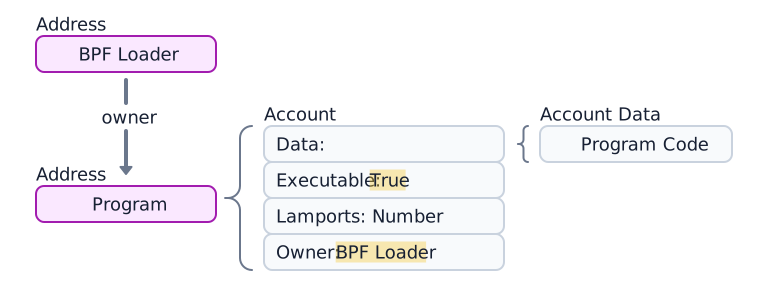
 Diagram of a program account, its 4 components and its loader program.
Program data accounts
Các chương trình được triển khai bằng loader-v3 (xem
Loader programs) không
lưu trữ bytecode có thể thực thi trong trường data của chính chúng. Thay vào
đó, data của chúng trỏ đến một program data account riêng biệt chứa mã
chương trình. (Xem sơ đồ bên dưới.)

 A program account with data. The data points to a separate program data account
Trong quá trình triển khai hoặc nâng cấp chương trình, buffer accounts được sử dụng để tạm thời lưu trữ quá trình tải lên.
Ví dụ sau đây lấy tài khoản Token Program. Trường executable là true, xác
nhận đây là một program account.
import { Address, createClient } from "@solana/kit";import { solanaRpc } from "@solana/kit-plugin-rpc";import { generatedPayer } from "@solana/kit-plugin-signer";const client = await createClient().use(generatedPayer()).use(solanaRpc({rpcUrl: "https://api.mainnet.solana.com"}));const programId = "TokenkegQfeZyiNwAJbNbGKPFXCWuBvf9Ss623VQ5DA" as Address;const accountInfo = await client.rpc.getAccountInfo(programId, { encoding: "base64" }).send();console.log(accountInfo);
Tài khoản dữ liệu
Tài khoản dữ liệu không chứa mã thực thi. Chúng lưu trữ trạng thái do chương trình định nghĩa.
Tài khoản trạng thái chương trình
Các chương trình lưu trữ trạng thái của chúng trong tài khoản dữ liệu. Việc tạo tài khoản trạng thái chương trình bao gồm hai bước:
- Gọi System Program để tạo tài khoản. System Program chuyển quyền sở hữu cho chương trình được chỉ định.
- Chương trình sở hữu khởi tạo trường
datacủa tài khoản theo instructions của nó.
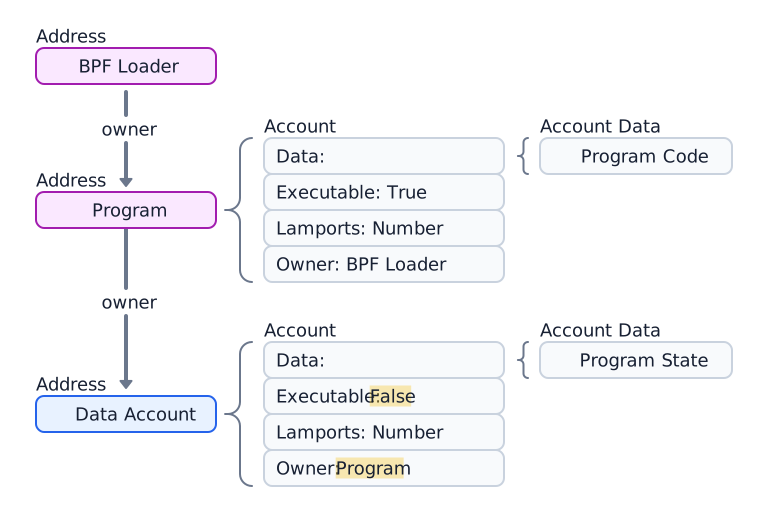
 Diagram of a data account owned by a program account
Ví dụ sau tạo và lấy một tài khoản Token Mint thuộc sở hữu của chương trình Token 2022.
import { createClient, generateKeyPairSigner, lamports } from "@solana/kit";import { solanaRpc, rpcAirdrop } from "@solana/kit-plugin-rpc";import { generatedPayer, airdropPayer } from "@solana/kit-plugin-signer";import { systemProgram } from "@solana-program/system";import {getInitializeMintInstruction,getMintSize,TOKEN_2022_PROGRAM_ADDRESS,fetchMint} from "@solana-program/token-2022";const client = await createClient().use(generatedPayer()).use(solanaRpc({rpcUrl: "http://localhost:8899",rpcSubscriptionsUrl: "ws://localhost:8900"})).use(rpcAirdrop()).use(airdropPayer(lamports(1_000_000_000n))).use(systemProgram());// Generate keypair to use as address of mintconst mint = await generateKeyPairSigner();// Get default mint account size (in bytes), no extensions enabledconst space = BigInt(getMintSize());// Get minimum balance for rent exemptionconst rent = await client.rpc.getMinimumBalanceForRentExemption(space).send();const transactionSignature = await client.sendTransaction([client.system.instructions.createAccount({newAccount: mint,lamports: rent,space,programAddress: TOKEN_2022_PROGRAM_ADDRESS}),getInitializeMintInstruction({mint: mint.address,decimals: 9,mintAuthority: client.payer.address})]);console.log("Mint Address:", mint.address);console.log("Transaction Signature:", transactionSignature.context.signature);const accountInfo = await client.rpc.getAccountInfo(mint.address).send();console.log(accountInfo);const mintAccount = await fetchMint(client.rpc, mint.address);console.log(mintAccount);
Tài khoản hệ thống
Các tài khoản vẫn thuộc sở hữu của System Program sau khi tạo được gọi là tài khoản hệ thống. Việc gửi SOL đến một địa chỉ mới lần đầu tiên sẽ tạo một tài khoản mới tại địa chỉ đó thuộc sở hữu của System Program.
Tất cả tài khoản ví đều là tài khoản hệ thống. Người trả phí trong giao dịch phải là tài khoản hệ thống, vì chỉ các tài khoản thuộc sở hữu của System Program mới có thể trả phí giao dịch.
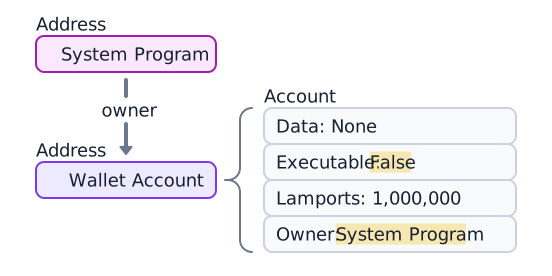
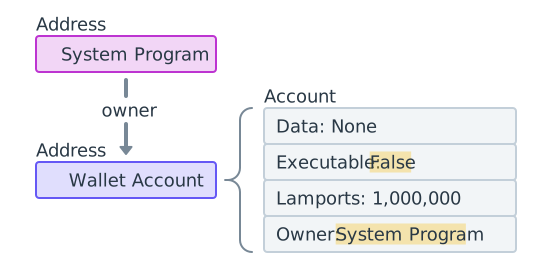 A wallet owned by the System Program containing 1,000,000 lamports
Ví dụ sau tạo một keypair mới, nạp SOL vào đó và lấy tài khoản. Trường owner
là 11111111111111111111111111111111
(System Program).
import { createClient, generateKeyPairSigner, lamports } from "@solana/kit";import { solanaRpc, rpcAirdrop } from "@solana/kit-plugin-rpc";import { generatedPayer } from "@solana/kit-plugin-signer";const client = await createClient().use(generatedPayer()).use(solanaRpc({rpcUrl: "http://localhost:8899",rpcSubscriptionsUrl: "ws://localhost:8900"})).use(rpcAirdrop());// Generate a new keypairconst keypair = await generateKeyPairSigner();console.log(`Public Key: ${keypair.address}`);// Funding an address with SOL automatically creates an accountconst signature = await client.airdrop(keypair.address,lamports(1_000_000_000n));const accountInfo = await client.rpc.getAccountInfo(keypair.address).send();console.log(accountInfo);
Tài khoản Sysvar
Tài khoản Sysvar là các tài khoản đặc biệt tại các địa chỉ được xác định trước, cung cấp quyền truy cập chỉ đọc vào dữ liệu trạng thái của cụm. Chúng cập nhật động mỗi slot.
| Sysvar | Địa chỉ | Mục đích |
|---|---|---|
| Clock | SysvarC1ock11111111111111111111111111111111 | Slot hiện tại, epoch và dấu thời gian Unix |
| EpochSchedule | SysvarEpochSchedu1e111111111111111111111111 | Các hằng số lập lịch epoch được đặt trong genesis |
| EpochRewards | SysvarEpochRewards1111111111111111111111111 | Trạng thái và tiến trình phân phối phần thưởng epoch |
| Rent | SysvarRent111111111111111111111111111111111 | Tỷ lệ rent và ngưỡng miễn trừ |
| SlotHashes | SysvarS1otHashes111111111111111111111111111 | Các hash gần đây nhất của các bank cha của slot |
| StakeHistory | SysvarStakeHistory1111111111111111111111111 | Kích hoạt và hủy kích hoạt stake theo epoch |
| LastRestartSlot | SysvarLastRestartS1ot1111111111111111111111 | Slot khởi động lại cụm gần nhất |
| Instructions | Sysvar1nstructions1111111111111111111111111 | Các instruction được tuần tự hóa của giao dịch hiện tại |
| SlotHistory | SysvarS1otHistory11111111111111111111111111 | Bản ghi các slot đã được tạo ra trong epoch trước |
Ví dụ sau đây lấy và giải tuần tự hóa tài khoản Sysvar Clock.
import { createClient } from "@solana/kit";import { solanaRpc } from "@solana/kit-plugin-rpc";import { generatedPayer } from "@solana/kit-plugin-signer";import { fetchSysvarClock, SYSVAR_CLOCK_ADDRESS } from "@solana/sysvars";const client = await createClient().use(generatedPayer()).use(solanaRpc({rpcUrl: "https://api.mainnet.solana.com"}));const accountInfo = await client.rpc.getAccountInfo(SYSVAR_CLOCK_ADDRESS, { encoding: "base64" }).send();console.log(accountInfo);// Automatically fetch and deserialize the account dataconst clock = await fetchSysvarClock(client.rpc);console.log(clock);
Is this page helpful?