Tóm tắt
Một giao dịch bao gồm chữ ký và một thông điệp. Thông điệp chứa tiêu đề, địa chỉ tài khoản, blockhash gần đây và các lệnh đã được biên dịch. Kích thước tuần tự hóa tối đa: 1.232 byte (4.096 byte cho định dạng v1).
Một
Transaction
có hai trường cấp cao nhất:
signatures: Một mảng các chữ kýmessage: Thông tin giao dịch, bao gồm danh sách các lệnh cần được xử lý
pub struct Transaction {pub signatures: Vec<Signature>,pub message: Message,}
 Sơ đồ hiển thị hai phần của giao dịch
Tổng kích thước sau khi serialize của một giao dịch không được vượt quá
PACKET_DATA_SIZE
(1.232 byte). Giới hạn này bằng 1.280 byte (MTU tối thiểu của IPv6) trừ đi 48
byte cho tiêu đề mạng (40 byte IPv6 + 8 byte tiêu đề phân mảnh). 1.232 byte bao
gồm cả mảng signatures và struct message.
Giao dịch v1 nâng giới hạn lên 4.096 byte
Trang này mô tả định dạng giao dịch kế thừa (legacy), mà định dạng v0 cũng tuân theo ngoại trừ tiền tố phiên bản và bảng tra cứu địa chỉ. Định dạng v1 nâng giới hạn kích thước lên 4.096 byte và sử dụng bố cục wire khác.
 Sơ đồ hiển thị định dạng giao dịch và giới hạn kích thước
Chữ ký
Trường signatures là một mảng được mã hóa compact của các giá trị
Signature.
Mỗi Signature là một chữ ký Ed25519 64 byte của Message đã được serialize,
được ký bằng khóa riêng của tài khoản người ký. Một chữ ký được yêu cầu cho mỗi
tài khoản người ký được tham chiếu bởi các lệnh của giao
dịch.
Mỗi chữ ký được tạo ra bởi một khóa riêng tư. Khóa đó lưu trữ ở đâu — một keypair cục bộ, HSM hoặc KMS trên đám mây, hay một dịch vụ ví được quản lý — là một quyết định thiết kế trong môi trường sản xuất. Xem Ký trong Môi trường Sản xuất.
Chữ ký đầu tiên trong mảng thuộc về người trả phí, tài khoản thanh toán phí cơ bản và phí ưu tiên của giao dịch. Chữ ký đầu tiên này cũng đóng vai trò là ID giao dịch, dùng để tra cứu giao dịch trên mạng. ID giao dịch thường được gọi là chữ ký giao dịch.
Yêu cầu đối với người trả phí:
- Phải là tài khoản đầu tiên trong thông điệp (chỉ mục 0) và là người ký.
- Phải là tài khoản thuộc sở hữu của System Program hoặc một tài khoản nonce
(được xác thực bởi
validate_fee_payer). - Phải giữ đủ lamport để trang trải
rent_exempt_minimum + total_fee; nếu không giao dịch sẽ thất bại với lỗiInsufficientFundsForFee.
Thông điệp
Trường message là một struct
Message
chứa nội dung tải của giao dịch:
header: Tiêu đề của thông điệpaccount_keys: Một mảng các địa chỉ tài khoản được yêu cầu bởi các lệnh của giao dịchrecent_blockhash: Một blockhash đóng vai trò là dấu thời gian cho giao dịchinstructions: Một mảng các lệnh
pub struct Message {/// The message header, identifying signed and read-only `account_keys`.pub header: MessageHeader,/// All the account keys used by this transaction.#[serde(with = "short_vec")]pub account_keys: Vec<Pubkey>,/// The id of a recent ledger entry.pub recent_blockhash: Hash,/// Programs that will be executed in sequence and committed in/// one atomic transaction if all succeed.#[serde(with = "short_vec")]pub instructions: Vec<CompiledInstruction>,}
Tiêu đề
Trường header là một struct
MessageHeader
với ba trường u8 phân chia mảng account_keys thành các nhóm quyền:
num_required_signatures: Tổng số chữ ký mà giao dịch yêu cầu.num_readonly_signed_accounts: Số tài khoản đã ký chỉ có quyền đọc.num_readonly_unsigned_accounts: Số tài khoản chưa ký chỉ có quyền đọc.
pub struct MessageHeader {/// The number of signatures required for this message to be considered/// valid. The signers of those signatures must match the first/// `num_required_signatures` of [`Message::account_keys`].pub num_required_signatures: u8,/// The last `num_readonly_signed_accounts` of the signed keys are read-only/// accounts.pub num_readonly_signed_accounts: u8,/// The last `num_readonly_unsigned_accounts` of the unsigned keys are/// read-only accounts.pub num_readonly_unsigned_accounts: u8,}
Tiền tố thông điệp kế thừa và có phiên bản
Trong thông điệp giao dịch kế thừa, byte đầu tiên của thông điệp là
num_required_signatures, theo sau là hai byte MessageHeader còn lại. Trong
thông điệp giao dịch có phiên bản, byte đầu tiên là tiền tố phiên bản thay thế;
MessageHeader ba byte bắt đầu ngay sau tiền tố đó. Xem
giao dịch có phiên bản để biết
bố cục thông điệp đầy đủ của v0 và v1.
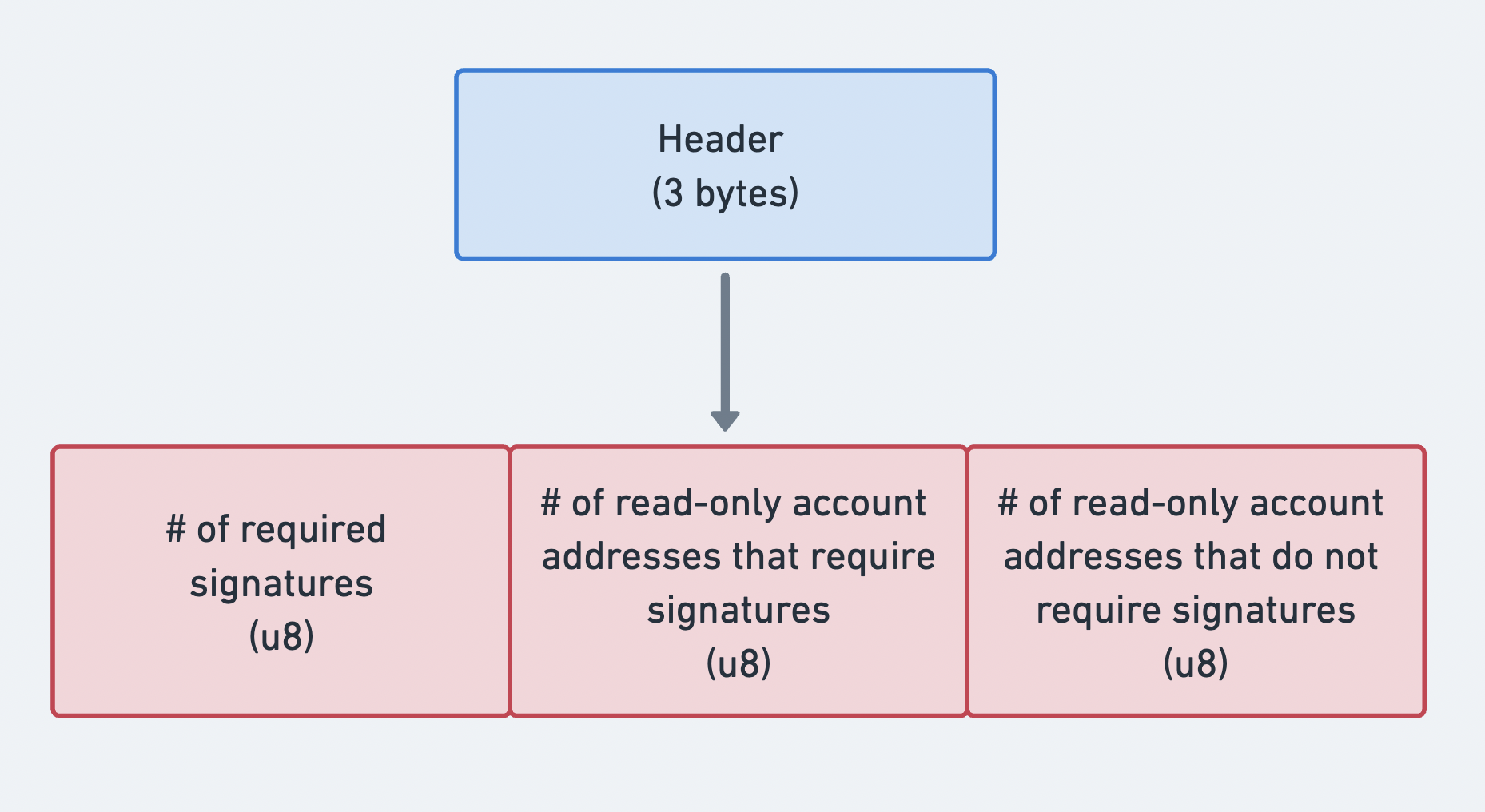 Sơ đồ hiển thị ba phần của tiêu đề thông điệp
Địa chỉ tài khoản
Trường
account_keys
là một mảng khóa công khai được mã hóa gọn. Mỗi mục xác định một tài khoản được
sử dụng bởi ít nhất một trong các lệnh của giao dịch. Mảng phải bao gồm mọi tài
khoản và phải tuân theo thứ tự nghiêm ngặt sau:
- Người ký + Có thể ghi
- Người ký + Chỉ đọc
- Không phải người ký + Có thể ghi
- Không phải người ký + Chỉ đọc
Thứ tự nghiêm ngặt này cho phép mảng account_keys được kết hợp với ba số đếm
trong header của thông điệp để xác định quyền cho từng tài khoản
mà không cần lưu trữ cờ siêu dữ liệu theo từng tài khoản. Các số đếm trong
tiêu đề phân chia mảng thành bốn nhóm quyền được liệt kê ở trên.
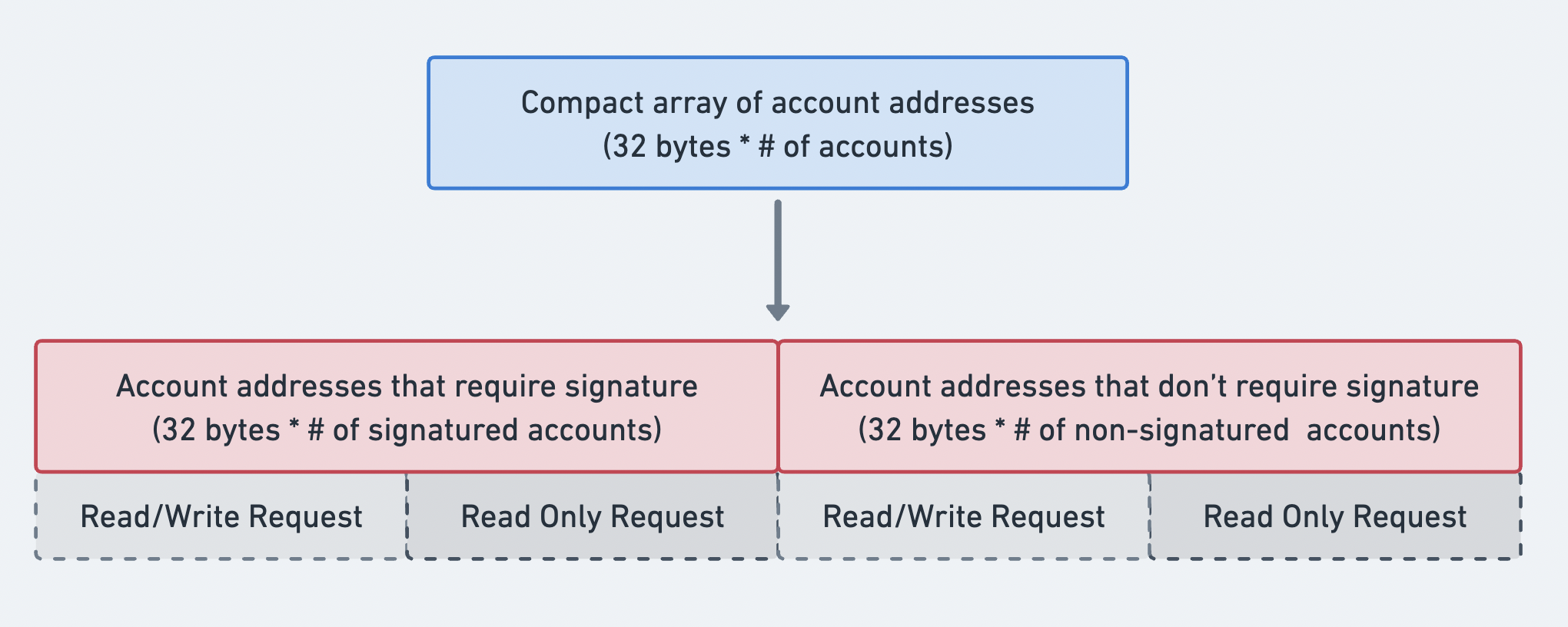 Sơ đồ hiển thị thứ tự của mảng địa chỉ tài khoản
Blockhash gần đây
Trường recent_blockhash là một hàm băm 32 byte phục vụ hai mục đích:
- Dấu thời gian: chứng minh giao dịch được tạo gần đây.
- Loại trùng lặp: ngăn chặn cùng một giao dịch được xử lý hai lần.
Một blockhash hết hạn sau 150 slot. Nếu blockhash không còn hợp lệ khi giao dịch
đến, nó sẽ bị từ chối với BlockhashNotFound, trừ khi nó là một
giao dịch nonce bền vững hợp lệ.
Phương thức RPC getLatestBlockhash cho
phép bạn lấy blockhash hiện tại và chiều cao khối cuối cùng mà blockhash sẽ
còn hợp lệ.
Lệnh (Instructions)
Trường
instructions
là một mảng mã hóa compact gồm các struct
CompiledInstruction.
Mỗi CompiledInstruction tham chiếu các tài khoản theo chỉ số trong mảng
account_keys thay vì dùng public key đầy đủ. Nó bao gồm:
program_id_index: Chỉ số trongaccount_keysxác định chương trình cần gọi.accounts: Mảng các chỉ số trongaccount_keyschỉ định các tài khoản được truyền vào chương trình.data: Mảng byte chứa bộ phân biệt lệnh và các đối số đã được serialize.
pub struct CompiledInstruction {/// Index into the transaction keys array indicating the program account that executes this instruction.pub program_id_index: u8,/// Ordered indices into the transaction keys array indicating which accounts to pass to the program.#[serde(with = "short_vec")]pub accounts: Vec<u8>,/// The program input data.#[serde(with = "short_vec")]pub data: Vec<u8>,}
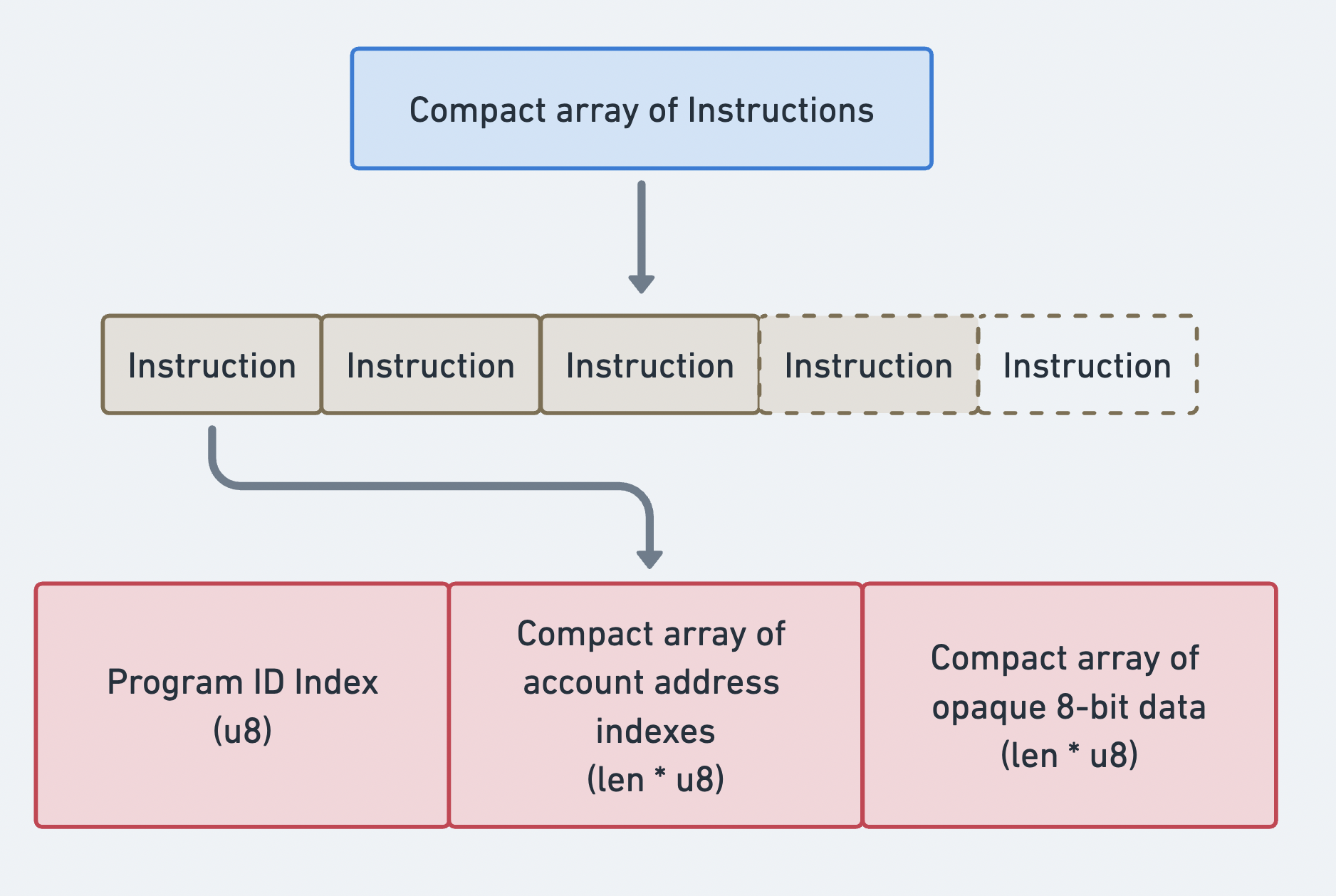 Mảng compact các Instructions
Định dạng nhị phân của giao dịch
Các giao dịch được serialize bằng cơ chế mã hóa compact. Tất cả các mảng có độ dài thay đổi (chữ ký, khóa tài khoản, lệnh) đều được thêm tiền tố độ dài compact-u16. Định dạng này dùng 1 byte cho các giá trị 0–127 và 2–3 byte cho các giá trị lớn hơn.
Cấu trúc giao dịch Legacy (trên đường truyền):
| Trường | Kích thước | Mô tả |
|---|---|---|
num_signatures | 1-3 byte (compact-u16) | Số lượng chữ ký |
signatures | num_signatures x 64 byte | Chữ ký Ed25519 |
num_required_signatures | 1 byte | Trường 1 của MessageHeader |
num_readonly_signed | 1 byte | Trường 2 của MessageHeader |
num_readonly_unsigned | 1 byte | Trường 3 của MessageHeader |
num_account_keys | 1-3 byte (compact-u16) | Số lượng khóa tài khoản tĩnh |
account_keys | num_account_keys x 32 byte | Các public key |
recent_blockhash | 32 byte | Blockhash |
num_instructions | 1-3 byte (compact-u16) | Số lượng lệnh |
instructions | thay đổi | Mảng các lệnh đã biên dịch |
Mỗi lệnh đã biên dịch được serialize như sau:
| Trường | Kích thước | Mô tả |
|---|---|---|
program_id_index | 1 byte | Chỉ số trong khóa tài khoản |
num_accounts | 1-3 byte (compact-u16) | Số lượng chỉ số tài khoản |
account_indices | num_accounts x 1 byte | Các chỉ số khóa tài khoản |
data_len | 1-3 byte (compact-u16) | Độ dài của instruction data |
data | data_len byte | instruction data thô |
Tính toán kích thước
Cho PACKET_DATA_SIZE = 1.232 byte, không gian khả dụng có thể được tính
như sau:
Total = 1232 bytes- compact-u16(num_sigs) # 1 byte- num_sigs * 64 # signature bytes- 3 # message header- compact-u16(num_keys) # 1 byte- num_keys * 32 # account key bytes- 32 # recent blockhash- compact-u16(num_ixs) # 1 byte- sum(instruction_sizes) # per-instruction overhead + data
Ví dụ: Giao dịch chuyển SOL
Sơ đồ dưới đây minh họa cách các giao dịch và lệnh phối hợp với nhau để cho phép người dùng tương tác với mạng. Trong ví dụ này, SOL được chuyển từ một tài khoản sang tài khoản khác.
Siêu dữ liệu của tài khoản người gửi chỉ ra rằng tài khoản đó phải ký cho giao dịch. Điều này cho phép System Program trừ lamport. Cả tài khoản người gửi và người nhận đều phải có quyền ghi, để số dư lamport của chúng có thể thay đổi. Để thực thi lệnh này, ví của người gửi sẽ gửi giao dịch chứa chữ ký và thông điệp bao gồm lệnh chuyển SOL.
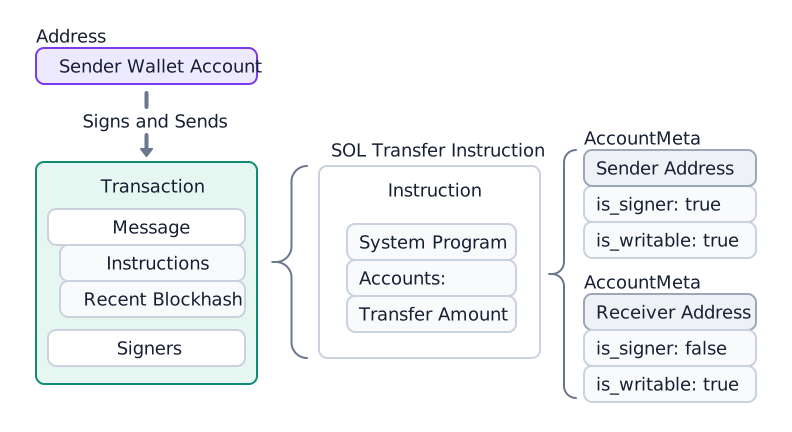
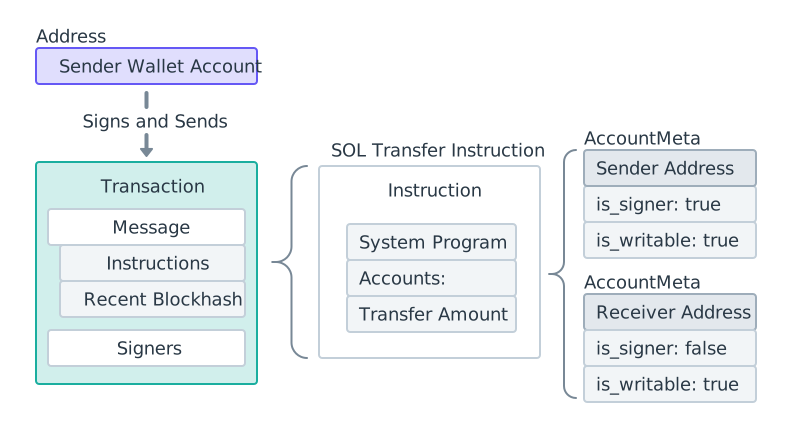 Sơ đồ chuyển SOL
Sau khi giao dịch được gửi đi, System Program xử lý lệnh chuyển và cập nhật số dư lamport của cả hai tài khoản.
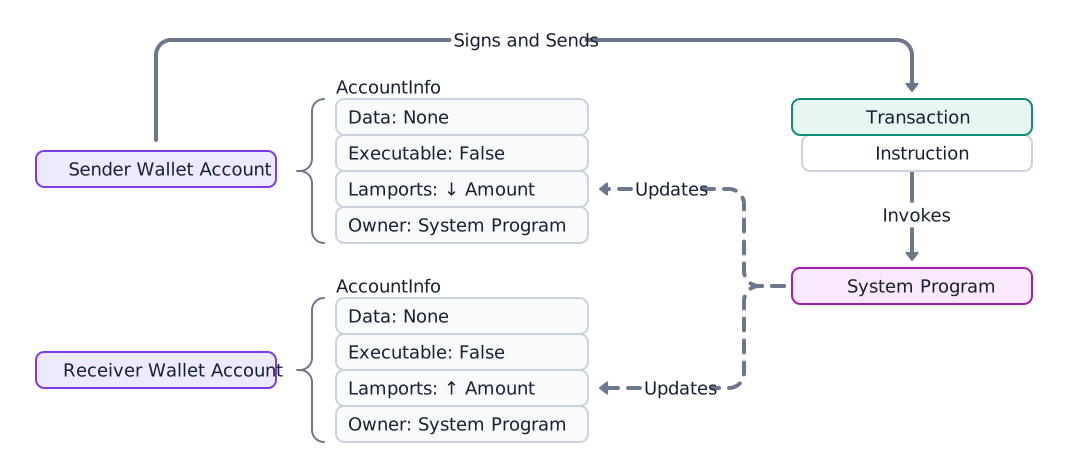
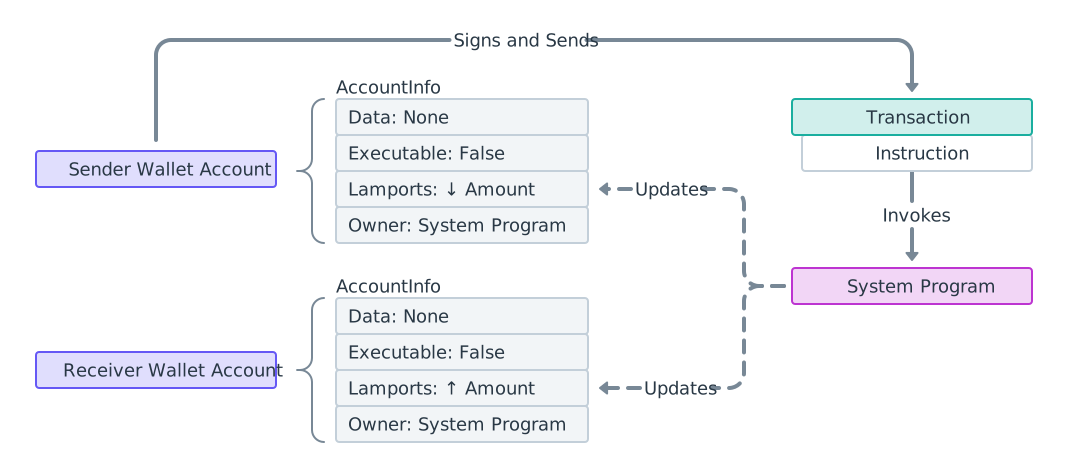 Sơ đồ quy trình chuyển SOL
Xác minh người nhận trước khi gửi SOL
Một lệnh chuyển của System Program sẽ thêm lamport vào bất kỳ tài khoản nào. Không có kiểm tra ở cấp độ giao thức để đảm bảo người nhận có thể chuyển SOL ra ngoài. Lamport chỉ có thể được rút ra bởi chương trình sở hữu tài khoản, do đó việc gửi SOL đến token mint, một chương trình, hoặc một PDA mà bạn không kiểm soát có nguy cơ mất tiền vĩnh viễn — chỉ có thẩm quyền được chỉ định bởi chương trình sở hữu mới có thể hoàn lại. SOL được gửi đến một token account chỉ có thể được thu hồi bởi chủ sở hữu của tài khoản đó, không bao giờ là người gửi.
Các lệnh chuyển token SPL có tính tự bảo vệ một phần: Token Program từ chối lệnh chuyển có các tài khoản không khớp với mint dự kiến. Các lệnh chuyển SOL gốc không có biện pháp bảo vệ như vậy, vì vậy người gửi phải xác minh người nhận trước khi ký. Xem Xác minh địa chỉ để biết logic phân loại đầy đủ.
Ví dụ dưới đây hiển thị mã liên quan đến các sơ đồ trên. Xem
hàm transfer
của System Program.
import { createClient, generateKeyPairSigner, lamports } from "@solana/kit";import { solanaRpc, rpcAirdrop } from "@solana/kit-plugin-rpc";import { generatedPayer, airdropPayer } from "@solana/kit-plugin-signer";import { systemProgram } from "@solana-program/system";const client = await createClient().use(generatedPayer()).use(solanaRpc({rpcUrl: "http://localhost:8899",rpcSubscriptionsUrl: "ws://localhost:8900"})).use(rpcAirdrop()).use(airdropPayer(lamports(1_000_000_000n))).use(systemProgram());const sender = client.payer;const recipient = await generateKeyPairSigner();const LAMPORTS_PER_SOL = 1_000_000_000n;const transferAmount = lamports(LAMPORTS_PER_SOL / 100n); // 0.01 SOL// Check balance before transferconst { value: preBalance1 } = await client.rpc.getBalance(sender.address).send();const { value: preBalance2 } = await client.rpc.getBalance(recipient.address).send();// Create a transfer instruction for transferring SOL from sender to recipientconst transferInstruction = client.system.instructions.transferSol({source: sender,destination: recipient.address,amount: transferAmount // 0.01 SOL in lamports});const transactionSignature = await client.sendTransaction([transferInstruction]);// Check balance after transferconst { value: postBalance1 } = await client.rpc.getBalance(sender.address).send();const { value: postBalance2 } = await client.rpc.getBalance(recipient.address).send();console.log("Sender prebalance:",Number(preBalance1) / Number(LAMPORTS_PER_SOL));console.log("Recipient prebalance:",Number(preBalance2) / Number(LAMPORTS_PER_SOL));console.log("Sender postbalance:",Number(postBalance1) / Number(LAMPORTS_PER_SOL));console.log("Recipient postbalance:",Number(postBalance2) / Number(LAMPORTS_PER_SOL));console.log("Transaction Signature:", transactionSignature.context.signature);
Ví dụ dưới đây hiển thị cấu trúc của một giao dịch chứa một lệnh chuyển SOL duy nhất.
import {createClient,generateKeyPairSigner,lamports,createTransactionMessage,setTransactionMessageFeePayerSigner,setTransactionMessageLifetimeUsingBlockhash,appendTransactionMessageInstructions,pipe,signTransactionMessageWithSigners,getCompiledTransactionMessageDecoder} from "@solana/kit";import { solanaRpc, rpcAirdrop } from "@solana/kit-plugin-rpc";import { generatedPayer, airdropPayer } from "@solana/kit-plugin-signer";import { systemProgram } from "@solana-program/system";const client = await createClient().use(generatedPayer()).use(solanaRpc({rpcUrl: "http://localhost:8899",rpcSubscriptionsUrl: "ws://localhost:8900"})).use(rpcAirdrop()).use(airdropPayer(lamports(1_000_000_000n))).use(systemProgram());const { value: latestBlockhash } = await client.rpc.getLatestBlockhash().send();const sender = client.payer;const recipient = await generateKeyPairSigner();// Define the amount to transferconst LAMPORTS_PER_SOL = 1_000_000_000n;const transferAmount = lamports(LAMPORTS_PER_SOL / 100n); // 0.01 SOL// Create a transfer instruction for transferring SOL from sender to recipientconst transferInstruction = client.system.instructions.transferSol({source: sender,destination: recipient.address,amount: transferAmount});// Create transaction messageconst transactionMessage = pipe(createTransactionMessage({ version: 0 }),(tx) => setTransactionMessageFeePayerSigner(sender, tx),(tx) => setTransactionMessageLifetimeUsingBlockhash(latestBlockhash, tx),(tx) => appendTransactionMessageInstructions([transferInstruction], tx));const signedTransaction =await signTransactionMessageWithSigners(transactionMessage);// Decode the messageBytesconst compiledTransactionMessage =getCompiledTransactionMessageDecoder().decode(signedTransaction.messageBytes);console.log(JSON.stringify(compiledTransactionMessage, null, 2));
Đoạn mã bên dưới hiển thị đầu ra từ các đoạn mã trước. Định dạng khác nhau giữa các SDK, nhưng lưu ý rằng mỗi lệnh đều chứa cùng thông tin bắt buộc.
{"version": 0,"header": {"numSignerAccounts": 1,"numReadonlySignerAccounts": 0,"numReadonlyNonSignerAccounts": 1},"staticAccounts": ["HoCy8p5xxDDYTYWEbQZasEjVNM5rxvidx8AfyqA4ywBa","5T388jBjovy7d8mQ3emHxMDTbUF8b7nWvAnSiP3EAdFL","11111111111111111111111111111111"],"lifetimeToken": "EGCWPUEXhqHJWYBfDirq3mHZb4qDpATmYqBZMBy9TBC1","instructions": [{"programAddressIndex": 2,"accountIndices": [0, 1],"data": {"0": 2,"1": 0,"2": 0,"3": 0,"4": 128,"5": 150,"6": 152,"7": 0,"8": 0,"9": 0,"10": 0,"11": 0}}]}
Xác minh người nhận trước khi chuyển
Vì việc chuyển SOL thành công vào bất kỳ tài khoản nào, hãy kiểm tra người nhận trước khi ký. Tải tài khoản và chỉ gửi đến ví System Program (hoặc một địa chỉ trên đường cong chưa được cấp vốn); từ chối các mint, token account, chương trình và PDA mà bạn không kiểm soát.
import {type Address,createSolanaRpc,fetchJsonParsedAccount,isOffCurveAddress} from "@solana/kit";const rpc = createSolanaRpc("https://api.mainnet.solana.com");const SYSTEM_PROGRAM = "11111111111111111111111111111111" as Address;/*** Throws if `recipient` cannot safely receive native SOL.** Only System Program wallets (or unfunded on-curve addresses) are safe. Any* other account locks the lamports because no authority can debit them.*/async function assertSafeSolRecipient(recipient: Address): Promise<void> {const account = await fetchJsonParsedAccount(rpc, recipient);if (!account.exists) {// Off-curve = a PDA with no account; reject conservatively.if (isOffCurveAddress(recipient)) {throw new Error("Recipient is a PDA with no account; SOL would be locked");}// On-curve = an unfunded wallet, safe to fund.return;}if (account.programAddress !== SYSTEM_PROGRAM) {throw new Error(`Recipient is owned by ${account.programAddress}, not a wallet; SOL would be locked`);}}// A wallet: safe.await assertSafeSolRecipient("H8sMJSCQxfKiFTCfDR3DUMLPwcRbM61LGFJ8N4dK3WjS" as Address);// The USDC mint: rejected before any SOL leaves the sender.await assertSafeSolRecipient("EPjFWdd5AufqSSqeM2qN1xzybapC8G4wEGGkZwyTDt1v" as Address);
Đoạn mã này kiểm tra người nhận SOL gốc. Để xem toàn bộ phân loại cũng xử lý việc gửi SPL token (token account, ATA, Token-2022), xem Xác minh Địa chỉ.
Lấy thông tin chi tiết giao dịch
Sau khi gửi, hãy truy xuất thông tin chi tiết giao dịch bằng chữ ký giao dịch và phương thức RPC getTransaction.
Bạn cũng có thể tìm giao dịch bằng Solana Explorer.
{"blockTime": 1745196488,"meta": {"computeUnitsConsumed": 150,"err": null,"fee": 5000,"innerInstructions": [],"loadedAddresses": {"readonly": [],"writable": []},"logMessages": ["Program 11111111111111111111111111111111 invoke [1]","Program 11111111111111111111111111111111 success"],"postBalances": [989995000, 10000000, 1],"postTokenBalances": [],"preBalances": [1000000000, 0, 1],"preTokenBalances": [],"rewards": [],"status": {"Ok": null}},"slot": 13049,"transaction": {"message": {"header": {"numReadonlySignedAccounts": 0,"numReadonlyUnsignedAccounts": 1,"numRequiredSignatures": 1},"accountKeys": ["8PLdpLxkuv9Nt8w3XcGXvNa663LXDjSrSNon4EK7QSjQ","7GLg7bqgLBv1HVWXKgWAm6YoPf1LoWnyWGABbgk487Ma","11111111111111111111111111111111"],"recentBlockhash": "7ZCxc2SDhzV2bYgEQqdxTpweYJkpwshVSDtXuY7uPtjf","instructions": [{"accounts": [0, 1],"data": "3Bxs4NN8M2Yn4TLb","programIdIndex": 2,"stackHeight": null}],"indexToProgramIds": {}},"signatures": ["3jUKrQp1UGq5ih6FTDUUt2kkqUfoG2o4kY5T1DoVHK2tXXDLdxJSXzuJGY4JPoRivgbi45U2bc7LZfMa6C4R3szX"]},"version": "legacy"}
Phản hồi thô xác định các tài khoản theo chỉ mục và lưu trữ các lệnh nội bộ (CPI) dưới dạng các blob được mã hóa. Để phân giải chúng thành địa chỉ và duyệt toàn bộ cây lệnh, hãy xem Transaction Introspection.
Is this page helpful?