x402 là gì?
x402 là một giao thức mở cho các khoản thanh toán gốc trên internet. Mã lỗi 402 có nghĩa là "Yêu cầu Thanh toán" và đã tồn tại từ lâu trong đặc tả HTTP, nhưng chỉ đến nay việc sử dụng nó mới trở nên khả thi nhờ sự phát triển của các mạng blockchain. Hiện nay, giao thức 402 đề cập đến việc triển khai mẫu HTTP 402 Payment Required: máy chủ yêu cầu thanh toán trước khi trả về phản hồi được bảo vệ. Trên Solana, điều này thường được thực hiện bằng cách yêu cầu client gửi một khoản chuyển khoản nhỏ, sau đó máy chủ xác minh điều này trên chuỗi và phục vụ nội dung.
Hiện tại vẫn chưa rõ SDK 402 nào sẽ phổ biến nhất. Vì vậy, trong hướng dẫn này, chúng tôi sẽ hướng dẫn cách triển khai x402 bằng một máy chủ và client tối giản, đồng thời liệt kê tất cả các SDK 402 hiện có cùng với mức độ hỗ trợ Solana hiện tại.
Cơ chế hoạt động như thế nào?
Có một số cách để triển khai x402, từ cực kỳ tinh gọn đến được quản lý hoàn toàn.
Ý tưởng giao thức: Sử dụng HTTP thuần túy. Client truy cập URL của bạn → bạn phản hồi 402 Payment Required với đối tượng JSON Payment Requirements → client thanh toán và thử lại với header X-PAYMENT → bạn xác minh/quyết toán → phản hồi 200 OK. Không cần tài khoản, không cần OAuth.
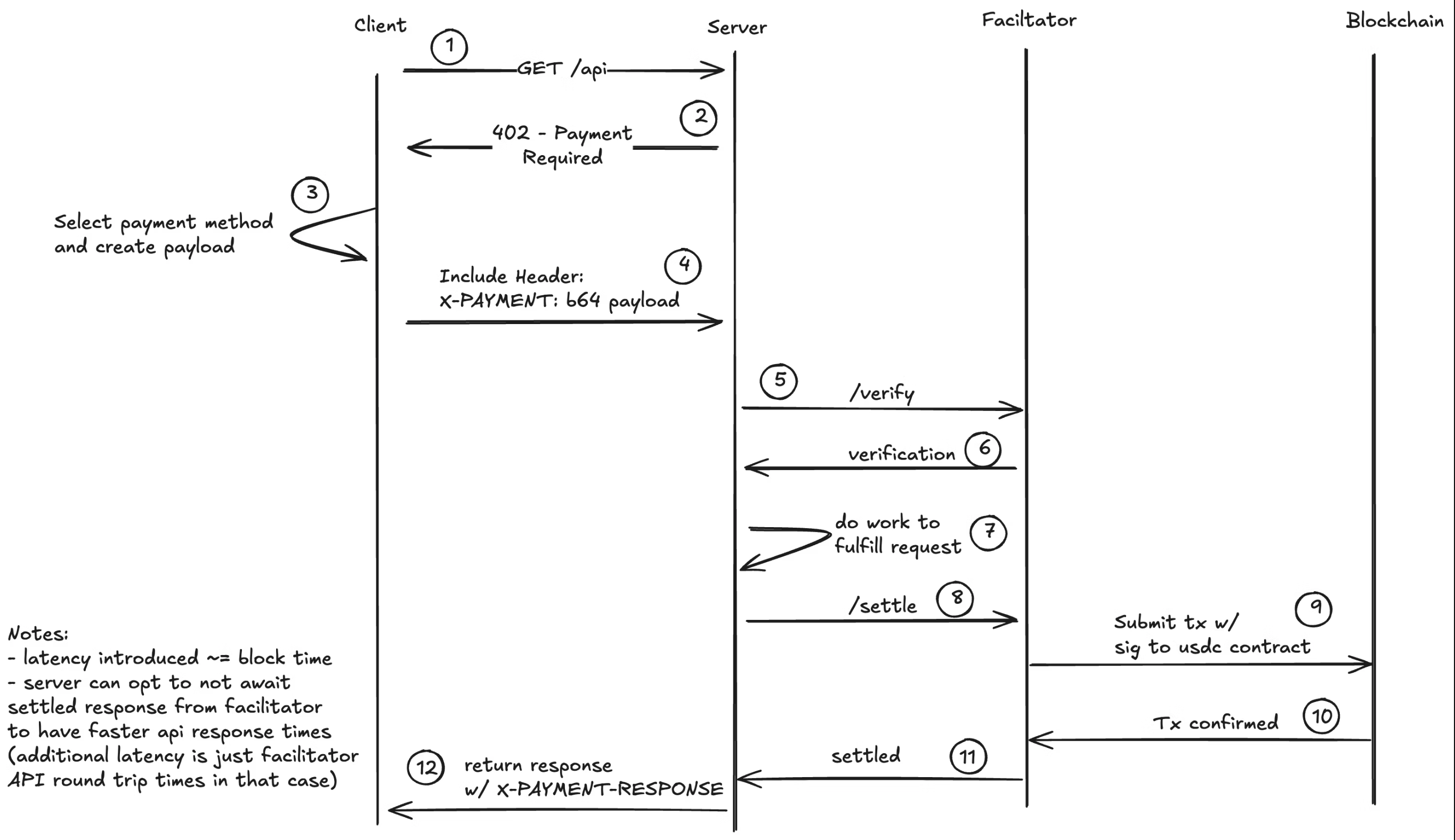 Sơ đồ Luồng x402
Lưu ý: Facilitator hoàn toàn tùy chọn và bạn cũng có thể tự triển khai logic xác thực của mình chỉ với vài dòng code. Facilitator trừu tượng hóa các chi tiết tích hợp blockchain khỏi máy chủ và client, giúp việc triển khai dễ dàng hơn.
Những điểm đặc tả cần biết: Cấu trúc PaymentRequirements, header X-PAYMENT được mã hóa base64, X-PAYMENT-RESPONSE tùy chọn khi thành công, và API facilitator tùy chọn cho /verify, /settle, /supported. Scheme cụ thể hiện tại là exact (thanh toán một số tiền cụ thể). Các scheme khác như upto đang được đề xuất.
Hỗ trợ Solana: Bản thân giao thức không phụ thuộc vào chuỗi cụ thể; trên Solana, nó hỗ trợ tất cả các token SPL. Hỗ trợ Solana đã có sẵn hoặc đang được phát triển cho hầu hết các SDK 402.
Phía dưới là danh sách các SDK 402 hiện có cùng với mức độ hỗ trợ Solana hiện tại.
Các Trường hợp Sử dụng
x402 cho phép một loạt các kịch bản thanh toán vi mô và trả theo lượt sử dụng mà trước đây không khả thi về mặt kinh tế nhờ blockchain. Hãy tưởng tượng Netflix trả tiền cho mỗi lượt xem hoặc Spotify trả tiền cho mỗi bài hát thay vì trả phí đăng ký. Dưới đây là một vài ý tưởng khả thi. Nhưng toàn bộ phổ khả năng vẫn còn rộng mở cho trí tưởng tượng:
AI & Thương mại Agent:
- Truy cập API Agent AI: Thanh toán theo từng lần suy luận LLM, tạo ảnh hoặc lời gọi API mô hình AI (Xem ví dụ ACK)
- Kiếm tiền từ MCP Server: Tính phí cho các công cụ Model Context Protocol, nguồn dữ liệu và khả năng agent chuyên biệt (Xem MCPay.tech)
- Thanh toán Agent-to-Agent: Cho phép các agent tự động giao dịch với nhau để sử dụng dịch vụ và dữ liệu (Xem ví dụ a2a-x402)
- Dữ liệu Huấn luyện AI Cao cấp: Bán quyền truy cập vào các bộ dữ liệu được tuyển chọn theo từng truy vấn
Nội dung & Truyền thông:
- Bài viết trả phí: Tính phí vi mô theo từng bài viết thay vì đăng ký toàn bộ
- Phát trực tuyến Video/Âm thanh: Trả tiền theo lượt xem hoặc theo phút nội dung
- Hình ảnh Độ phân giải Cao: Mở khóa tải xuống độ phân giải đầy đủ sau khi thanh toán (xem ví dụ ACK) hoặc ví dụ x402 coinbase
- Truy cập Bản tin Cao cấp: Kiếm tiền từ từng số bản tin riêng lẻ
Dịch vụ Lập trình:
- Đo lường API: Trả tiền theo từng lời gọi RPC, truy vấn cơ sở dữ liệu hoặc đơn vị tính toán (Xem ví dụ Corbits)
- Serverless Functions: Tính phí cho từng lần thực thi hàm
Dữ liệu & Phân tích:
- Dữ liệu Thị trường Thời gian Thực: Feed giá theo từng lần báo giá hoặc theo từng tick
- Bảng điều khiển Phân tích: Mở khóa các báo cáo hoặc xuất dữ liệu cụ thể
- Dữ liệu Cảm biến IoT: Thanh toán vi mô cho dữ liệu cảm biến từ các mạng DePIN
Gaming & Hàng hóa Ảo:
- Truy cập Máy chủ Game: Trả tiền theo phiên hoặc theo giờ
- Tải xuống Mod/Asset: Kiếm tiền từ nội dung do người dùng tạo
- Phí Tham gia Giải đấu: Phân phối phần thưởng tự động
Khác:
- Lọc Email/DM: Yêu cầu thanh toán để tiếp cận hộp thư đến của bạn (chống thư rác)
- Tài nguyên Tính toán: Trả tiền theo giờ CPU, phút GPU hoặc GB lưu trữ
- Truy cập VPN/Proxy: Định giá theo GB băng thông
- Tải xuống File Một lần: Bán file kỹ thuật số mà không cần chi phí đăng ký (Xem ví dụ ACK)
Lợi thế chính của x402 trên Solana là chi phí giao dịch thấp (một phần nhỏ của một xu) giúp thanh toán vi mô thực sự khả thi, cùng với quyết toán tức thì cho phép kiểm soát truy cập theo thời gian thực.
Các SDK và mức độ hỗ trợ Solana
Đây là danh sách đang phát triển và sẽ được cập nhật khi có thêm SDK được phát hành hoặc bổ sung hỗ trợ Solana.
| SDK / Dự án | Hỗ trợ Solana | Ghi chú | Tài liệu / URL |
|---|---|---|---|
| Corbits | Có | SDK tiện lợi cho 402 trên Solana | Tài liệu |
| MCPay.tech | Có | Trả tiền cho MCP server bằng micropayment | Website |
| PayAI Facilitator | Có | x402 facilitator với hỗ trợ Solana | payai.network |
| Coinbase | Có / Python đang phát triển | Triển khai tham chiếu x402 của Coinbase | GitHub |
| ACK | Đang trong PR | Giao thức thanh toán agent với hỗ trợ x402 | GitHub |
| Crossmint | Đang phát triển | Thanh toán, ví; tài chính agentic; không chuyên biệt cho x402 | crossmint.com |
| A2A x402 (Google) | Đang phát triển | Thanh toán Agent-to-Agent sử dụng Google AI | GitHub |
| Nexus (Thirdweb) | Đang phát triển | Wrapper x402 quanh các API key | Nexus |
| x402scan | N/A (Explorer) | Explorer hệ sinh thái x402 (không phải SDK) | x402scan.com |
| Ví dụ Gốc | Có | Ví dụ tối giản không có phụ thuộc | Ví dụ |
Corbits
SDK ưu tiên Solana để triển khai các luồng x402 nhanh chóng trên Solana. Xem tài liệu: https://corbits.dev/
Ví dụ cho phép bạn trả tiền cho các yêu cầu RPC Solana.
npm install @faremeter/payment-solana @faremeter/fetch @faremeter/info@solana/web3.js
Tạo file payer-wallet.json và nạp vào đó một ít USDC và một ít SOL mainnet.
import {Keypair,PublicKey,VersionedTransaction,Connection} from "@solana/web3.js";import { createPaymentHandler } from "@faremeter/payment-solana/exact";import { wrap } from "@faremeter/fetch";import { lookupKnownSPLToken } from "@faremeter/info/solana";import * as fs from "fs";// Load keypair from fileconst keypairData = JSON.parse(fs.readFileSync("./payer-wallet.json", "utf-8"));const keypair = Keypair.fromSecretKey(Uint8Array.from(keypairData));const network = "mainnet-beta";const connection = new Connection("https://api.mainnet.solana.com");const usdcInfo = lookupKnownSPLToken(network, "USDC");const usdcMint = new PublicKey(usdcInfo.address);// Create wallet interfaceconst wallet = {network,publicKey: keypair.publicKey,updateTransaction: async (tx: VersionedTransaction) => {tx.sign([keypair]);return tx;}};// Setup payment handlerconst handler = createPaymentHandler(wallet, usdcMint, connection);const fetchWithPayer = wrap(fetch, { handlers: [handler] });// Call the API - payment happens automaticallyconst response = await fetchWithPayer("https://helius.api.corbits.dev", {method: "POST",headers: { "Content-Type": "application/json" },body: JSON.stringify({jsonrpc: "2.0",id: 1,method: "getBlockHeight"})});const data = await response.json();console.log(data);
npx tsx e2e.ts
Lệnh này sẽ thanh toán cho yêu cầu RPC và trả về chiều cao khối bằng cách thanh toán qua giao thức corbits 402.
Coinbase
Triển khai tham chiếu của Coinbase cho giao thức x402 cung cấp các thư viện TypeScript và ví dụ cho cả luồng client và máy chủ. Kho lưu trữ bao gồm các bài kiểm tra đầu cuối bao phủ 6 kịch bản SVM (Solana Virtual Machine) khác nhau. Triển khai bao gồm xác minh thanh toán, tạo biên lai và xử lý lỗi.
Các tính năng chính:
- Triển khai client và máy chủ bằng TypeScript
- Tiện ích xác minh thanh toán
- Hỗ trợ nhiều scheme thanh toán (số tiền chính xác, số tiền tối đa)
- Bộ kiểm tra với các ví dụ giao dịch Solana
- Tách biệt giữa logic giao thức và logic nghiệp vụ
Bạn có thể tìm thấy một ví dụ dễ sử dụng với máy chủ và client tối giản tại đây.
const app = express();const PORT = 3000;// Apply x402 payment middleware// This automatically handles:// - 402 responses with payment requirements// - Payment verification (pre-flight checks)// - Transaction submission via facilitator// - Settlement confirmationapp.use(paymentMiddleware(RECIPIENT, {// Protected endpoint: requires $0.001 USDC payment"GET /premium": {price: "$0.0001", // Price in USD (converted to USDC)network: "solana-devnet" // Solana devnet},// Another endpoint with different price"GET /expensive": {price: "$0.001",network: "solana-devnet"}}));// Protected endpoints - only accessible after paymentapp.get("/premium", (req, res) => {res.json({message: "🎉 Premium content accessed!",data: {secret: "This is premium content",timestamp: new Date().toISOString()}});});
Hỗ trợ Python đang được phát triển với một ví dụ đầu cuối hoạt động được có sẵn tại đây.
ACK
Agent Commerce Kit (ACK) hỗ trợ giao thức x402 nhưng bổ sung các lớp quan trọng cho nền kinh tế agent: danh tính agent có thể xác minh (ACK-ID) sử dụng W3C DIDs/VCs và biên lai được bảo mật bằng mật mã (ACK-Pay) dưới dạng Verifiable Credentials. Điều này cho phép các agent chứng minh quyền sở hữu, xác thực tự động và tạo bằng chứng thanh toán sẵn sàng tuân thủ, giải quyết cuộc khủng hoảng danh tính và các rào cản giao dịch ngăn cản AI agent tham gia vào thương mại.
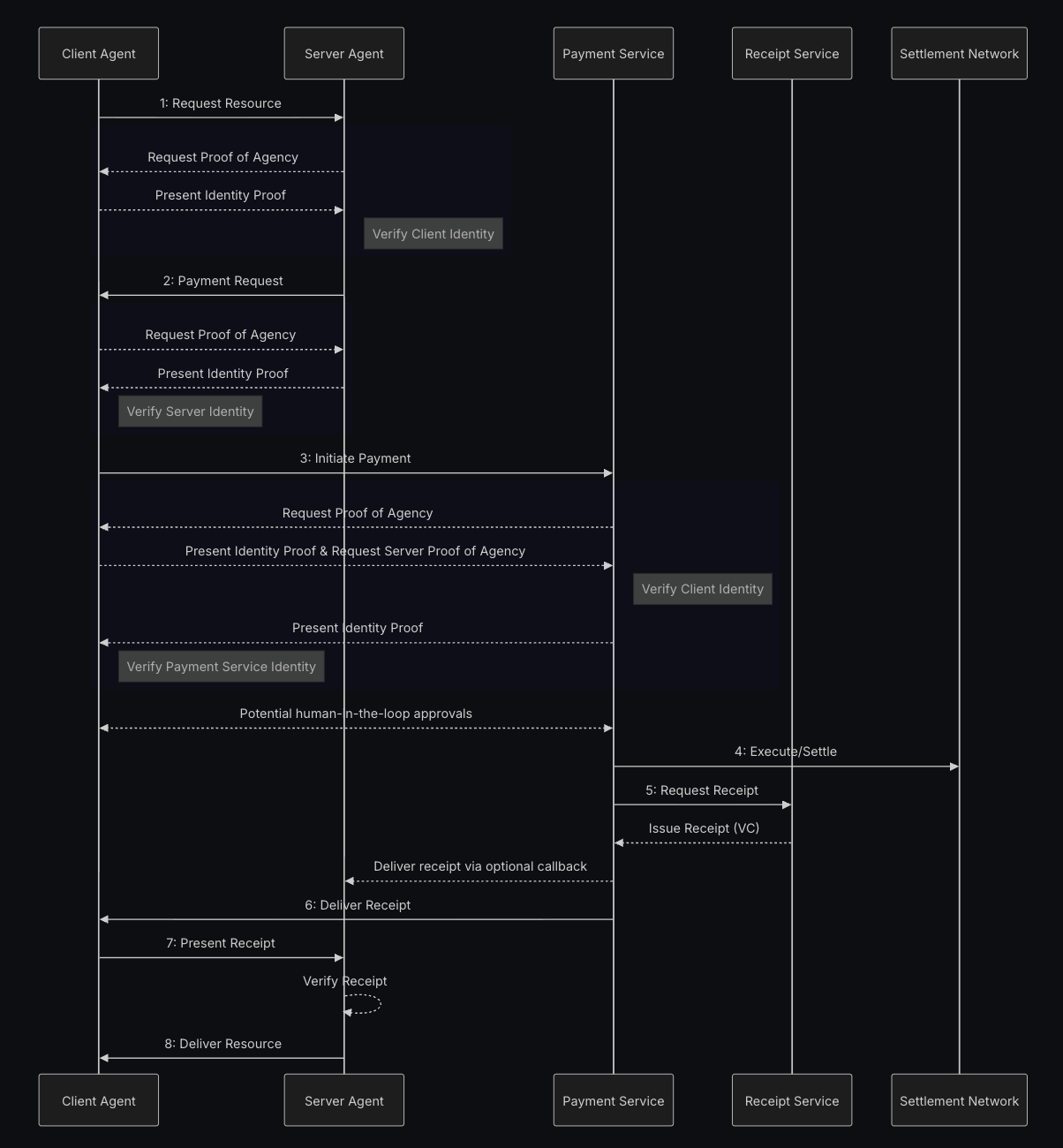 Sơ đồ Luồng ACK
Có một PR với ví dụ e2e chưa được merge nhưng vẫn hoạt động. Ngoài ra còn có một Ví dụ Trực tiếp cho thấy cách đặt paywall cho hình ảnh, một juke box và một API có thể tạo hoạt ảnh cho hình ảnh. Mã nguồn cho các ví dụ cùng với một twitter bot sử dụng API để tạo hoạt ảnh cho hình ảnh trên timeline có thể được tìm thấy tại đây.
MCPay.tech
Thanh toán vi mô theo từng yêu cầu cho các máy chủ MCP (Model Context Protocol) sử dụng các luồng tương tự x402. Cho phép các nhà phát triển kiếm tiền từ các công cụ và tài nguyên MCP bằng cách yêu cầu thanh toán nhỏ cho mỗi lời gọi API hoặc lời gọi công cụ, giúp dễ dàng tính phí truy cập AI agent vào các nguồn dữ liệu cao cấp, công cụ chuyên biệt hoặc tài nguyên tính toán. Trang web: https://mcpay.tech/
PayAI Facilitator
Facilitator x402 ưu tiên Solana với một echo merchant trực tiếp để kiểm tra và hoàn tiền. PayAI hiện đang chịu toàn bộ phí giao dịch. Trang web: https://payai.network/
A2A x402 (Google)
Sáng kiến 402 agent-to-agent khám phá các luồng payment-required được chuẩn hóa. Hỗ trợ Solana hiện đang trong quá trình phát triển và một ví dụ chat hoạt động có thể được tìm thấy tại đây
Crossmint
Crossmint là nền tảng tất cả trong một dành cho các công ty và agent để tích hợp hạ tầng crypto — bao gồm ví, onramp, điều phối stablecoin và nhiều hơn nữa. Hỗ trợ x402 trên Solana hiện đang được phát triển và dự kiến hoàn thành vào ngày 30.10.2025. Trang web: https://www.crossmint.com/
x402scan
Explorer cho hệ sinh thái x402 cung cấp thống kê toàn diện, danh sách dự án và phân tích cho các triển khai x402. Theo dõi khối lượng giao dịch, khám phá các merchant đang hoạt động và theo dõi sự tăng trưởng của các endpoint payment-required trên các mạng khác nhau. Trang web: https://x402scan.com/
Nexus (Thirdweb)
Thirdweb Nexus phát triển wrapper x402 xung quanh các API key (hiện đang được phát triển). Trang web: https://nexus.thirdweb.com/
Ví dụ gốc
Một ví dụ gốc không có phụ thuộc với máy chủ và client tối giản.
Bạn có thể clone kho lưu trữ và chạy ví dụ:
git clone https://github.com/Woody4618/x402-solana-examplesnpm install# Terminal 1: Start servernpm run usdc:server# Terminal 2: Run client (requires devnet USDC)npm run usdc:client
Tổng quan Luồng
- Client yêu cầu
/premium. - Máy chủ phản hồi 402 với các điều khoản thanh toán: người nhận, số tiền.
- Client tạo một giao dịch với lệnh chuyển khoản đến người nhận.
- Client thử lại
/premiumvới payload giao dịch. - Máy chủ xác minh giao dịch và gửi giao dịch đến mạng.
- Sau khi được xác nhận, máy chủ phản hồi 200.
Phương án thay thế dành riêng cho Solana: Trên Solana, bạn có thể triển khai một biến thể trong đó client gửi giao dịch trực tiếp lên mạng kèm theo một lệnh memo (thay vì gửi đến server), sau đó chỉ gửi chữ ký giao dịch đến server để xác minh. Cách này giải quyết vấn đề mất kết nối—nếu client ngắt kết nối sau khi thanh toán nhưng trước khi nhận được nội dung, họ có thể thử lại với cùng chữ ký vì giao dịch thanh toán đã được xác nhận trên chuỗi. Tuy nhiên, cách tiếp cận này lệch khỏi luồng chuẩn x402.org (vốn yêu cầu server phát sóng giao dịch), vì vậy chúng ta sẽ sử dụng cách tiếp cận chuẩn trong ví dụ này.
Lưu ý: Mã nguồn của ví dụ này chưa được kiểm toán, chưa sẵn sàng cho môi trường production và chỉ dành cho mục đích minh họa. Nó cho thấy bạn có thể triển khai x402 mà không cần các phụ thuộc và không cần sử dụng facilitator. Sử dụng facilitator rất tiện lợi vì nó che giấu sự phức tạp và có thể đảm nhận phí giao dịch, nhưng cũng có thể trở thành điểm lỗi duy nhất, ví dụ khi ví facilitator hết tiền. Server ví dụ sẽ gửi các giao dịch đã được client ký. Bạn có thể cần validate những giao dịch này.
Server Tối Giản (Express)
// x402-compliant server with USDC (SPL Token) paymentsimport express from "express";import { Connection, PublicKey, Transaction } from "@solana/web3.js";import { TOKEN_PROGRAM_ID, getAssociatedTokenAddress } from "@solana/spl-token";const connection = new Connection("https://api.devnet.solana.com", "confirmed");// Devnet USDC mint addressconst USDC_MINT = new PublicKey("4zMMC9srt5Ri5X14GAgXhaHii3GnPAEERYPJgZJDncDU");// Your recipient wallet address (same as SOL example)const RECIPIENT_WALLET = new PublicKey("seFkxFkXEY9JGEpCyPfCWTuPZG9WK6ucf95zvKCfsRX");// Derive the recipient's USDC token account (Associated Token Account)const RECIPIENT_TOKEN_ACCOUNT = await getAssociatedTokenAddress(USDC_MINT,RECIPIENT_WALLET);// Picking a small USDC priceconst PRICE_USDC = 100; // 0.0001 USDCconst app = express();app.use(express.json());// x402 endpoint - Quote or verify paymentapp.get("/premium", async (req, res) => {const xPaymentHeader = req.header("X-Payment");// If client provided X-Payment header, verify and submit transactionif (xPaymentHeader) {try {// Decode base64 and parse JSON (x402 standard)const paymentData = JSON.parse(Buffer.from(xPaymentHeader, "base64").toString("utf-8")) as {x402Version: number;scheme: string;network: string;payload: {serializedTransaction: string;};};console.log("Received USDC payment proof from client");console.log(` Network: ${paymentData.network}`);// Deserialize the transactionconst txBuffer = Buffer.from(paymentData.payload.serializedTransaction,"base64");const tx = Transaction.from(txBuffer);console.log("Verifying SPL Token transfer instructions...");// Step 1: Introspect and decode SPL Token transfer instructionconst instructions = tx.instructions;let validTransfer = false;let transferAmount = 0;for (const ix of instructions) {// Check if this is a Token Program instructionif (ix.programId.equals(TOKEN_PROGRAM_ID)) {// SPL Token Transfer instruction layout:// [0] = instruction type (3 for Transfer)// [1-8] = amount (u64, little-endian)if (ix.data.length >= 9 && ix.data[0] === 3) {// Read the amount (u64 in little-endian, starts at byte 1)transferAmount = Number(ix.data.readBigUInt64LE(1));// Verify accounts: [source, destination, owner]if (ix.keys.length >= 2) {const destAccount = ix.keys[1].pubkey;if (destAccount.equals(RECIPIENT_TOKEN_ACCOUNT) &&transferAmount >= PRICE_USDC) {validTransfer = true;console.log(` ✓ Valid USDC transfer: ${transferAmount / 1000000} USDC`);console.log(` To: ${RECIPIENT_TOKEN_ACCOUNT.toBase58()}`);break;}}}}}if (!validTransfer) {return res.status(402).json({error:"Transaction does not contain valid USDC transfer to recipient with correct amount",details:transferAmount > 0? `Found transfer of ${transferAmount}, expected ${PRICE_USDC}`: "No valid token transfer instruction found"});}// Step 2: Simulate the transaction BEFORE submittingconsole.log("Simulating transaction...");try {const simulation = await connection.simulateTransaction(tx);if (simulation.value.err) {console.error("Simulation failed:", simulation.value.err);return res.status(402).json({error: "Transaction simulation failed",details: simulation.value.err,logs: simulation.value.logs});}console.log(" ✓ Simulation successful");} catch (simError) {console.error("Simulation error:", simError);return res.status(402).json({error: "Failed to simulate transaction",details:simError instanceof Error ? simError.message : "Unknown error"});}// Step 3: Submit the transaction (only if verified and simulated successfully)// Note: Solana blockchain automatically rejects duplicate transaction signaturesconsole.log("Submitting transaction to network...");const signature = await connection.sendRawTransaction(txBuffer, {skipPreflight: false,preflightCommitment: "confirmed"});console.log(`Transaction submitted: ${signature}`);// Wait for confirmationconst confirmation = await connection.confirmTransaction(signature,"confirmed");if (confirmation.value.err) {return res.status(402).json({error: "Transaction failed onchain",details: confirmation.value.err});}// Fetch the transaction to verify payment details.// web3.js v1 cannot deserialize v1 transactions, so the max version is// capped at 0 here. A facilitator that must settle v1 payments needs// @solana/kit or web3.js v3 and a max version of 1.const confirmedTx = await connection.getTransaction(signature, {commitment: "confirmed",maxSupportedTransactionVersion: 0});if (!confirmedTx) {return res.status(402).json({error: "Could not fetch confirmed transaction"});}// Verify token balance changes from transaction metadataconst postTokenBalances = confirmedTx.meta?.postTokenBalances ?? [];const preTokenBalances = confirmedTx.meta?.preTokenBalances ?? [];// Find the recipient's token account in the balance changeslet amountReceived = 0;for (let i = 0; i < postTokenBalances.length; i++) {const postBal = postTokenBalances[i];const preBal = preTokenBalances.find((pre) => pre.accountIndex === postBal.accountIndex);// Check if this is the recipient's accountconst accountKey =confirmedTx.transaction.message.staticAccountKeys[postBal.accountIndex];if (accountKey && accountKey.equals(RECIPIENT_TOKEN_ACCOUNT)) {const postAmount = postBal.uiTokenAmount.amount;const preAmount = preBal?.uiTokenAmount.amount ?? "0";amountReceived = Number(postAmount) - Number(preAmount);break;}}if (amountReceived < PRICE_USDC) {return res.status(402).json({error: `Insufficient payment: received ${amountReceived}, expected ${PRICE_USDC}`});}console.log(`Payment verified: ${amountReceived / 1000000} USDC received`);console.log(`View transaction: https://explorer.solana.com/tx/${signature}?cluster=devnet`);// Payment verified! Return premium contentreturn res.json({data: "Premium content - USDC payment verified!",paymentDetails: {signature,amount: amountReceived,amountUSDC: amountReceived / 1000000,recipient: RECIPIENT_TOKEN_ACCOUNT.toBase58(),explorerUrl: `https://explorer.solana.com/tx/${signature}?cluster=devnet`}});} catch (e) {console.error("Payment verification error:", e);return res.status(402).json({error: "Payment verification failed",details: e instanceof Error ? e.message : "Unknown error"});}}// No payment provided - return 402 with payment detailsconsole.log("New USDC payment quote requested");return res.status(402).json({payment: {recipientWallet: RECIPIENT_WALLET.toBase58(),tokenAccount: RECIPIENT_TOKEN_ACCOUNT.toBase58(),mint: USDC_MINT.toBase58(),amount: PRICE_USDC,amountUSDC: PRICE_USDC / 1000000,cluster: "devnet",message: "Send USDC to the token account"}});});app.listen(3001, () => console.log("x402 USDC server listening on :3001"));
Client Tối Giản (Node)
import { Connection, Keypair, PublicKey, Transaction } from "@solana/web3.js";import {createTransferInstruction,getOrCreateAssociatedTokenAccount,createAssociatedTokenAccountInstruction,getAccount} from "@solana/spl-token";import fetch from "node-fetch";import { readFileSync } from "fs";const connection = new Connection("https://api.devnet.solana.com", "confirmed");const keypairData = JSON.parse(readFileSync("./pay-in-usdc/client.json", "utf-8"));const payer = Keypair.fromSecretKey(Uint8Array.from(keypairData));async function run() {// 1) Request payment quote from serverconst quote = await fetch("http://localhost:3001/premium");const q = (await quote.json()) as {payment: {tokenAccount: string;mint: string;amount: number;amountUSDC: number;cluster: string;};};if (quote.status !== 402) throw new Error("Expected 402 quote");const recipientTokenAccount = new PublicKey(q.payment.tokenAccount);const mint = new PublicKey(q.payment.mint);const amount = q.payment.amount;console.log("USDC Payment required:");console.log(` Recipient Token Account: ${q.payment.tokenAccount}`);console.log(` Mint (USDC): ${q.payment.mint}`);console.log(` Amount: ${q.payment.amountUSDC} USDC (${amount} smallest units)`);// 2) Get or create the payer's associated token accountconsole.log("\nChecking/creating associated token account...");const payerTokenAccount = await getOrCreateAssociatedTokenAccount(connection,payer,mint,payer.publicKey);console.log(` Payer Token Account: ${payerTokenAccount.address.toBase58()}`);// Check if payer has enough USDCconst balance = await connection.getTokenAccountBalance(payerTokenAccount.address);console.log(` Current Balance: ${balance.value.uiAmountString} USDC`);if (Number(balance.value.amount) < amount) {throw new Error(`Insufficient USDC balance. Have: ${balance.value.uiAmountString}, Need: ${q.payment.amountUSDC}`);}// 3) Check if recipient token account exists, create if notconsole.log("\nChecking recipient token account...");let recipientAccountExists = false;try {await getAccount(connection, recipientTokenAccount);recipientAccountExists = true;console.log(" ✓ Recipient token account exists");} catch (error) {console.log(" ⚠ Recipient token account doesn't exist, will create it");}// 4) Create USDC transfer transaction (but DON'T submit it)const { blockhash } = await connection.getLatestBlockhash();const tx = new Transaction({feePayer: payer.publicKey,blockhash,lastValidBlockHeight: (await connection.getLatestBlockhash()).lastValidBlockHeight});// Add create account instruction if neededif (!recipientAccountExists) {// We need to know the recipient wallet address to create the ATA// The server should provide this, so let's get it from the wallet address// Usually the server will already have the token account, but to be sure for the examples// lets create one.const recipientWallet = new PublicKey("seFkxFkXEY9JGEpCyPfCWTuPZG9WK6ucf95zvKCfsRX");const createAccountIx = createAssociatedTokenAccountInstruction(payer.publicKey, // payerrecipientTokenAccount, // associated token account addressrecipientWallet, // ownermint // mint);tx.add(createAccountIx);console.log(" + Added create token account instruction");}// Add transfer instructionconst transferIx = createTransferInstruction(payerTokenAccount.address, // sourcerecipientTokenAccount, // destinationpayer.publicKey, // owneramount // amount in smallest units);tx.add(transferIx);// Sign the transaction (but don't send it, the server will do that)tx.sign(payer);// Serialize the signed transactionconst serializedTx = tx.serialize().toString("base64");console.log("\nTransaction created and signed (not submitted yet)");console.log(` Instructions: ${tx.instructions.length}`);// 4) Send X-Payment header with serialized transaction (x402 standard)const paymentProof = {x402Version: 1,scheme: "exact",network:q.payment.cluster === "devnet" ? "solana-devnet" : "solana-mainnet",payload: {serializedTransaction: serializedTx}};// Base64 encode the payment proofconst xPaymentHeader = Buffer.from(JSON.stringify(paymentProof)).toString("base64");console.log("\nSending payment proof to server (server will submit transaction)...");const paid = await fetch("http://localhost:3001/premium", {headers: {"X-Payment": xPaymentHeader}});const result = (await paid.json()) as {data?: string;error?: string;paymentDetails?: {signature: string;amount: number;amountUSDC: number;recipient: string;explorerUrl: string;};};console.log("\nServer response:");console.log(result);// Display explorer link if payment was successfulif (result.paymentDetails?.explorerUrl) {console.log("\n🔗 View transaction on Solana Explorer:");console.log(result.paymentDetails.explorerUrl);}}run().catch(console.error);
Các Cải Tiến
- Hãy cân nhắc trả về một JWT sau khi thanh toán để client có thể tái sử dụng quyền truy cập trong thời gian ngắn. ACK giúp điều đó khá dễ dàng.
- Hãy đảm bảo các khóa của bạn không bị rò rỉ và đặt chúng vào các biến môi trường.
Is this page helpful?