Das Signieren einer Nachricht beweist, dass ein Nutzer eine Wallet kontrolliert – ohne Transaktion, ohne Fee und ohne Netzwerkaufruf. Apps verwenden signierte Nachrichten, um Nutzer anzumelden, festzuhalten, dass ein Nutzer Bedingungen akzeptiert hat, eine Wallet mit bestehenden Konten zu verknüpfen oder eine Aktion zu autorisieren, die off-chain stattfindet, etwa das Aufgeben einer Bestellung.
Solana-Wallets signieren Nachrichten auf zwei Arten:
- Off-Chain-Nachrichten (
solana:signOffchainMessage) verpacken deinen Text in ein Standardformat, das durch die Spezifikation für das Signieren von Off-Chain-Nachrichten (OCMS) definiert ist. Das Format kann nie mit einer Transaktion verwechselt werden, benennt die Konten, die es signieren müssen, und ist das Format, das Hardware-Wallets signieren. - Rohnachrichten (
solana:signMessage) signieren genau die Bytes, die deine App übergibt – ohne Präfix und ohne deklarierte Signer. Die meisten Software-Wallets unterstützen sie, aber nichts in den Bytes kennzeichnet sie als Nachricht statt als Transaktion.
Verwende Off-Chain-Nachrichten, wo die Wallet sie unterstützt, und weiche auf Rohnachrichten aus, wo sie es nicht tut. In diesem Leitfaden dient die Anmeldung als durchgängiges Beispiel, aber dieselben Signatur- und Verifizierungsschritte gelten für jede Nachricht.
Nachrichtenformat auswählen
| Off-Chain-Nachricht | Rohnachricht | Transaktion | |
|---|---|---|---|
| Wallet-Feature | signOffchainMessage | signMessage | signTransaction |
| Hardware-Wallet-Unterstützung | Geräteabhängig | Nein | Ja |
| Für Nutzer lesbar | Ja | Nur Software | Geräteabhängig |
| Deklariert erforderliche Signer | Ja | Nein | Ja |
| RPC-Aufrufe und Fee | Keine | Keine | Blockhash, Senden, Fee, Bestätigen |
Warum keine Transaktion?
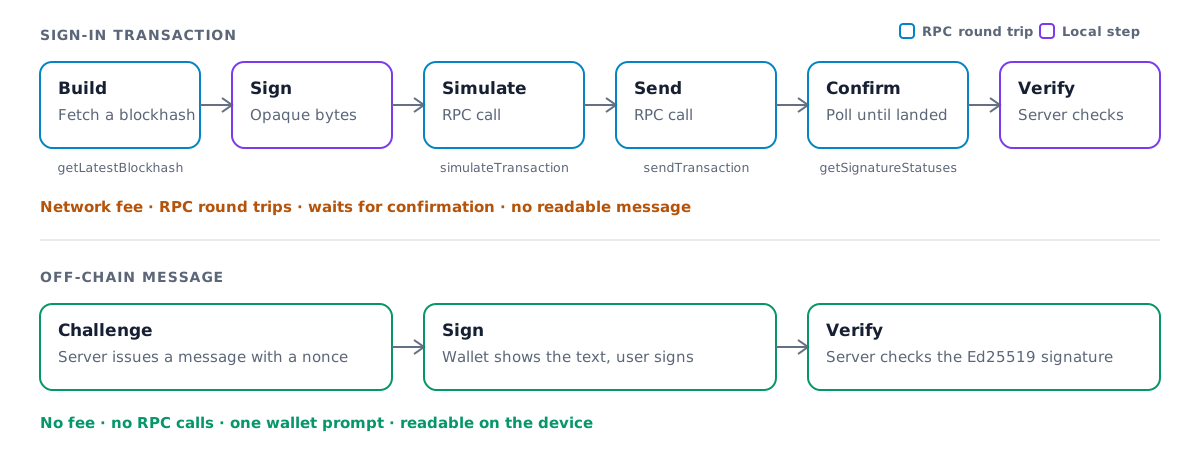
Hardware-Wallets konnten früher keine lesbare Nachricht signieren. Viele Apps griffen darauf zurück, diese Nutzer um die Signatur einer No-Op-Transaktion zu bitten. Das funktioniert, bringt aber Latenz, Kosten und Risiken mit sich:
- Netzwerk-Fee. Eine Transaktion zahlt eine Fee, selbst wenn sie nichts bewirkt.
- Mehrere RPC-Aufrufe. Deine App ruft einen Blockhash ab, simuliert, sendet und fragt dann die Bestätigung per Polling ab.
- Zusätzliche Latenz. Jeder dieser Aufrufe ist ein Roundtrip, bevor der Nutzer angemeldet ist.
- Nichts Lesbares. Der Nutzer genehmigt Transaktionsbytes, keine Erklärung dessen, wozu er zustimmt.
- Verhaltensrisiko. Nutzer zu bitten, nur zum Anmelden eine Transaktion zu signieren, macht sie anfälliger dafür, zur Signatur einer schädlichen Transaktion verleitet zu werden.
Eine Off-Chain-Nachricht erspart all das. Der einzige Roundtrip geht zu deinem eigenen Server.
Was die Wallet signiert
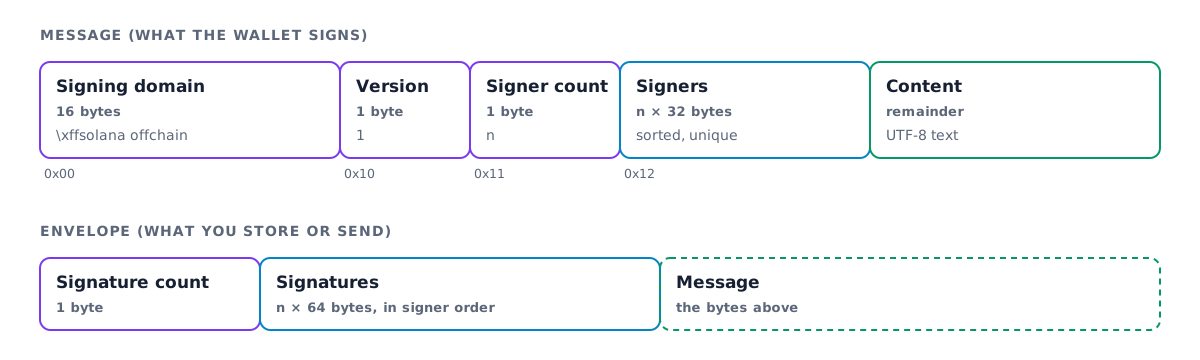
Eine Off-Chain-Nachricht beginnt mit einer festen Signing-Domain, \xffsolana offchain.
Keine gültige Transaktion beginnt mit diesen Bytes, daher kann eine signierte Nachricht nie als
Transaktion verwendet werden. Version 1 des Formats listet anschließend die erforderlichen Signer auf
und enthält die Nachricht als UTF-8-Text, ohne Längenbegrenzung.
Die Wallet erstellt diese Bytes, signiert sie und gibt sie zusammen mit der Signatur zurück. Die Spezifikation beschreibt das vollständige Format, einschließlich der Legacy-Version 0.
Anmeldemethode auswählen
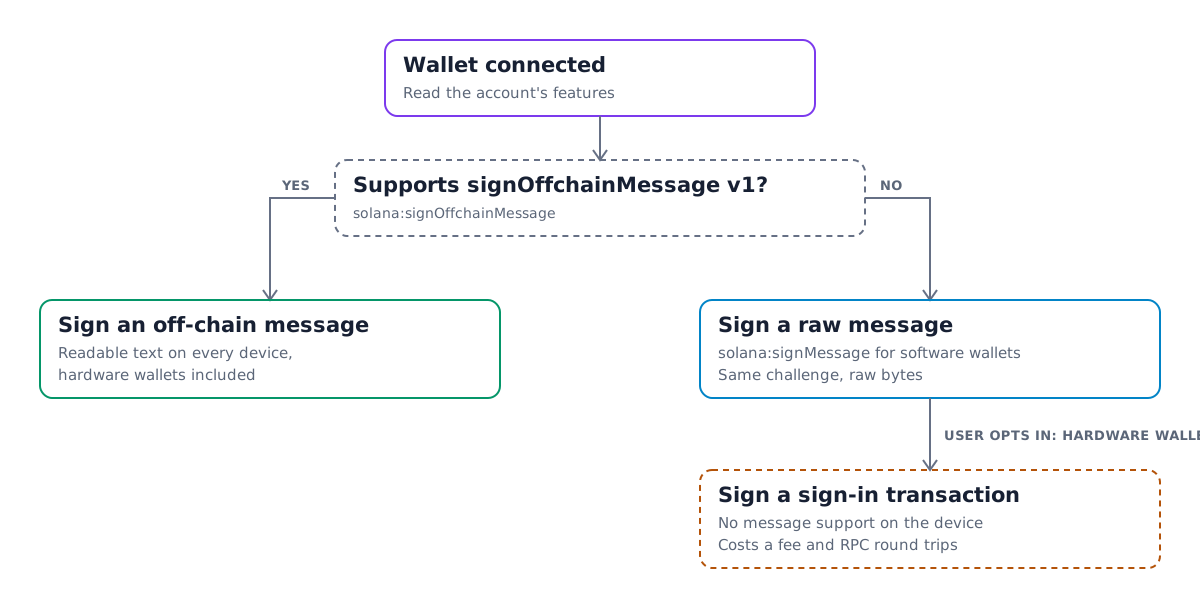
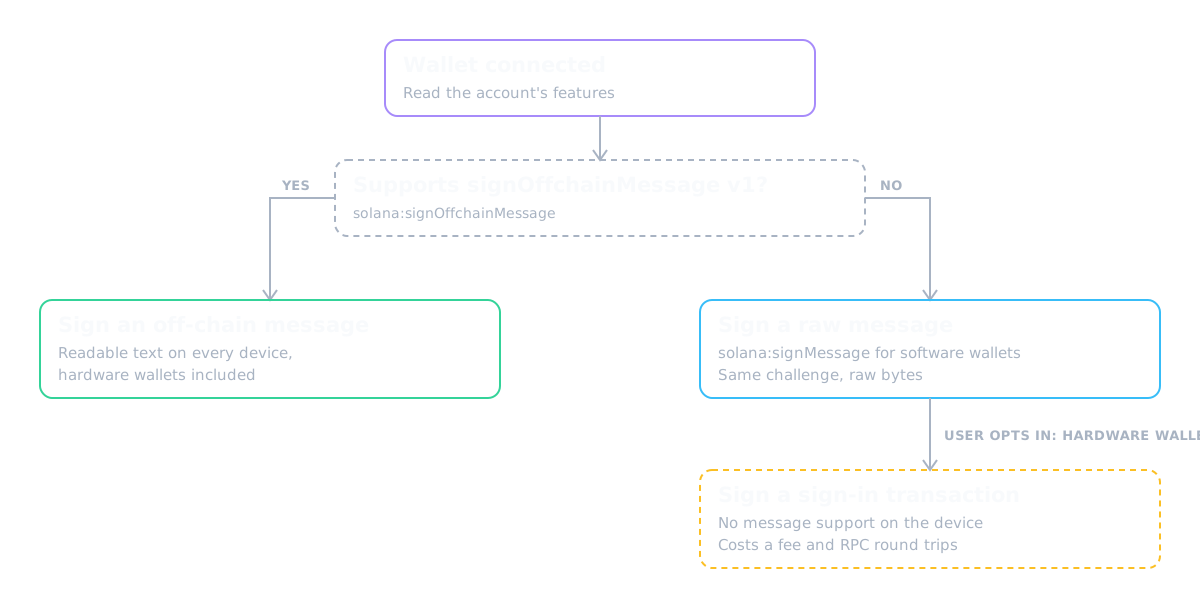
Noch nicht jede Wallet unterstützt Off-Chain-Nachrichten. Prüfe vor der Signaturanfrage die Features der verbundenen Konten und weiche aus, wenn das Feature fehlt:
- Unterstützen die Konten
solana:signOffchainMessagemit Nachrichtenversion 1, signiere eine Off-Chain-Nachricht. - Andernfalls signiere dieselbe Challenge mit
solana:signMessage. Die meisten Software- Wallets unterstützen dies. - Biete Hardware-Wallet-Nutzern ohne Nachrichtenunterstützung ein explizites Opt-in an, etwa einen Schalter „Ich verwende eine Hardware-Wallet“, das stattdessen eine Anmelde-Transaktion signiert. Schicke sie nicht standardmäßig auf diesen Weg.
Eine Nachricht im Browser signieren
Installiere die Wallet-Standard-Pakete zusammen mit Kit:
$npm install @solana/kit @solana/wallet-standard-features @wallet-standard/ui @wallet-standard/ui-features @wallet-standard/ui-registry
Diese Helfer erwarten ein UiWalletAccount, etwa das account, das
useConnectedWallet im React-Leitfaden zurückgibt:
import {SolanaSignOffchainMessage,type SolanaSignOffchainMessageFeature} from "@solana/wallet-standard-features";import type { UiWalletAccount } from "@wallet-standard/ui";import { getWalletAccountFeature } from "@wallet-standard/ui-features";import { getWalletAccountForUiWalletAccount } from "@wallet-standard/ui-registry";type OffchainMessageFeature =SolanaSignOffchainMessageFeature[typeof SolanaSignOffchainMessage];export function supportsOffchainMessages(account: UiWalletAccount) {if (!account.features.includes(SolanaSignOffchainMessage)) return false;const feature = getWalletAccountFeature(account,SolanaSignOffchainMessage) as OffchainMessageFeature;return feature.supportedMessageVersions.includes(1);}export async function signOffchainMessage(account: UiWalletAccount,message: string) {const feature = getWalletAccountFeature(account,SolanaSignOffchainMessage) as OffchainMessageFeature;const [output] = await feature.signOffchainMessage({messageVersion: 1,account: getWalletAccountForUiWalletAccount(account),message,requiredSigners: [account.publicKey]});return output;}
signOffchainMessage gibt signedOffchainMessage zurück – die vollständigen Bytes, die die Wallet
signiert hat – sowie signature. Kodiere beide in Base64 und sende sie zusammen mit
der Wallet-Adresse an deinen Server.
Formuliere die Challenge so, dass sie sich auf einem kleinen Bildschirm gut lesen lässt. Nenne deine App und Domain, erkläre, was das Signieren bewirkt, und füge eine einmalig verwendbare Nonce sowie einen Ausstellungszeitpunkt von deinem Server hinzu:
swap.app wants you to sign in with your Solana account.Signing in costs nothing and does not submit a transaction.Nonce: 8f3a1c9eIssued at: 2026-09-29T17:04:00Z
Die Signatur auf deinem Server verifizieren
Die Verifizierung ist eine lokale Signaturprüfung und benötigt keine RPC-Verbindung. Dekodiere die von der Wallet signierten Bytes, bestätige, dass sie mit der von dir ausgestellten Challenge übereinstimmen, und prüfe dann die Signatur:
import {address,assertOffchainMessageV1Equal,getBase64Encoder,getOffchainMessageDecoder,verifyOffchainMessageEnvelope,type OffchainMessageBytes,type SignatureBytes} from "@solana/kit";export async function verifySignIn(input: {walletAddress: string;expectedMessage: string;signedOffchainMessage: string;signature: string;}) {const signer = address(input.walletAddress);const base64 = getBase64Encoder();const content = base64.encode(input.signedOffchainMessage) as OffchainMessageBytes;const signature = base64.encode(input.signature) as SignatureBytes;const received = getOffchainMessageDecoder().decode(content);if (received.version !== 1) {throw new Error(`Expected a v1 message, got v${received.version}`);}assertOffchainMessageV1Equal(received, {version: 1,requiredSignatories: [{ address: signer }],content: input.expectedMessage});await verifyOffchainMessageEnvelope({content,signatures: { [signer]: signature }});}
assertOffchainMessageV1Equal wirft einen Fehler, wenn Inhalt oder Signer von dem abweichen,
was du erwartet hast. verifyOffchainMessageEnvelope wirft einen Fehler, wenn die Signatur
fehlt oder ungültig ist. Suche expectedMessage auf deinem Server anhand der Nonce heraus, statt
der vom Client zurückgesendeten Kopie zu vertrauen. Verbrauche die Nonce, sobald die Verifizierung
erfolgreich war, damit dieselbe Signatur nicht zweimal zur Anmeldung dienen kann.
Eine Rohnachricht verifizieren
Eine signMessage-Signatur deckt die Challenge-Bytes direkt ab, daher muss der Client
nur die Signatur und die Wallet-Adresse senden. Prüfe sie gegen die
Challenge, die du ausgestellt hast:
import {address,getBase64Encoder,getPublicKeyFromAddress,getUtf8Encoder,signatureBytes,verifySignature} from "@solana/kit";export async function verifyRawSignIn(input: {walletAddress: string;expectedMessage: string;signature: string;}) {const publicKey = await getPublicKeyFromAddress(address(input.walletAddress));const signature = signatureBytes(getBase64Encoder().encode(input.signature));const message = getUtf8Encoder().encode(input.expectedMessage);if (!(await verifySignature(publicKey, signature, message))) {throw new Error("Invalid signature");}}
Es gelten dieselben Nonce-Regeln: Suche expectedMessage anhand der Nonce heraus und verbrauche sie,
sobald die Verifizierung erfolgreich war.
@solana/kit re-exportiert diese Helfer aus @solana/offchain-messages. Verwende
das eigenständige Paket, wenn dein Server nicht von Kit abhängt.
Sign In With Solana
Sign In With Solana (SIWS)
standardisiert die Challenge selbst. Deine App übergibt strukturierte Felder wie
domain, statement, nonce und issuedAt an das Feature solana:signIn der Wallet.
Die Wallet formatiert sie zu einer Standardnachricht, stellt bei Bedarf eine Verbindung her
und signiert sie in einem Schritt.
Version 1.1.0 von solana:signIn fügt die Option useOffchainMessage hinzu. Wenn du
useOffchainMessage: { messageVersion: 1 } übergibst, verpackt die Wallet den SIWS-Text
in eine Off-Chain-Nachricht der Version 1, deren einziger erforderlicher Signer aus den signierenden Konten stammt.
Hardware-Wallets können sie anzeigen und signieren, und die Ausgabe meldet
signedMessageFormat: { kind: "offchainMessage", messageVersion: 1 }. Wallets,
die Version 1.0.0 angeben, kennen die Option nicht. Prüfe daher zuerst die Feature-Version
und lass die Option andernfalls weg.
solana:signIn ist ein Wallet-Feature, kein Konten-Feature, daher erwarten diese
Helfer ein UiWallet:
import {SolanaSignIn,type SolanaSignInFeature,type SolanaSignInInput} from "@solana/wallet-standard-features";import type { UiWallet } from "@wallet-standard/ui";import { getWalletFeature } from "@wallet-standard/ui-features";type SignInFeature = SolanaSignInFeature[typeof SolanaSignIn];export function supportsOffchainSignIn(wallet: UiWallet) {if (!wallet.features.includes(SolanaSignIn)) return false;const feature = getWalletFeature(wallet, SolanaSignIn) as SignInFeature;return feature.version === "1.1.0";}export async function signIn(wallet: UiWallet, input: SolanaSignInInput) {const feature = getWalletFeature(wallet, SolanaSignIn) as SignInFeature;const [output] = await feature.signIn({...input,...(supportsOffchainSignIn(wallet) && {useOffchainMessage: { messageVersion: 1 }})});return output;}
Erstelle die Eingabe auf deinem Server mit einer einmalig verwendbaren nonce und einem issuedAt-
Zeitpunkt und bewahre eine nach der Nonce indizierte Kopie auf. Verbrauche die Nonce, sobald die Anmeldung
verifiziert wurde.
Ohne Wallet Adapter prüft verifySignIn aus @solana/wallet-standard-util
nur reine SIWS-Ausgaben. Meldet signedMessageFormat eine Off-Chain-
Nachricht, ist signedMessage eine Off-Chain-Nachricht, deren Inhalt der SIWS-Text ist.
Rekonstruiere den erwarteten Text aus deiner gespeicherten Eingabe und der Signieradresse mit
createSignInMessageText aus @solana/wallet-standard-util und verifiziere ihn dann
wie jede andere Off-Chain-Nachricht, wie unter
Die Signatur auf deinem Server verifizieren. Die
@solana/offchain-messages-README
beschreibt diesen Ablauf in Kit.
Für Wallets
Wallets fügen Unterstützung hinzu, indem sie das Wallet-Standard-Feature solana:signOffchainMessage
aus @solana/wallet-standard-features implementieren:
- Melde
version: "1.0.0"und liste die Nachrichtenversionen, die du signieren kannst, insupportedMessageVersionsauf. Derzeit ist das[1]. - Erstelle die Version-1-Präambel aus
requiredSigners, die du sortierst und auf Duplikate prüfst. Lehne die Anfrage ab, wenn die Konten nicht zu den erforderlichen Signer gehören. - Zeige dem Nutzer den Nachrichtentext vor dem Signieren vollständig an, auch auf Hardware-Geräten.
- Gib die exakten Bytes, die du signiert hast, als
signedOffchainMessagezurück, zusammen mit der Ed25519-signature. - Um Off-Chain-Sign-In-With-Solana zu unterstützen, melde
version: "1.1.0"fürsolana:signIn. Wenn die EingabeuseOffchainMessageenthält, signiere den SIWS-Text als Off-Chain-Nachricht der Version 1, gib deren Bytes alssignedMessagezurück und setzesignedMessageFormat. - Unterstütze weiterhin
solana:signMessage. Es bleibt unverändert, und Apps nutzen es weiterhin als Fallback.
Is this page helpful?