Summary
Program accounts hold executable sBPF code. Data accounts store state, owned by programs. System accounts are owned by the System Program. Sysvars provide cluster-wide state accessible at predefined addresses.
The executable field determines an
account's category:
- Program accounts:
executable=true. Contains executable code. - Data accounts:
executable=false. Stores state or user data.
This separation of code from mutable state means a program is deployed once and can manage any number of data accounts.
Program accounts
A program account stores executable code. Every program account is owned by a loader program. When a program is deployed, the runtime creates a program account to hold its bytecode.
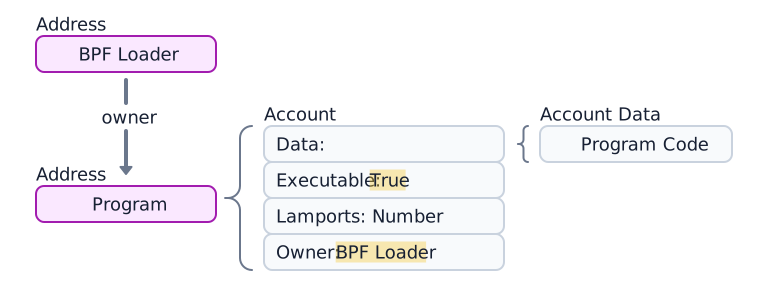
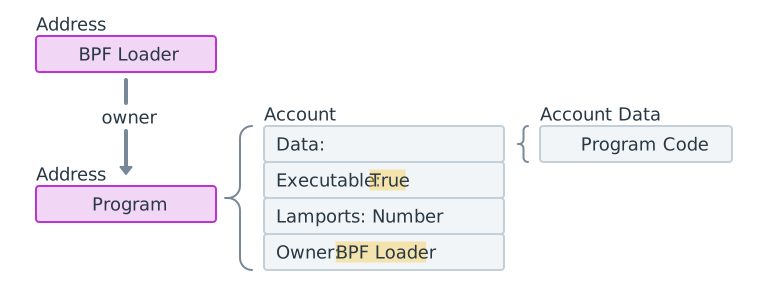 Diagram of a program account, its 4 components and its loader program.
Program data accounts
Programs deployed using loader-v3 (see
Loader programs) do not
store executable bytecode in their own data field. Instead, their data
points to a separate program data account that contains the program code.
(See the diagram below.)

 A program account with data. The data points to a separate program data account
During program deployment or upgrades, buffer accounts are used to temporarily stage the upload.
The following example fetches the Token Program account. The executable field
is true, confirming it is a program account.
import { Address, createClient } from "@solana/kit";import { solanaRpc } from "@solana/kit-plugin-rpc";import { generatedPayer } from "@solana/kit-plugin-signer";const client = await createClient().use(generatedPayer()).use(solanaRpc({rpcUrl: "https://api.mainnet.solana.com"}));const programId = "TokenkegQfeZyiNwAJbNbGKPFXCWuBvf9Ss623VQ5DA" as Address;const accountInfo = await client.rpc.getAccountInfo(programId, { encoding: "base64" }).send();console.log(accountInfo);
Data accounts
Data accounts do not contain executable code. They store program-defined state.
Program state account
Programs store their state in data accounts. Creating a program state account involves two steps:
- Invoke the System Program to create the account. The System Program transfers ownership to the specified program.
- The owning program initializes the account's
datafield according to its instructions.
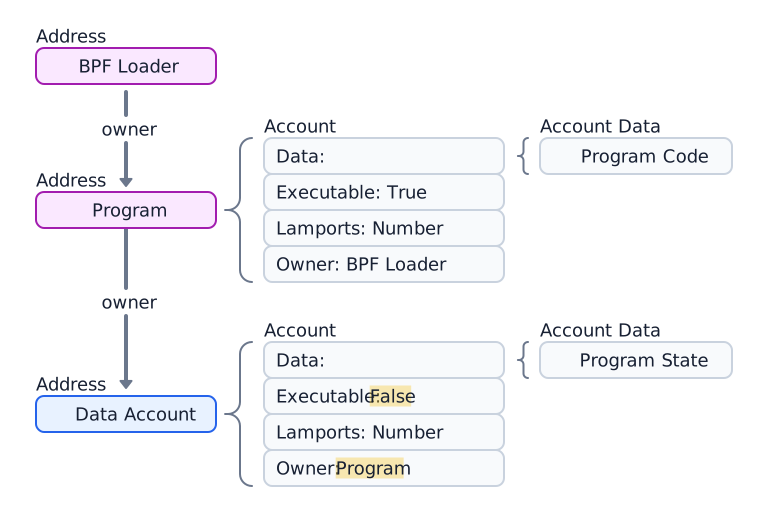
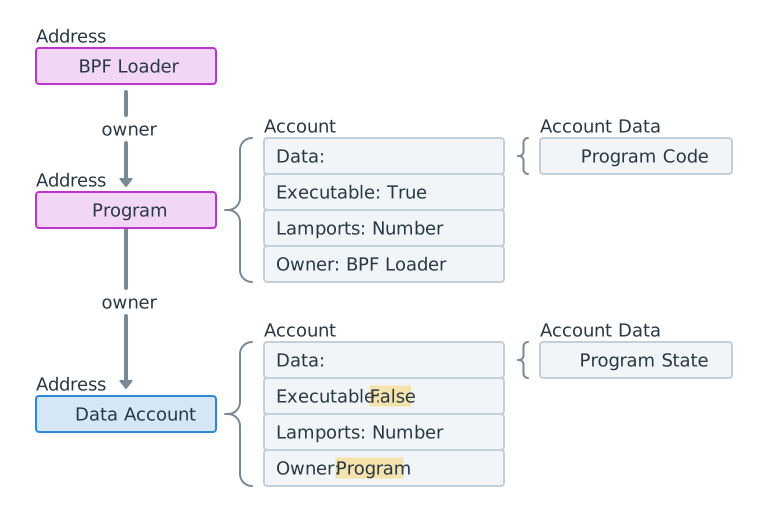 Diagram of a data account owned by a program account
The following example creates and fetches a Token Mint account owned by the Token 2022 program.
import { createClient, generateKeyPairSigner, lamports } from "@solana/kit";import { solanaRpc, rpcAirdrop } from "@solana/kit-plugin-rpc";import { generatedPayer, airdropPayer } from "@solana/kit-plugin-signer";import { systemProgram } from "@solana-program/system";import {getInitializeMintInstruction,getMintSize,TOKEN_2022_PROGRAM_ADDRESS,fetchMint} from "@solana-program/token-2022";const client = await createClient().use(generatedPayer()).use(solanaRpc({rpcUrl: "http://localhost:8899",rpcSubscriptionsUrl: "ws://localhost:8900"})).use(rpcAirdrop()).use(airdropPayer(lamports(1_000_000_000n))).use(systemProgram());// Generate keypair to use as address of mintconst mint = await generateKeyPairSigner();// Get default mint account size (in bytes), no extensions enabledconst space = BigInt(getMintSize());// Get minimum balance for rent exemptionconst rent = await client.rpc.getMinimumBalanceForRentExemption(space).send();const transactionSignature = await client.sendTransaction([client.system.instructions.createAccount({newAccount: mint,lamports: rent,space,programAddress: TOKEN_2022_PROGRAM_ADDRESS}),getInitializeMintInstruction({mint: mint.address,decimals: 9,mintAuthority: client.payer.address})]);console.log("Mint Address:", mint.address);console.log("Transaction Signature:", transactionSignature.context.signature);const accountInfo = await client.rpc.getAccountInfo(mint.address).send();console.log(accountInfo);const mintAccount = await fetchMint(client.rpc, mint.address);console.log(mintAccount);
System accounts
Accounts that remain owned by the System Program after creation are called system accounts. Sending SOL to a new address for the first time creates a new account at that address owned by the System Program.
All wallet accounts are system accounts. The fee payer on a transaction must be a system account, because only System Program-owned accounts can pay transaction fees.
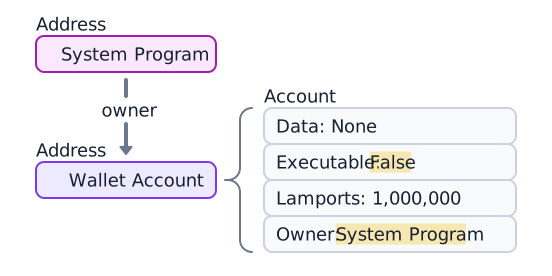
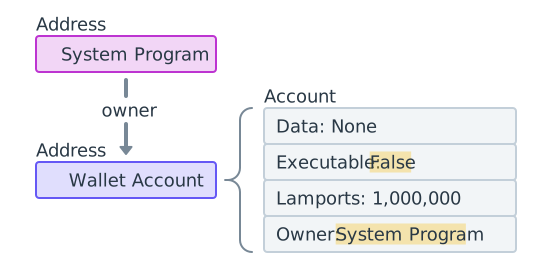 A wallet owned by the System Program containing 1,000,000 lamports
The following example generates a new keypair, funds it with SOL, and fetches
the account. The owner field is 11111111111111111111111111111111 (the
System Program).
import { createClient, generateKeyPairSigner, lamports } from "@solana/kit";import { solanaRpc, rpcAirdrop } from "@solana/kit-plugin-rpc";import { generatedPayer } from "@solana/kit-plugin-signer";const client = await createClient().use(generatedPayer()).use(solanaRpc({rpcUrl: "http://localhost:8899",rpcSubscriptionsUrl: "ws://localhost:8900"})).use(rpcAirdrop());// Generate a new keypairconst keypair = await generateKeyPairSigner();console.log(`Public Key: ${keypair.address}`);// Funding an address with SOL automatically creates an accountconst signature = await client.airdrop(keypair.address,lamports(1_000_000_000n));const accountInfo = await client.rpc.getAccountInfo(keypair.address).send();console.log(accountInfo);
Sysvar accounts
Sysvar accounts are special accounts at predefined addresses that provide read-only access to cluster state data. They update dynamically each slot.
| Sysvar | Address | Purpose |
|---|---|---|
| Clock | SysvarC1ock11111111111111111111111111111111 | Current slot, epoch, and Unix timestamp |
| EpochSchedule | SysvarEpochSchedu1e111111111111111111111111 | Epoch scheduling constants set in genesis |
| EpochRewards | SysvarEpochRewards1111111111111111111111111 | Epoch rewards distribution status and progress |
| Rent | SysvarRent111111111111111111111111111111111 | Rental rate and exemption threshold |
| SlotHashes | SysvarS1otHashes111111111111111111111111111 | Most recent hashes of the slot's parent banks |
| StakeHistory | SysvarStakeHistory1111111111111111111111111 | Stake activations and deactivations per epoch |
| LastRestartSlot | SysvarLastRestartS1ot1111111111111111111111 | Last cluster restart slot |
| Instructions | Sysvar1nstructions1111111111111111111111111 | Serialized instructions of the current transaction |
| SlotHistory | SysvarS1otHistory11111111111111111111111111 | Record of which slots were produced over the last epoch |
The following example fetches and deserializes the Sysvar Clock account.
import { createClient } from "@solana/kit";import { solanaRpc } from "@solana/kit-plugin-rpc";import { generatedPayer } from "@solana/kit-plugin-signer";import { fetchSysvarClock, SYSVAR_CLOCK_ADDRESS } from "@solana/sysvars";const client = await createClient().use(generatedPayer()).use(solanaRpc({rpcUrl: "https://api.mainnet.solana.com"}));const accountInfo = await client.rpc.getAccountInfo(SYSVAR_CLOCK_ADDRESS, { encoding: "base64" }).send();console.log(accountInfo);// Automatically fetch and deserialize the account dataconst clock = await fetchSysvarClock(client.rpc);console.log(clock);
Is this page helpful?