Signer un message prouve qu'un utilisateur contrôle un portefeuille, sans transaction, sans frais et sans appel réseau. Les applications utilisent les messages signés pour connecter des utilisateurs, enregistrer qu'un utilisateur a accepté des conditions, associer un portefeuille à un compte existant ou autoriser une action exécutée hors chaîne, comme passer une commande.
Les portefeuilles Solana signent les messages de deux manières :
- Les messages off-chain (
solana:signOffchainMessage) encapsulent votre texte dans un format standard, défini par la spécification de signature de messages off-chain (OCMS). Ce format ne peut jamais être confondu avec une transaction, indique les comptes qui doivent le signer, et c'est le format que signent les portefeuilles matériels. - Les messages bruts (
solana:signMessage) signent exactement les octets que votre application transmet, sans préfixe et sans signataires déclarés. La plupart des portefeuilles logiciels les prennent en charge, mais rien dans ces octets ne les identifie comme un message plutôt que comme une transaction.
Utilisez les messages off-chain lorsque le portefeuille les prend en charge, et repliez-vous sur les messages bruts dans le cas contraire. Le reste de ce guide prend la connexion comme exemple concret, mais les mêmes étapes de signature et de vérification s'appliquent à n'importe quel message.
Choisir un format de message
| Message off-chain | Message brut | Transaction | |
|---|---|---|---|
| Fonctionnalité du portefeuille | signOffchainMessage | signMessage | signTransaction |
| Prise en charge des portefeuilles matériels | Selon l'appareil | Non | Oui |
| Lisible par l'utilisateur | Oui | Portefeuilles logiciels uniquement | Selon l'appareil |
| Déclare les signataires requis | Oui | Non | Oui |
| Appels RPC et frais | Aucun | Aucun | Blockhash, envoi, frais, confirmation |
Pourquoi pas une transaction ?
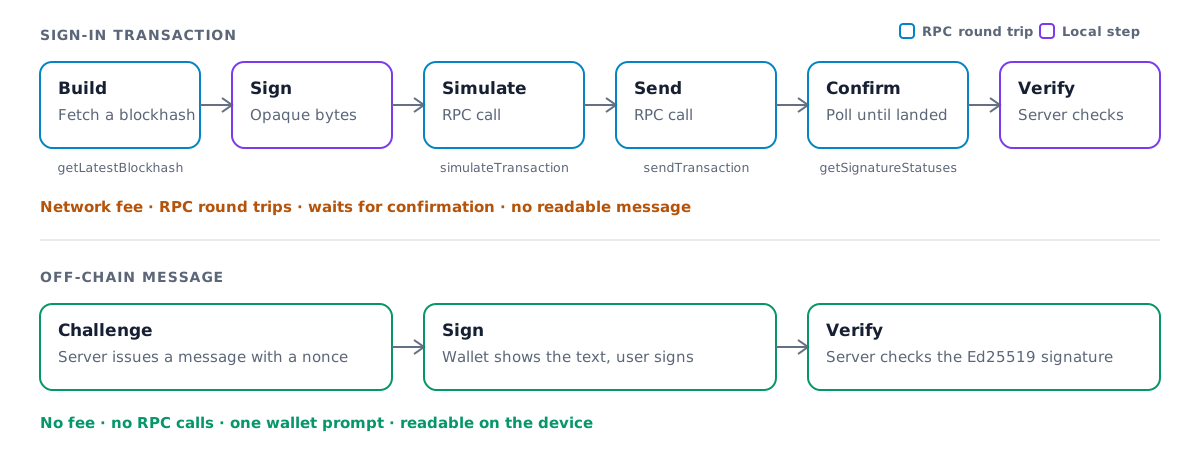
Les portefeuilles matériels ne pouvaient auparavant pas signer de message lisible. De nombreuses applications se rabattaient sur une transaction sans effet que ces utilisateurs devaient signer. Cela fonctionne, mais cela ajoute de la latence, des coûts et des risques :
- Frais de réseau. Une transaction entraîne des frais, même lorsqu'elle ne fait rien.
- Plusieurs appels RPC. Votre application récupère un blockhash, simule, envoie, puis interroge le réseau pour obtenir la confirmation.
- Latence supplémentaire. Chacun de ces appels est un aller-retour avant que l'utilisateur ne soit connecté.
- Rien de lisible. L'utilisateur approuve des octets de transaction, et non une déclaration de ce à quoi il consent.
- Risque comportemental. Demander aux utilisateurs de signer une transaction uniquement pour se connecter les rend plus faciles à piéger pour qu'ils en signent une malveillante.
Un message off-chain évite tout cela. Le seul aller-retour se fait avec votre propre serveur.
Ce que le portefeuille signe
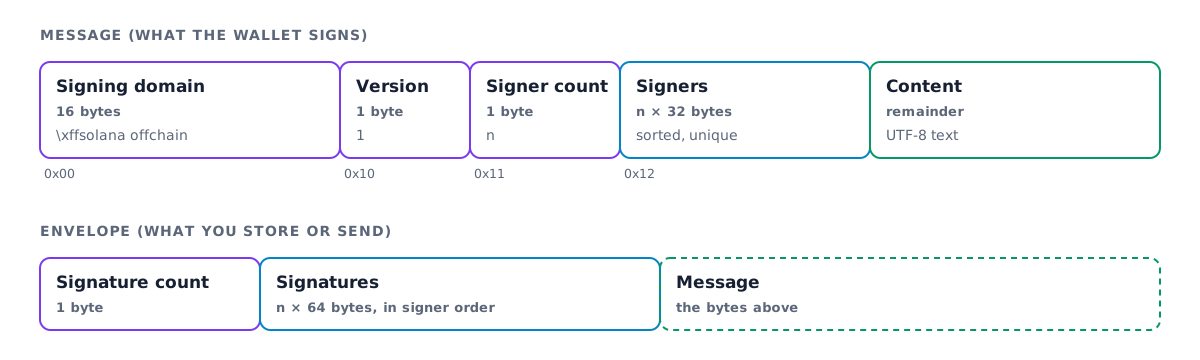
Un message off-chain commence par un domaine de signature fixe, \xffsolana offchain.
Aucune transaction valide ne commence par ces octets : un message signé ne peut donc jamais être
utilisé comme transaction. La version 1 du format énumère ensuite les signataires requis
et transporte le message sous forme de texte UTF-8, sans limite de longueur.
Le portefeuille construit ces octets, les signe et les renvoie avec la signature. La spécification détaille le format complet, y compris l'ancienne version 0.
Choisir une méthode de connexion
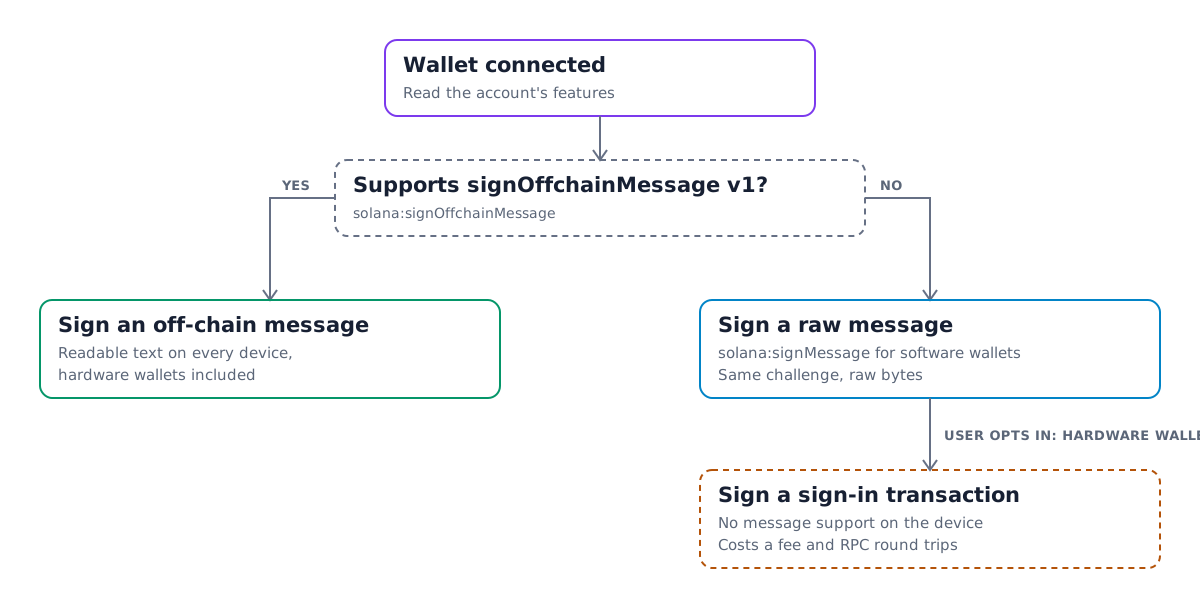
Tous les portefeuilles ne prennent pas encore en charge les messages off-chain. Vérifiez les fonctionnalités du compte connecté avant de demander une signature, et utilisez la solution de repli lorsque la fonctionnalité est absente :
- Si le compte prend en charge
solana:signOffchainMessageavec la version 1 des messages, signez un message off-chain. - Sinon, signez le même défi avec
solana:signMessage. La plupart des portefeuilles logiciels le prennent en charge. - Proposez aux utilisateurs de portefeuilles matériels sans prise en charge des messages une option explicite, comme un interrupteur « J'utilise un portefeuille matériel », qui signe à la place une transaction de connexion. Ne les orientez pas vers cette voie par défaut.
Signer un message dans le navigateur
Installez les paquets Wallet Standard avec Kit :
$npm install @solana/kit @solana/wallet-standard-features @wallet-standard/ui @wallet-standard/ui-features @wallet-standard/ui-registry
Ces utilitaires prennent un UiWalletAccount, comme l'account renvoyé par
useConnectedWallet dans le guide React :
import {SolanaSignOffchainMessage,type SolanaSignOffchainMessageFeature} from "@solana/wallet-standard-features";import type { UiWalletAccount } from "@wallet-standard/ui";import { getWalletAccountFeature } from "@wallet-standard/ui-features";import { getWalletAccountForUiWalletAccount } from "@wallet-standard/ui-registry";type OffchainMessageFeature =SolanaSignOffchainMessageFeature[typeof SolanaSignOffchainMessage];export function supportsOffchainMessages(account: UiWalletAccount) {if (!account.features.includes(SolanaSignOffchainMessage)) return false;const feature = getWalletAccountFeature(account,SolanaSignOffchainMessage) as OffchainMessageFeature;return feature.supportedMessageVersions.includes(1);}export async function signOffchainMessage(account: UiWalletAccount,message: string) {const feature = getWalletAccountFeature(account,SolanaSignOffchainMessage) as OffchainMessageFeature;const [output] = await feature.signOffchainMessage({messageVersion: 1,account: getWalletAccountForUiWalletAccount(account),message,requiredSigners: [account.publicKey]});return output;}
signOffchainMessage renvoie signedOffchainMessage, les octets complets que le portefeuille
a signés, ainsi que signature. Encodez les deux en Base64 et envoyez-les à votre serveur avec
l'adresse du portefeuille.
Rédigez le défi pour qu'il se lise bien sur un petit écran. Indiquez le nom de votre application et son domaine, expliquez ce que fait la signature, et incluez un nonce à usage unique ainsi qu'une heure d'émission provenant de votre serveur :
swap.app wants you to sign in with your Solana account.Signing in costs nothing and does not submit a transaction.Nonce: 8f3a1c9eIssued at: 2026-09-29T17:04:00Z
Vérifier la signature sur votre serveur
La vérification est un contrôle local de la signature et ne nécessite aucune connexion RPC. Décodez les octets signés par le portefeuille, confirmez qu'ils correspondent au défi que vous avez émis, puis vérifiez la signature :
import {address,assertOffchainMessageV1Equal,getBase64Encoder,getOffchainMessageDecoder,verifyOffchainMessageEnvelope,type OffchainMessageBytes,type SignatureBytes} from "@solana/kit";export async function verifySignIn(input: {walletAddress: string;expectedMessage: string;signedOffchainMessage: string;signature: string;}) {const signer = address(input.walletAddress);const base64 = getBase64Encoder();const content = base64.encode(input.signedOffchainMessage) as OffchainMessageBytes;const signature = base64.encode(input.signature) as SignatureBytes;const received = getOffchainMessageDecoder().decode(content);if (received.version !== 1) {throw new Error(`Expected a v1 message, got v${received.version}`);}assertOffchainMessageV1Equal(received, {version: 1,requiredSignatories: [{ address: signer }],content: input.expectedMessage});await verifyOffchainMessageEnvelope({content,signatures: { [signer]: signature }});}
assertOffchainMessageV1Equal lève une erreur si le contenu ou les signataires diffèrent de
ce que vous attendiez. verifyOffchainMessageEnvelope lève une erreur si la signature est
absente ou invalide. Retrouvez expectedMessage à partir du nonce sur votre serveur plutôt que de
faire confiance à la copie renvoyée par le client. Consommez le nonce dès que la vérification
réussit, afin que la même signature ne puisse pas servir à se connecter deux fois.
Vérifier un message brut
Une signature signMessage porte directement sur les octets du défi : le client
n'a donc qu'à envoyer la signature et l'adresse du portefeuille. Vérifiez-la par rapport au
défi que vous avez émis :
import {address,getBase64Encoder,getPublicKeyFromAddress,getUtf8Encoder,signatureBytes,verifySignature} from "@solana/kit";export async function verifyRawSignIn(input: {walletAddress: string;expectedMessage: string;signature: string;}) {const publicKey = await getPublicKeyFromAddress(address(input.walletAddress));const signature = signatureBytes(getBase64Encoder().encode(input.signature));const message = getUtf8Encoder().encode(input.expectedMessage);if (!(await verifySignature(publicKey, signature, message))) {throw new Error("Invalid signature");}}
Les mêmes règles de nonce s'appliquent : retrouvez expectedMessage à partir du nonce et consommez-le
dès que la vérification réussit.
@solana/kit réexporte ces utilitaires depuis @solana/offchain-messages. Utilisez
le paquet autonome si votre serveur ne dépend pas de Kit.
Sign In With Solana
Sign In With Solana (SIWS)
standardise le défi lui-même. Votre application transmet des champs structurés, tels que
domain, statement, nonce et issuedAt, à la fonctionnalité solana:signIn
du portefeuille. Le portefeuille les met en forme dans un message standard, se connecte si nécessaire
et le signe en une seule étape.
La version 1.1.0 de solana:signIn ajoute une option useOffchainMessage. Lorsque vous
passez useOffchainMessage: { messageVersion: 1 }, le portefeuille encapsule le texte SIWS
dans un message off-chain de version 1, avec le compte signataire comme unique signataire requis.
Les portefeuilles matériels peuvent l'afficher et le signer, et la sortie indique
signedMessageFormat: { kind: "offchainMessage", messageVersion: 1 }. Les portefeuilles
qui annoncent la version 1.0.0 ne connaissent pas cette option : vérifiez donc d'abord la version
de la fonctionnalité et omettez l'option dans ce cas.
solana:signIn est une fonctionnalité du portefeuille, et non du compte ; ces
utilitaires prennent donc un UiWallet :
import {SolanaSignIn,type SolanaSignInFeature,type SolanaSignInInput} from "@solana/wallet-standard-features";import type { UiWallet } from "@wallet-standard/ui";import { getWalletFeature } from "@wallet-standard/ui-features";type SignInFeature = SolanaSignInFeature[typeof SolanaSignIn];export function supportsOffchainSignIn(wallet: UiWallet) {if (!wallet.features.includes(SolanaSignIn)) return false;const feature = getWalletFeature(wallet, SolanaSignIn) as SignInFeature;return feature.version === "1.1.0";}export async function signIn(wallet: UiWallet, input: SolanaSignInInput) {const feature = getWalletFeature(wallet, SolanaSignIn) as SignInFeature;const [output] = await feature.signIn({...input,...(supportsOffchainSignIn(wallet) && {useOffchainMessage: { messageVersion: 1 }})});return output;}
Construisez l'entrée sur votre serveur, avec un nonce à usage unique et une heure issuedAt,
et conservez une copie indexée par le nonce. Consommez le nonce dès que la connexion
est vérifiée.
Sans Wallet Adapter, verifySignIn de @solana/wallet-standard-util
ne vérifie que la sortie SIWS brute. Lorsque signedMessageFormat indique un message
off-chain, signedMessage est un message off-chain dont le contenu est le texte SIWS.
Reconstruisez le texte attendu à partir de l'entrée stockée et de l'adresse du signataire avec
createSignInMessageText de @solana/wallet-standard-util, puis vérifiez-le
comme n'importe quel autre message off-chain, comme dans
Vérifier la signature sur votre serveur. Le
README de @solana/offchain-messages
décrit ce flux dans Kit.
Pour les portefeuilles
Les portefeuilles ajoutent la prise en charge en implémentant la fonctionnalité Wallet
Standard solana:signOffchainMessage de @solana/wallet-standard-features :
- Indiquez
version: "1.0.0"et listez les versions de message que vous pouvez signer danssupportedMessageVersions. Aujourd'hui, il s'agit de[1]. - Construisez le préambule de la version 1 à partir de
requiredSigners, que vous triez et dont vous vérifiez l'absence de doublons. Rejetez la requête si le compte ne figure pas parmi les signataires requis. - Affichez le texte du message à l'utilisateur dans son intégralité avant la signature, y compris sur les appareils matériels.
- Renvoyez les octets exacts que vous avez signés sous la forme de
signedOffchainMessage, ainsi que lasignatureEd25519. - Pour prendre en charge Sign In With Solana hors chaîne, indiquez
version: "1.1.0"poursolana:signIn. Lorsque l'entrée inclutuseOffchainMessage, signez le texte SIWS comme un message hors chaîne de version 1, renvoyez ses octets sous la forme designedMessage, et définissezsignedMessageFormat. - Continuez à prendre en charge
solana:signMessage. Il reste inchangé, et les applications l'utilisent toujours comme solution de repli.
Is this page helpful?