요약
Program account는 실행 가능한 sBPF 코드를 보유합니다. Data account는 프로그램이 소유한 상태를 저장합니다. System account는 System Program이 소유합니다. Sysvar는 미리 정의된 주소에서 접근 가능한 클러스터 전체 상태를 제공합니다.
executable 필드는 계정의 카테고리를
결정합니다:
- Program account:
executable=true. 실행 가능한 코드를 포함합니다. - Data account:
executable=false. 상태 또는 사용자 데이터를 저장합니다.
코드와 변경 가능한 상태의 이러한 분리는 프로그램이 한 번 배포되면 임의의 수의 data account를 관리할 수 있음을 의미합니다.
Program account
Program account는 실행 가능한 코드를 저장합니다. 모든 program account는 loader 프로그램이 소유합니다. 프로그램이 배포되면 런타임은 해당 바이트코드를 보유할 program account를 생성합니다.
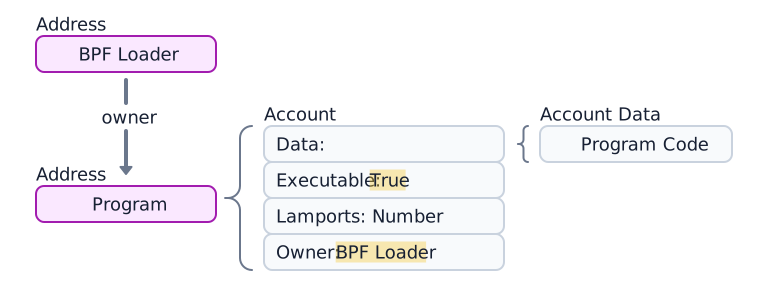
 Program account, 4개의 구성 요소 및 loader 프로그램의 다이어그램.
Program data account
Loader-v3를 사용하여 배포된
프로그램(Loader 프로그램
참조)은 자체 data 필드에 실행 가능한 바이트코드를 저장하지 않습니다. 대신 해당
data는 프로그램 코드를 포함하는 별도의 program data account를 가리킵니다.
(아래 다이어그램 참조.)

 데이터가 있는 program account. 데이터는 별도의 program data account를 가리킵니다
프로그램 배포 또는 업그레이드 중에 buffer account는 업로드를 임시로 준비하는 데 사용됩니다.
다음 예제는 Token Program 계정을 가져옵니다. executable 필드가 true이므로
program account임을 확인합니다.
import { Address, createClient } from "@solana/kit";import { solanaRpc } from "@solana/kit-plugin-rpc";import { generatedPayer } from "@solana/kit-plugin-signer";const client = await createClient().use(generatedPayer()).use(solanaRpc({rpcUrl: "https://api.mainnet.solana.com"}));const programId = "TokenkegQfeZyiNwAJbNbGKPFXCWuBvf9Ss623VQ5DA" as Address;const accountInfo = await client.rpc.getAccountInfo(programId, { encoding: "base64" }).send();console.log(accountInfo);
데이터 계정
데이터 계정은 실행 가능한 코드를 포함하지 않습니다. 프로그램에서 정의한 상태를 저장합니다.
프로그램 상태 계정
프로그램은 데이터 계정에 상태를 저장합니다. 프로그램 상태 계정을 생성하는 과정은 두 단계로 이루어집니다:
- System Program을 호출하여 계정을 생성합니다. System Program은 지정된 프로그램으로 소유권을 이전합니다.
- 소유 프로그램이 지침에 따라 계정의
data필드를 초기화합니다.
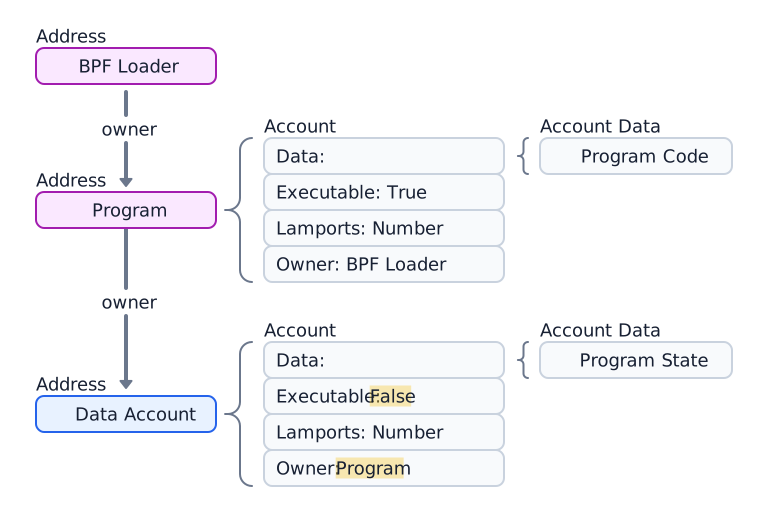
 프로그램 계정이 소유한 데이터 계정 다이어그램
다음 예제는 Token 2022 프로그램이 소유한 토큰 민트 계정을 생성하고 가져옵니다.
import { createClient, generateKeyPairSigner, lamports } from "@solana/kit";import { solanaRpc, rpcAirdrop } from "@solana/kit-plugin-rpc";import { generatedPayer, airdropPayer } from "@solana/kit-plugin-signer";import { systemProgram } from "@solana-program/system";import {getInitializeMintInstruction,getMintSize,TOKEN_2022_PROGRAM_ADDRESS,fetchMint} from "@solana-program/token-2022";const client = await createClient().use(generatedPayer()).use(solanaRpc({rpcUrl: "http://localhost:8899",rpcSubscriptionsUrl: "ws://localhost:8900"})).use(rpcAirdrop()).use(airdropPayer(lamports(1_000_000_000n))).use(systemProgram());// Generate keypair to use as address of mintconst mint = await generateKeyPairSigner();// Get default mint account size (in bytes), no extensions enabledconst space = BigInt(getMintSize());// Get minimum balance for rent exemptionconst rent = await client.rpc.getMinimumBalanceForRentExemption(space).send();const transactionSignature = await client.sendTransaction([client.system.instructions.createAccount({newAccount: mint,lamports: rent,space,programAddress: TOKEN_2022_PROGRAM_ADDRESS}),getInitializeMintInstruction({mint: mint.address,decimals: 9,mintAuthority: client.payer.address})]);console.log("Mint Address:", mint.address);console.log("Transaction Signature:", transactionSignature.context.signature);const accountInfo = await client.rpc.getAccountInfo(mint.address).send();console.log(accountInfo);const mintAccount = await fetchMint(client.rpc, mint.address);console.log(mintAccount);
시스템 계정
생성 후에도 System Program이 소유하는 계정을 시스템 계정이라고 합니다. 새 주소로 처음 SOL을 전송하면 System Program이 소유하는 새 계정이 해당 주소에 생성됩니다.
모든 지갑 계정은 시스템 계정입니다. 트랜잭션의 수수료 지불자는 반드시 시스템 계정이어야 합니다. System Program이 소유한 계정만 트랜잭션 수수료를 지불할 수 있기 때문입니다.
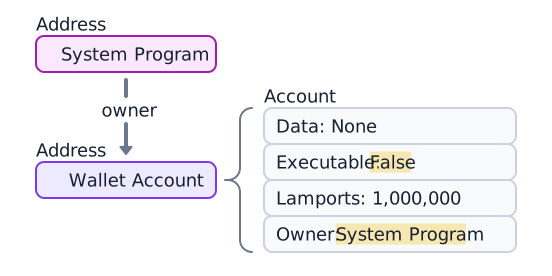
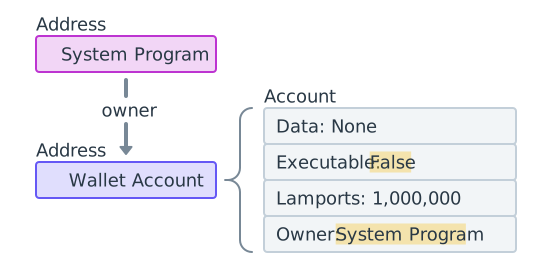 1,000,000 램포트를 포함하는 System Program 소유 지갑
다음 예제는 새 키페어를 생성하고, SOL을 입금한 후 계정을 가져옵니다. owner
필드는
11111111111111111111111111111111(System Program)입니다.
import { createClient, generateKeyPairSigner, lamports } from "@solana/kit";import { solanaRpc, rpcAirdrop } from "@solana/kit-plugin-rpc";import { generatedPayer } from "@solana/kit-plugin-signer";const client = await createClient().use(generatedPayer()).use(solanaRpc({rpcUrl: "http://localhost:8899",rpcSubscriptionsUrl: "ws://localhost:8900"})).use(rpcAirdrop());// Generate a new keypairconst keypair = await generateKeyPairSigner();console.log(`Public Key: ${keypair.address}`);// Funding an address with SOL automatically creates an accountconst signature = await client.airdrop(keypair.address,lamports(1_000_000_000n));const accountInfo = await client.rpc.getAccountInfo(keypair.address).send();console.log(accountInfo);
Sysvar 계정
Sysvar 계정은 미리 정의된 주소에 있는 특수 계정으로, 클러스터 상태 데이터에 대한 읽기 전용 액세스를 제공합니다. 이들은 각 slot마다 동적으로 업데이트됩니다.
| Sysvar | 주소 | 목적 |
|---|---|---|
| Clock | SysvarC1ock11111111111111111111111111111111 | 현재 slot, epoch 및 Unix 타임스탬프 |
| EpochSchedule | SysvarEpochSchedu1e111111111111111111111111 | 제네시스에서 설정된 epoch 스케줄링 상수 |
| EpochRewards | SysvarEpochRewards1111111111111111111111111 | Epoch 보상 분배 상태 및 진행 상황 |
| Rent | SysvarRent111111111111111111111111111111111 | Rent 요율 및 면제 임계값 |
| SlotHashes | SysvarS1otHashes111111111111111111111111111 | slot의 부모 뱅크에 대한 최근 해시 |
| StakeHistory | SysvarStakeHistory1111111111111111111111111 | Epoch별 스테이크 활성화 및 비활성화 |
| LastRestartSlot | SysvarLastRestartS1ot1111111111111111111111 | 마지막 클러스터 재시작 slot |
| Instructions | Sysvar1nstructions1111111111111111111111111 | 현재 트랜잭션의 직렬화된 인스트럭션 |
| SlotHistory | SysvarS1otHistory11111111111111111111111111 | 지난 epoch 동안 생성된 slot의 기록 |
다음 예제는 Sysvar Clock 계정을 가져와서 역직렬화합니다.
import { createClient } from "@solana/kit";import { solanaRpc } from "@solana/kit-plugin-rpc";import { generatedPayer } from "@solana/kit-plugin-signer";import { fetchSysvarClock, SYSVAR_CLOCK_ADDRESS } from "@solana/sysvars";const client = await createClient().use(generatedPayer()).use(solanaRpc({rpcUrl: "https://api.mainnet.solana.com"}));const accountInfo = await client.rpc.getAccountInfo(SYSVAR_CLOCK_ADDRESS, { encoding: "base64" }).send();console.log(accountInfo);// Automatically fetch and deserialize the account dataconst clock = await fetchSysvarClock(client.rpc);console.log(clock);
Is this page helpful?