요약
트랜잭션에는 서명과 메시지가 포함됩니다. 메시지에는 헤더, 계정 주소, 최근 블록해시, 그리고 컴파일된 명령어가 포함됩니다. 최대 직렬화 크기: 1,232바이트 (v1 형식의 경우 4,096바이트)
Transaction는
두 개의 최상위 필드를 가집니다:
signatures: 서명 배열message: 처리할 명령어 목록을 포함한 트랜잭션 정보
pub struct Transaction {pub signatures: Vec<Signature>,pub message: Message,}
 트랜잭션의 두 부분을 보여주는 다이어그램
트랜잭션의 총 직렬화 크기는
PACKET_DATA_SIZE(1,232바이트)를
초과할 수 없습니다. 이 제한은 1,280바이트(IPv6 최소 MTU)에서 네트워크 헤더용
48바이트(IPv6 40바이트 + 프래그먼트 헤더 8바이트)를 뺀 값입니다. 1,232바이트에는
signatures 배열과 message 구조체가 모두
포함됩니다.
v1 트랜잭션은 한도를 4,096바이트로 높입니다
이 페이지에서는 레거시 트랜잭션 형식을 설명하며, v0 형식도 버전 접두사와 주소 조회 테이블을 제외하고 동일한 형식을 따릅니다. v1 형식은 크기 제한을 4,096바이트로 높이고 다른 와이어 레이아웃을 사용합니다.
 트랜잭션 형식과 크기 제한을 보여주는 다이어그램
서명
signatures 필드는
Signature
값의 컴팩트 인코딩 배열입니다. 각 Signature는 서명자 계정의 개인 키로 서명된
직렬화된 Message의 64바이트 Ed25519 서명입니다. 트랜잭션의 명령어가 참조하는
모든 서명자 계정에 대해 하나의 서명이 필요합니다.
각 서명은 개인 키에 의해 생성됩니다. 해당 키가 어디에 위치하는지 — 로컬 keypair, 클라우드 HSM 또는 KMS, 또는 관리형 지갑 서비스 — 는 프로덕션 설계 결정 사항입니다. 프로덕션에서의 서명을 참조하세요.
배열의 첫 번째 서명은 수수료 지불자에 해당하며, 트랜잭션의 기본 수수료 및 우선순위 수수료를 지불하는 계정입니다. 이 첫 번째 서명은 네트워크에서 트랜잭션을 조회하는 데 사용되는 트랜잭션 ID 역할도 합니다. 트랜잭션 ID는 일반적으로 트랜잭션 서명이라고도 불립니다.
수수료 지불자 요건:
- 메시지의 첫 번째 계정(인덱스 0)이어야 하며 서명자여야 합니다.
- System Program 소유 계정이거나 nonce 계정이어야
합니다(
validate_fee_payer에 의해 검증됨). rent_exempt_minimum + total_fee를 충당하기에 충분한 lamport를 보유해야 합니다. 그렇지 않으면 트랜잭션이 *rsInsufficientFundsForFee*와 함께 실패합니다.
메시지
message 필드는 트랜잭션의 페이로드를 담고 있는
Message
구조체입니다:
header: 메시지 헤더account_keys: 트랜잭션 명령어에서 필요한 계정 주소 배열recent_blockhash: 트랜잭션의 타임스탬프 역할을 하는 블록해시instructions: 명령어 배열
pub struct Message {/// The message header, identifying signed and read-only `account_keys`.pub header: MessageHeader,/// All the account keys used by this transaction.#[serde(with = "short_vec")]pub account_keys: Vec<Pubkey>,/// The id of a recent ledger entry.pub recent_blockhash: Hash,/// Programs that will be executed in sequence and committed in/// one atomic transaction if all succeed.#[serde(with = "short_vec")]pub instructions: Vec<CompiledInstruction>,}
헤더
header 필드는 세 개의 u8 필드를 가진
MessageHeader
구조체로, account_keys 배열을 권한 그룹으로 분류합니다:
num_required_signatures: 트랜잭션에 필요한 총 서명 수.num_readonly_signed_accounts: 읽기 전용인 서명된 계정의 수.num_readonly_unsigned_accounts: 읽기 전용인 서명되지 않은 계정의 수.
pub struct MessageHeader {/// The number of signatures required for this message to be considered/// valid. The signers of those signatures must match the first/// `num_required_signatures` of [`Message::account_keys`].pub num_required_signatures: u8,/// The last `num_readonly_signed_accounts` of the signed keys are read-only/// accounts.pub num_readonly_signed_accounts: u8,/// The last `num_readonly_unsigned_accounts` of the unsigned keys are/// read-only accounts.pub num_readonly_unsigned_accounts: u8,}
레거시 및 버전 지정 메시지 접두사
레거시 트랜잭션 메시지에서 첫 번째 메시지 바이트는
num_required_signatures이며, 그 뒤에 나머지 두 개의 MessageHeader 바이트가 옵니다. 버전이 지정된 트랜잭션 메시지에서 첫 번째 바이트는 버전 접두사이며,
3바이트 MessageHeader는 해당 접두사 바로 다음에 시작됩니다. 전체 v0 및 v1 메시지 레이아웃은
버전 지정 트랜잭션을
참조하세요.
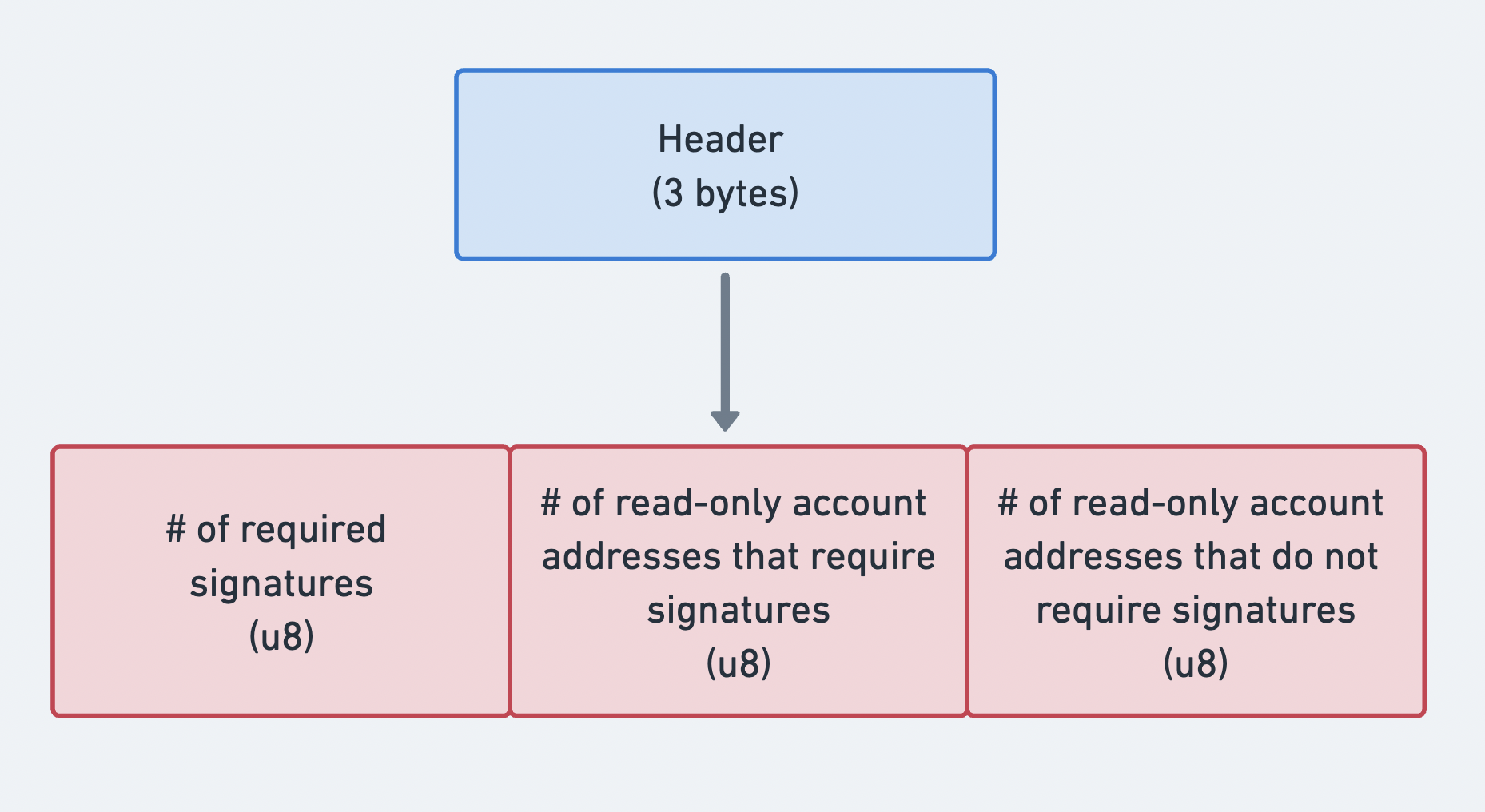 메시지 헤더의 세 부분을 나타내는 다이어그램
계정 주소
account_keys
필드는 공개 키의 컴팩트 인코딩 배열입니다. 각 항목은 트랜잭션의 명령어 중 하나
이상에서 사용되는 계정을 식별합니다. 배열에는 모든 계정이 포함되어야 하며 다음의
엄격한 순서를 따라야 합니다:
- 서명자 + 쓰기 가능
- 서명자 + 읽기 전용
- 비서명자 + 쓰기 가능
- 비서명자 + 읽기 전용
이 엄격한 순서를 통해 account_keys 배열을 메시지의 header에
있는 세 개의 카운트와 결합하면, 계정별 메타데이터 플래그를 저장하지 않고도 각
계정의 권한을 확인할 수 있습니다. 헤더 카운트는 배열을 위에 나열된 네 가지
권한 그룹으로 분할합니다.
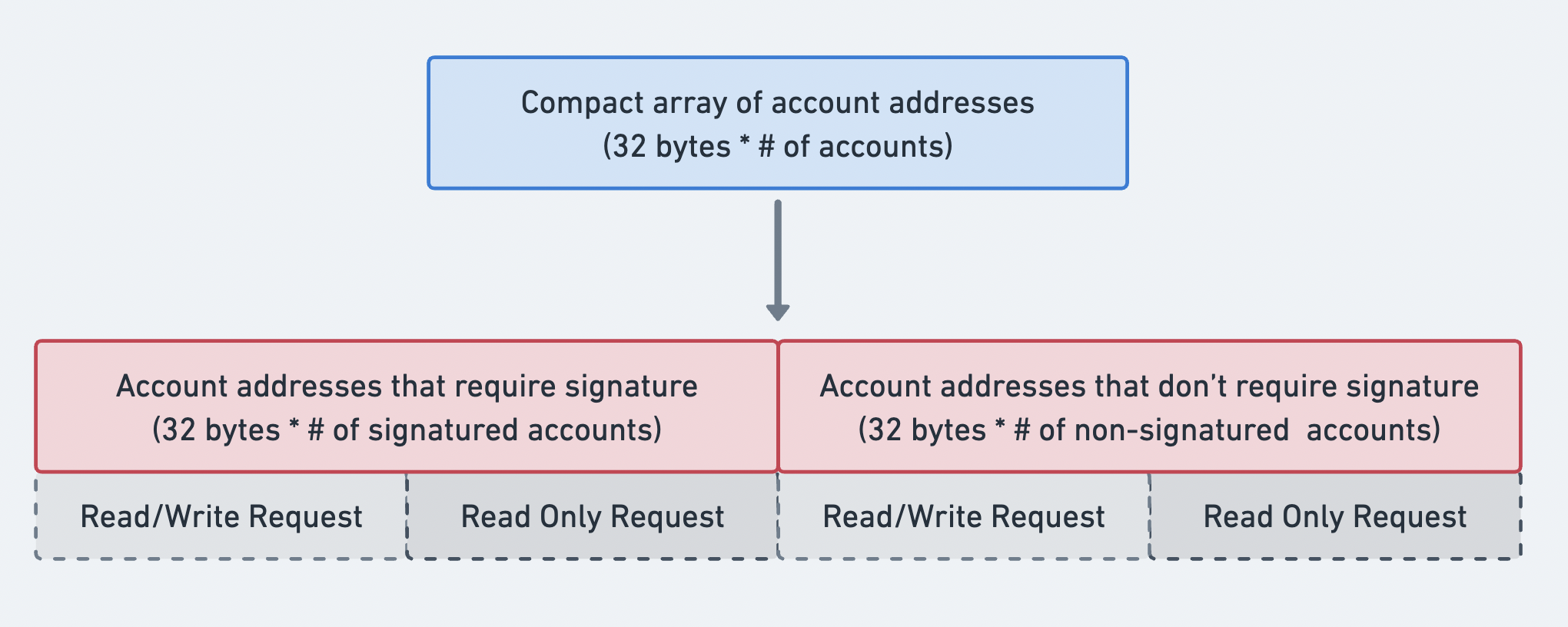 계정 주소 배열의 순서를 나타내는 다이어그램
최근 블록해시
recent_blockhash 필드는 두 가지 목적을 수행하는 32바이트 해시입니다:
- 타임스탬프: 트랜잭션이 최근에 생성되었음을 증명합니다.
- 중복 방지: 동일한 트랜잭션이 두 번 처리되는 것을 방지합니다.
블록해시는 150 slot 이후에 만료됩니다. 트랜잭션이 도착했을 때 블록해시가 더 이상
유효하지 않으면,
내구성 있는 논스 트랜잭션이 아닌 경우
*rsBlockhashNotFound*로 거부됩니다.
getLatestBlockhash RPC 메서드를
사용하면 현재 블록해시와 해당 블록해시가 유효한 마지막 블록 높이를 가져올 수
있습니다.
명령어
instructions
필드는
CompiledInstruction
구조체의 컴팩트 인코딩 배열입니다. 각 *rsCompiledInstruction*는 전체 공개 키
대신 account_keys 배열의 인덱스로 계정을 참조하며, 다음을 포함합니다:
program_id_index: 호출할 프로그램을 식별하는account_keys의 인덱스.accounts: 프로그램에 전달할 계정을 지정하는account_keys의 인덱스 배열.data: 명령어 구분자와 직렬화된 인수를 포함하는 바이트 배열.
pub struct CompiledInstruction {/// Index into the transaction keys array indicating the program account that executes this instruction.pub program_id_index: u8,/// Ordered indices into the transaction keys array indicating which accounts to pass to the program.#[serde(with = "short_vec")]pub accounts: Vec<u8>,/// The program input data.#[serde(with = "short_vec")]pub data: Vec<u8>,}
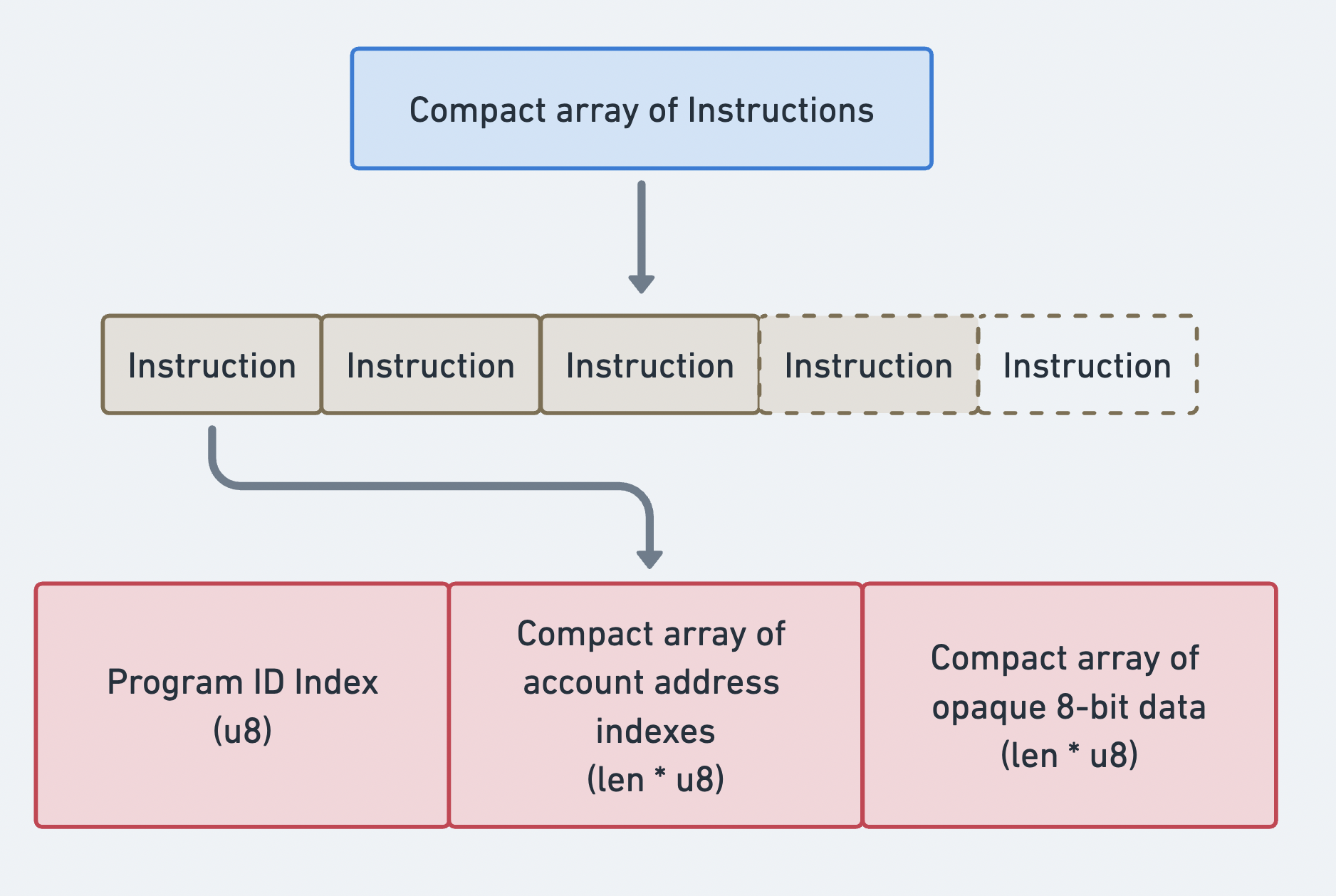 명령어의 컴팩트 배열
트랜잭션 바이너리 형식
트랜잭션은 컴팩트 인코딩 방식을 사용하여 직렬화됩니다. 모든 가변 길이 배열(서명, 계정 키, 명령어)에는 compact-u16 길이 인코딩이 접두사로 붙습니다. 이 형식은 0-127 값에 1바이트를, 더 큰 값에는 2-3바이트를 사용합니다.
레거시 트랜잭션 레이아웃 (전송 형식):
| 필드 | 크기 | 설명 |
|---|---|---|
num_signatures | 1-3 바이트 (compact-u16) | 서명 수 |
signatures | num_signatures x 64 바이트 | Ed25519 서명 |
num_required_signatures | 1 바이트 | MessageHeader 필드 1 |
num_readonly_signed | 1 바이트 | MessageHeader 필드 2 |
num_readonly_unsigned | 1 바이트 | MessageHeader 필드 3 |
num_account_keys | 1-3 바이트 (compact-u16) | 정적 계정 키 수 |
account_keys | num_account_keys x 32 바이트 | 공개 키 |
recent_blockhash | 32 바이트 | 블록해시 |
num_instructions | 1-3 바이트 (compact-u16) | 명령어 수 |
instructions | 가변 | 컴파일된 명령어 배열 |
각 컴파일된 명령어는 다음과 같이 직렬화됩니다:
| 필드 | 크기 | 설명 |
|---|---|---|
program_id_index | 1 바이트 | 계정 키의 인덱스 |
num_accounts | 1-3 바이트 (compact-u16) | 계정 인덱스 수 |
account_indices | num_accounts x 1 바이트 | 계정 키 인덱스 |
data_len | 1-3 바이트 (compact-u16) | instruction data 길이 |
data | data_len 바이트 | 불투명한 instruction data |
크기 계산
PACKET_DATA_SIZE = 1,232 바이트일 때, 사용 가능한 공간을 다음과 같이
계산할 수 있습니다:
Total = 1232 bytes- compact-u16(num_sigs) # 1 byte- num_sigs * 64 # signature bytes- 3 # message header- compact-u16(num_keys) # 1 byte- num_keys * 32 # account key bytes- 32 # recent blockhash- compact-u16(num_ixs) # 1 byte- sum(instruction_sizes) # per-instruction overhead + data
예시: SOL 전송 트랜잭션
아래 다이어그램은 트랜잭션과 명령어가 함께 작동하여 사용자가 네트워크와 상호작용하는 방식을 보여줍니다. 이 예시에서는 한 계정에서 다른 계정으로 SOL이 전송됩니다.
발신자 계정의 메타데이터는 해당 계정이 트랜잭션에 서명해야 함을 나타냅니다. 이를 통해 System Program이 lamport를 차감할 수 있습니다. 발신자와 수신자 계정 모두 lamport 잔액이 변경되어야 하므로 쓰기 가능 상태여야 합니다. 이 명령어를 실행하기 위해 발신자의 지갑은 서명과 SOL 전송 명령어가 포함된 메시지를 담은 트랜잭션을 전송합니다.
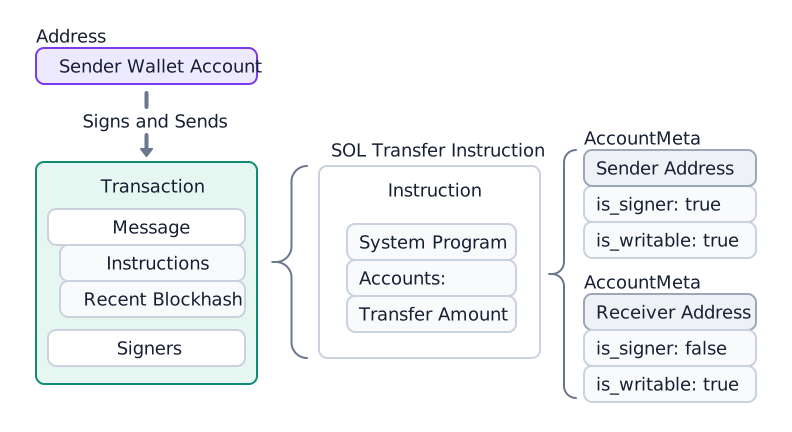
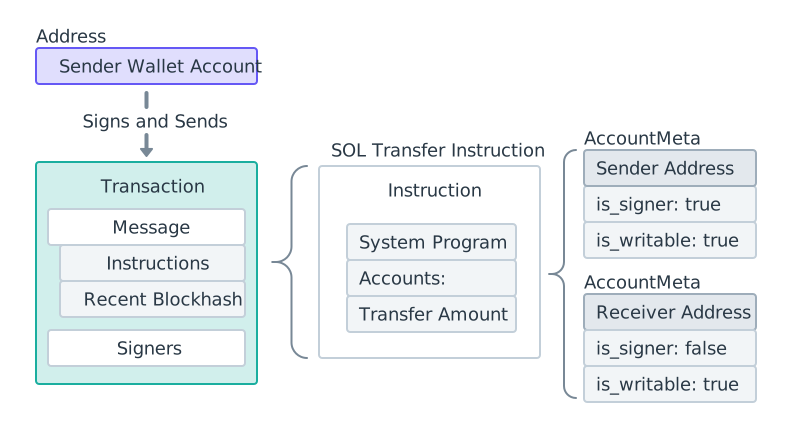 SOL 전송 다이어그램
트랜잭션이 전송된 후, System Program은 전송 명령어를 처리하고 두 계정의 lamport 잔액을 업데이트합니다.
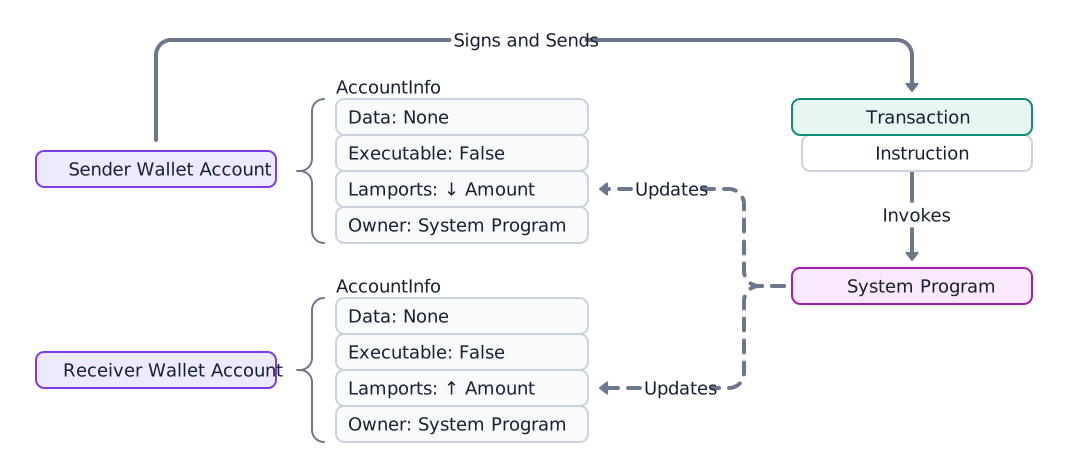
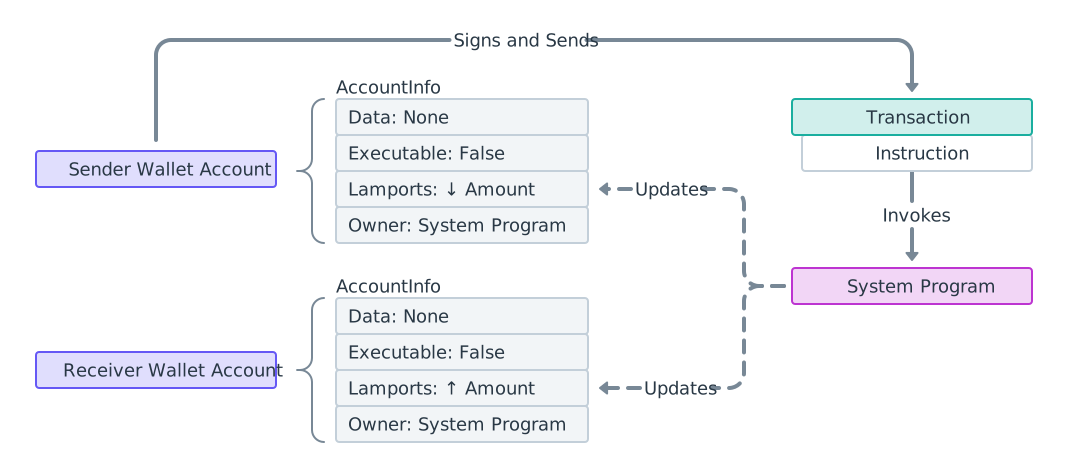 SOL 전송 프로세스 다이어그램
SOL을 전송하기 전에 수신자를 확인하세요
System Program 전송은 모든 계정에 lamport를 추가합니다. 수신자가 SOL을 다시 인출할 수 있는지에 대한 프로토콜 수준의 확인은 없습니다. lamport는 해당 계정을 소유한 프로그램만이 인출할 수 있으므로, 토큰 민트, 프로그램, 또는 본인이 제어하지 않는 PDA로 SOL을 전송하면 영구적인 자금 손실의 위험이 있습니다 — 소유 프로그램이 지정한 권한자만이 이를 반환할 수 있습니다. token account로 전송된 SOL은 해당 계정의 소유자만 회수할 수 있으며, 발신자는 회수할 수 없습니다.
SPL 토큰 전송은 부분적으로 자체 보호 기능이 있습니다: Token Program은 계정이 예상 민트와 일치하지 않는 전송을 거부합니다. 네이티브 SOL 전송에는 이러한 보호 장치가 없으므로, 발신자는 서명하기 전에 수신자를 반드시 확인해야 합니다. 전체 분류 로직은 주소 확인을 참고하세요.
아래 예제는 위 다이어그램과 관련된 코드를 보여줍니다. System Program의
transfer 함수를
참조하세요.
import { createClient, generateKeyPairSigner, lamports } from "@solana/kit";import { solanaRpc, rpcAirdrop } from "@solana/kit-plugin-rpc";import { generatedPayer, airdropPayer } from "@solana/kit-plugin-signer";import { systemProgram } from "@solana-program/system";const client = await createClient().use(generatedPayer()).use(solanaRpc({rpcUrl: "http://localhost:8899",rpcSubscriptionsUrl: "ws://localhost:8900"})).use(rpcAirdrop()).use(airdropPayer(lamports(1_000_000_000n))).use(systemProgram());const sender = client.payer;const recipient = await generateKeyPairSigner();const LAMPORTS_PER_SOL = 1_000_000_000n;const transferAmount = lamports(LAMPORTS_PER_SOL / 100n); // 0.01 SOL// Check balance before transferconst { value: preBalance1 } = await client.rpc.getBalance(sender.address).send();const { value: preBalance2 } = await client.rpc.getBalance(recipient.address).send();// Create a transfer instruction for transferring SOL from sender to recipientconst transferInstruction = client.system.instructions.transferSol({source: sender,destination: recipient.address,amount: transferAmount // 0.01 SOL in lamports});const transactionSignature = await client.sendTransaction([transferInstruction]);// Check balance after transferconst { value: postBalance1 } = await client.rpc.getBalance(sender.address).send();const { value: postBalance2 } = await client.rpc.getBalance(recipient.address).send();console.log("Sender prebalance:",Number(preBalance1) / Number(LAMPORTS_PER_SOL));console.log("Recipient prebalance:",Number(preBalance2) / Number(LAMPORTS_PER_SOL));console.log("Sender postbalance:",Number(postBalance1) / Number(LAMPORTS_PER_SOL));console.log("Recipient postbalance:",Number(postBalance2) / Number(LAMPORTS_PER_SOL));console.log("Transaction Signature:", transactionSignature.context.signature);
다음 예제는 단일 SOL 전송 명령어를 포함하는 트랜잭션의 구조를 보여줍니다.
import {createClient,generateKeyPairSigner,lamports,createTransactionMessage,setTransactionMessageFeePayerSigner,setTransactionMessageLifetimeUsingBlockhash,appendTransactionMessageInstructions,pipe,signTransactionMessageWithSigners,getCompiledTransactionMessageDecoder} from "@solana/kit";import { solanaRpc, rpcAirdrop } from "@solana/kit-plugin-rpc";import { generatedPayer, airdropPayer } from "@solana/kit-plugin-signer";import { systemProgram } from "@solana-program/system";const client = await createClient().use(generatedPayer()).use(solanaRpc({rpcUrl: "http://localhost:8899",rpcSubscriptionsUrl: "ws://localhost:8900"})).use(rpcAirdrop()).use(airdropPayer(lamports(1_000_000_000n))).use(systemProgram());const { value: latestBlockhash } = await client.rpc.getLatestBlockhash().send();const sender = client.payer;const recipient = await generateKeyPairSigner();// Define the amount to transferconst LAMPORTS_PER_SOL = 1_000_000_000n;const transferAmount = lamports(LAMPORTS_PER_SOL / 100n); // 0.01 SOL// Create a transfer instruction for transferring SOL from sender to recipientconst transferInstruction = client.system.instructions.transferSol({source: sender,destination: recipient.address,amount: transferAmount});// Create transaction messageconst transactionMessage = pipe(createTransactionMessage({ version: 0 }),(tx) => setTransactionMessageFeePayerSigner(sender, tx),(tx) => setTransactionMessageLifetimeUsingBlockhash(latestBlockhash, tx),(tx) => appendTransactionMessageInstructions([transferInstruction], tx));const signedTransaction =await signTransactionMessageWithSigners(transactionMessage);// Decode the messageBytesconst compiledTransactionMessage =getCompiledTransactionMessageDecoder().decode(signedTransaction.messageBytes);console.log(JSON.stringify(compiledTransactionMessage, null, 2));
아래 코드는 이전 코드 스니펫의 출력 결과를 보여줍니다. SDK마다 형식은 다르지만, 각 명령어에 동일한 필수 정보가 포함되어 있음을 확인할 수 있습니다.
{"version": 0,"header": {"numSignerAccounts": 1,"numReadonlySignerAccounts": 0,"numReadonlyNonSignerAccounts": 1},"staticAccounts": ["HoCy8p5xxDDYTYWEbQZasEjVNM5rxvidx8AfyqA4ywBa","5T388jBjovy7d8mQ3emHxMDTbUF8b7nWvAnSiP3EAdFL","11111111111111111111111111111111"],"lifetimeToken": "EGCWPUEXhqHJWYBfDirq3mHZb4qDpATmYqBZMBy9TBC1","instructions": [{"programAddressIndex": 2,"accountIndices": [0, 1],"data": {"0": 2,"1": 0,"2": 0,"3": 0,"4": 128,"5": 150,"6": 152,"7": 0,"8": 0,"9": 0,"10": 0,"11": 0}}]}
전송 전 수신자 확인
SOL 전송은 어떤 계정으로도 성공할 수 있으므로, 서명 전에 수신자를 확인하세요. 계정을 조회하여 System Program 지갑(또는 자금이 없는 온커브 주소)으로만 전송하고, 직접 제어하지 않는 민트, token account, 프로그램 및 PDA는 거부하세요.
import {type Address,createSolanaRpc,fetchJsonParsedAccount,isOffCurveAddress} from "@solana/kit";const rpc = createSolanaRpc("https://api.mainnet.solana.com");const SYSTEM_PROGRAM = "11111111111111111111111111111111" as Address;/*** Throws if `recipient` cannot safely receive native SOL.** Only System Program wallets (or unfunded on-curve addresses) are safe. Any* other account locks the lamports because no authority can debit them.*/async function assertSafeSolRecipient(recipient: Address): Promise<void> {const account = await fetchJsonParsedAccount(rpc, recipient);if (!account.exists) {// Off-curve = a PDA with no account; reject conservatively.if (isOffCurveAddress(recipient)) {throw new Error("Recipient is a PDA with no account; SOL would be locked");}// On-curve = an unfunded wallet, safe to fund.return;}if (account.programAddress !== SYSTEM_PROGRAM) {throw new Error(`Recipient is owned by ${account.programAddress}, not a wallet; SOL would be locked`);}}// A wallet: safe.await assertSafeSolRecipient("H8sMJSCQxfKiFTCfDR3DUMLPwcRbM61LGFJ8N4dK3WjS" as Address);// The USDC mint: rejected before any SOL leaves the sender.await assertSafeSolRecipient("EPjFWdd5AufqSSqeM2qN1xzybapC8G4wEGGkZwyTDt1v" as Address);
이 스니펫은 네이티브 SOL 수신자를 확인합니다. SPL 토큰 전송(token account, ATA, Token-2022)도 처리하는 전체 분류 방법은 주소 확인을 참조하세요.
트랜잭션 세부 정보 가져오기
제출 후, 트랜잭션 서명과 getTransaction RPC 메서드를 사용하여 트랜잭션 세부 정보를 가져올 수 있습니다.
Solana Explorer를 사용하여 트랜잭션을 찾을 수도 있습니다.
{"blockTime": 1745196488,"meta": {"computeUnitsConsumed": 150,"err": null,"fee": 5000,"innerInstructions": [],"loadedAddresses": {"readonly": [],"writable": []},"logMessages": ["Program 11111111111111111111111111111111 invoke [1]","Program 11111111111111111111111111111111 success"],"postBalances": [989995000, 10000000, 1],"postTokenBalances": [],"preBalances": [1000000000, 0, 1],"preTokenBalances": [],"rewards": [],"status": {"Ok": null}},"slot": 13049,"transaction": {"message": {"header": {"numReadonlySignedAccounts": 0,"numReadonlyUnsignedAccounts": 1,"numRequiredSignatures": 1},"accountKeys": ["8PLdpLxkuv9Nt8w3XcGXvNa663LXDjSrSNon4EK7QSjQ","7GLg7bqgLBv1HVWXKgWAm6YoPf1LoWnyWGABbgk487Ma","11111111111111111111111111111111"],"recentBlockhash": "7ZCxc2SDhzV2bYgEQqdxTpweYJkpwshVSDtXuY7uPtjf","instructions": [{"accounts": [0, 1],"data": "3Bxs4NN8M2Yn4TLb","programIdIndex": 2,"stackHeight": null}],"indexToProgramIds": {}},"signatures": ["3jUKrQp1UGq5ih6FTDUUt2kkqUfoG2o4kY5T1DoVHK2tXXDLdxJSXzuJGY4JPoRivgbi45U2bc7LZfMa6C4R3szX"]},"version": "legacy"}
원시 응답은 계정을 인덱스로 식별하고, 내부(CPI) 명령어를 인코딩된 블롭으로 저장합니다. 이를 주소로 변환하고 전체 명령어 트리를 탐색하려면 트랜잭션 인트로스펙션을 참조하세요.
Is this page helpful?