Özet
Program hesapları yürütülebilir sBPF kodunu tutar. Veri hesapları, programlara ait durumu saklar. Sistem hesapları System Program'a aittir. Sysvars, önceden tanımlanmış adreslerde erişilebilen küme genelinde durumu sağlar.
executable alanı bir hesabın
kategorisini belirler:
- Program hesapları:
executable=true. Yürütülebilir kod içerir. - Veri hesapları:
executable=false. Durum veya kullanıcı verilerini saklar.
Kodun değiştirilebilir durumdan bu şekilde ayrılması, bir programın bir kez dağıtılabileceği ve herhangi bir sayıda veri hesabını yönetebileceği anlamına gelir.
Program hesapları
Bir program hesabı yürütülebilir kodu saklar. Her program hesabı bir yükleyici programa aittir. Bir program dağıtıldığında, çalışma zamanı bayt kodunu tutmak için bir program hesabı oluşturur.
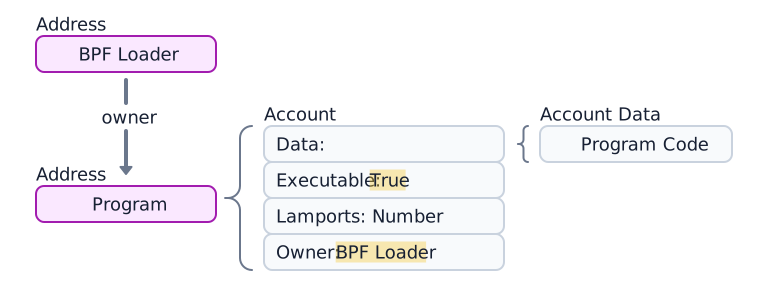
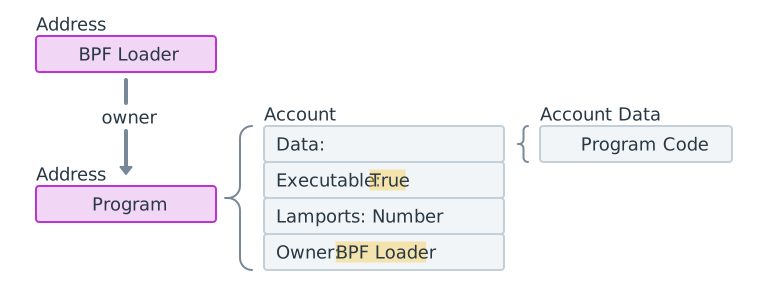 Bir program hesabının, 4 bileşeninin ve yükleyici programının diyagramı.
Program veri hesapları
Loader-v3 kullanılarak dağıtılan programlar
(Yükleyici programlar
bölümüne bakın) yürütülebilir bayt kodunu kendi data alanında saklamaz. Bunun
yerine, data alanları program kodunu içeren ayrı bir program veri hesabına
işaret eder. (Aşağıdaki diyagrama bakın.)

 Verili bir program hesabı. Veri, ayrı bir program veri hesabına işaret eder
Program dağıtımı veya yükseltmeleri sırasında, yüklemeyi geçici olarak hazırlamak için tampon hesapları kullanılır.
Aşağıdaki örnek Token Program hesabını getirir. executable alanı true olup,
bunun bir program hesabı olduğunu doğrular.
import { Address, createClient } from "@solana/kit";import { solanaRpc } from "@solana/kit-plugin-rpc";import { generatedPayer } from "@solana/kit-plugin-signer";const client = await createClient().use(generatedPayer()).use(solanaRpc({rpcUrl: "https://api.mainnet.solana.com"}));const programId = "TokenkegQfeZyiNwAJbNbGKPFXCWuBvf9Ss623VQ5DA" as Address;const accountInfo = await client.rpc.getAccountInfo(programId, { encoding: "base64" }).send();console.log(accountInfo);
Veri hesapları
Veri hesapları çalıştırılabilir kod içermez. Program tarafından tanımlanan durumu depolarlar.
Program durum hesabı
Programlar durumlarını veri hesaplarında depolar. Bir program durum hesabı oluşturmak iki adımdan oluşur:
- Hesabı oluşturmak için System Program'ı çağırın. System Program, sahipliği belirtilen programa aktarır.
- Sahip program, hesabın
dataalanını talimatlarına göre başlatır.
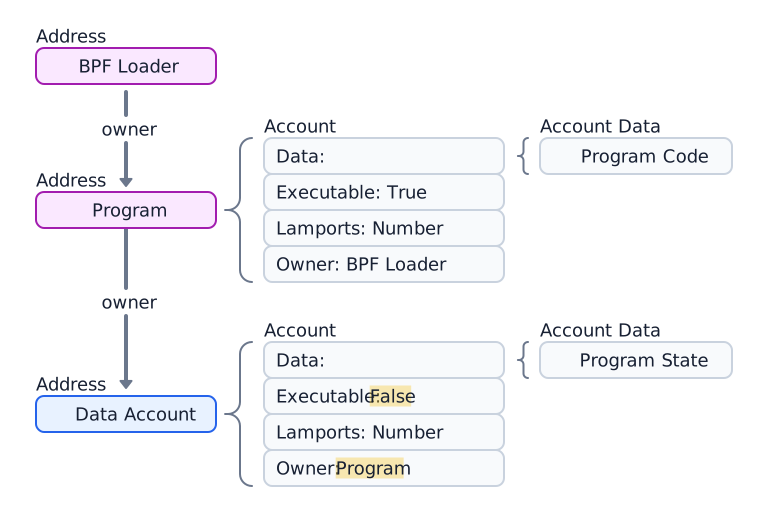
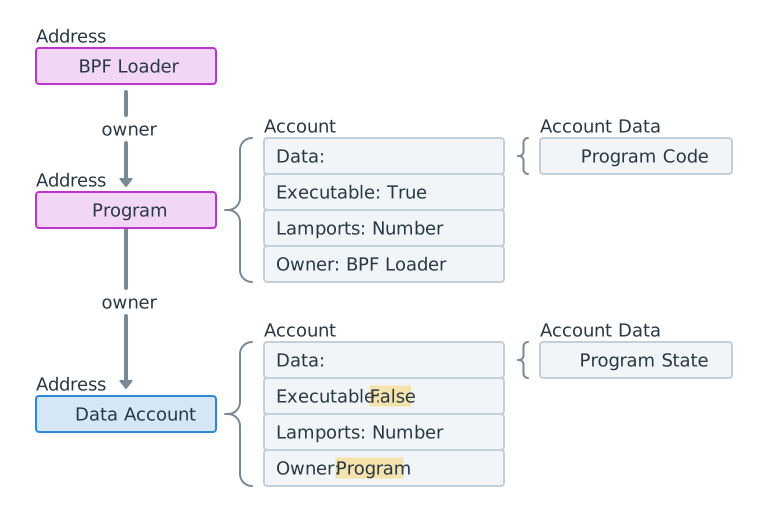 Bir program hesabına ait veri hesabının diyagramı
Aşağıdaki örnek, Token 2022 programına ait bir Token Mint hesabı oluşturur ve getirir.
import { createClient, generateKeyPairSigner, lamports } from "@solana/kit";import { solanaRpc, rpcAirdrop } from "@solana/kit-plugin-rpc";import { generatedPayer, airdropPayer } from "@solana/kit-plugin-signer";import { systemProgram } from "@solana-program/system";import {getInitializeMintInstruction,getMintSize,TOKEN_2022_PROGRAM_ADDRESS,fetchMint} from "@solana-program/token-2022";const client = await createClient().use(generatedPayer()).use(solanaRpc({rpcUrl: "http://localhost:8899",rpcSubscriptionsUrl: "ws://localhost:8900"})).use(rpcAirdrop()).use(airdropPayer(lamports(1_000_000_000n))).use(systemProgram());// Generate keypair to use as address of mintconst mint = await generateKeyPairSigner();// Get default mint account size (in bytes), no extensions enabledconst space = BigInt(getMintSize());// Get minimum balance for rent exemptionconst rent = await client.rpc.getMinimumBalanceForRentExemption(space).send();const transactionSignature = await client.sendTransaction([client.system.instructions.createAccount({newAccount: mint,lamports: rent,space,programAddress: TOKEN_2022_PROGRAM_ADDRESS}),getInitializeMintInstruction({mint: mint.address,decimals: 9,mintAuthority: client.payer.address})]);console.log("Mint Address:", mint.address);console.log("Transaction Signature:", transactionSignature.context.signature);const accountInfo = await client.rpc.getAccountInfo(mint.address).send();console.log(accountInfo);const mintAccount = await fetchMint(client.rpc, mint.address);console.log(mintAccount);
Sistem hesapları
Oluşturulduktan sonra System Program'a ait kalan hesaplara sistem hesapları denir. Yeni bir adrese ilk kez SOL göndermek, o adreste System Program'a ait yeni bir hesap oluşturur.
Tüm cüzdan hesapları sistem hesaplarıdır. Bir işlemdeki ücret ödeyicisi bir sistem hesabı olmalıdır, çünkü yalnızca System Program'a ait hesaplar işlem ücretlerini ödeyebilir.
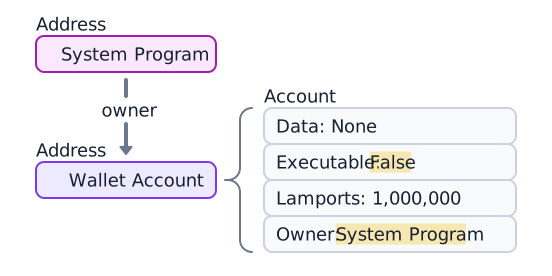
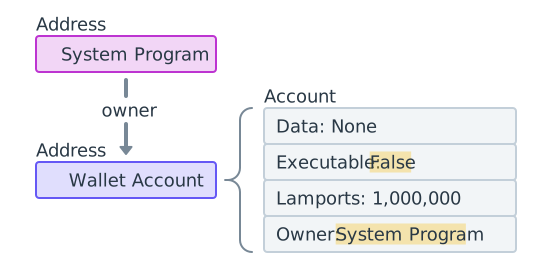 1.000.000 lamport içeren System Program'a ait bir cüzdan
Aşağıdaki örnek yeni bir keypair oluşturur, SOL ile fonlar ve hesabı getirir.
owner alanı 11111111111111111111111111111111'dir
(System Program).
import { createClient, generateKeyPairSigner, lamports } from "@solana/kit";import { solanaRpc, rpcAirdrop } from "@solana/kit-plugin-rpc";import { generatedPayer } from "@solana/kit-plugin-signer";const client = await createClient().use(generatedPayer()).use(solanaRpc({rpcUrl: "http://localhost:8899",rpcSubscriptionsUrl: "ws://localhost:8900"})).use(rpcAirdrop());// Generate a new keypairconst keypair = await generateKeyPairSigner();console.log(`Public Key: ${keypair.address}`);// Funding an address with SOL automatically creates an accountconst signature = await client.airdrop(keypair.address,lamports(1_000_000_000n));const accountInfo = await client.rpc.getAccountInfo(keypair.address).send();console.log(accountInfo);
Sysvar hesapları
Sysvar hesapları önceden tanımlanmış adreslerde bulunan ve küme durum verilerine salt okunur erişim sağlayan özel hesaplardır. Her slot'ta dinamik olarak güncellenir.
| Sysvar | Adres | Amaç |
|---|---|---|
| Clock | SysvarC1ock11111111111111111111111111111111 | Mevcut slot, epoch ve Unix zaman damgası |
| EpochSchedule | SysvarEpochSchedu1e111111111111111111111111 | Genesis'te ayarlanan epoch zamanlama sabitleri |
| EpochRewards | SysvarEpochRewards1111111111111111111111111 | Epoch ödül dağıtım durumu ve ilerlemesi |
| Rent | SysvarRent111111111111111111111111111111111 | Kiralama oranı ve muafiyet eşiği |
| SlotHashes | SysvarS1otHashes111111111111111111111111111 | Slot'un üst bankalarının en son hash'leri |
| StakeHistory | SysvarStakeHistory1111111111111111111111111 | Epoch başına stake aktivasyonları ve deaktivasyonları |
| LastRestartSlot | SysvarLastRestartS1ot1111111111111111111111 | Son küme yeniden başlatma slot'u |
| Instructions | Sysvar1nstructions1111111111111111111111111 | Mevcut işlemin serileştirilmiş talimatları |
| SlotHistory | SysvarS1otHistory11111111111111111111111111 | Son epoch boyunca hangi slot'ların üretildiğinin kaydı |
Aşağıdaki örnek Sysvar Clock hesabını getirir ve deserialize eder.
import { createClient } from "@solana/kit";import { solanaRpc } from "@solana/kit-plugin-rpc";import { generatedPayer } from "@solana/kit-plugin-signer";import { fetchSysvarClock, SYSVAR_CLOCK_ADDRESS } from "@solana/sysvars";const client = await createClient().use(generatedPayer()).use(solanaRpc({rpcUrl: "https://api.mainnet.solana.com"}));const accountInfo = await client.rpc.getAccountInfo(SYSVAR_CLOCK_ADDRESS, { encoding: "base64" }).send();console.log(accountInfo);// Automatically fetch and deserialize the account dataconst clock = await fetchSysvarClock(client.rpc);console.log(clock);
Is this page helpful?