Samenvatting
Program accounts bevatten uitvoerbare sBPF-code. Data accounts slaan status op, eigendom van programma's. System accounts zijn eigendom van het System Program. Sysvars bieden clusterwijde status toegankelijk op vooraf gedefinieerde adressen.
Het executable veld bepaalt de
categorie van een account:
- Program accounts:
executable=true. Bevat uitvoerbare code. - Data accounts:
executable=false. Slaat status of gebruikersgegevens op.
Deze scheiding van code en veranderbare status betekent dat een programma eenmaal wordt geïmplementeerd en vervolgens een willekeurig aantal data accounts kan beheren.
Program accounts
Een program account slaat uitvoerbare code op. Elk program account is eigendom van een loader program. Wanneer een programma wordt geïmplementeerd, creëert de runtime een program account om de bytecode op te slaan.
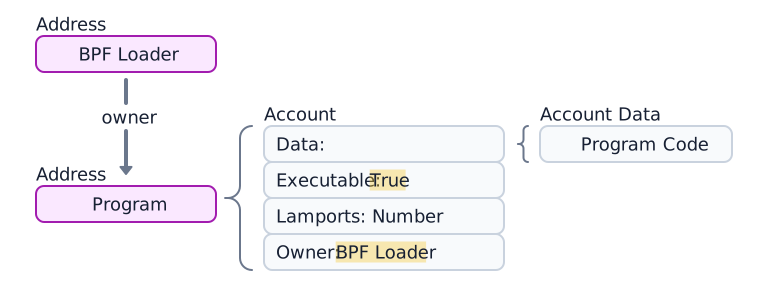
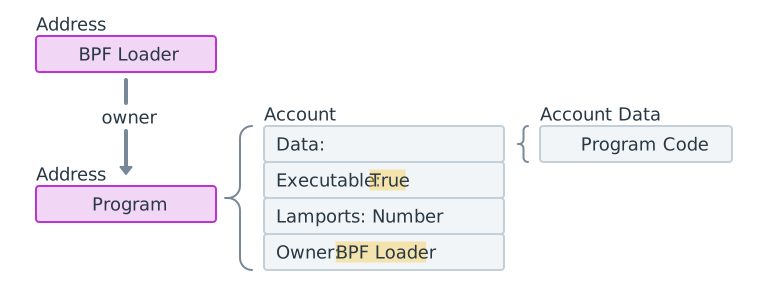 Diagram van een program account, zijn 4 componenten en zijn loader program.
Program data accounts
Programma's die zijn geïmplementeerd met loader-v3 (zie
Loader programs) slaan
uitvoerbare bytecode niet op in hun eigen data veld. In plaats daarvan wijst
hun data naar een apart program data account dat de programmacode bevat.
(Zie het diagram hieronder.)

 Een program account met data. De data wijst naar een apart program data account
Tijdens programma-implementatie of upgrades worden buffer accounts gebruikt om de upload tijdelijk te faseren.
Het volgende voorbeeld haalt het Token Program account op. Het executable veld
is true, wat bevestigt dat het een program account is.
import { Address, createClient } from "@solana/kit";import { solanaRpc } from "@solana/kit-plugin-rpc";import { generatedPayer } from "@solana/kit-plugin-signer";const client = await createClient().use(generatedPayer()).use(solanaRpc({rpcUrl: "https://api.mainnet.solana.com"}));const programId = "TokenkegQfeZyiNwAJbNbGKPFXCWuBvf9Ss623VQ5DA" as Address;const accountInfo = await client.rpc.getAccountInfo(programId, { encoding: "base64" }).send();console.log(accountInfo);
Data-accounts
Data-accounts bevatten geen uitvoerbare code. Ze slaan door het programma gedefinieerde status op.
Programmastatusaccount
Programma's slaan hun status op in data-accounts. Het aanmaken van een programmastatusaccount omvat twee stappen:
- Roep het System Program aan om het account aan te maken. Het System Program draagt het eigendom over aan het opgegeven programma.
- Het eigenaarsprogramma initialiseert het
data-veld van het account volgens zijn instructions.
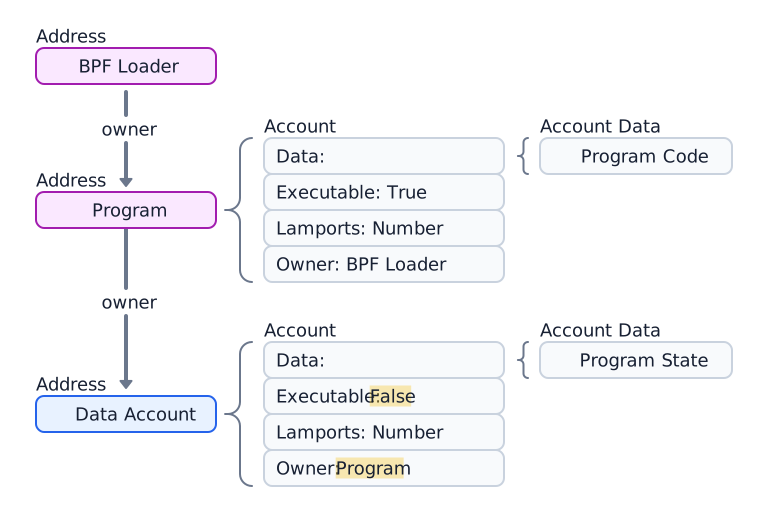
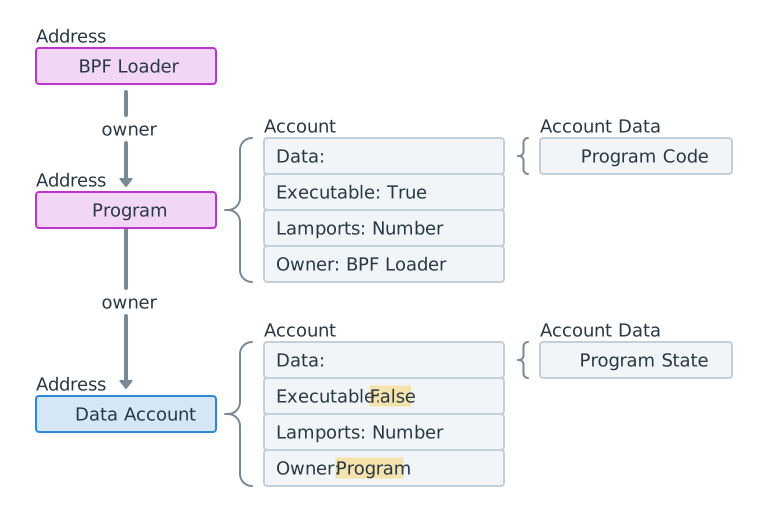 Diagram van een data-account dat eigendom is van een program account
Het volgende voorbeeld maakt een Token Mint-account aan en haalt dit op, dat eigendom is van het Token 2022-programma.
import { createClient, generateKeyPairSigner, lamports } from "@solana/kit";import { solanaRpc, rpcAirdrop } from "@solana/kit-plugin-rpc";import { generatedPayer, airdropPayer } from "@solana/kit-plugin-signer";import { systemProgram } from "@solana-program/system";import {getInitializeMintInstruction,getMintSize,TOKEN_2022_PROGRAM_ADDRESS,fetchMint} from "@solana-program/token-2022";const client = await createClient().use(generatedPayer()).use(solanaRpc({rpcUrl: "http://localhost:8899",rpcSubscriptionsUrl: "ws://localhost:8900"})).use(rpcAirdrop()).use(airdropPayer(lamports(1_000_000_000n))).use(systemProgram());// Generate keypair to use as address of mintconst mint = await generateKeyPairSigner();// Get default mint account size (in bytes), no extensions enabledconst space = BigInt(getMintSize());// Get minimum balance for rent exemptionconst rent = await client.rpc.getMinimumBalanceForRentExemption(space).send();const transactionSignature = await client.sendTransaction([client.system.instructions.createAccount({newAccount: mint,lamports: rent,space,programAddress: TOKEN_2022_PROGRAM_ADDRESS}),getInitializeMintInstruction({mint: mint.address,decimals: 9,mintAuthority: client.payer.address})]);console.log("Mint Address:", mint.address);console.log("Transaction Signature:", transactionSignature.context.signature);const accountInfo = await client.rpc.getAccountInfo(mint.address).send();console.log(accountInfo);const mintAccount = await fetchMint(client.rpc, mint.address);console.log(mintAccount);
Systeemaccounts
Accounts die na aanmaak eigendom blijven van het System Program worden systeemaccounts genoemd. Het versturen van SOL naar een nieuw adres voor de eerste keer maakt een nieuw account aan op dat adres dat eigendom is van het System Program.
Alle wallet-accounts zijn systeemaccounts. De fee payer op een transactie moet een systeemaccount zijn, omdat alleen accounts die eigendom zijn van het System Program transactiekosten kunnen betalen.
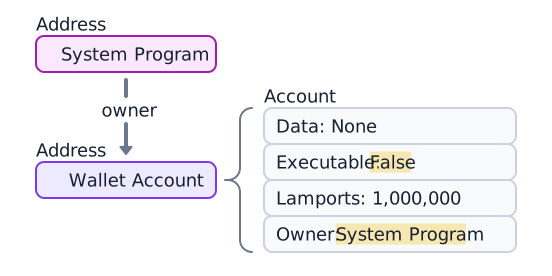
 Een wallet die eigendom is van het System Program en 1.000.000 lamports bevat
Het volgende voorbeeld genereert een nieuw keypair, financiert het met SOL en
haalt het account op. Het owner-veld is 11111111111111111111111111111111
(het System Program).
import { createClient, generateKeyPairSigner, lamports } from "@solana/kit";import { solanaRpc, rpcAirdrop } from "@solana/kit-plugin-rpc";import { generatedPayer } from "@solana/kit-plugin-signer";const client = await createClient().use(generatedPayer()).use(solanaRpc({rpcUrl: "http://localhost:8899",rpcSubscriptionsUrl: "ws://localhost:8900"})).use(rpcAirdrop());// Generate a new keypairconst keypair = await generateKeyPairSigner();console.log(`Public Key: ${keypair.address}`);// Funding an address with SOL automatically creates an accountconst signature = await client.airdrop(keypair.address,lamports(1_000_000_000n));const accountInfo = await client.rpc.getAccountInfo(keypair.address).send();console.log(accountInfo);
Sysvar-accounts
Sysvar-accounts zijn speciale accounts op vooraf gedefinieerde adressen die alleen-lezen toegang bieden tot cluster state data. Ze worden dynamisch bijgewerkt elke slot.
| Sysvar | Adres | Doel |
|---|---|---|
| Clock | SysvarC1ock11111111111111111111111111111111 | Huidige slot, epoch en Unix-tijdstempel |
| EpochSchedule | SysvarEpochSchedu1e111111111111111111111111 | Epoch-planningsconstanten ingesteld in genesis |
| EpochRewards | SysvarEpochRewards1111111111111111111111111 | Status en voortgang van epoch-beloningsdistributie |
| Rent | SysvarRent111111111111111111111111111111111 | Rent-tarief en vrijstellingsdrempel |
| SlotHashes | SysvarS1otHashes111111111111111111111111111 | Meest recente hashes van de parent banks van de slot |
| StakeHistory | SysvarStakeHistory1111111111111111111111111 | Stake-activeringen en -deactiveringen per epoch |
| LastRestartSlot | SysvarLastRestartS1ot1111111111111111111111 | Laatste cluster-herstart slot |
| Instructions | Sysvar1nstructions1111111111111111111111111 | Geserialiseerde instructies van de huidige transactie |
| SlotHistory | SysvarS1otHistory11111111111111111111111111 | Registratie van welke slots zijn geproduceerd in de laatste epoch |
Het volgende voorbeeld haalt het Sysvar Clock-account op en deserialiseert het.
import { createClient } from "@solana/kit";import { solanaRpc } from "@solana/kit-plugin-rpc";import { generatedPayer } from "@solana/kit-plugin-signer";import { fetchSysvarClock, SYSVAR_CLOCK_ADDRESS } from "@solana/sysvars";const client = await createClient().use(generatedPayer()).use(solanaRpc({rpcUrl: "https://api.mainnet.solana.com"}));const accountInfo = await client.rpc.getAccountInfo(SYSVAR_CLOCK_ADDRESS, { encoding: "base64" }).send();console.log(accountInfo);// Automatically fetch and deserialize the account dataconst clock = await fetchSysvarClock(client.rpc);console.log(clock);
Is this page helpful?