概要
トランザクションには署名とメッセージが含まれます。メッセージにはヘッダー、アカウントアドレス、最近のブロックハッシュ、およびコンパイル済みのinstructionsが含まれます。シリアル化後の最大サイズ:1,232バイト(今後のv1フォーマットでは4,096バイト)。
Transactionには、2つのトップレベルフィールドがあります:
signatures: 署名の配列message: 処理されるinstructionsのリストを含むトランザクション情報
pub struct Transaction {pub signatures: Vec<Signature>,pub message: Message,}
 トランザクションの2つの部分を示す図
トランザクションのシリアライズ後の合計サイズは、PACKET_DATA_SIZE(1,232バイト)を超えてはなりません。この制限は、1,280バイト(IPv6の最小MTU)からネットワークヘッダー用の48バイト(IPv6用40バイト + フラグメントヘッダー用8バイト)を引いた値です。1,232バイトには、signatures配列とmessage構造体の両方が含まれます。
v1トランザクションでは上限が4,096バイトに引き上げられます
このページではレガシートランザクションフォーマットについて説明します。v0フォーマットも、バージョンプレフィックスとアドレスルックアップテーブルを除いて同じ仕様に従っています。今後リリース予定の v1フォーマット ではサイズ制限が4,096バイトに引き上げられ、異なるワイヤーレイアウトが使用されます。
 トランザクション形式とサイズ制限を示す図
署名
signaturesフィールドは、Signature値のコンパクトエンコード配列です。各Signatureは、署名者アカウントの秘密鍵で署名された、シリアライズされたMessageの64バイトEd25519署名です。トランザクションのinstructionsによって参照される署名者アカウントごとに1つの署名が必要です。
各署名は秘密鍵によって生成されます。その鍵がローカルのkeypair、クラウドHSMまたはKMS、マネージドウォレットサービスのいずれに保管されるかは、本番環境における設計上の決定事項です。詳細は 本番環境での署名を参照してください。
配列内の最初の署名は手数料支払者のものであり、トランザクションの 基本手数料および優先手数料を支払うアカウントです。この最初の署名はトランザクションIDとしても機能し、ネットワーク上でトランザクションを検索する際に使用されます。トランザクションIDは一般的に トランザクション署名と呼ばれます。
手数料支払者の要件:
- メッセージ内の最初のアカウント(インデックス0)であり、署名者でなければなりません。
- System
Programが所有するアカウント、またはnonceアカウントである必要があります(
validate_fee_payerによって検証)。 rent_exempt_minimum + total_feeをカバーするのに十分なlamportsを保有している必要があります。そうでない場合、トランザクションはInsufficientFundsForFeeで失敗します。
メッセージ
messageフィールドは、トランザクションのペイロードを格納する
Message
構造体です:
header: メッセージのヘッダーaccount_keys: トランザクションのinstructionsが必要とするアカウントアドレスの配列recent_blockhash: トランザクションのタイムスタンプとして機能するブロックハッシュinstructions: instructionsの配列
pub struct Message {/// The message header, identifying signed and read-only `account_keys`.pub header: MessageHeader,/// All the account keys used by this transaction.#[serde(with = "short_vec")]pub account_keys: Vec<Pubkey>,/// The id of a recent ledger entry.pub recent_blockhash: Hash,/// Programs that will be executed in sequence and committed in/// one atomic transaction if all succeed.#[serde(with = "short_vec")]pub instructions: Vec<CompiledInstruction>,}
ヘッダー
headerフィールドは、account_keys配列をパーミッショングループに分割する3つのu8フィールドを持つ
MessageHeader
構造体です:
num_required_signatures: トランザクションに必要な署名の総数。num_readonly_signed_accounts: 読み取り専用の署名済みアカウント数。num_readonly_unsigned_accounts: 読み取り専用の未署名アカウント数。
pub struct MessageHeader {/// The number of signatures required for this message to be considered/// valid. The signers of those signatures must match the first/// `num_required_signatures` of [`Message::account_keys`].pub num_required_signatures: u8,/// The last `num_readonly_signed_accounts` of the signed keys are read-only/// accounts.pub num_readonly_signed_accounts: u8,/// The last `num_readonly_unsigned_accounts` of the unsigned keys are/// read-only accounts.pub num_readonly_unsigned_accounts: u8,}
レガシーおよびバージョン付きメッセージプレフィックス
レガシートランザクションメッセージでは、メッセージの最初のバイトはnum_required_signaturesであり、その後に残り2つのMessageHeaderバイトが続きます。バージョン付きトランザクションメッセージでは、最初のバイトの代わりにバージョンプレフィックスが使用されます。3バイトのMessageHeaderはそのプレフィックスの直後から始まります。v0およびv1メッセージの完全なレイアウトについては、バージョン付きトランザクションを参照してください。
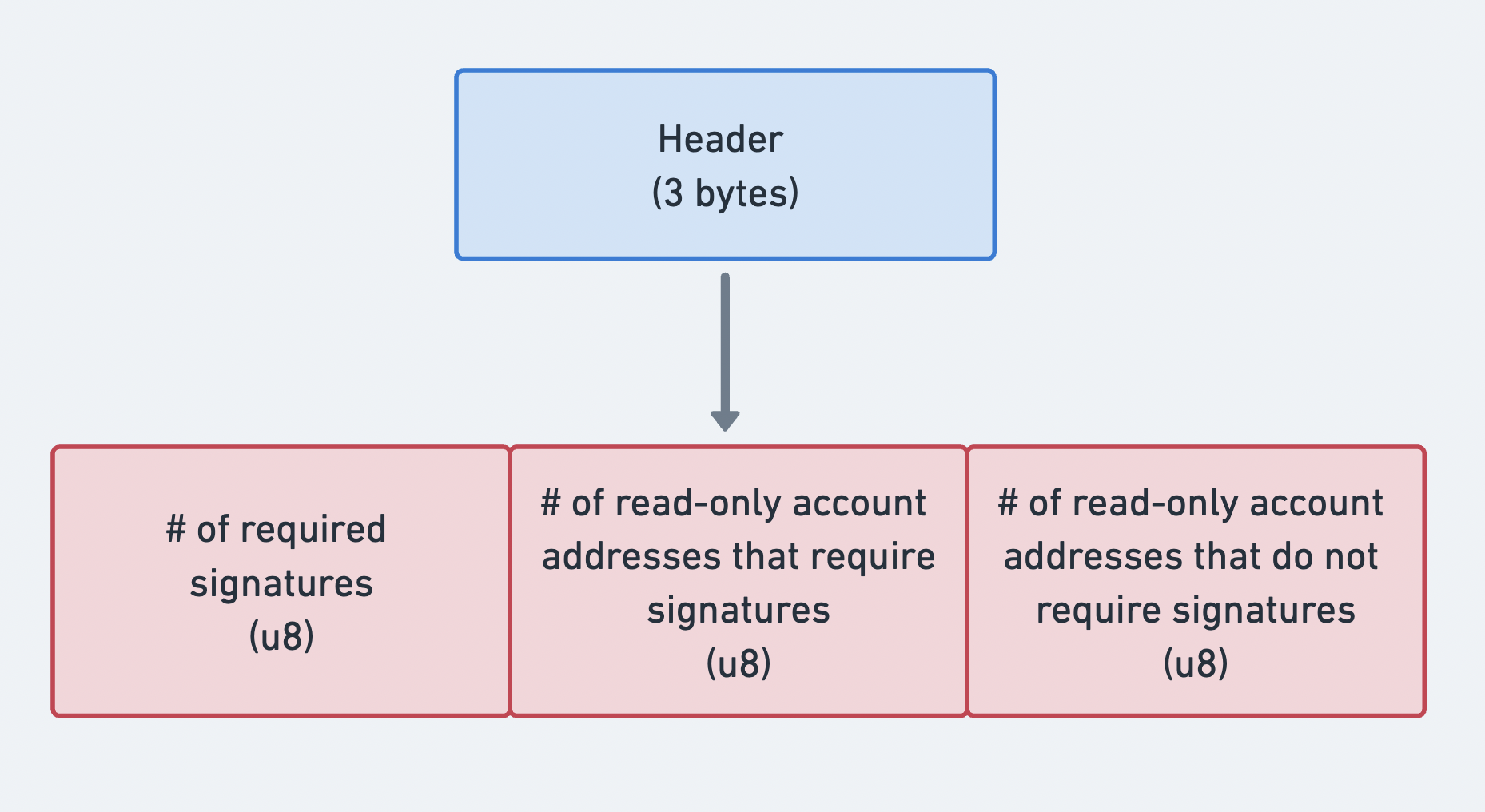 メッセージヘッダーの3つの部分を示す図
アカウントアドレス
account_keys
フィールドは、公開鍵のコンパクトエンコードされた配列です。各エントリは、トランザクションのinstructionsの少なくとも1つで使用されるアカウントを識別します。この配列にはすべてのアカウントを含める必要があり、以下の厳密な順序に従う必要があります:
- 署名者 + 書き込み可能
- 署名者 + 読み取り専用
- 非署名者 + 書き込み可能
- 非署名者 + 読み取り専用
この厳密な順序により、account_keys 配列をメッセージの header
にある
3つのカウントと組み合わせることで、アカウントごとのメタデータフラグを保存することなく、
各アカウントのパーミッションを判別できます。ヘッダーのカウントにより、
配列は上記の4つのパーミッショングループに分割されます。
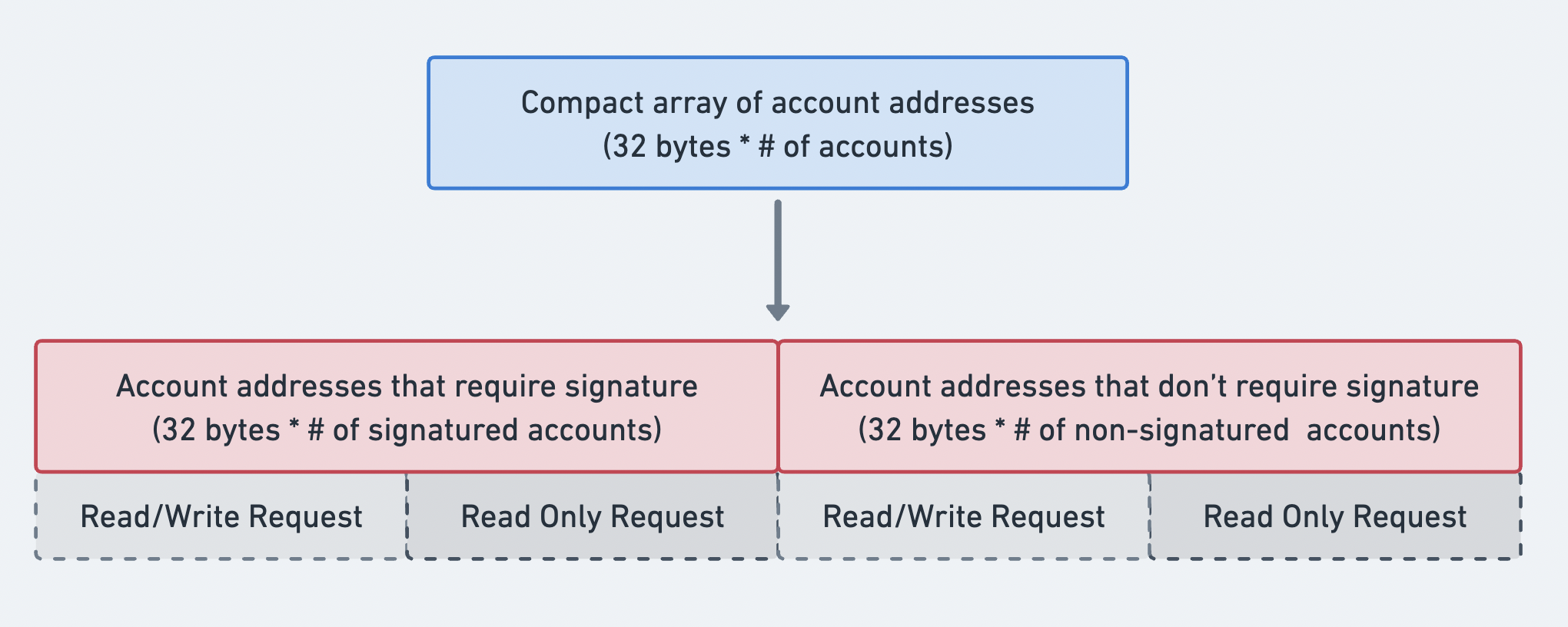 アカウントアドレス配列の順序を示す図
最近のブロックハッシュ
recent_blockhash フィールドは、2つの目的を果たす32バイトのハッシュです:
- タイムスタンプ:トランザクションが最近作成されたことを証明します。
- 重複排除:同じトランザクションが2回処理されるのを防ぎます。
ブロックハッシュは150
slot後に期限切れになります。トランザクションが到着した時点でブロックハッシュが有効でなくなっている場合、耐久性ノンストランザクションでない限り、BlockhashNotFound
で拒否されます。
getLatestBlockhash RPC
メソッドを使用すると、
現在のブロックハッシュとブロックハッシュが有効な最後のブロック高を取得できます。
instructions
instructions
フィールドは、CompiledInstruction
構造体のコンパクトエンコードされた配列です。各 CompiledInstruction
は、完全な公開鍵ではなく、 account_keys
配列へのインデックスによってアカウントを参照します。以下の要素を含みます:
program_id_index:account_keysへのインデックスで、呼び出すプログラムを特定します。accounts:account_keysへのインデックスの配列で、プログラムに渡すアカウントを指定します。data: instructionの識別子とシリアライズされた引数を含むバイト配列。
pub struct CompiledInstruction {/// Index into the transaction keys array indicating the program account that executes this instruction.pub program_id_index: u8,/// Ordered indices into the transaction keys array indicating which accounts to pass to the program.#[serde(with = "short_vec")]pub accounts: Vec<u8>,/// The program input data.#[serde(with = "short_vec")]pub data: Vec<u8>,}
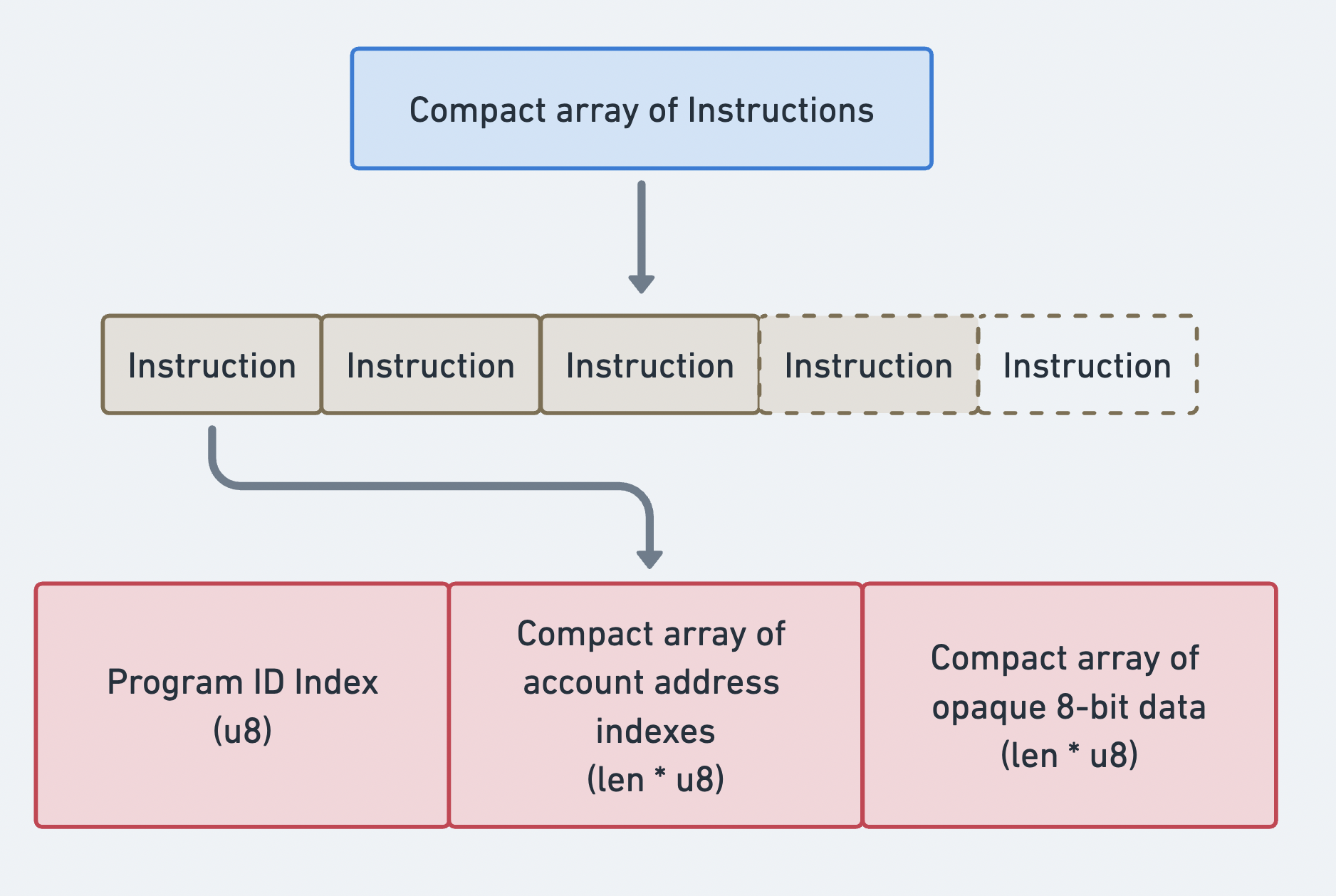 Compact array of Instructions
トランザクションのバイナリフォーマット
トランザクションはコンパクトエンコード方式でシリアライズされます。可変長の配列(署名、アカウントキー、instructions)はすべて、compact-u16 の長さエンコードをプレフィックスとして持ちます。このフォーマットは、値 0〜127 に対しては 1 バイトを使用し、より大きな値には 2〜3 バイトを使用します。
レガシートランザクションのレイアウト(ワイヤーフォーマット):
| フィールド | サイズ | 説明 |
|---|---|---|
num_signatures | 1〜3バイト(compact-u16) | 署名の数 |
signatures | num_signatures × 64バイト | Ed25519署名 |
num_required_signatures | 1バイト | MessageHeader フィールド1 |
num_readonly_signed | 1バイト | MessageHeader フィールド2 |
num_readonly_unsigned | 1バイト | MessageHeader フィールド3 |
num_account_keys | 1〜3バイト(compact-u16) | 静的アカウントキーの数 |
account_keys | num_account_keys × 32バイト | 公開鍵 |
recent_blockhash | 32バイト | ブロックハッシュ |
num_instructions | 1〜3バイト(compact-u16) | instructionsの数 |
instructions | 可変長 | コンパイル済みinstructionsの配列 |
各コンパイル済みinstructionは以下のようにシリアライズされます:
| フィールド | サイズ | 説明 |
|---|---|---|
program_id_index | 1バイト | アカウントキーへのインデックス |
num_accounts | 1〜3バイト(compact-u16) | アカウントインデックスの数 |
account_indices | num_accounts × 1バイト | アカウントキーインデックス |
data_len | 1〜3バイト(compact-u16) | instruction dataの長さ |
data | data_len バイト | オペークなinstruction data |
サイズ計算
PACKET_DATA_SIZE =
1,232 バイトとすると、利用可能なスペースは次のように計算できます:
Total = 1232 bytes- compact-u16(num_sigs) # 1 byte- num_sigs * 64 # signature bytes- 3 # message header- compact-u16(num_keys) # 1 byte- num_keys * 32 # account key bytes- 32 # recent blockhash- compact-u16(num_ixs) # 1 byte- sum(instruction_sizes) # per-instruction overhead + data
例:SOL 送金トランザクション
以下の図は、トランザクションと instructions がどのように連携して、ユーザーがネットワークと対話できるようにするかを示しています。この例では、SOL があるアカウントから別のアカウントに送金されます。
送信者アカウントの メタデータ は、トランザクションへの署名が必要であることを示しています。これにより、System Program が lamport を差し引くことができます。lamport 残高を変更するために、送信者と受信者の両方のアカウントが書き込み可能である必要があります。この instruction を実行するために、送信者のウォレットは署名と SOL 送金 instruction を含むメッセージを含んだトランザクションを送信します。
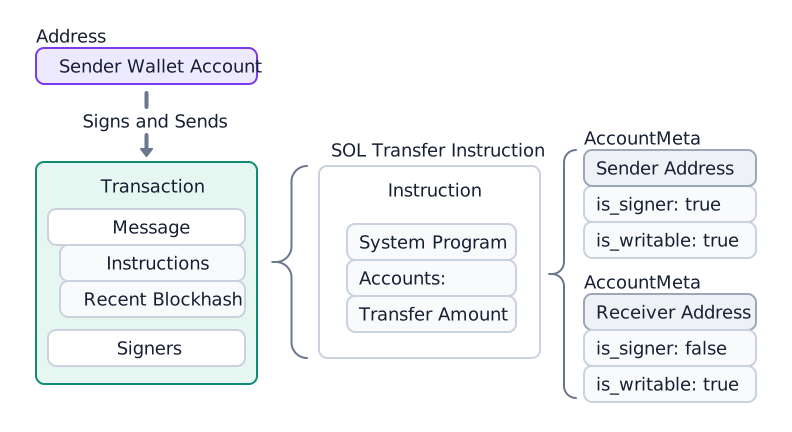
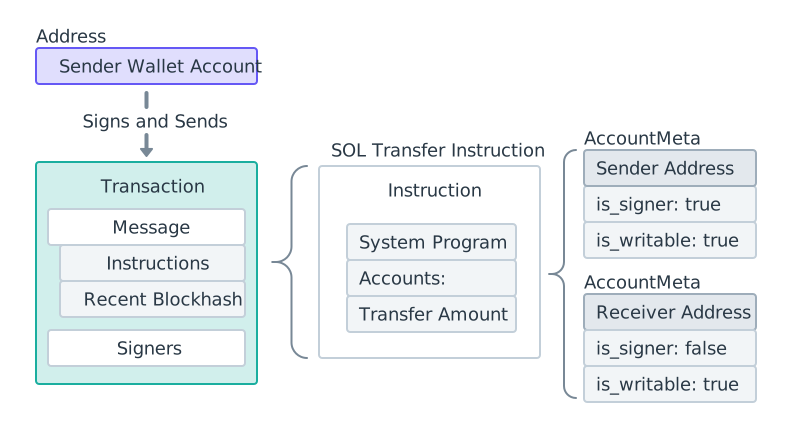 SOL送金ダイアグラム
トランザクションが送信された後、System Program は送金 instruction を処理し、両方のアカウントの lamport 残高を更新します。
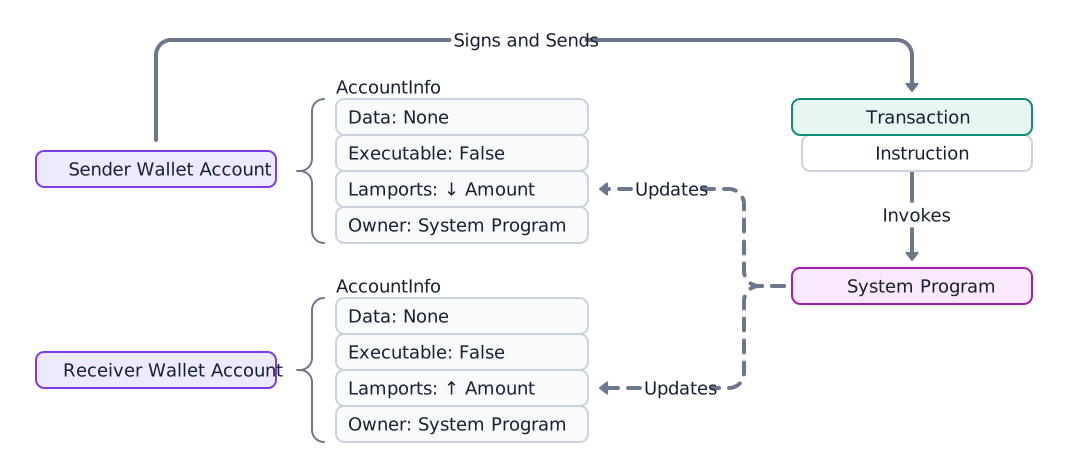
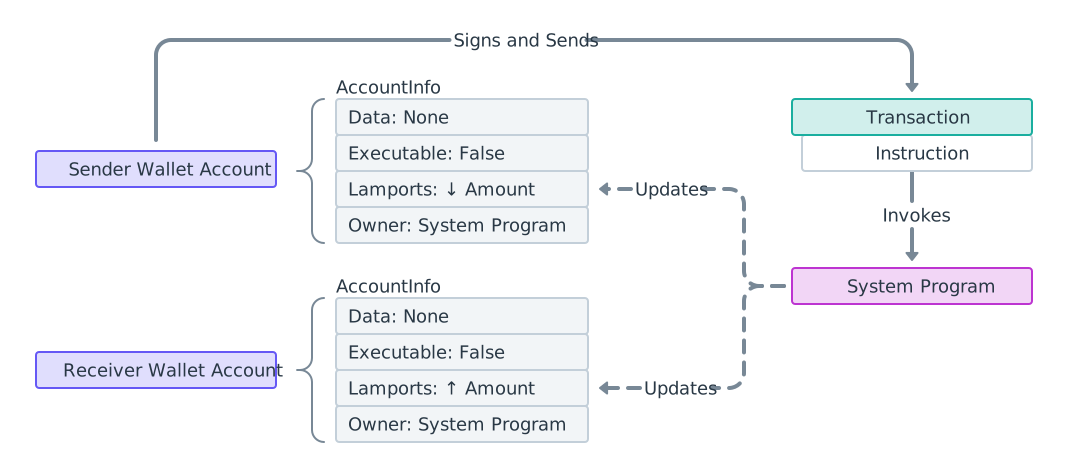 SOL送金プロセスダイアグラム
SOLを送信する前に受取人を確認してください
System Program の送金は あらゆる アカウントに lamport を追加します。受取人が SOL を送り返せるかどうかのプロトコルレベルのチェックはありません。lamport はアカウントの所有プログラムによってのみ移動できるため、管理していない token mint、プログラム、または PDA に SOL を送金すると 資金の永久損失のリスク があります — 所有プログラムが指定した権限者のみが返還できます。token account に送金された SOL は、そのアカウントの所有者のみが回収できます。送信者には回収できません。
SPL トークン 送金には部分的な自己保護機能があります:Token Program は、アカウントが期待される mint と一致しない送金を拒否します。ネイティブ SOL 送金にはそのようなガードがないため、署名前に送信者が受取人を確認する必要があります。分類ロジックの詳細については、アドレスの確認 を参照してください。
以下の例は、上記の図に関連するコードを示しています。System Programの
transfer関数をご参照ください。
import { createClient, generateKeyPairSigner, lamports } from "@solana/kit";import { solanaRpc, rpcAirdrop } from "@solana/kit-plugin-rpc";import { generatedPayer, airdropPayer } from "@solana/kit-plugin-signer";import { systemProgram } from "@solana-program/system";const client = await createClient().use(generatedPayer()).use(solanaRpc({rpcUrl: "http://localhost:8899",rpcSubscriptionsUrl: "ws://localhost:8900"})).use(rpcAirdrop()).use(airdropPayer(lamports(1_000_000_000n))).use(systemProgram());const sender = client.payer;const recipient = await generateKeyPairSigner();const LAMPORTS_PER_SOL = 1_000_000_000n;const transferAmount = lamports(LAMPORTS_PER_SOL / 100n); // 0.01 SOL// Check balance before transferconst { value: preBalance1 } = await client.rpc.getBalance(sender.address).send();const { value: preBalance2 } = await client.rpc.getBalance(recipient.address).send();// Create a transfer instruction for transferring SOL from sender to recipientconst transferInstruction = client.system.instructions.transferSol({source: sender,destination: recipient.address,amount: transferAmount // 0.01 SOL in lamports});const transactionSignature = await client.sendTransaction([transferInstruction]);// Check balance after transferconst { value: postBalance1 } = await client.rpc.getBalance(sender.address).send();const { value: postBalance2 } = await client.rpc.getBalance(recipient.address).send();console.log("Sender prebalance:",Number(preBalance1) / Number(LAMPORTS_PER_SOL));console.log("Recipient prebalance:",Number(preBalance2) / Number(LAMPORTS_PER_SOL));console.log("Sender postbalance:",Number(postBalance1) / Number(LAMPORTS_PER_SOL));console.log("Recipient postbalance:",Number(postBalance2) / Number(LAMPORTS_PER_SOL));console.log("Transaction Signature:", transactionSignature.context.signature);
以下の例は、単一のSOL転送instructionsを含むトランザクションの構造を示しています。
import {createClient,generateKeyPairSigner,lamports,createTransactionMessage,setTransactionMessageFeePayerSigner,setTransactionMessageLifetimeUsingBlockhash,appendTransactionMessageInstructions,pipe,signTransactionMessageWithSigners,getCompiledTransactionMessageDecoder} from "@solana/kit";import { solanaRpc, rpcAirdrop } from "@solana/kit-plugin-rpc";import { generatedPayer, airdropPayer } from "@solana/kit-plugin-signer";import { systemProgram } from "@solana-program/system";const client = await createClient().use(generatedPayer()).use(solanaRpc({rpcUrl: "http://localhost:8899",rpcSubscriptionsUrl: "ws://localhost:8900"})).use(rpcAirdrop()).use(airdropPayer(lamports(1_000_000_000n))).use(systemProgram());const { value: latestBlockhash } = await client.rpc.getLatestBlockhash().send();const sender = client.payer;const recipient = await generateKeyPairSigner();// Define the amount to transferconst LAMPORTS_PER_SOL = 1_000_000_000n;const transferAmount = lamports(LAMPORTS_PER_SOL / 100n); // 0.01 SOL// Create a transfer instruction for transferring SOL from sender to recipientconst transferInstruction = client.system.instructions.transferSol({source: sender,destination: recipient.address,amount: transferAmount});// Create transaction messageconst transactionMessage = pipe(createTransactionMessage({ version: 0 }),(tx) => setTransactionMessageFeePayerSigner(sender, tx),(tx) => setTransactionMessageLifetimeUsingBlockhash(latestBlockhash, tx),(tx) => appendTransactionMessageInstructions([transferInstruction], tx));const signedTransaction =await signTransactionMessageWithSigners(transactionMessage);// Decode the messageBytesconst compiledTransactionMessage =getCompiledTransactionMessageDecoder().decode(signedTransaction.messageBytes);console.log(JSON.stringify(compiledTransactionMessage, null, 2));
以下のコードは、前のコードスニペットの出力を示しています。 SDKによってフォーマットは異なりますが、各instructionsには同じ必要な情報が含まれていることに注目してください。
{"version": 0,"header": {"numSignerAccounts": 1,"numReadonlySignerAccounts": 0,"numReadonlyNonSignerAccounts": 1},"staticAccounts": ["HoCy8p5xxDDYTYWEbQZasEjVNM5rxvidx8AfyqA4ywBa","5T388jBjovy7d8mQ3emHxMDTbUF8b7nWvAnSiP3EAdFL","11111111111111111111111111111111"],"lifetimeToken": "EGCWPUEXhqHJWYBfDirq3mHZb4qDpATmYqBZMBy9TBC1","instructions": [{"programAddressIndex": 2,"accountIndices": [0, 1],"data": {"0": 2,"1": 0,"2": 0,"3": 0,"4": 128,"5": 150,"6": 152,"7": 0,"8": 0,"9": 0,"10": 0,"11": 0}}]}
転送前に受取人を確認する
SOLの転送はどのアカウントにも成功するため、署名前に受取人を確認してください。アカウントを取得し、System Programウォレット(または未資金のオンカーブアドレス)にのみ送信してください。自分が管理していないミント、token account、プログラム、およびPDAは拒否してください。
import {type Address,createSolanaRpc,fetchJsonParsedAccount,isOffCurveAddress} from "@solana/kit";const rpc = createSolanaRpc("https://api.mainnet.solana.com");const SYSTEM_PROGRAM = "11111111111111111111111111111111" as Address;/*** Throws if `recipient` cannot safely receive native SOL.** Only System Program wallets (or unfunded on-curve addresses) are safe. Any* other account locks the lamports because no authority can debit them.*/async function assertSafeSolRecipient(recipient: Address): Promise<void> {const account = await fetchJsonParsedAccount(rpc, recipient);if (!account.exists) {// Off-curve = a PDA with no account; reject conservatively.if (isOffCurveAddress(recipient)) {throw new Error("Recipient is a PDA with no account; SOL would be locked");}// On-curve = an unfunded wallet, safe to fund.return;}if (account.programAddress !== SYSTEM_PROGRAM) {throw new Error(`Recipient is owned by ${account.programAddress}, not a wallet; SOL would be locked`);}}// A wallet: safe.await assertSafeSolRecipient("H8sMJSCQxfKiFTCfDR3DUMLPwcRbM61LGFJ8N4dK3WjS" as Address);// The USDC mint: rejected before any SOL leaves the sender.await assertSafeSolRecipient("EPjFWdd5AufqSSqeM2qN1xzybapC8G4wEGGkZwyTDt1v" as Address);
このスニペットはネイティブSOLの受取人を確認します。SPLトークン送信(token account、ATA、Token-2022)も処理する完全な分類については、アドレスの確認をご参照ください。
トランザクション詳細の取得
送信後、トランザクションの署名と getTransaction RPCメソッドを使用してトランザクションの詳細を取得します。
Solana Explorer を使用してトランザクションを検索することもできます。
{"blockTime": 1745196488,"meta": {"computeUnitsConsumed": 150,"err": null,"fee": 5000,"innerInstructions": [],"loadedAddresses": {"readonly": [],"writable": []},"logMessages": ["Program 11111111111111111111111111111111 invoke [1]","Program 11111111111111111111111111111111 success"],"postBalances": [989995000, 10000000, 1],"postTokenBalances": [],"preBalances": [1000000000, 0, 1],"preTokenBalances": [],"rewards": [],"status": {"Ok": null}},"slot": 13049,"transaction": {"message": {"header": {"numReadonlySignedAccounts": 0,"numReadonlyUnsignedAccounts": 1,"numRequiredSignatures": 1},"accountKeys": ["8PLdpLxkuv9Nt8w3XcGXvNa663LXDjSrSNon4EK7QSjQ","7GLg7bqgLBv1HVWXKgWAm6YoPf1LoWnyWGABbgk487Ma","11111111111111111111111111111111"],"recentBlockhash": "7ZCxc2SDhzV2bYgEQqdxTpweYJkpwshVSDtXuY7uPtjf","instructions": [{"accounts": [0, 1],"data": "3Bxs4NN8M2Yn4TLb","programIdIndex": 2,"stackHeight": null}],"indexToProgramIds": {}},"signatures": ["3jUKrQp1UGq5ih6FTDUUt2kkqUfoG2o4kY5T1DoVHK2tXXDLdxJSXzuJGY4JPoRivgbi45U2bc7LZfMa6C4R3szX"]},"version": "legacy"}
生のレスポンスでは、アカウントはインデックスで識別され、内部(CPI)instructions はエンコードされたブロブとして保存されます。これらをアドレスに解決し、完全なinstructionsツリーをたどるには、Transaction Introspection を参照してください。
Is this page helpful?