什么是 x402?
x402 是一种面向互联网原生支付的开放协议。402 错误码代表"需要付款",长期以来存在于 HTTP 规范中,但直到区块链网络的兴起,才使其真正可行。如今,402 协议指的是实现 HTTP 402 Payment Required 模式:服务器在返回受保护的响应之前要求客户端先完成付款。在 Solana 上,这通常通过要求客户端提交少量转账来实现,服务器随后在链上验证并提供内容。
目前尚不清楚哪个 402 SDK 会成为最受欢迎的选择。因此,本指南将展示如何使用一个最简化的服务端和客户端来实现 x402,并列出所有现有的 402 SDK 及其当前对 Solana 的支持情况。
它是如何工作的?
实现 x402 有多种方式,从极简方案到全托管方案均有覆盖。
协议原理:使用纯 HTTP。客户端访问你的 URL → 你返回 402 Payment Required 并附带 JSON 支付需求对象 → 客户端完成支付并携带 X-PAYMENT 头部重试 → 你验证/结算 → 返回 200 OK。无需账户,无需 OAuth。
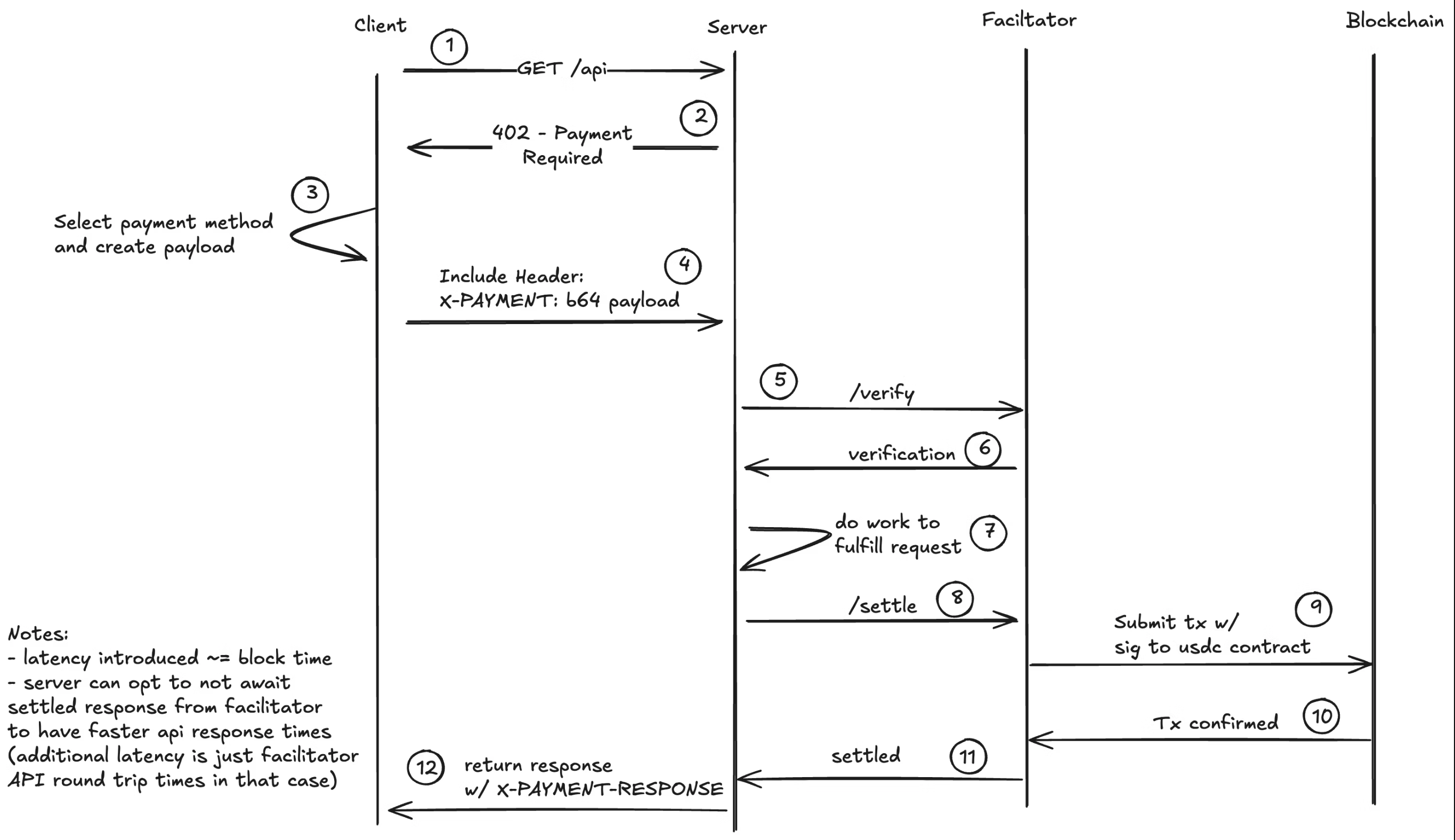 x402 流程图
注意:促进者(facilitator)完全是可选的,你也可以用几行代码实现自己的验证逻辑。促进者将区块链集成细节从服务端和客户端中抽象出来,从而简化实现过程。
需了解的规范要点:PaymentRequirements 结构体、base64 编码的 X-PAYMENT 头部、成功时可选的 X-PAYMENT-RESPONSE,以及用于 /verify、/settle、/supported 的(可选)促进者 API。当前的具体方案为精确支付(支付特定金额),upto(最多支付)等方案已被提出。
Solana 支持:该协议本身与链无关;在 Solana 上支持所有 SPL 代币。大多数 402 SDK 已支持或正在开发 Solana 支持。
下方列出了可用的 402 SDK 及其当前对 Solana 的支持情况。
使用场景
x402 开启了大量微支付和按使用付费的场景,这些场景在区块链出现之前在经济上并不可行。想象一下 Netflix 按每次观看付费,或 Spotify 按每首歌付费,而非按订阅收费。以下是一些可能的应用场景,但可能性的完整空间完全向想象力开放:
AI 与智能体商务:
- AI 智能体 API 访问:按 LLM 推理、图像生成或 AI 模型 API 调用次数付费(参见 ACK 示例)
- MCP 服务器变现:对模型上下文协议工具、数据源及专业智能体能力收费(参见 MCPay.tech)
- 智能体间支付:使自主智能体能够相互为服务和数据进行交易(参见 a2a-x402 示例)
- 高端 AI 训练数据:按查询次数出售精选数据集的访问权限
内容与媒体:
- 付费文章:按篇收取微额费用,而非整体订阅
- 视频/音频流媒体:按观看次数或内容分钟数付费
- 高分辨率图片:付款后解锁全分辨率下载(参见 ACK 示例)或 x402 coinbase 示例
- 高端Newsletter访问:对单期 Newsletter 进行变现
开发者服务:
- API 计量:按 RPC 调用、数据库查询或计算单元次数付费(参见 Corbits 示例)
- 无服务器函数:对单次函数执行收费
数据与分析:
- 实时市场数据:按报价或按 tick 定价的行情数据
- 分析仪表盘:解锁特定报告或数据导出
- 物联网传感器数据:为 DePIN 网络传感器读数提供微支付
游戏与虚拟物品:
- 游戏服务器访问:按局或按小时付费
- 模组/资产下载:对用户生成内容进行变现
- 锦标赛报名费:自动化奖池分配
其他:
- 邮件/私信过滤:要求付款才能进入收件箱(防垃圾信息)
- 计算资源:按 CPU 小时、GPU 分钟或存储 GB 付费
- VPN/代理访问:按 GB 流量定价
- 一次性文件下载:无需订阅即可出售数字文件(参见 ACK 示例)
x402 在 Solana 上的核心优势在于极低的交易成本(不足一分钱),使真正的微支付成为可能,加上即时结算,从而实现实时访问控制。
SDK 及其 Solana 支持情况
这是一个持续更新的列表,随着更多 SDK 的发布或 Solana 支持的添加,将不断更新。
| SDK / 项目 | Solana 支持 | 备注 | 文档 / 链接 |
|---|---|---|---|
| Corbits | 是 | 适用于 Solana 上 402 的便捷 SDK | 文档 |
| MCPay.tech | 是 | 通过微支付为 MCP 服务器付费 | 官网 |
| PayAI Facilitator | 是 | 支持 Solana 的 x402 促进者 | payai.network |
| Coinbase | 是 / Python 开发中 | x402 协议的 Coinbase 参考实现 | GitHub |
| ACK | PR 中 | 支持 x402 的智能体支付协议 | GitHub |
| Crossmint | 开发中 | 支付、钱包、智能体金融;非 x402 专用 | crossmint.com |
| A2A x402 (Google) | 开发中 | 使用 Google AI 的智能体间支付 | GitHub |
| Nexus (Thirdweb) | 开发中 | 基于 API 密钥的 x402 封装 | Nexus |
| x402scan | N/A(浏览器) | x402 生态系统浏览器(非 SDK) | x402scan.com |
| 原生示例 | 是 | 无依赖的最简示例 | 示例 |
Corbits
专为 Solana 优先设计的 SDK,可快速在 Solana 上实现 x402 流程。查看文档: https://corbits.dev/
此示例允许你为 Solana RPC 请求付费。
npm install @faremeter/payment-solana @faremeter/fetch @faremeter/info@solana/web3.js
创建一个 payer-wallet.json 文件并向其充值一些 USDC 和部分主网 SOL。
import {Keypair,PublicKey,VersionedTransaction,Connection} from "@solana/web3.js";import { createPaymentHandler } from "@faremeter/payment-solana/exact";import { wrap } from "@faremeter/fetch";import { lookupKnownSPLToken } from "@faremeter/info/solana";import * as fs from "fs";// Load keypair from fileconst keypairData = JSON.parse(fs.readFileSync("./payer-wallet.json", "utf-8"));const keypair = Keypair.fromSecretKey(Uint8Array.from(keypairData));const network = "mainnet-beta";const connection = new Connection("https://api.mainnet.solana.com");const usdcInfo = lookupKnownSPLToken(network, "USDC");const usdcMint = new PublicKey(usdcInfo.address);// Create wallet interfaceconst wallet = {network,publicKey: keypair.publicKey,updateTransaction: async (tx: VersionedTransaction) => {tx.sign([keypair]);return tx;}};// Setup payment handlerconst handler = createPaymentHandler(wallet, usdcMint, connection);const fetchWithPayer = wrap(fetch, { handlers: [handler] });// Call the API - payment happens automaticallyconst response = await fetchWithPayer("https://helius.api.corbits.dev", {method: "POST",headers: { "Content-Type": "application/json" },body: JSON.stringify({jsonrpc: "2.0",id: 1,method: "getBlockHeight"})});const data = await response.json();console.log(data);
npx tsx e2e.ts
这将为 RPC 请求付费并使用 corbits 402 协议返回区块高度。
Coinbase
Coinbase 的参考实现 为 x402 协议提供了 TypeScript 库及客户端和服务端流程的示例。该仓库包含覆盖 6 种不同 SVM(Solana 虚拟机)场景的端到端测试,涵盖支付验证、收据生成和错误处理。
主要特性:
- TypeScript 客户端和服务端实现
- 支付验证工具
- 支持多种支付方案(精确金额、最高金额)
- 含 Solana 交易示例的测试套件
- 协议逻辑与业务逻辑的分离
你可以在此处找到一个包含最简服务端和客户端的易用示例。
const app = express();const PORT = 3000;// Apply x402 payment middleware// This automatically handles:// - 402 responses with payment requirements// - Payment verification (pre-flight checks)// - Transaction submission via facilitator// - Settlement confirmationapp.use(paymentMiddleware(RECIPIENT, {// Protected endpoint: requires $0.001 USDC payment"GET /premium": {price: "$0.0001", // Price in USD (converted to USDC)network: "solana-devnet" // Solana devnet},// Another endpoint with different price"GET /expensive": {price: "$0.001",network: "solana-devnet"}}));// Protected endpoints - only accessible after paymentapp.get("/premium", (req, res) => {res.json({message: "🎉 Premium content accessed!",data: {secret: "This is premium content",timestamp: new Date().toISOString()}});});
Python 支持正在开发中,已有可用的端到端示例,请点击此处查看。
ACK
Agent Commerce Kit(ACK)支持 x402 协议,并为智能体经济增加了关键层:使用 W3C DID/VC 的可验证智能体身份(ACK-ID)以及作为可验证凭证的加密安全收据(ACK-Pay)。这使得智能体能够证明所有权、自主认证并生成合规的支付证明,从而解决阻碍 AI 智能体参与商业活动的身份危机和交易障碍。
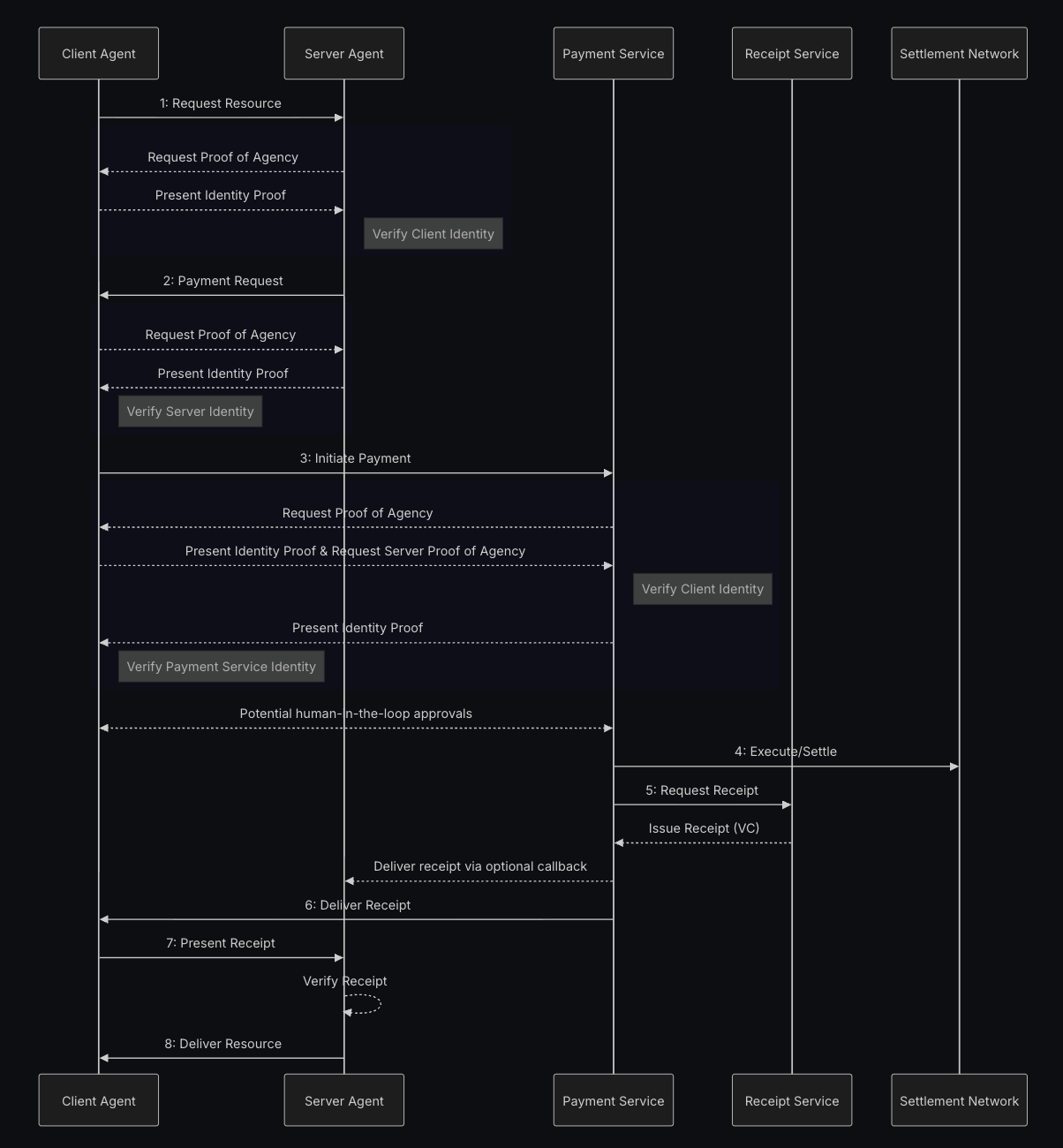 ACK 流程图
目前有一个包含端到端示例的 PR 尚未合并,但已可正常运行。此外还有一个在线示例,展示了如何对图片设置付费墙、一个点唱机以及一个可为图片添加动效的 API。示例源代码以及一个使用该 API 在时间线上为图片添加动效的 Twitter 机器人可在此处找到。
MCPay.tech
为 MCP(模型上下文协议)服务器提供类 x402 流程的按请求微支付方案。通过对每次 API 调用或工具调用收取少量费用,使开发者能够对 MCP 工具和资源进行变现,轻松实现对高端数据源、专业工具或计算资源的 AI 智能体访问收费。网站:https://mcpay.tech/
PayAI Facilitator
Solana 优先的 x402 促进者,提供实时回声商户以测试和退款支付。PayAI 目前承担所有交易手续费。网站: https://payai.network/
A2A x402 (Google)
探索标准化"需要付款"流程的智能体间 402 项目。Solana 支持目前正在开发中,可在此处找到一个可用的聊天示例。
Crossmint
Crossmint 是一个面向企业和智能体的一站式加密货币轨道集成平台,涵盖钱包、法币入金、稳定币编排等功能。Solana x402 支持目前正在开发中,预计于 2025 年 10 月 30 日完成。网站:https://www.crossmint.com/
x402scan
x402 生态系统浏览器,提供全面的统计数据、项目列表以及 x402 实现的分析功能。可追踪交易量、发现活跃商户,并监控不同网络中需要付款的端点的增长情况。网站:https://x402scan.com/
Nexus (Thirdweb)
Thirdweb Nexus 正在开发基于 API 密钥的 x402 封装(目前仍在开发中)。网站:https://nexus.thirdweb.com/
原生示例
一个无任何依赖、包含最简服务端和客户端的原生示例。
你可以克隆该仓库并运行示例:
git clone https://github.com/Woody4618/x402-solana-examplesnpm install# Terminal 1: Start servernpm run usdc:server# Terminal 2: Run client (requires devnet USDC)npm run usdc:client
流程概览
- 客户端请求
/premium。 - 服务器返回 402 并附带支付条款:收款方、金额。
- 客户端创建一笔包含向收款方转账指令的交易。
- 客户端携带交易载荷重试请求
/premium。 - 服务器验证交易并将其广播至网络。
- 交易确认后,服务器返回 200。
Solana 特有的替代方案: 在 Solana 上,你可以实现一种变体,让客户端直接将交易提交到网络并附带备注指令(而非将其发送到服务器),然后仅将交易签名发送给服务器进行验证。这解决了连接中断的问题——如果客户端在付款后、接收内容前断开连接,可以使用相同的签名重试,因为付款已在链上确认。但是,此方案偏离了 x402.org 的标准流程(该标准要求由服务器广播交易),因此本示例中我们采用标准方式。
注意:本示例代码未经审计,不适用于生产环境,仅供演示目的。它表明你可以在不依赖任何依赖项和中间人(facilitator)的情况下实现 x402。使用中间人的好处在于它能隐藏复杂性并代为承担交易费用,但它也可能成为单点故障,例如当中间人钱包资金不足时。示例服务器会提交客户端签名的交易,你可能需要对这些交易进行 validate。
最简服务器(Express)
// x402-compliant server with USDC (SPL Token) paymentsimport express from "express";import { Connection, PublicKey, Transaction } from "@solana/web3.js";import { TOKEN_PROGRAM_ID, getAssociatedTokenAddress } from "@solana/spl-token";const connection = new Connection("https://api.devnet.solana.com", "confirmed");// Devnet USDC mint addressconst USDC_MINT = new PublicKey("4zMMC9srt5Ri5X14GAgXhaHii3GnPAEERYPJgZJDncDU");// Your recipient wallet address (same as SOL example)const RECIPIENT_WALLET = new PublicKey("seFkxFkXEY9JGEpCyPfCWTuPZG9WK6ucf95zvKCfsRX");// Derive the recipient's USDC token account (Associated Token Account)const RECIPIENT_TOKEN_ACCOUNT = await getAssociatedTokenAddress(USDC_MINT,RECIPIENT_WALLET);// Picking a small USDC priceconst PRICE_USDC = 100; // 0.0001 USDCconst app = express();app.use(express.json());// x402 endpoint - Quote or verify paymentapp.get("/premium", async (req, res) => {const xPaymentHeader = req.header("X-Payment");// If client provided X-Payment header, verify and submit transactionif (xPaymentHeader) {try {// Decode base64 and parse JSON (x402 standard)const paymentData = JSON.parse(Buffer.from(xPaymentHeader, "base64").toString("utf-8")) as {x402Version: number;scheme: string;network: string;payload: {serializedTransaction: string;};};console.log("Received USDC payment proof from client");console.log(` Network: ${paymentData.network}`);// Deserialize the transactionconst txBuffer = Buffer.from(paymentData.payload.serializedTransaction,"base64");const tx = Transaction.from(txBuffer);console.log("Verifying SPL Token transfer instructions...");// Step 1: Introspect and decode SPL Token transfer instructionconst instructions = tx.instructions;let validTransfer = false;let transferAmount = 0;for (const ix of instructions) {// Check if this is a Token Program instructionif (ix.programId.equals(TOKEN_PROGRAM_ID)) {// SPL Token Transfer instruction layout:// [0] = instruction type (3 for Transfer)// [1-8] = amount (u64, little-endian)if (ix.data.length >= 9 && ix.data[0] === 3) {// Read the amount (u64 in little-endian, starts at byte 1)transferAmount = Number(ix.data.readBigUInt64LE(1));// Verify accounts: [source, destination, owner]if (ix.keys.length >= 2) {const destAccount = ix.keys[1].pubkey;if (destAccount.equals(RECIPIENT_TOKEN_ACCOUNT) &&transferAmount >= PRICE_USDC) {validTransfer = true;console.log(` ✓ Valid USDC transfer: ${transferAmount / 1000000} USDC`);console.log(` To: ${RECIPIENT_TOKEN_ACCOUNT.toBase58()}`);break;}}}}}if (!validTransfer) {return res.status(402).json({error:"Transaction does not contain valid USDC transfer to recipient with correct amount",details:transferAmount > 0? `Found transfer of ${transferAmount}, expected ${PRICE_USDC}`: "No valid token transfer instruction found"});}// Step 2: Simulate the transaction BEFORE submittingconsole.log("Simulating transaction...");try {const simulation = await connection.simulateTransaction(tx);if (simulation.value.err) {console.error("Simulation failed:", simulation.value.err);return res.status(402).json({error: "Transaction simulation failed",details: simulation.value.err,logs: simulation.value.logs});}console.log(" ✓ Simulation successful");} catch (simError) {console.error("Simulation error:", simError);return res.status(402).json({error: "Failed to simulate transaction",details:simError instanceof Error ? simError.message : "Unknown error"});}// Step 3: Submit the transaction (only if verified and simulated successfully)// Note: Solana blockchain automatically rejects duplicate transaction signaturesconsole.log("Submitting transaction to network...");const signature = await connection.sendRawTransaction(txBuffer, {skipPreflight: false,preflightCommitment: "confirmed"});console.log(`Transaction submitted: ${signature}`);// Wait for confirmationconst confirmation = await connection.confirmTransaction(signature,"confirmed");if (confirmation.value.err) {return res.status(402).json({error: "Transaction failed onchain",details: confirmation.value.err});}// Fetch the transaction to verify payment details.// web3.js v1 cannot deserialize v1 transactions, so the max version is// capped at 0 here. A facilitator that must settle v1 payments needs// @solana/kit or web3.js v3 and a max version of 1.const confirmedTx = await connection.getTransaction(signature, {commitment: "confirmed",maxSupportedTransactionVersion: 0});if (!confirmedTx) {return res.status(402).json({error: "Could not fetch confirmed transaction"});}// Verify token balance changes from transaction metadataconst postTokenBalances = confirmedTx.meta?.postTokenBalances ?? [];const preTokenBalances = confirmedTx.meta?.preTokenBalances ?? [];// Find the recipient's token account in the balance changeslet amountReceived = 0;for (let i = 0; i < postTokenBalances.length; i++) {const postBal = postTokenBalances[i];const preBal = preTokenBalances.find((pre) => pre.accountIndex === postBal.accountIndex);// Check if this is the recipient's accountconst accountKey =confirmedTx.transaction.message.staticAccountKeys[postBal.accountIndex];if (accountKey && accountKey.equals(RECIPIENT_TOKEN_ACCOUNT)) {const postAmount = postBal.uiTokenAmount.amount;const preAmount = preBal?.uiTokenAmount.amount ?? "0";amountReceived = Number(postAmount) - Number(preAmount);break;}}if (amountReceived < PRICE_USDC) {return res.status(402).json({error: `Insufficient payment: received ${amountReceived}, expected ${PRICE_USDC}`});}console.log(`Payment verified: ${amountReceived / 1000000} USDC received`);console.log(`View transaction: https://explorer.solana.com/tx/${signature}?cluster=devnet`);// Payment verified! Return premium contentreturn res.json({data: "Premium content - USDC payment verified!",paymentDetails: {signature,amount: amountReceived,amountUSDC: amountReceived / 1000000,recipient: RECIPIENT_TOKEN_ACCOUNT.toBase58(),explorerUrl: `https://explorer.solana.com/tx/${signature}?cluster=devnet`}});} catch (e) {console.error("Payment verification error:", e);return res.status(402).json({error: "Payment verification failed",details: e instanceof Error ? e.message : "Unknown error"});}}// No payment provided - return 402 with payment detailsconsole.log("New USDC payment quote requested");return res.status(402).json({payment: {recipientWallet: RECIPIENT_WALLET.toBase58(),tokenAccount: RECIPIENT_TOKEN_ACCOUNT.toBase58(),mint: USDC_MINT.toBase58(),amount: PRICE_USDC,amountUSDC: PRICE_USDC / 1000000,cluster: "devnet",message: "Send USDC to the token account"}});});app.listen(3001, () => console.log("x402 USDC server listening on :3001"));
最简客户端(Node)
import { Connection, Keypair, PublicKey, Transaction } from "@solana/web3.js";import {createTransferInstruction,getOrCreateAssociatedTokenAccount,createAssociatedTokenAccountInstruction,getAccount} from "@solana/spl-token";import fetch from "node-fetch";import { readFileSync } from "fs";const connection = new Connection("https://api.devnet.solana.com", "confirmed");const keypairData = JSON.parse(readFileSync("./pay-in-usdc/client.json", "utf-8"));const payer = Keypair.fromSecretKey(Uint8Array.from(keypairData));async function run() {// 1) Request payment quote from serverconst quote = await fetch("http://localhost:3001/premium");const q = (await quote.json()) as {payment: {tokenAccount: string;mint: string;amount: number;amountUSDC: number;cluster: string;};};if (quote.status !== 402) throw new Error("Expected 402 quote");const recipientTokenAccount = new PublicKey(q.payment.tokenAccount);const mint = new PublicKey(q.payment.mint);const amount = q.payment.amount;console.log("USDC Payment required:");console.log(` Recipient Token Account: ${q.payment.tokenAccount}`);console.log(` Mint (USDC): ${q.payment.mint}`);console.log(` Amount: ${q.payment.amountUSDC} USDC (${amount} smallest units)`);// 2) Get or create the payer's associated token accountconsole.log("\nChecking/creating associated token account...");const payerTokenAccount = await getOrCreateAssociatedTokenAccount(connection,payer,mint,payer.publicKey);console.log(` Payer Token Account: ${payerTokenAccount.address.toBase58()}`);// Check if payer has enough USDCconst balance = await connection.getTokenAccountBalance(payerTokenAccount.address);console.log(` Current Balance: ${balance.value.uiAmountString} USDC`);if (Number(balance.value.amount) < amount) {throw new Error(`Insufficient USDC balance. Have: ${balance.value.uiAmountString}, Need: ${q.payment.amountUSDC}`);}// 3) Check if recipient token account exists, create if notconsole.log("\nChecking recipient token account...");let recipientAccountExists = false;try {await getAccount(connection, recipientTokenAccount);recipientAccountExists = true;console.log(" ✓ Recipient token account exists");} catch (error) {console.log(" ⚠ Recipient token account doesn't exist, will create it");}// 4) Create USDC transfer transaction (but DON'T submit it)const { blockhash } = await connection.getLatestBlockhash();const tx = new Transaction({feePayer: payer.publicKey,blockhash,lastValidBlockHeight: (await connection.getLatestBlockhash()).lastValidBlockHeight});// Add create account instruction if neededif (!recipientAccountExists) {// We need to know the recipient wallet address to create the ATA// The server should provide this, so let's get it from the wallet address// Usually the server will already have the token account, but to be sure for the examples// lets create one.const recipientWallet = new PublicKey("seFkxFkXEY9JGEpCyPfCWTuPZG9WK6ucf95zvKCfsRX");const createAccountIx = createAssociatedTokenAccountInstruction(payer.publicKey, // payerrecipientTokenAccount, // associated token account addressrecipientWallet, // ownermint // mint);tx.add(createAccountIx);console.log(" + Added create token account instruction");}// Add transfer instructionconst transferIx = createTransferInstruction(payerTokenAccount.address, // sourcerecipientTokenAccount, // destinationpayer.publicKey, // owneramount // amount in smallest units);tx.add(transferIx);// Sign the transaction (but don't send it, the server will do that)tx.sign(payer);// Serialize the signed transactionconst serializedTx = tx.serialize().toString("base64");console.log("\nTransaction created and signed (not submitted yet)");console.log(` Instructions: ${tx.instructions.length}`);// 4) Send X-Payment header with serialized transaction (x402 standard)const paymentProof = {x402Version: 1,scheme: "exact",network:q.payment.cluster === "devnet" ? "solana-devnet" : "solana-mainnet",payload: {serializedTransaction: serializedTx}};// Base64 encode the payment proofconst xPaymentHeader = Buffer.from(JSON.stringify(paymentProof)).toString("base64");console.log("\nSending payment proof to server (server will submit transaction)...");const paid = await fetch("http://localhost:3001/premium", {headers: {"X-Payment": xPaymentHeader}});const result = (await paid.json()) as {data?: string;error?: string;paymentDetails?: {signature: string;amount: number;amountUSDC: number;recipient: string;explorerUrl: string;};};console.log("\nServer response:");console.log(result);// Display explorer link if payment was successfulif (result.paymentDetails?.explorerUrl) {console.log("\n🔗 View transaction on Solana Explorer:");console.log(result.paymentDetails.explorerUrl);}}run().catch(console.error);
改进建议
- 考虑在付款后返回 JWT,以便客户端可以短暂复用访问权限。ACK 使这一实现相当简便。
- 请确保你的密钥不会泄露,并将其存储在环境变量中。
Is this page helpful?