摘要
program account 存储可执行的 sBPF 代码。数据账户用于存储状态,由程序拥有。系统账户由 System Program 拥有。sysvar 在预定义地址提供集群范围的状态。
executable 字段决定了账户的类别:
- program account:
executable=true。包含可执行代码。 - 数据账户:
executable=false。用于存储状态或用户数据。
代码与可变状态的分离意味着程序只需部署一次,即可管理任意数量的数据账户。
program account
program account 用于存储可执行代码。每个 program account 都由 loader program 拥有。当 program 部署时,运行时会创建一个 program account 来存放其字节码。
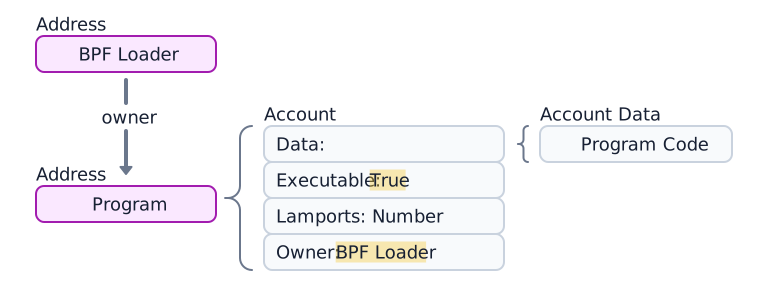
 program account 及其 4 个组成部分和 loader program 的示意图
程序数据账户
使用 loader-v3 部署的程序(参见
Loader programs)不会将可执行字节码存储在自己的
data 字段中,而是将其 data 指向一个单独的 program data
account,该账户包含程序代码。(见下图。)

 带有数据的 program account。数据指向一个单独的 program data account
以下示例获取了 Token Program account。executable 字段为
true,确认其为 program account。
import { Address, createClient } from "@solana/kit";import { solanaRpc } from "@solana/kit-plugin-rpc";import { generatedPayer } from "@solana/kit-plugin-signer";const client = await createClient().use(generatedPayer()).use(solanaRpc({rpcUrl: "https://api.mainnet.solana.com"}));const programId = "TokenkegQfeZyiNwAJbNbGKPFXCWuBvf9Ss623VQ5DA" as Address;const accountInfo = await client.rpc.getAccountInfo(programId, { encoding: "base64" }).send();console.log(accountInfo);
数据账户
数据账户不包含可执行代码,而是用于存储程序自定义的状态。
程序状态账户
程序会将其状态存储在数据账户中。创建程序状态账户需要两个步骤:
- 调用 System Program 创建账户。System Program 会将账户所有权转移给指定的程序。
- 拥有该账户的程序根据其 instructions 初始化账户的
data字段。
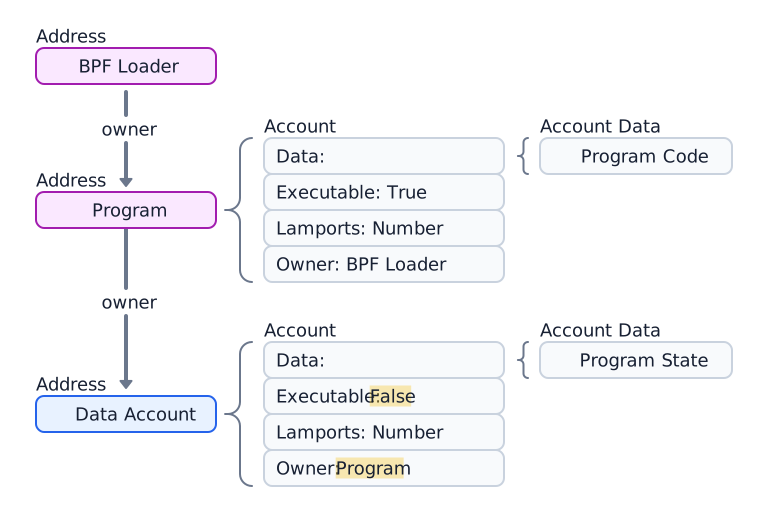
 由 program account 拥有的数据账户示意图
以下示例演示如何创建并获取由 Token 2022 program 拥有的 Token Mint account。
import { createClient, generateKeyPairSigner, lamports } from "@solana/kit";import { solanaRpc, rpcAirdrop } from "@solana/kit-plugin-rpc";import { generatedPayer, airdropPayer } from "@solana/kit-plugin-signer";import { systemProgram } from "@solana-program/system";import {getInitializeMintInstruction,getMintSize,TOKEN_2022_PROGRAM_ADDRESS,fetchMint} from "@solana-program/token-2022";const client = await createClient().use(generatedPayer()).use(solanaRpc({rpcUrl: "http://localhost:8899",rpcSubscriptionsUrl: "ws://localhost:8900"})).use(rpcAirdrop()).use(airdropPayer(lamports(1_000_000_000n))).use(systemProgram());// Generate keypair to use as address of mintconst mint = await generateKeyPairSigner();// Get default mint account size (in bytes), no extensions enabledconst space = BigInt(getMintSize());// Get minimum balance for rent exemptionconst rent = await client.rpc.getMinimumBalanceForRentExemption(space).send();const transactionSignature = await client.sendTransaction([client.system.instructions.createAccount({newAccount: mint,lamports: rent,space,programAddress: TOKEN_2022_PROGRAM_ADDRESS}),getInitializeMintInstruction({mint: mint.address,decimals: 9,mintAuthority: client.payer.address})]);console.log("Mint Address:", mint.address);console.log("Transaction Signature:", transactionSignature.context.signature);const accountInfo = await client.rpc.getAccountInfo(mint.address).send();console.log(accountInfo);const mintAccount = await fetchMint(client.rpc, mint.address);console.log(mintAccount);
System accounts
创建后仍由 System Program 拥有的账户称为 system account。首次向新地址发送 SOL 时,会在该地址创建一个由 System Program 拥有的新账户。
所有钱包账户都是 system account。交易的手续费支付者必须是 system account,因为只有 System Program 拥有的账户才能支付 交易手续费。
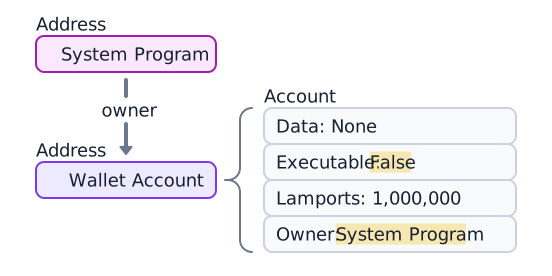
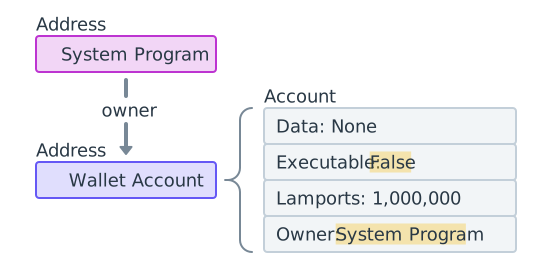 由 System Program 拥有、包含 1,000,000 lamports 的钱包示意图
以下示例生成一个新的 keypair,为其充值 SOL,并获取该账户。owner 字段为
11111111111111111111111111111111(System Program)。
import { createClient, generateKeyPairSigner, lamports } from "@solana/kit";import { solanaRpc } from "@solana/kit-plugin-rpc";import { generatedPayer } from "@solana/kit-plugin-signer";const client = await createClient().use(generatedPayer()).use(solanaRpc({rpcUrl: "http://localhost:8899",rpcSubscriptionsUrl: "ws://localhost:8900"}));// Generate a new keypairconst keypair = await generateKeyPairSigner();console.log(`Public Key: ${keypair.address}`);// Funding an address with SOL automatically creates an accountconst signature = await client.airdrop(keypair.address,lamports(1_000_000_000n));const accountInfo = await client.rpc.getAccountInfo(keypair.address).send();console.log(accountInfo);
Sysvar 账户
Sysvar 账户 是在预定义地址上的特殊账户,提供对集群状态数据的只读访问。它们会在每个 slot 动态更新。
| Sysvar | Address | Purpose |
|---|---|---|
| Clock | SysvarC1ock11111111111111111111111111111111 | 当前 slot、epoch 和 Unix 时间戳 |
| EpochSchedule | SysvarEpochSchedu1e111111111111111111111111 | 在创世块中设定的 epoch 调度常量 |
| EpochRewards | SysvarEpochRewards1111111111111111111111111 | epoch 奖励分配状态与进度 |
| Rent | SysvarRent111111111111111111111111111111111 | 租金费率与免租门槛 |
| SlotHashes | SysvarS1otHashes111111111111111111111111111 | slot 父银行的最新哈希值 |
| StakeHistory | SysvarStakeHistory1111111111111111111111111 | 每个 epoch 的质押激活与撤销记录 |
| LastRestartSlot | SysvarLastRestartS1ot1111111111111111111111 | 上一次集群重启的 slot |
| Instructions | Sysvar1nstructions1111111111111111111111111 | 当前交易的序列化指令 |
| SlotHistory | SysvarS1otHistory11111111111111111111111111 | 最近一个 epoch 内已产出的 slot 记录 |
以下示例演示如何获取并反序列化 Sysvar Clock 账户。
import { createClient } from "@solana/kit";import { solanaRpc } from "@solana/kit-plugin-rpc";import { generatedPayer } from "@solana/kit-plugin-signer";import { fetchSysvarClock, SYSVAR_CLOCK_ADDRESS } from "@solana/sysvars";const client = await createClient().use(generatedPayer()).use(solanaRpc({rpcUrl: "https://api.mainnet.solana.com"}));const accountInfo = await client.rpc.getAccountInfo(SYSVAR_CLOCK_ADDRESS, { encoding: "base64" }).send();console.log(accountInfo);// Automatically fetch and deserialize the account dataconst clock = await fetchSysvarClock(client.rpc);console.log(clock);
Is this page helpful?