摘要
一个指令包含 3 个字段:program_id(要调用的程序)、 accounts(带有
is_signer/is_writable 标志的 AccountMeta 列表)和 data
(程序解析的数据字节数组)。
指令结构
一个
Instruction
包含三个字段:
pub struct Instruction {/// Pubkey of the program that executes this instruction.pub program_id: Pubkey,/// Metadata describing accounts that should be passed to the program.pub accounts: Vec<AccountMeta>,/// Opaque data passed to the program for its own interpretation.pub data: Vec<u8>,}
程序 ID
指令的 program_id
是包含该指令执行逻辑的程序的公钥地址。运行时会使用此字段将指令路由到正确的程序进行处理。
账户元数据
指令的 accounts 数组是一个有序的
AccountMeta
结构体列表。每个指令交互的账户都必须提供元数据。validator 会利用这些元数据判断哪些交易可以并行运行。写入不同账户的交易可以并行执行。
下图展示了包含单个指令的交易。该指令的 accounts 数组包含了两个账户的元数据。
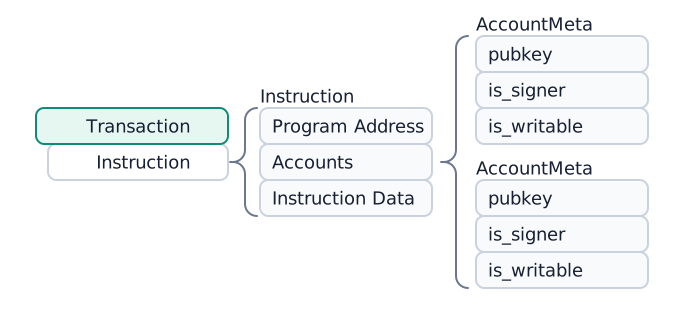
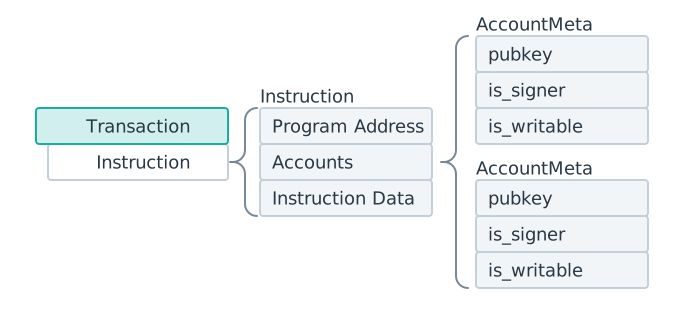 包含一个指令的交易。该指令的 accounts 数组中有两个 AccountMeta 结构体。
每个 AccountMeta 有三个字段:
- pubkey:账户的公钥地址
- is_signer:如果账户需要签名交易,则设置为
true - is_writable:如果指令会修改账户数据,则设置为
true
要了解某个指令需要哪些账户,包括哪些账户必须是可写、只读或需要签署交易,必须参考该指令的具体实现,也就是由程序定义的实现。
pub struct AccountMeta {/// An account's public key.pub pubkey: Pubkey,/// True if an `Instruction` requires a `Transaction` signature matching `pubkey`.pub is_signer: bool,/// True if the account data or metadata may be mutated during program execution.pub is_writable: bool,}
数据
指令的 data
字段是一个字节数组,用于告知程序要调用哪个函数,并为该函数提供参数。数据通常以一个判别符或索引字节开头,用于标识目标函数,后面跟着序列化的参数。编码格式由每个程序自行定义(例如 Borsh 序列化或自定义布局)。
常见的编码约定:
- 核心程序(System、Stake、Vote):使用 Bincode 序列化的枚举变体索引,后跟序列化参数。
- Anchor 程序:使用 8 字节判别符(即 SHA-256 哈希值的前 8 个字节,基于
"global:<function_name>")后跟 Borsh 序列化参数。
运行时不会解析 data 字段。它会原样传递给程序的 process_instruction 入口点。
已编译指令
当指令被序列化到交易消息中时,它们会变成
CompiledInstruction
结构体,将所有公钥替换为消息中 account_keys 数组中的紧凑整数索引。
示例:SOL 转账指令
下面的示例展示了一个 SOL 转账指令的结构。
import { createClient, generateKeyPairSigner, lamports } from "@solana/kit";import { solanaRpc, rpcAirdrop } from "@solana/kit-plugin-rpc";import { generatedPayer, airdropPayer } from "@solana/kit-plugin-signer";import { systemProgram } from "@solana-program/system";const client = await createClient().use(generatedPayer()).use(solanaRpc({rpcUrl: "http://localhost:8899",rpcSubscriptionsUrl: "ws://localhost:8900"})).use(rpcAirdrop()).use(airdropPayer(lamports(1_000_000_000n))).use(systemProgram());// Generate sender and recipient keypairsconst sender = client.payer;const recipient = await generateKeyPairSigner();// Define the amount to transferconst LAMPORTS_PER_SOL = 1_000_000_000n;const transferAmount = lamports(LAMPORTS_PER_SOL / 100n); // 0.01 SOL// Create a transfer instruction for transferring SOL from sender to recipientconst transferInstruction = client.system.instructions.transferSol({source: sender,destination: recipient.address,amount: transferAmount});console.log(JSON.stringify(transferInstruction, null, 2));
下面的代码展示了前面代码片段的输出。不同 SDK 的格式可能有所不同,但请注意,每个指令都包含相同的三项必要信息:program_id、accounts、data。
{"accounts": [{"address": "Hu28vRMGWpQXN56eaE7jRiDDRRz3vCXEs7EKHRfL6bC","role": 3,"signer": {"address": "Hu28vRMGWpQXN56eaE7jRiDDRRz3vCXEs7EKHRfL6bC","keyPair": {"privateKey": {},"publicKey": {}}}},{"address": "2mBY6CTgeyJNJDzo6d2Umipw2aGUquUA7hLdFttNEj7p","role": 1}],"programAddress": "11111111111111111111111111111111","data": {"0": 2,"1": 0,"2": 0,"3": 0,"4": 128,"5": 150,"6": 152,"7": 0,"8": 0,"9": 0,"10": 0,"11": 0}}
下面的示例展示了如何手动构建转账指令。( Expanded Instruction
选项卡在功能上等同于 Instruction 选项卡。)
实际开发中,通常无需手动构建 Instruction。
大多数程序都提供带有辅助函数的客户端库,能够帮你自动生成指令。如果没有可用的库,你也可以手动构建指令。
const transferAmount = 0.01; // 0.01 SOLconst transferInstruction = client.system.instructions.transferSol({source: sender,destination: recipient.address,amount: transferAmount * LAMPORTS_PER_SOL});
Is this page helpful?