摘要
一笔交易包含签名和消息。消息由头部、账户地址、最近区块哈希以及已编译的指令组成。最大序列化大小:1,232 字节(v1 格式为 4,096 字节)。
一个
Transaction
有两个顶层字段:
signatures:签名数组message:交易信息,包括待处理的指令列表
pub struct Transaction {pub signatures: Vec<Signature>,pub message: Message,}
 展示交易两部分的示意图
交易的总序列化大小不得超过
PACKET_DATA_SIZE
(1,232 字节)。该限制等于 1,280 字节(IPv6 最小 MTU)减去 48 字节的网络头部(40 字节 IPv6 +
8 字节分片头)。1,232 字节包括 signatures 数组和
message 结构体。
v1 交易将上限提高至 4,096 字节
本页介绍的是旧版交易格式,v0 格式除版本前缀和地址查找表外也遵循相同结构。v1 格式将大小限制提高至 4,096 字节,并采用不同的线路布局。
 展示交易格式和大小限制的示意图
签名
signatures 字段是一个经过紧凑编码的
Signature
值数组。每个 Signature 都是对序列化的 Message
进行 Ed25519 算法签名(64 字节),由签名账户的私钥签署。每个交易指令中引用的
签名账户 都需要一个签名。
每个签名由一个私钥生成。该密钥的存储位置——本地 keypair、云端 HSM 或 KMS,还是托管钱包服务——属于生产环境的设计决策。请参阅 生产环境中的签名。
数组中的第一个签名属于手续费支付方,即支付交易 基础费用和优先级费用的账户。该第一个签名同时作为交易 ID,用于在网络上查询该交易。交易 ID 通常被称为 交易签名。
手续费支付方的要求:
- 必须是消息中的第一个账户(索引 0)且为签名者。
- 必须是由系统程序拥有的账户或 nonce 账户(由
validate_fee_payer验证)。 - 必须持有足够的 lamport 以覆盖
rent_exempt_minimum + total_fee;否则交易将以InsufficientFundsForFee失败。
消息
message 字段是一个
Message
结构体,包含交易的有效载荷:
pub struct Message {/// The message header, identifying signed and read-only `account_keys`.pub header: MessageHeader,/// All the account keys used by this transaction.#[serde(with = "short_vec")]pub account_keys: Vec<Pubkey>,/// The id of a recent ledger entry.pub recent_blockhash: Hash,/// Programs that will be executed in sequence and committed in/// one atomic transaction if all succeed.#[serde(with = "short_vec")]pub instructions: Vec<CompiledInstruction>,}
头部
header 字段是一个
MessageHeader
结构体,包含三个 u8 字段,将 account_keys 数组划分为不同的权限组:
num_required_signatures:交易所需签名的总数。num_readonly_signed_accounts:只读的已签名账户数量。num_readonly_unsigned_accounts:只读的未签名账户数量。
pub struct MessageHeader {/// The number of signatures required for this message to be considered/// valid. The signers of those signatures must match the first/// `num_required_signatures` of [`Message::account_keys`].pub num_required_signatures: u8,/// The last `num_readonly_signed_accounts` of the signed keys are read-only/// accounts.pub num_readonly_signed_accounts: u8,/// The last `num_readonly_unsigned_accounts` of the unsigned keys are/// read-only accounts.pub num_readonly_unsigned_accounts: u8,}
旧版和版本化消息前缀
在旧版交易消息中,消息的第一个字节为 num_required_signatures,其后是另外两个 MessageHeader 字节。在版本化交易消息中,第一个字节为版本前缀;三字节的 MessageHeader 紧随该前缀之后。完整的 v0 和 v1 消息布局请参阅
版本化交易。
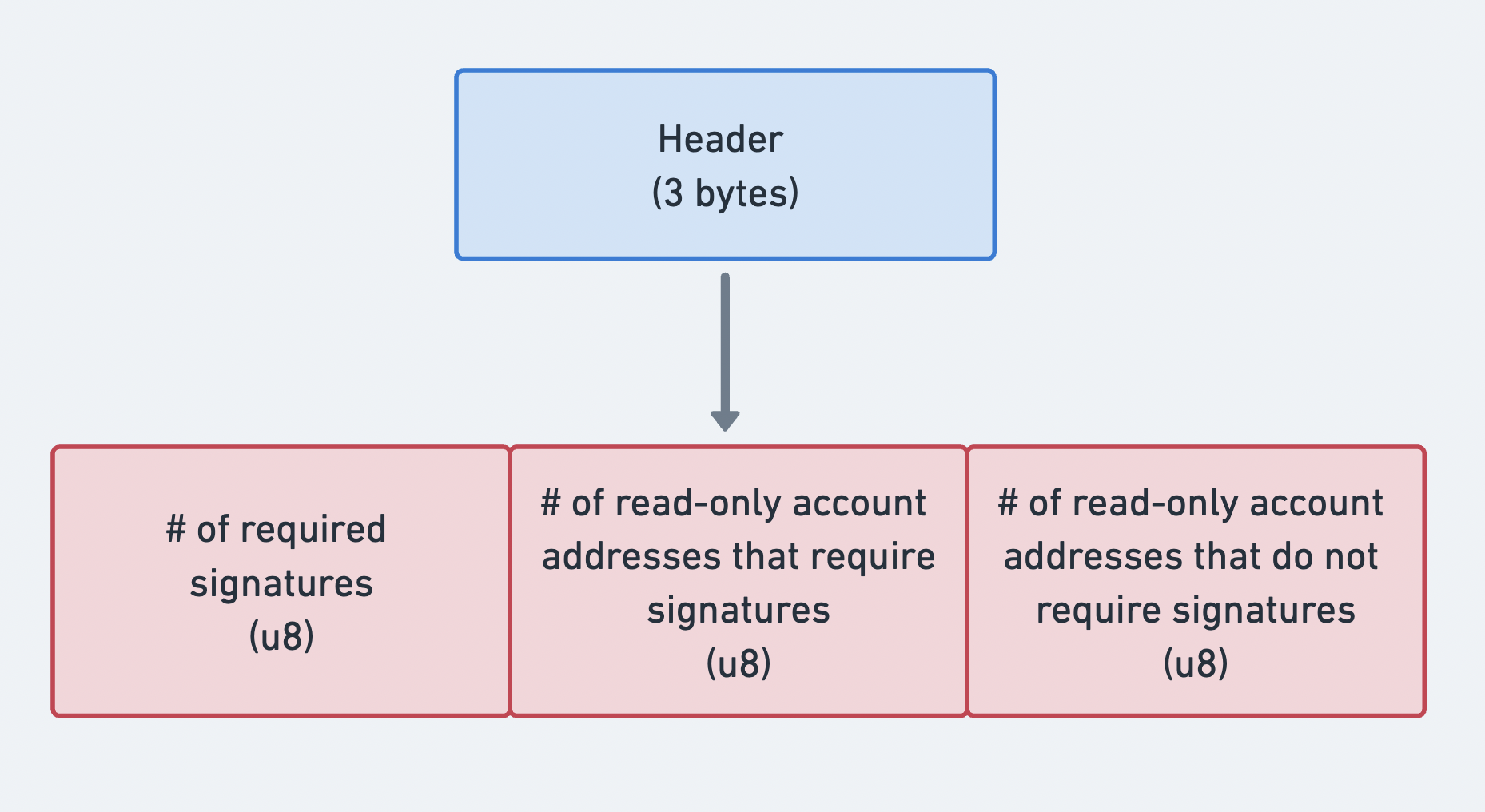 展示消息头三个部分的示意图
账户地址
account_keys
字段是一个紧凑编码的公钥数组。每个条目标识交易指令中至少使用一次的账户。该数组必须包含所有账户,并须遵循以下严格排序:
- 签名者 + 可写
- 签名者 + 只读
- 非签名者 + 可写
- 非签名者 + 只读
这种严格的排序方式允许将 account_keys 数组与消息 header
中的三个计数组合使用,从而无需存储每个账户的元数据标志即可确定各账户的权限。头部计数将数组划分为上述四个权限组。
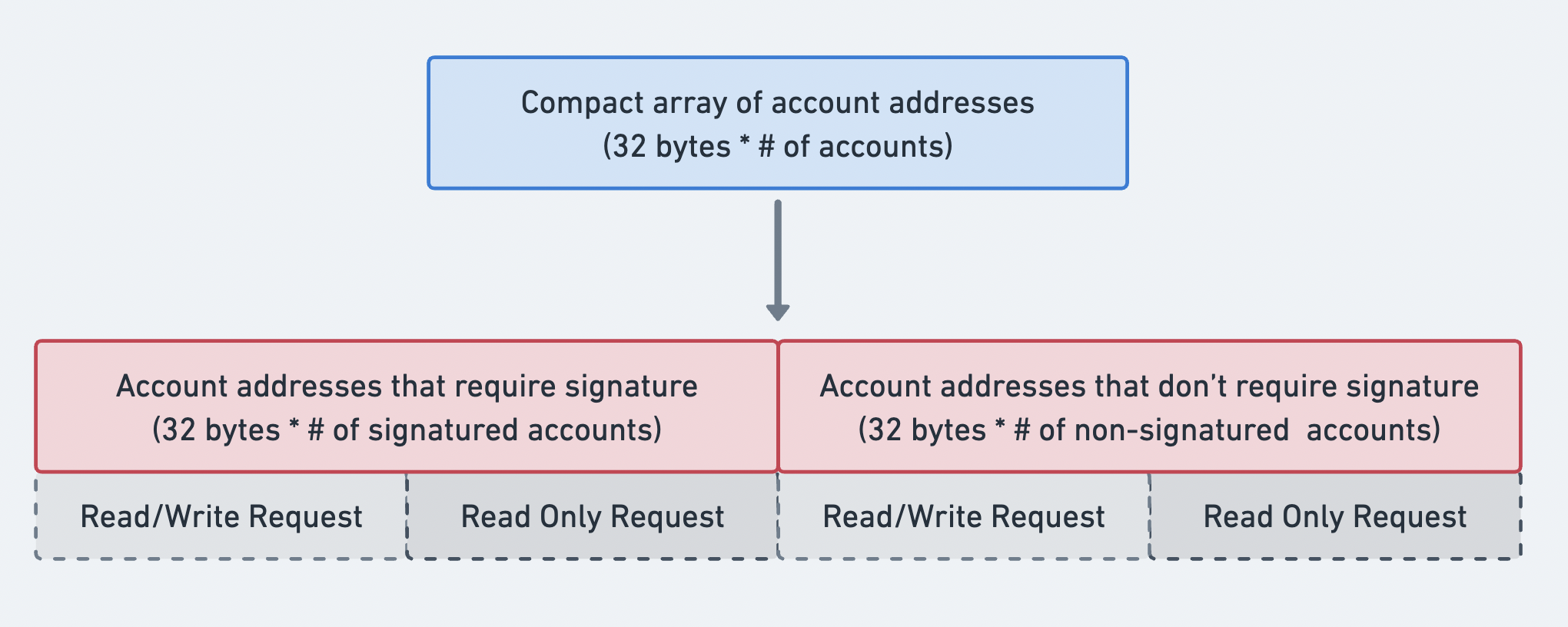 展示账户地址数组顺序的示意图
最近区块哈希
recent_blockhash 字段是一个 32 字节的哈希值,具有两个用途:
- 时间戳:证明交易是近期创建的。
- 去重:防止同一笔交易被重复处理。
区块哈希在 150 个 slot 后过期。如果交易到达时区块哈希已不再有效,该交易将以
BlockhashNotFound
被拒绝,除非它是有效的持久 nonce 交易。
getLatestBlockhash RPC 方法
允许您获取当前区块哈希及该区块哈希有效的最后区块高度。
指令
instructions
字段是一个紧凑编码的
CompiledInstruction
结构体数组。每个 CompiledInstruction 通过索引引用 account_keys
数组中的账户,而非使用完整公钥。它包含:
program_id_index:account_keys中的索引,用于标识要调用的程序。accounts:account_keys中的索引数组,用于指定传递给程序的账户。data:字节数组,包含指令鉴别器和序列化参数。
pub struct CompiledInstruction {/// Index into the transaction keys array indicating the program account that executes this instruction.pub program_id_index: u8,/// Ordered indices into the transaction keys array indicating which accounts to pass to the program.#[serde(with = "short_vec")]pub accounts: Vec<u8>,/// The program input data.#[serde(with = "short_vec")]pub data: Vec<u8>,}
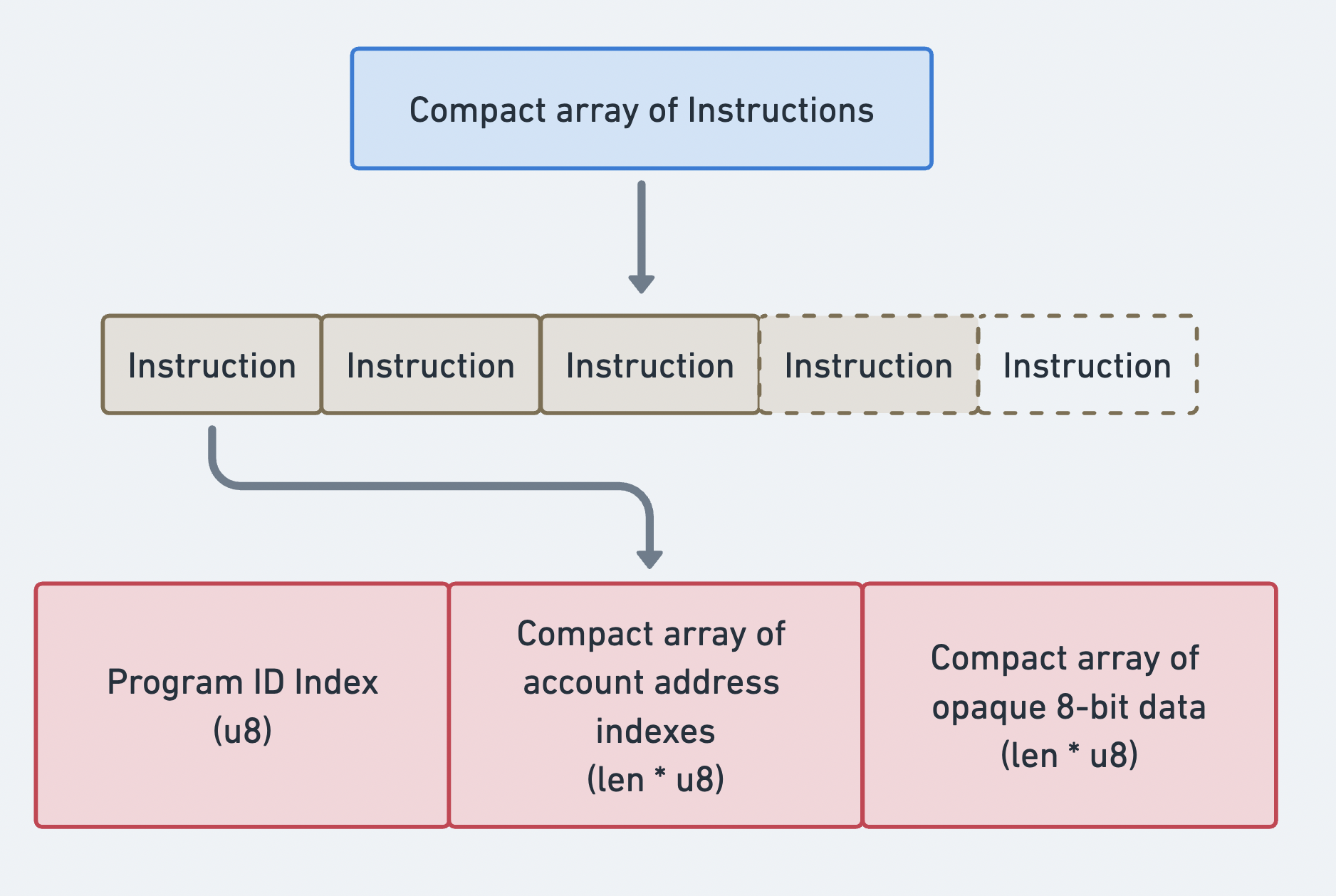 指令紧凑数组
交易二进制格式
交易使用紧凑编码方案进行序列化。所有可变长度数组(签名、账户密钥、指令)均以 compact-u16 长度编码作为前缀。该格式对 0-127 的值使用 1 个字节,对更大的值使用 2-3 个字节。
旧版交易布局(传输格式):
| 字段 | 大小 | 描述 |
|---|---|---|
num_signatures | 1-3 字节 (compact-u16) | 签名数量 |
signatures | num_signatures x 64 字节 | Ed25519 签名 |
num_required_signatures | 1 字节 | MessageHeader 字段 1 |
num_readonly_signed | 1 字节 | MessageHeader 字段 2 |
num_readonly_unsigned | 1 字节 | MessageHeader 字段 3 |
num_account_keys | 1-3 字节 (compact-u16) | 静态账户密钥数量 |
account_keys | num_account_keys x 32 字节 | 公钥 |
recent_blockhash | 32 字节 | 区块哈希 |
num_instructions | 1-3 字节 (compact-u16) | 指令数量 |
instructions | 可变 | 已编译指令数组 |
每条已编译指令的序列化格式如下:
| 字段 | 大小 | 描述 |
|---|---|---|
program_id_index | 1 字节 | 账户密钥索引 |
num_accounts | 1-3 字节 (compact-u16) | 账户索引数量 |
account_indices | num_accounts x 1 字节 | 账户密钥索引列表 |
data_len | 1-3 字节 (compact-u16) | instruction data 长度 |
data | data_len 字节 | 不透明 instruction data |
大小计算
已知 PACKET_DATA_SIZE = 1,232 字节,可用空间可按如下方式计算:
Total = 1232 bytes- compact-u16(num_sigs) # 1 byte- num_sigs * 64 # signature bytes- 3 # message header- compact-u16(num_keys) # 1 byte- num_keys * 32 # account key bytes- 32 # recent blockhash- compact-u16(num_ixs) # 1 byte- sum(instruction_sizes) # per-instruction overhead + data
示例:SOL 转账交易
下图展示了交易与指令如何协同工作,使用户能够与网络进行交互。在此示例中,SOL 从一个账户转账至另一个账户。
发送方账户的 元数据 表明该账户必须为交易签名。这允许 System Program 从中扣除 lamport。发送方和接收方账户均须设为可写,以便其 lamport 余额发生变化。为执行此指令,发送方钱包将包含其签名及含有 SOL 转账指令的消息的交易发送出去。
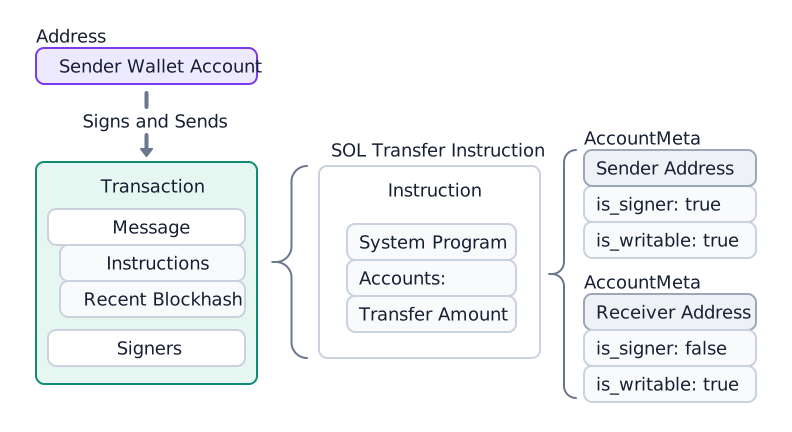
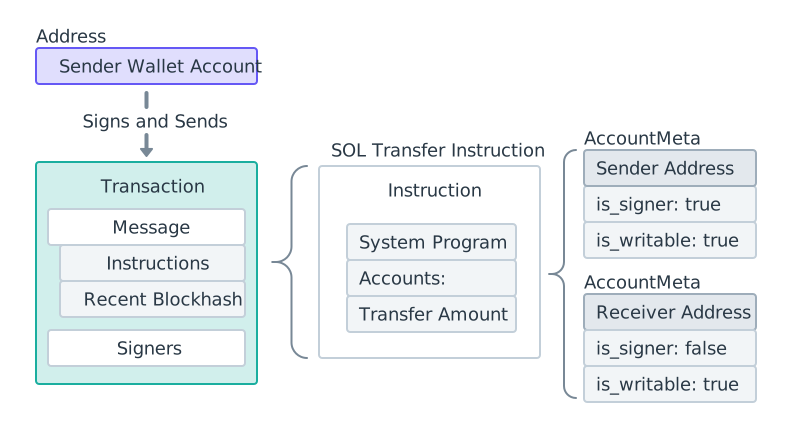 SOL 转账示意图
交易发送后,System Program 处理转账指令并更新两个账户的 lamport 余额。
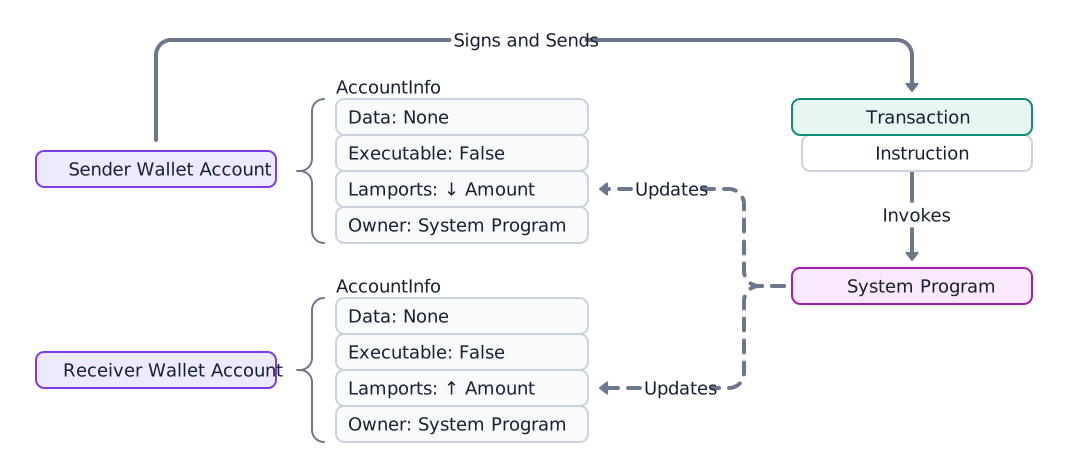
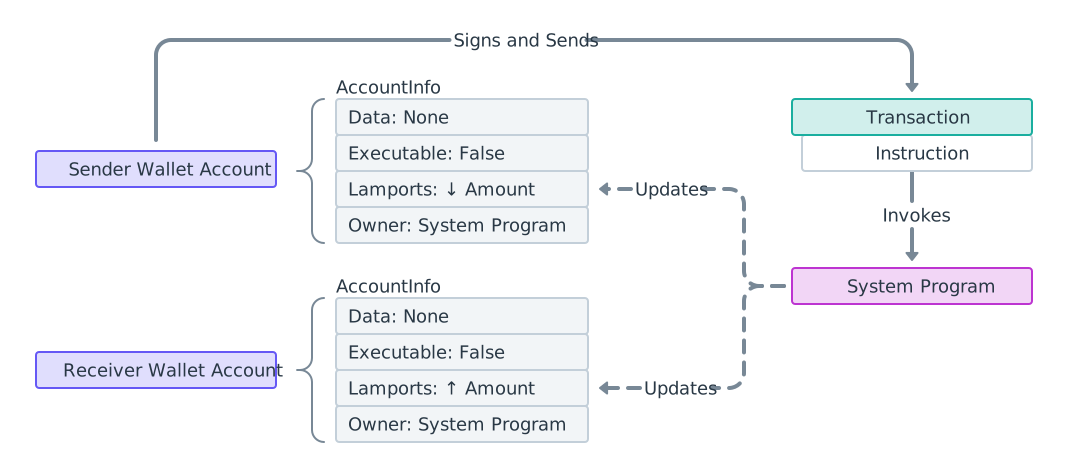 SOL 转账流程示意图
发送 SOL 前请验证接收方
System Program 转账会向任意账户添加 lamport,协议层面不会检查接收方是否能将 SOL 转回。lamport 只能由账户的所属程序转出,因此将 SOL 发送至您不控制的 token mint、某个程序或 PDA,存在永久损失资金的风险——只有所属程序指定的授权方才能将其取回。发送至 token account 的 SOL 只能由该账户的所有者取回,发送方无法追回。
SPL token 转账具有一定的自我保护机制:若账户与预期的 mint 不匹配,Token Program 会拒绝该转账。原生 SOL 转账则没有此类保护,因此发送方在签名前必须验证接收方。完整的分类逻辑请参阅 验证地址。
下方示例展示了与上述图表相关的代码。请参阅 System Program 的
transfer 函数。
import { createClient, generateKeyPairSigner, lamports } from "@solana/kit";import { solanaRpc, rpcAirdrop } from "@solana/kit-plugin-rpc";import { generatedPayer, airdropPayer } from "@solana/kit-plugin-signer";import { systemProgram } from "@solana-program/system";const client = await createClient().use(generatedPayer()).use(solanaRpc({rpcUrl: "http://localhost:8899",rpcSubscriptionsUrl: "ws://localhost:8900"})).use(rpcAirdrop()).use(airdropPayer(lamports(1_000_000_000n))).use(systemProgram());const sender = client.payer;const recipient = await generateKeyPairSigner();const LAMPORTS_PER_SOL = 1_000_000_000n;const transferAmount = lamports(LAMPORTS_PER_SOL / 100n); // 0.01 SOL// Check balance before transferconst { value: preBalance1 } = await client.rpc.getBalance(sender.address).send();const { value: preBalance2 } = await client.rpc.getBalance(recipient.address).send();// Create a transfer instruction for transferring SOL from sender to recipientconst transferInstruction = client.system.instructions.transferSol({source: sender,destination: recipient.address,amount: transferAmount // 0.01 SOL in lamports});const transactionSignature = await client.sendTransaction([transferInstruction]);// Check balance after transferconst { value: postBalance1 } = await client.rpc.getBalance(sender.address).send();const { value: postBalance2 } = await client.rpc.getBalance(recipient.address).send();console.log("Sender prebalance:",Number(preBalance1) / Number(LAMPORTS_PER_SOL));console.log("Recipient prebalance:",Number(preBalance2) / Number(LAMPORTS_PER_SOL));console.log("Sender postbalance:",Number(postBalance1) / Number(LAMPORTS_PER_SOL));console.log("Recipient postbalance:",Number(postBalance2) / Number(LAMPORTS_PER_SOL));console.log("Transaction Signature:", transactionSignature.context.signature);
以下示例展示了包含单条 SOL 转账指令的交易结构。
import {createClient,generateKeyPairSigner,lamports,createTransactionMessage,setTransactionMessageFeePayerSigner,setTransactionMessageLifetimeUsingBlockhash,appendTransactionMessageInstructions,pipe,signTransactionMessageWithSigners,getCompiledTransactionMessageDecoder} from "@solana/kit";import { solanaRpc, rpcAirdrop } from "@solana/kit-plugin-rpc";import { generatedPayer, airdropPayer } from "@solana/kit-plugin-signer";import { systemProgram } from "@solana-program/system";const client = await createClient().use(generatedPayer()).use(solanaRpc({rpcUrl: "http://localhost:8899",rpcSubscriptionsUrl: "ws://localhost:8900"})).use(rpcAirdrop()).use(airdropPayer(lamports(1_000_000_000n))).use(systemProgram());const { value: latestBlockhash } = await client.rpc.getLatestBlockhash().send();const sender = client.payer;const recipient = await generateKeyPairSigner();// Define the amount to transferconst LAMPORTS_PER_SOL = 1_000_000_000n;const transferAmount = lamports(LAMPORTS_PER_SOL / 100n); // 0.01 SOL// Create a transfer instruction for transferring SOL from sender to recipientconst transferInstruction = client.system.instructions.transferSol({source: sender,destination: recipient.address,amount: transferAmount});// Create transaction messageconst transactionMessage = pipe(createTransactionMessage({ version: 0 }),(tx) => setTransactionMessageFeePayerSigner(sender, tx),(tx) => setTransactionMessageLifetimeUsingBlockhash(latestBlockhash, tx),(tx) => appendTransactionMessageInstructions([transferInstruction], tx));const signedTransaction =await signTransactionMessageWithSigners(transactionMessage);// Decode the messageBytesconst compiledTransactionMessage =getCompiledTransactionMessageDecoder().decode(signedTransaction.messageBytes);console.log(JSON.stringify(compiledTransactionMessage, null, 2));
以下代码展示了前述代码片段的输出结果。 不同 SDK 的格式有所差异, 但请注意每条指令均包含相同的必要信息。
{"version": 0,"header": {"numSignerAccounts": 1,"numReadonlySignerAccounts": 0,"numReadonlyNonSignerAccounts": 1},"staticAccounts": ["HoCy8p5xxDDYTYWEbQZasEjVNM5rxvidx8AfyqA4ywBa","5T388jBjovy7d8mQ3emHxMDTbUF8b7nWvAnSiP3EAdFL","11111111111111111111111111111111"],"lifetimeToken": "EGCWPUEXhqHJWYBfDirq3mHZb4qDpATmYqBZMBy9TBC1","instructions": [{"programAddressIndex": 2,"accountIndices": [0, 1],"data": {"0": 2,"1": 0,"2": 0,"3": 0,"4": 128,"5": 150,"6": 152,"7": 0,"8": 0,"9": 0,"10": 0,"11": 0}}]}
转账前验证收款方
由于 SOL 转账可成功发送至任意账户,请在签名前核实收款方身份。获取账户信息,仅向 System Program 钱包(或未充值的 链上曲线地址)发送;拒绝向铸币账户、token account、程序及您不控制的 PDA 发送。
import {type Address,createSolanaRpc,fetchJsonParsedAccount,isOffCurveAddress} from "@solana/kit";const rpc = createSolanaRpc("https://api.mainnet.solana.com");const SYSTEM_PROGRAM = "11111111111111111111111111111111" as Address;/*** Throws if `recipient` cannot safely receive native SOL.** Only System Program wallets (or unfunded on-curve addresses) are safe. Any* other account locks the lamports because no authority can debit them.*/async function assertSafeSolRecipient(recipient: Address): Promise<void> {const account = await fetchJsonParsedAccount(rpc, recipient);if (!account.exists) {// Off-curve = a PDA with no account; reject conservatively.if (isOffCurveAddress(recipient)) {throw new Error("Recipient is a PDA with no account; SOL would be locked");}// On-curve = an unfunded wallet, safe to fund.return;}if (account.programAddress !== SYSTEM_PROGRAM) {throw new Error(`Recipient is owned by ${account.programAddress}, not a wallet; SOL would be locked`);}}// A wallet: safe.await assertSafeSolRecipient("H8sMJSCQxfKiFTCfDR3DUMLPwcRbM61LGFJ8N4dK3WjS" as Address);// The USDC mint: rejected before any SOL leaves the sender.await assertSafeSolRecipient("EPjFWdd5AufqSSqeM2qN1xzybapC8G4wEGGkZwyTDt1v" as Address);
此代码片段用于检查原生 SOL 收款方。如需完整的地址分类(同时支持 SPL 代币发送,包括 token account、ATA 及 Token-2022),请参阅 验证地址。
获取交易详情
提交后,使用交易签名和 getTransaction RPC 方法检索交易详情。
您也可以使用 Solana Explorer 查找该交易。
{"blockTime": 1745196488,"meta": {"computeUnitsConsumed": 150,"err": null,"fee": 5000,"innerInstructions": [],"loadedAddresses": {"readonly": [],"writable": []},"logMessages": ["Program 11111111111111111111111111111111 invoke [1]","Program 11111111111111111111111111111111 success"],"postBalances": [989995000, 10000000, 1],"postTokenBalances": [],"preBalances": [1000000000, 0, 1],"preTokenBalances": [],"rewards": [],"status": {"Ok": null}},"slot": 13049,"transaction": {"message": {"header": {"numReadonlySignedAccounts": 0,"numReadonlyUnsignedAccounts": 1,"numRequiredSignatures": 1},"accountKeys": ["8PLdpLxkuv9Nt8w3XcGXvNa663LXDjSrSNon4EK7QSjQ","7GLg7bqgLBv1HVWXKgWAm6YoPf1LoWnyWGABbgk487Ma","11111111111111111111111111111111"],"recentBlockhash": "7ZCxc2SDhzV2bYgEQqdxTpweYJkpwshVSDtXuY7uPtjf","instructions": [{"accounts": [0, 1],"data": "3Bxs4NN8M2Yn4TLb","programIdIndex": 2,"stackHeight": null}],"indexToProgramIds": {}},"signatures": ["3jUKrQp1UGq5ih6FTDUUt2kkqUfoG2o4kY5T1DoVHK2tXXDLdxJSXzuJGY4JPoRivgbi45U2bc7LZfMa6C4R3szX"]},"version": "legacy"}
原始响应通过索引标识账户,并将内部(CPI)指令存储为编码数据块。若要将这些内容解析为地址并遍历完整的指令树,请参阅交易内省。
Is this page helpful?